Pwodwi souview
The Mesqool Digital Alarm Clock is a versatile device designed to enhance your living space with its multi-functional display and convenient features. It provides accurate time, date, temperature, and humidity readings, along with dual alarm capabilities and charging ports for your electronic devices.

Figure 1: Mesqool Digital Alarm Clock with charging capabilities.
Ki sa ki nan bwat la
- An bwa Digital Alam Clock
- US AC Power Adapter
- Chaje kab
- Manyèl papye

Figi 2: Kontni pake a.
Karakteristik kle
- Gwo ekspozisyon: An 8.7-inch screen clearly displays time, date, and day of the week.
- Siveyans Tanperati ak Imidite: Assists in monitoring indoor environment conditions.
- Loud Alarm with Snooze: Adjustable alarm volume from 65dB to 120dB with a 9-minute snooze function.
- Multiple Alarm Settings: Four alarm modes available: Every day, Weekend, Weekdays, or One Time Alarm. Supports dual alarm settings.
- USB and Type-C Charging Ports: Equipped with both USB and Type-C ports to charge two electronic devices simultaneously.
- 5 Levels Dimmer: Easily adjust display brightness with five levels to suit various lighting conditions.
- Konsepsyon élégance: Features a wood grain pattern and metal buttons for a modern aesthetic.
- Power Cord Operated with Battery Backup: Primarily AC powered, with 2x AAA batteries (not included) for memory backup during power outages.
Videyo 1: Finiview of Mesqool Digital Alarm Clock features, including dual alarm, adjustable brightness, charging ports, and environmental monitoring.
Enstalasyon
1. Koneksyon pouvwa
Connect the provided AC power adapter to the clock's power input port and plug it into a standard wall outlet. The clock is primarily AC powered.

Figure 3: Power connection and battery backup.
2. Enstalasyon sovgad batri
Pou backup memwa pandan kouran an koupetages, install 2x AAA batteries (not included) into the battery compartment located at the back of the clock. This ensures that time and alarm settings are retained.
Enstriksyon Operasyon
1. Mete Tan ak Dat
- Peze a DAT button to cycle through date display modes (e.g., MM-DD-YYYY).
- Peze a TIME 12/24H button to switch between 12-hour and 24-hour time formats.
- Pou fikse lè a, peze epi kenbe la TIME 12/24H button until the hour digits flash. Use the +HOUR epi -MIN bouton yo pou ajiste lè a ak minit la. Peze SNOOZE/OK konfime chak anviwònman.
- To set the date, press and hold the DAT button until the year digits flash. Use the +HOUR epi -MIN buttons to adjust the year, month, and day. Press SNOOZE/OK konfime chak anviwònman.

Figure 4: Multiple display styles and unit switching.
2. Mete Alam
The clock supports dual alarms (ALM1 and ALM2).
- Peze a ALM1 or ALM2 button to select the alarm you wish to set.
- Press and hold the selected alarm button (e.g., ALM1) until the alarm time flashes. Use +HOUR epi -MIN to set the desired alarm time. Press SNOOZE/OK pou konfime.
- After setting the time, the alarm mode will flash. Use +HOUR or -MIN to select one of the four alarm modes:
- Lendi-Dimanch: Alam lan sonnen chak jou.
- Lendi-Vandredi: Alarm sounds on weekdays only.
- Samdi-Solèy: Alarm sounds on weekends only.
- Yon sèl fwa: Alarm sounds once.
- Pou aktive/dezaktive yon alam, peze yon ti bouton ki koresponn lan. ALM1 or ALM2 bouton an. Yon ikòn alam ap parèt/disparèt sou ekran an.

Figure 5: Dual alarm settings and modes.
3. Adjusting Brightness (Dimmer)
Peze a DIMMER button to cycle through 5 levels of display brightness. Select the level that best suits your environment and preference.

Figure 6: Display brightness adjustment.
4. Ajiste Volim Alam lan
Peze a VOL DST button to adjust the alarm volume. The volume can be set between 65dB and 120dB across 5 levels.

Figure 7: Alarm volume adjustment and snooze button.
5. Fonksyon repetisyon
Lè alam lan sonnen, peze gwo bouton an SNOOZE/OK button on top of the clock to activate the snooze function. The alarm will pause for 9 minutes and then sound again.
6. Ekspozisyon Tanperati ak Imidite
The clock displays indoor temperature and humidity. Press the °F/°C button to switch between Fahrenheit and Celsius temperature units.
7. Charging Electronic Devices
Utilize the USB and Type-C charging ports located at the back of the clock to charge your smartphones, tablets, or other compatible electronic devices.

Figure 8: USB and Type-C charging ports in use.
Antretyen
- Netwaye revèy la avèk yon twal mou epi sèk. Pa sèvi ak pwodui netwayaj abrazif oswa solvan.
- Evite ekspoze revèy la nan tanperati ekstrèm, limyè solèy dirèk, oswa imidite ki wo.
- Ensure proper ventilation around the clock, especially if using the charging ports for extended periods.
Depanaj
| Pwoblèm | Kòz posib | Solisyon |
|---|---|---|
| Ekran an vid oswa li fèb. | Pa gen kouran, kouran koupetage, or brightness set too low. | Check power adapter connection. Ensure batteries are installed for backup. Press the DIMMER bouton pou ogmante klète. |
| Alam lan pa sonnen. | Alarm is off, volume is too low, or incorrect alarm mode. | Ensure the alarm is activated (icon visible). Increase alarm volume using VOL DST. Verify the alarm mode (Mon-Sun, Mon-Fri, etc.) is correctly set. |
| Lè/Dat la pa kòrèk. | Not set correctly or power interruption without battery backup. | Follow the "Setting Time and Date" instructions to reset. Install fresh AAA batteries for backup. |
| Aparèy yo pa ap chaje. | Incorrect cable, device not compatible, or clock not powered. | Ensure correct USB/Type-C cable is used. Verify the clock is powered on. Check device compatibility. |
Espesifikasyon
- Mak: Mesqool
- Nimewo Modèl: MQL-CR1019
- Kalite ekspozisyon: Digital
- Dimansyon pwodwi: 8.07" lajè x 3.62" wotè
- Sous pouvwa: Corded Electric (AC Adapter included)
- Batri Backup: 2 x AAA pil (pa enkli)
- Volim alam: 65dB - 120dB (5 levels)
- Ekspozisyon klète: 5 nivo reglabl
- Pò chaje: 1 x USB, 1 x Type-C
- Materyèl: Plastic (wood grain finish)
- Karakteristik espesyal: Calendar Display, Temperature Display, Humidity Display, Dual Alarm, Large Screen Display, Snooze
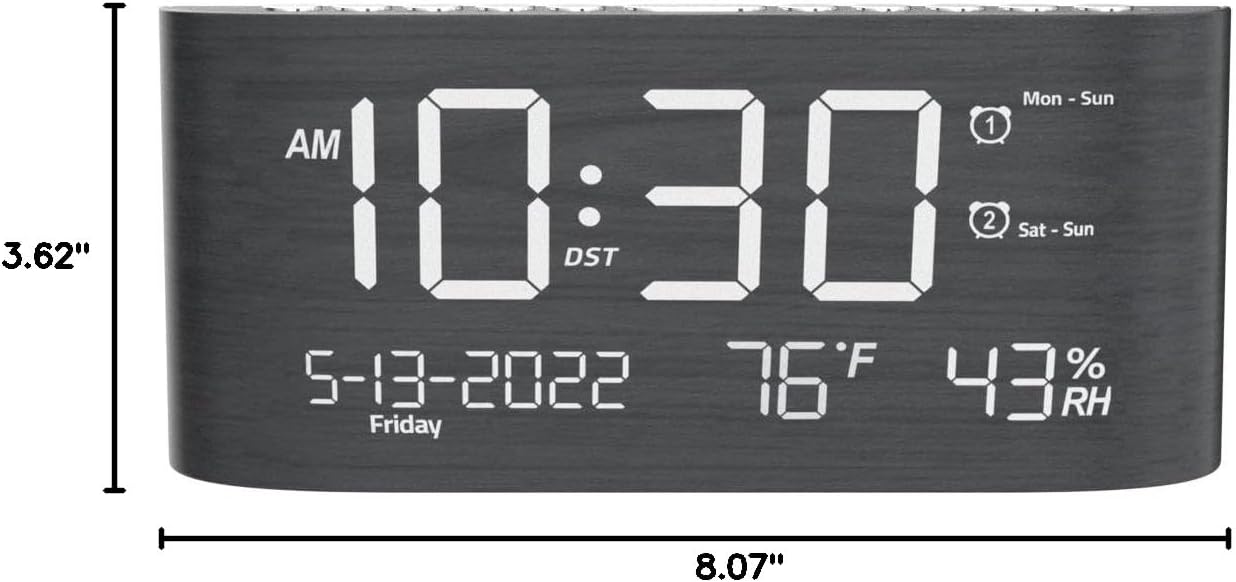
Figi 9: Dimansyon pwodwi a.
Garanti ak sipò
This Mesqool product comes with a 2 Years Exchange Warranty. For any support inquiries, troubleshooting assistance, or warranty claims, please refer to the official Mesqool websit la oubyen kontakte sèvis kliyan yo dirèkteman.
Yon vèsyon elektwonik manyèl itilizatè sa a disponib pou telechaje: Telechaje Manyèl Itilizatè a (PDF)


