1. Entwodiksyon
This manual provides detailed instructions for the installation, operation, and maintenance of your CAMECHO Android 13 Car Stereo. This 9-inch capacitive touch screen head unit is designed specifically for 2011, 2012, and 2013 Hyundai Elantra models, offering features such as GPS navigation, Bluetooth 4.2, FM/RDS radio, Steering Wheel Control (SWC) compatibility, Mirror Link for Android and iOS devices, and support for a backup camera. Please read this manual thoroughly before installation and use to ensure proper functionality and safety.
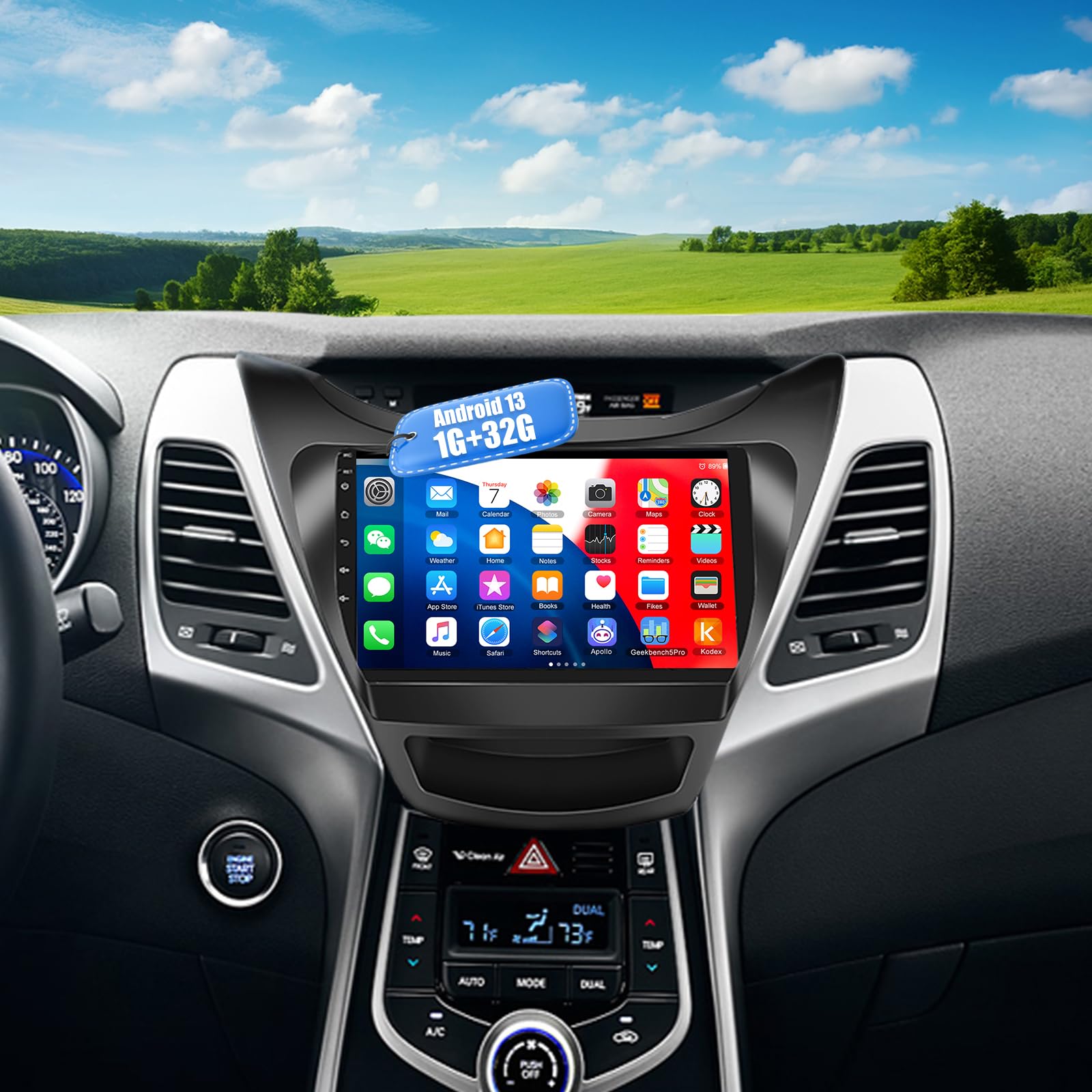
Figure 1.1: CAMECHO Android 13 Car Stereo main unit.
2. Enfòmasyon sou Sekirite
Toujou obsève prekosyon sekirite sa yo pou evite aksidan oswa domaj nan aparèy la:
- Enstalasyon pwofesyonèl rekòmande: Installation of this product requires technical knowledge and experience. It is highly recommended to have it installed by a qualified professional.
- Sous pouvwa: Konekte aparèy la sèlman ak yon ekipman pou kouran 12V DC ki gen yon tè negatif.
- Fil elektrik: Ensure all wiring is correctly connected according to the provided diagram. Incorrect wiring can cause damage to the unit or the vehicle.
- Sekirite Kondwi: Pa sèvi ak aparèy la yon fason ki distrè w pandan w ap kondui. Toujou bay sekirite wout priyorite.
- Tanperati: Evite ekspoze aparèy la nan tanperati ekstrèm oswa anba limyè solèy dirèk pou yon peryòd tan pwolonje.
- Imidite: Kenbe aparèy la lwen dlo ak imidite twòp.
3. Pake kontni
Verifye ke tout atik ki nan lis anba a yo enkli nan pakè ou a:
- Android Double Din Car Stereo Unit
- Hyundai Elantra 2011-2013 Special Frame
- Pouvwa kab
- Accessories (Mounting Brackets, Screws)
- Kamera Antre Kab
- RCA Input and Output Cables
- Kab USB (x2)
- 12 LEDs Backup Camera
- Zouti enstalasyon
- GPS antèn
- Manyèl Itilizatè (dokiman sa a)

Figure 3.1: Included components in the package.
4. Enstalasyon ak Enstalasyon
4.1 Veyikil konpatib
This CAMECHO car stereo is designed for a direct fit in the following vehicles:
- Hyundai Elantra (2011-2013)
The package includes a dash kit and radio kit for plug-and-play installation in these models.

Figure 4.1: Compatible Hyundai Elantra dashboard.
4.2 Enstalasyon souview
The installation process generally involves removing the factory radio, connecting the new head unit using the provided wiring harness and frame, and installing any accessories like the GPS antenna and backup camera. Professional installation is recommended.

Figure 4.2: Before and after installation comparison.
4.3 Dyagram fil elektrik
Refer to the following diagram for correct wiring connections. Ensure all connections are secure to prevent electrical issues.

Figure 4.3: Wiring diagram and dimensions.
Koneksyon fil elektrik kle yo:
- Kab pouvwa: Connect to vehicle's power supply (12V DC).
- Kab RCA: For audio/video input and output.
- Câbles USB: For external USB devices.
- Antre kamera: For connecting the backup camera.
- GPS Antèn: Konekte epi mete pozisyon ou nan yon kote ki gen syèl klè view for optimal signal.
- Kontwòl volan (SWC): Connect to the vehicle's SWC wires. If your car uses a digital CANBUS signal, an external digital-to-resistive converter may be required.
5. Operasyon Enstriksyon
5.1 Operasyon debaz
- Limen/Etenyen: Press and hold the power button (usually on the front panel) to turn the unit on or off. A short press typically mutes/unmutes audio.
- Ekran manyen: Navigate the interface by tapping, swiping, and pinching on the 9-inch capacitive touch screen.
- Ekran Kay: Access various applications and settings from the main home screen.

Figure 5.1: Android 13 interface and WiFi connection.
5.2 Navigasyon GPS
The unit comes with a built-in offline map. For online navigation and real-time traffic updates, connect the unit to a Wi-Fi network.
- Tap the 'Navigation' icon on the home screen to launch the GPS application.
- Enter your destination to receive turn-by-turn directions.
- Ensure the GPS antenna is properly installed for accurate positioning.

Figi 5.2: Entèfas navigasyon GPS.
5.3 Bluetooth Connectivity (Bluetooth 4.2)
Konekte smartphone ou atravè Bluetooth pou apèl men lib ak difizyon odyo.
- Go to the 'Bluetooth' application.
- Pèmèt Bluetooth sou smartphone ou epi chèche aparèy ki disponib.
- Chwazi stereo machin nan nan lis la epi konekte li.
- Yon fwa konekte, ou ka fè/resevwa apèl epi jwe mizik san fil.

Figure 5.3: Bluetooth call interface.
Radyo 5.4 FM/RDS
Access local radio stations and RDS information.
- Open the 'Radio' application.
- Sèvi ak fonksyon eskanè a pou jwenn estasyon ki disponib yo oubyen pou branche yon frekans manyèlman.
- Sove estasyon ou pi renmen yo kòm prereglaj pou aksè rapid.
Figure 5.4: FM/RDS Radio interface.
5.5 Kontwòl volan (SWC)
If your vehicle has factory steering wheel controls, they can be configured to operate the stereo.
- Access the 'Steering Wheel Control' settings in the unit's menu.
- Follow the on-screen instructions to map your vehicle's steering wheel buttons to the stereo functions.
- Note: This feature is based on resistive analog signal input. If your car uses a digital CANBUS data signal, an applicable digital-to-resistive converter may be needed.
5.6 Mirror Link (Phonelink App)
Mirror your smartphone screen onto the car stereo display.
- Open the 'Phonelink' application on the stereo.
- For Android phones: Connect via Wi-Fi or USB for two-way control.
- For iOS phones: Connect via Wi-Fi for one-way control (screen mirroring only).
Figi 5.5: Fonksyonalite Mirror Link.
5.7 Koneksyon Wi-Fi
Connect to a Wi-Fi hotspot to access online features, download apps, and browse the internet.
- Ale nan 'Paramèt' > 'Rezo ak Entènèt' > 'Wi-Fi'.
- Select your desired Wi-Fi network and enter the password if required.
- Once connected, you can use online maps, stream media, and download applications from the Application Store.
5.8 Fonksyon ekran divize
Multitask by running two applications simultaneously on the screen.
- While an app is open, press and hold the recent apps button (usually a square icon) or swipe up from the bottom and hold to enter split-screen mode.
- Select a second application to run alongside the first.

Figi 5.6: Fonksyonalite ekran divize.
5.9 Reversing Image (Backup Camera)
The unit automatically displays the backup camera feed when the vehicle is in reverse gear, provided the camera is correctly installed and wired.
- Ensure the backup camera is connected to the 'Camera Input' and the reverse trigger wire is correctly connected.
- When shifting into reverse, the screen will automatically switch to the camera view.
Figi 5.7: Kamera pou fè bak view.
5.10 EQ Sound Settings
Adjust audio output to your preference using the built-in equalizer.
- Access 'Sound Settings' or 'EQ Settings' from the main menu.
- Choose from preset equalizer modes (e.g., Pop, Rock, Jazz) or customize your own settings.
6. Antretyen
Bon antretyen asire lonjevite ak pèfòmans optimal stereo machin ou an.
- Netwaye ekran an: Sèvi ak yon twal mou ki pa gen pousyè pou siye ekran taktil la dousman. Pou tach ki difisil pou retire, siye l yon ti kras.ampLave twal la avèk dlo oswa yon pwodui netwayaj ki pa danjere pou ekran. Evite pwodui chimik ki agresif oswa materyèl abrazif.
- Netwayaj jeneral: Kenbe deyò aparèy la pwòp de pousyè ak debri. Sèvi ak yon twal mou epi sèk.
- Evite likid: Pa vide likid sou aparèy la. Si likid antre nan aparèy la, dekonekte kouran an imedyatman epi konsilte yon pwofesyonèl.
- Kontwòl Tanperati: Avoid leaving the vehicle in extreme hot or cold conditions for extended periods, as this can affect the unit's performance and lifespan.
NAN. Depanaj
If you encounter issues with your CAMECHO car stereo, refer to the following common problems and solutions:
| Pwoblèm | Kòz posib | Solisyon |
|---|---|---|
| Aparèy pa limen. | Fil elektrik ki pa kòrèk; Fuzib ki boule; Pwoblèm ekipman pou kouran. | Check power cable connections. Verify vehicle's fuse and the unit's fuse. Ensure 12V DC power is supplied. |
| Pa gen son oswa son defòme. | Speaker wires incorrectly connected; Volume too low; EQ settings misconfigured. | Check speaker wiring. Adjust volume. Reset EQ settings to default. |
| Siyal GPS la fèb oswa li pa egzak. | Antèn GPS la mal plase oswa dekonekte. | Ensure GPS antenna is securely connected and placed in a location with a clear view of the sky (e.g., dashboard, under windshield). |
| Pwoblèm koneksyon Bluetooth. | Bluetooth not enabled; Pairing failed; Interference. | Ensure Bluetooth is enabled on both the stereo and your phone. Delete previous pairings and re-pair. Move closer to the unit. |
| Kontwòl volan an pa fonksyone. | Incorrect wiring; Not configured; CANBUS incompatibility. | Verify SWC wiring. Configure buttons in settings. If vehicle uses CANBUS, a converter may be needed. |
| Mirror Link not connecting. | Incorrect connection method; App issues; Phone compatibility. | Ensure correct connection (Wi-Fi/USB). Check 'Phonelink' app on stereo and phone. Update phone OS if necessary. |
| Kamera bak la pa ap parèt. | Camera input cable disconnected; Reverse trigger wire not connected. | Check camera input cable connection. Ensure the reverse trigger wire is correctly connected to the vehicle's reverse light circuit. |
Si pwoblèm nan pèsiste apre ou fin eseye solisyon sa yo, tanpri kontakte sèvis kliyan.
8. Espesifikasyon
| Karakteristik | Detay |
|---|---|
| Mak | CAMECHO |
| Sistèm operasyon | Android 13 |
| RAM | 1GB |
| ROM | 32GB |
| Gwosè ekran | 9 pous |
| Rezolisyon | 1280 x 720 oswa 1920 x 1080 |
| Koneksyon Teknoloji | Wi-Fi, Bluetooth 4.2 |
| Karakteristik espesyal | Touchscreen, EQ Settings, FM Radio, Mirror Link, Steering Wheel Control, GPS Navigation |
| Kalite kat jeyografik | North America (Built-in Offline Map) |
| Audio Sòti Mode | Stereo |
| Kalite aliye | Dach mòn |
| Kalite Sèvis Machin | Car (Hyundai Elantra 2011-2013) |
| Pwa atik | 3.54 liv |
| Dimansyon pake | 14.41 x 12.28 x 4.49 pous |
9. Sipò
For further assistance, technical support, or inquiries regarding your CAMECHO Android 13 Car Stereo, please contact our customer support team.
Imèl: camechovip@126.com

Figure 9.1: Customer Support.


