Entwodiksyon
This manual provides comprehensive instructions for the safe and efficient use of your Dyson Pure Cool Purifier Fan TP4A. This device is designed to purify and circulate air, helping to maintain a cleaner and healthier indoor environment. Please read all instructions carefully before operating the appliance and retain this manual for future reference.
Enfòmasyon enpòtan sou sekirite
Toujou swiv prekosyon sekirite debaz yo lè w ap itilize aparèy elektrik pou diminye risk dife, chòk elektrik, oswa blesi.
- Aparèy sa a se pou itilizasyon andedan kay la sèlman. Pa sèvi avè l deyò oswa sou sifas mouye.
- Asire w mete aparèy la sou yon sifas ki estab ak nivo.
- Unplug the appliance before cleaning, performing maintenance, or replacing filters.
- Do not operate any appliance with a damaged cord or plug. If the supply cord is damaged, it must be replaced by the manufacturer, its service agent, or similarly qualified persons to avoid a hazard.
- Keep the appliance out of reach of children and individuals with reduced physical, sensory, or reasoning capabilities.
- Do not block air openings or operate near heat sources.
- Only use Dyson-recommended accessories and replacement parts.
Ki sa ki nan bwat la
Carefully unpack your Dyson Pure Cool Purifier Fan TP4A and ensure all components are present:
- Dyson Pure Cool Purifier Fan (Base and Loop Amplifier)
- Kontwòl Remote
- HEPA and Activated Carbon Filter (pre-installed or separate)

Imaj: Plis paseview of the Dyson Pure Cool Purifier Fan, highlighting its components and features such as the remote, oscillation, sensors, filtration system, LCD screen, and Air Multiplier technology.
Enstalasyon
Follow these steps to set up your Dyson Pure Cool Purifier Fan:
- Dekonpoze: Retire tout materyèl anbalaj nan aparèy la.
- Enstalasyon Filter: If the filter is not pre-installed, twist the filter cover counter-clockwise to remove it. Insert the HEPA and activated carbon filter, ensuring it clicks into place. Replace the filter cover by twisting clockwise until secure.
- Plasman: Place the fan on a firm, level surface, ensuring adequate space around the unit for optimal airflow.
- Koneksyon pouvwa: Ploge fil elektrik la nan yon priz elektrik apwopriye.

Image: The Dyson Pure Cool Purifier Fan TP4A, a tall, sleek white and silver tower fan with a perforated base and an oval-shaped loop amplifier.
Enstriksyon Operasyon
Your Dyson Pure Cool Purifier Fan TP4A can be controlled using the included remote control or the power button on the base.
Fonksyon kontwòl Remote

Image: The silver remote control for the Dyson Pure Cool Purifier Fan, showing buttons for power, information, auto mode, fan speed adjustment, oscillation, and night mode.
- Bouton pouvwa (O): Limen oswa etenn aparèy la.
- Information Button (i): Cycles through air quality information on the LCD screen.
- Auto Mode Button (OTO): Activates intelligent purification, automatically adjusting fan speed based on detected air quality.
- Kontwòl vitès vantilatè (+/-): Increases or decreases airflow speed.
- Bouton Osilasyon (flèch): Controls the oscillation angle (0° to 350°) to project purified air around the room.
- Night-time Mode Button (moon icon): Operates with the quietest settings and a dimmed display.
- Backwards Airflow Mode Button (arrow pointing back): Projects air through the back of the machine to purify without cooling.
Ekspozisyon ekran LCD
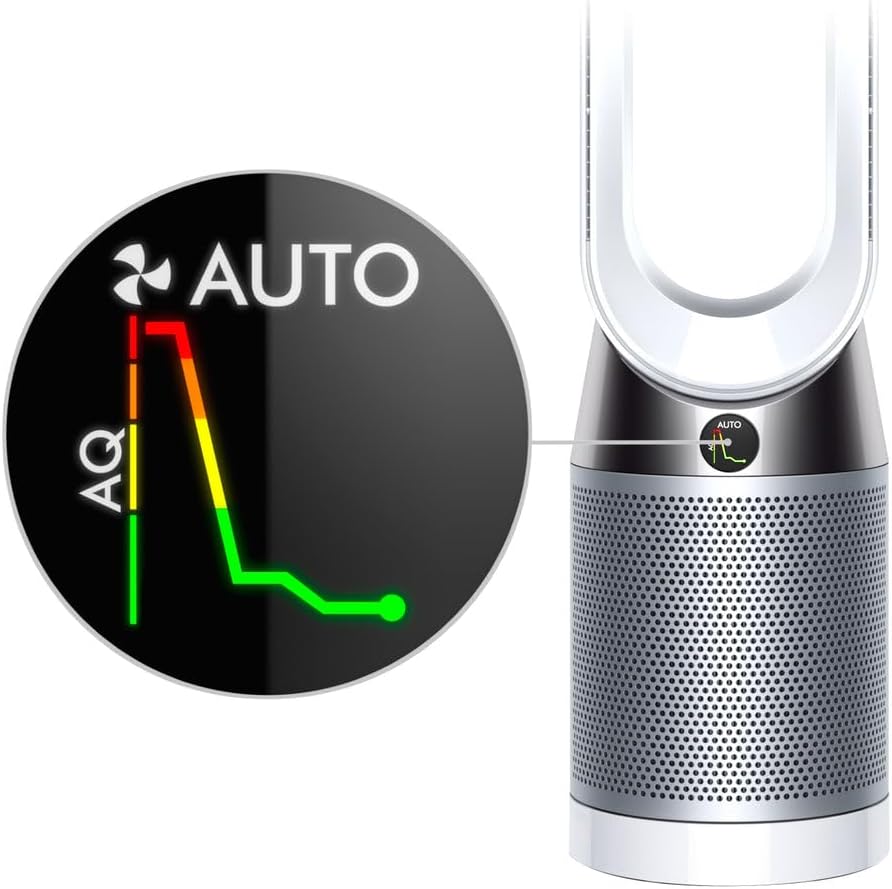
Image: Close-up of the Dyson Pure Cool Purifier Fan's LCD screen, displaying an air quality graph with green, yellow, and red segments, indicating real-time pollution levels and the fan's automatic response.
The LCD screen provides real-time air quality reports and operational status. In Auto mode, it displays a graph showing changes in air quality (AQ) over time.

Image: A visual representation of the Dyson Pure Cool Purifier Fan in operation, showing polluted air being drawn into the base and purified air being projected out through the loop amplifier, illustrating the Air Multiplier technology.
Antretyen
Ranplasman filtè
The appliance will indicate when the filter needs replacement on the LCD screen. Filter life varies based on usage and air quality. To replace the filter:
- Deploge aparèy la nan priz kouran an.
- Twist the filter cover counter-clockwise to remove it.
- Retire ansyen filtè a avèk prekosyon epi jete l dapre règleman lokal yo.
- Insert a new Dyson HEPA and Activated Carbon filter, ensuring it clicks into place.
- Replace the filter cover by twisting clockwise until secure.
- Plug the appliance back in. Reset the filter life indicator by holding the 'i' button on the remote for 5 seconds.
Netwayaj
Netwayaj regilye ede kenbe pèfòmans optimal.
- Toujou debranche aparèy la anvan w netwaye.
- Siye sifas eksteryè yo ak yon mou, damp twal. Pa sèvi ak detèjan oswa poli.
- Clean the air inlet holes on the base and the aperture of the loop amplifier with a soft brush or cloth to remove dust.
- Do not immerse the appliance in water or allow water to enter the motor housing.
Depanaj
If you encounter issues with your Dyson Pure Cool Purifier Fan, refer to the table below for common problems and solutions.
| Pwoblèm | Kòz posib | Solisyon |
|---|---|---|
| Aparèy la pa limen | Not plugged in; Power outlet fault; Remote control batteries low | Ensure power cord is securely plugged in; Test outlet with another device; Replace remote control batteries. |
| Pòv lè oswa pirifikasyon | Blocked air inlets/outlets; Dirty filter; Filter needs replacement | Check for obstructions and clean; Replace filter if indicated on LCD screen. |
| Appliance not oscillating | Fonksyon osilasyon an pa aktive | Press the oscillation button on the remote control. |
| Remote kontwòl pa travay | Batteries low or incorrectly inserted; Obstruction between remote and appliance | Replace batteries, ensuring correct polarity; Remove any obstructions. The remote is magnetic and stores on top of the machine. |
Espesifikasyon
- Modèl: TP4A
- Nimewo Pati: 420083-01
- Dimansyon (L x W x H): 4 x 9 x 40 pous (apeprè)
- Pwa: 16 liv (apeprè)
- Filtrasyon: 360° Sealed HEPA and Activated Carbon Filter
- Osilasyon: Jiska 350 °
- UPC: 885609028705
- Manifakti: Dyson
Garanti ak sipò
Your Dyson appliance comes with a limited warranty. Please refer to the warranty card included with your product or visit the official Dyson websit la pou wè kondisyon garanti detaye ki espesifik pou rejyon ou an.
For technical support, replacement parts, or further assistance, please contact Dyson Customer Service or visit their official support portal. You can find contact information on the Dyson websit: www.dyson.com/support


