1. Entwodiksyon
This manual provides essential information for the installation, operation, and maintenance of your NVIDIA GeForce RTX 3090 Ti Founders Edition graphics card. Please read this manual thoroughly before proceeding with installation to ensure proper functionality and to prevent damage.
2. Ki sa ki nan bwat la
Verifye ke tout konpozan yo prezan epi yo an bon kondisyon lè w ap debale yo:
- NVIDIA GeForce RTX 3090 Ti Founders Edition Graphics Card
- Kab adaptè pouvwa
3. Pwodwi souview
The NVIDIA GeForce RTX 3090 Ti Founders Edition is a high-performance graphics processing unit designed for demanding computing tasks, including gaming, content creation, and professional applications. It features advanced cooling solutions and multiple display outputs.

Figi 3.1: Angle view of the NVIDIA GeForce RTX 3090 Ti Founders Edition graphics card, showcasing its dual-fan design and sleek black finish.

Figi 3.2: Dèyè view of the graphics card, showing the multiple display output ports (HDMI and DisplayPort) and the ventilation grille.
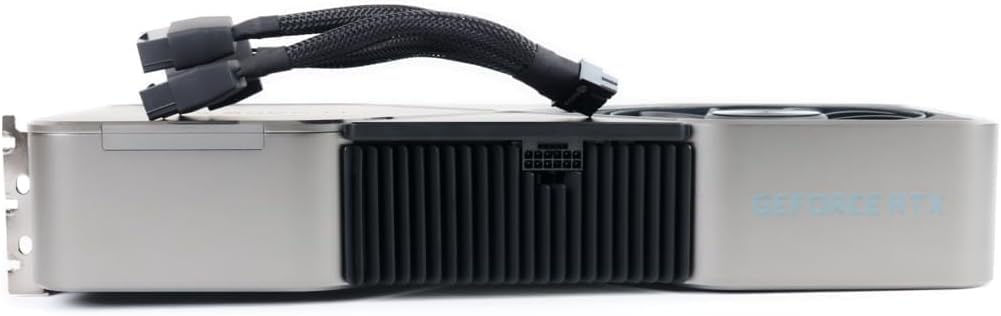
Figi 3.3: Side view of the graphics card with the 12-pin power adapter cable connected, illustrating the power input location.
4. Enstalasyon ak Enstalasyon
Before installation, ensure your system's power supply unit (PSU) meets the recommended wattage for the RTX 3090 Ti. It is recommended to consult your motherboard's manual for PCIe slot compatibility and proper installation procedures.
- Sistèm pou etenn: Etenn òdinatè w la nèt epi dekonekte kab kouran an nan priz miray la.
- Louvri bwat PC a: Retire panèl bò bwat òdinatè w la pou w ka jwenn aksè a kat manman an.
- Jwenn plas PCIe a: Identify an available PCIe x16 slot on your motherboard.
- Retire kouvèti fant yo: Remove the necessary expansion slot covers from the back of your PC case that align with the chosen PCIe slot.
- Mete Kat Grafik la: Carefully align the graphics card with the PCIe slot and press down firmly until it is securely seated. Ensure the retention clip on the PCIe slot locks into place.
- Kat Sekirite: Secure the graphics card to the PC case using screws or the case's retention mechanism.
- Konekte pouvwa: Connect the included power adapter cable to the graphics card's 12-pin power connector. Then, connect the other end(s) of the adapter cable to your PSU's PCIe power connectors (typically 8-pin or 6+2-pin). Ensure all connections are firm.
- Fèmen bwat òdinatè a: Ranplase panèl bò bwat òdinatè w la.
- Konekte Ekspozisyon: Connect your monitor(s) to the display output ports (HDMI or DisplayPort) on the graphics card.
- Power On and Install Drivers: Reconnect the power cable and power on your system. Once the operating system loads, download and install the latest graphics drivers from the official NVIDIA websit (nvidia.com/drivers).
5. Operasyon Enstriksyon
Once installed and drivers are updated, your NVIDIA GeForce RTX 3090 Ti Founders Edition is ready for use. The card will automatically manage its performance based on the demands of applications and games. For optimal performance, ensure your operating system and games are up-to-date.
- Panèl kontwòl NVIDIA: Access the NVIDIA Control Panel (usually found in your system tray or desktop right-click menu) to customize display settings, 3D settings, and other graphics-related preferences.
- GeForce Experience: Install NVIDIA GeForce Experience for automatic driver updates, game optimization, and features like ShadowPlay for recording gameplay.
- Siveyans Tanperati: Monitor the GPU temperature using third-party software to ensure it operates within safe limits, especially during prolonged high-load activities.
6. Antretyen
Antretyen regilye ede asire lonjevite ak pèfòmans optimal kat grafik ou a.
- Retire pousyè: Periodically clean dust from the fans and heatsink using compressed air. Ensure the system is powered off and unplugged before cleaning. Hold the fan blades gently to prevent them from spinning rapidly during cleaning.
- Mizajou chofè: Keep your graphics drivers updated to the latest version from the official NVIDIA websit.
- Sistèm koule lè a: Asire w ke gen bon sikilasyon lè anndan bwat PC ou a pou anpeche chalè akimile.
NAN. Depanaj
Si ou rankontre pwoblèm, gade etap depanaj komen sa yo:
- Pa gen okenn rezilta ekspozisyon:
- Asire w kat grafik la byen chita nan plas PCIe a.
- Verify all power cables are securely connected to the graphics card and PSU.
- Check that the monitor cable is connected to the graphics card, not the motherboard's integrated graphics port.
- Eseye yon lòt kab ekran oswa monitè.
- Pwoblèm Chofè / Aksidan:
- Perform a clean installation of the latest NVIDIA drivers. Use Display Driver Uninstaller (DDU) in Safe Mode to remove old drivers before installing new ones.
- Check for conflicts with other software.
- Surchof:
- Ensure proper case airflow and fan operation.
- Clean dust from the graphics card's heatsink and fans.
- Verify ambient room temperature is not excessively high.
- Pwoblèm pèfòmans:
- Ensure your system meets the minimum requirements for the applications/games you are running.
- Tcheke pou pwosesis background konsome resous sistèm yo.
- Verify that the graphics card is running at its expected clock speeds (can be monitored with third-party tools).
8. Espesifikasyon
Key technical specifications for the NVIDIA GeForce RTX 3090 Ti Founders Edition:
| Karakteristik | Detay |
|---|---|
| Mak | NVIDIA |
| Nimewo Modèl | 9001G1362505000 |
| Koprosesè grafik | NVIDIA GeForce RTX 3090 |
| Gwosè RAM Kat Grafik | 24 GB |
| Rezolisyon ekran maksimòm | 3840x2160 |
| Entèfas Sorti Videyo | HDMI (and DisplayPort, implied by images) |
| Pwa atik | 7.08 liv |
| Dimansyon pwodwi (LxWxH) | 12 x 4 x 0.1 pous |
9. Garanti ak sipò
For warranty information and technical support, please refer to the official NVIDIA websit la oubyen kontakte sèvis kliyan yo. Kenbe prèv acha ou pou reklamasyon garanti.
- Plan Pwoteksyon: Additional protection plans may be available from your retailer. For example, a 4-Year Protection Plan or a monthly Complete Protect plan.
- Règleman retounen: Standard return policies typically allow for refund/replacement within 30 days of purchase, subject to retailer terms.
- Sipò ofisyèl: Vizite nvidia.com/support for drivers, FAQs, and contact options.


