1. Entwodiksyon
This manual provides comprehensive instructions for the setup, operation, and maintenance of your Cherry MW 9100 Wireless Rechargeable Mouse. The MW 9100 is a compact, versatile mouse offering dual connectivity options (Bluetooth or 2.4 GHz USB receiver) and a convenient rechargeable battery.
Karakteristik kle yo enkli:
- Compact design with charging functionality.
- Flexible operation: use while charging via USB-C cable.
- Dual connectivity: Bluetooth or 2.4 GHz USB receiver.
- Magnetic storage for the USB receiver, ideal for travel.
- Adjustable DPI settings for varied usage.
2. Pake kontni
Verifye ke tout atik yo prezan nan pakè a:
- Cherry MW 9100 Wireless Rechargeable Mouse
- USB-C Chaje Kab
- 2.4 GHz USB reseptè
- Étui pwoteksyon
- Manyèl Enstriksyon (dokiman sa a)
3. Enstalasyon
3.1 Chaje Sourit la
The Cherry MW 9100 mouse features a built-in rechargeable battery. Before initial use, or when the battery is low, connect the included USB-C cable to the mouse and to a USB power source (e.g., computer USB port, USB wall adapter). The mouse can be used normally while charging.

Imaj 3.1: Top view of the Cherry MW 9100 mouse, showing the charging indicator light.
3.2 Konekte Sourit la
The MW 9100 offers two connection methods: 2.4 GHz wireless via USB receiver or Bluetooth.
Koneksyon san fil 3.2.1 2.4 GHz
- Locate the USB receiver. It is magnetically stored in a compartment on the underside of the mouse.
- Mete reseptè USB a nan yon pò USB ki disponib sou òdinatè w lan.
- On the underside of the mouse, slide the switch to the "RF" position.
- Sourit la ta dwe konekte otomatikman ak òdinatè w la.
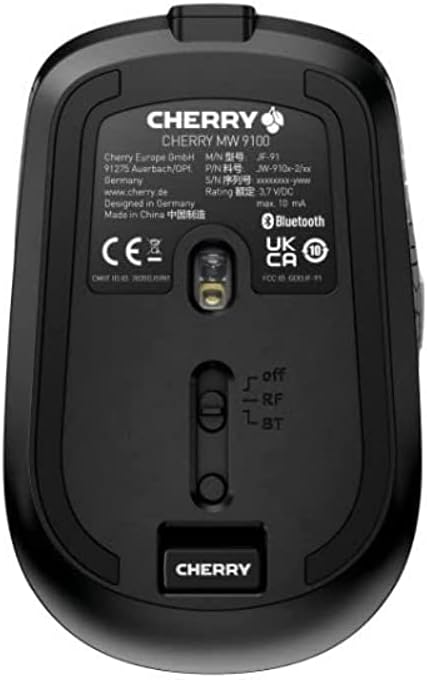
Imaj 3.2: Underside of the Cherry MW 9100 mouse, highlighting the USB receiver storage and the connection mode switch.
3.2.2 Bluetooth Koneksyon
- On the underside of the mouse, slide the switch to the "BT" (Bluetooth) position.
- Press and hold the small pairing button located near the connection switch on the underside of the mouse until the LED indicator on the mouse starts blinking, indicating pairing mode.
- Sou òdinatè w la oswa aparèy ou an, ouvri paramèt Bluetooth yo epi chèche nouvo aparèy.
- Select "Cherry MW 9100" from the list of available devices to complete the pairing process.
4. Operasyon Enstriksyon
4.1 Fonksyon debaz
The Cherry MW 9100 mouse features standard left and right click buttons, a scroll wheel (which also functions as a middle click button), and two side buttons for navigation (typically forward/back).
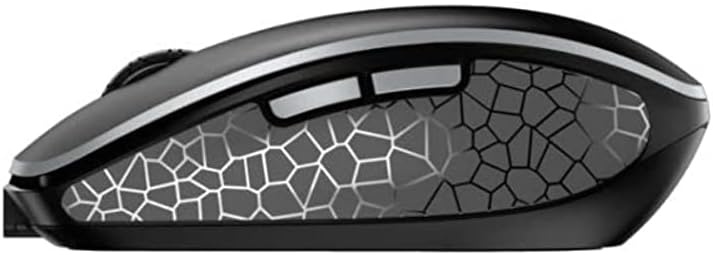
Imaj 4.1: Side view of the Cherry MW 9100 mouse, illustrating the ergonomic design and side buttons.
4.2 DPI Ajisteman
The mouse includes a DPI (Dots Per Inch) button, usually located near the scroll wheel, allowing you to adjust the cursor sensitivity. Press this button to cycle through different DPI settings to match your preference or task requirements.

Imaj 4.2: A hand demonstrating the comfortable grip on the Cherry MW 9100 mouse during use.
5. Antretyen
To ensure optimal performance and longevity of your Cherry MW 9100 mouse:
- Netwayaj: Sèvi ak yon twal mou epi sèk pou netwaye sifas sourit la. Pou pousyè tè ki difisil pou retire, yon ti krasamp Ou ka itilize twal, men asire w pa gen imidite ki antre nan aparèy la. Evite pwodui chimik ki agresif oswa materyèl abrazif.
- Depo: When not in use, especially during travel, store the mouse in the provided protective pouch to prevent scratches and damage.
- Swen batri: Avoid fully discharging the battery frequently. Recharge the mouse when the low battery indicator appears.
NAN. Depanaj
| Pwoblèm | Kòz posib | Solisyon |
|---|---|---|
| Sourit pa reponn | Low battery, incorrect connection mode, USB receiver not connected, Bluetooth not paired. |
|
| Intermittent connection (Bluetooth) | Interference, device driver issues, distance from device. |
|
| Mouvman kurseur a pa regilye oswa ralanti | Dirty optical sensor, low battery, incorrect DPI setting. |
|
7. Espesifikasyon
| Karakteristik | Detay |
|---|---|
| Mak | Cherry |
| Nimewo Modèl | JW-9100US-2 |
| Koneksyon Teknoloji | Bluetooth, 2.4 GHz USB Wireless |
| Mouvman Deteksyon | Optik |
| Karakteristik espesyal | Lightweight, Portable, Rechargeable |
| Dimansyon pwodwi | 4 x 3 x 2 pous |
| Pwa atik | 6.4 ons |
| Koulè | Nwa |
8. Garanti ak sipò
For warranty information and technical support, please refer to the official Cherry website or contact Cherry customer service directly. Keep your proof of purchase for warranty claims.
Manifakti: CHERRY
Websit: www.cherry.de


