Entwodiksyon
Mèsi pou acha aasing the Naxa NT-1400 Portable 14.1-inch TV and Digital Multimedia Player. This device is designed to provide portable entertainment, featuring a built-in ATSC tuner for over-the-air HD TV reception and multimedia playback capabilities via USB. This manual provides essential information for the proper setup, operation, and maintenance of your device. Please read it thoroughly before use and retain it for future reference.
Enfòmasyon sou Sekirite
- Sous pouvwa: Use only the provided AC adapter or DC car cord. Ensure the voltage matche ak kondisyon aparèy yo.
- Sekirite batri: The device contains a rechargeable lithium battery. Do not expose to extreme temperatures, puncture, or disassemble. Dispose of batteries according to local regulations.
- Dlo ak imidite: Pa ekspoze aparèy la nan lapli, imidite, oswa plonje l nan dlo.
- Vantilasyon: Asire bon vantilasyon toutotou aparèy la. Pa bloke ouvèti vantilasyon yo.
- Netwayaj: Disconnect power before cleaning. Use a soft, dry cloth. Avoid liquid cleaners.
- Sèvis: Pa eseye fè antretyen aparèy la tèt ou. Konfye tout antretyen bay pèsonèl kalifye.
Kontni pake
Verifye ke tout atik ki nan lis anba a yo enkli nan pakè ou a:
- Naxa NT-1400 Portable TV Unit
- Kontwòl Remote
- ETL AC Adapter
- DC Car Cord
- Antèn ekstèn
- Kab A/V
- Tablo kanpe
- Manyèl Itilizatè (dokiman sa a)

Image: Included accessories for the Naxa NT-1400.
Pwodwi souview
The Naxa NT-1400 features a 14.1-inch LCD screen with 1280 x 800 resolution, a built-in ATSC tuner for digital TV, and various input options for multimedia playback.

Imaj: Devan view of the Naxa NT-1400 Portable TV.

Image: Naxa NT-1400 in a portable setting, such as an RV.
Pò ak kontwòl
Familiarize yourself with the various ports and controls located on the unit:
- foumi: Connect the external antenna for TV reception.
- HD-IN: HDMI input for connecting external high-definition devices.
- VGA: VGA input for connecting to computers or other compatible devices.
- AV-IN/AV-OUT: Audio/Video input and output for connecting to older devices or external displays.
- Jack kas ekoutè (3.5mm): Pou koute prive.
- Pò USB: For playing multimedia files soti nan yon kondwi USB.
- DC 12V ON/OFF: Power input for the AC adapter or DC car cord, with a power switch.
- Kontwòl panèl devan: Volume, Channel, Menu, Input Source, Power.

Imaj: Bò kote view of the Naxa NT-1400 showing input/output ports.
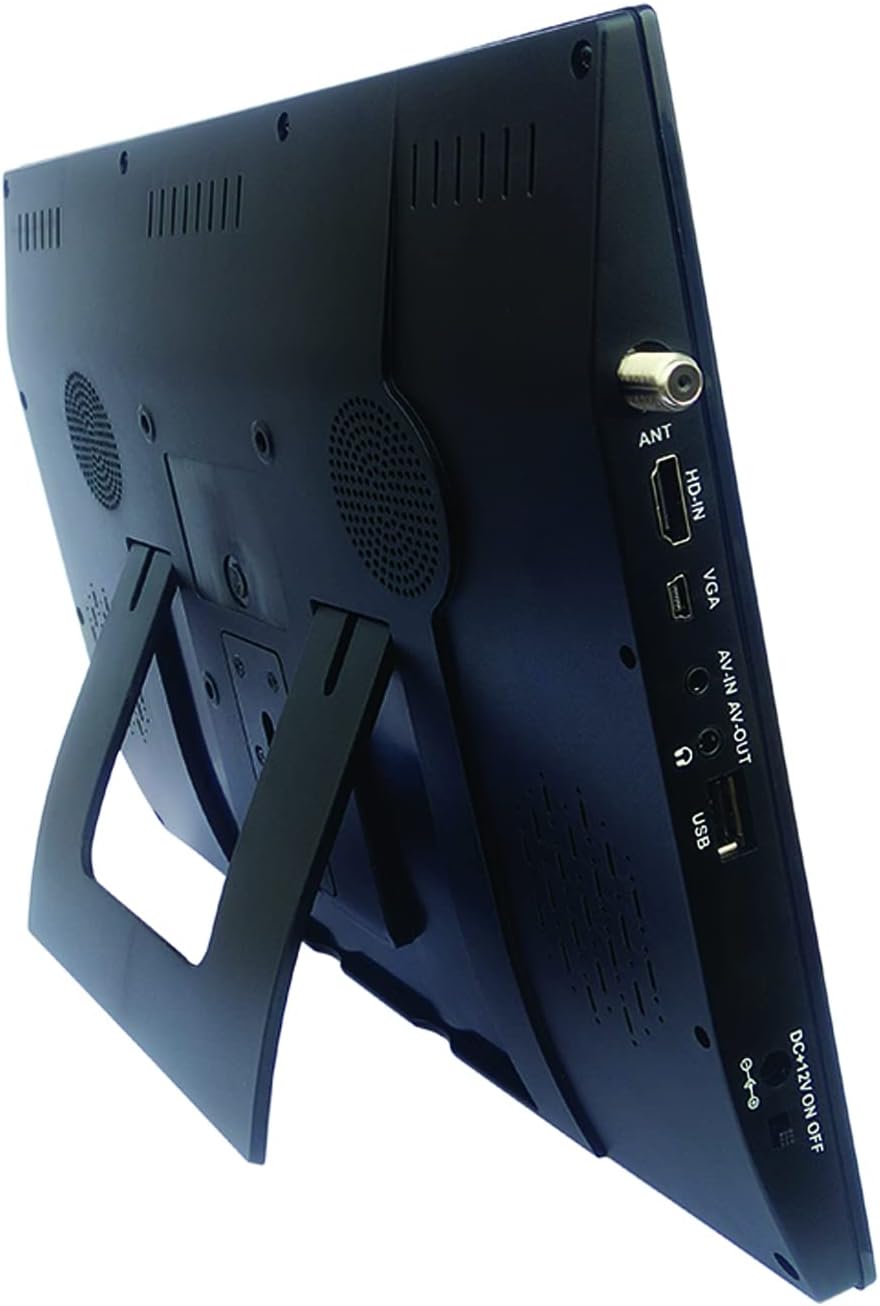
Image: Naxa NT-1400 with the integrated kickstand.
Enstalasyon
1. Alimente Aparèy la
- AC pouvwa: Connect the ETL AC adapter to the DC 12V input on the unit and plug it into a standard wall outlet.
- Pouvwa machin DC: Connect the DC car cord to the DC 12V input on the unit and plug it into your vehicle's 12V accessory socket.
- Entèn batri: The unit has a built-in rechargeable lithium battery. Ensure it is charged before portable use. The battery charges automatically when connected to AC or DC power.
2. Mete Sipò a an plas
- The unit includes an integrated flip-out kickstand for quick setup.
- For more stable placement, attach the provided tabletop stand to the back of the unit using the designated mounting points.
3. Konekte antèn la
For optimal over-the-air TV reception, connect the external antenna to the ANT port on the side of the unit. Position the antenna in an area with good signal strength.
4. Premye eskanè chanèl
After powering on the device for the first time, navigate to the 'Channel Setup' or 'Auto Scan' option in the main menu to scan for available digital TV channels. This process may take several minutes.
Enstriksyon Operasyon
1. Power On/Off
Press the 'POWER' button on the unit or the remote control to turn the device on or off.
2. Chwazi Sous Antre
Press the 'MODE' or 'INPUT' button on the unit or remote control to cycle through available input sources: TV, USB, HDMI, VGA, AV.
3. Operasyon Televizyon
- Seleksyon chanèl: Use the 'CH+' / 'CH-' buttons on the unit or the remote control to change channels. You can also enter channel numbers directly using the remote's numeric keypad.
- Kontwòl Volim: Use the 'VOL+' / 'VOL-' buttons on the unit or the remote control to adjust the volume.
- Navigasyon nan meni: Press the 'MENU' button to access settings. Use arrow keys and 'OK' on the remote to navigate and confirm selections.
4. Itilizasyon kas ekoutè
Plug standard 3.5mm headphones into the headphone jack for private audio listening. The internal speakers will automatically mute.
Miltimedya lèktur
The Naxa NT-1400 supports playback of various multimedia files soti nan yon kondwi USB.
1. Konekte yon kondwi USB
Insert your USB flash drive into the USB port on the side of the unit.
2. Accessing USB Media
Switch the input source to 'USB'. The device will display a file browser. Navigate through your folders and select the desired media file.
3. Sipòte File Fòma
- Videyo: MPEG, XVID, AVC, MP4, H.264, HEVC (H.265), FLV, MKV
- Odyo: MP3
- Imaj: JPEG
- Tèks: TXT
Antretyen
Netwayaj
Ensure the unit is powered off and unplugged before cleaning. Use a soft, dry, lint-free cloth to wipe the screen and exterior surfaces. Do not use liquid cleaners, aerosols, or abrasive materials.
Swen batri
To prolong battery life, avoid fully discharging the battery frequently. If storing the unit for an extended period, charge the battery to approximately 50% and store in a cool, dry place.
Depo
When not in use, store the unit in a clean, dry environment away from direct sunlight and extreme temperatures.
Depanaj
- Pa gen pouvwa: Ensure the AC adapter or DC car cord is securely connected and the power switch is in the 'ON' position. Check if the internal battery is charged.
- No TV Signal: Verify the external antenna is properly connected and positioned. Perform an 'Auto Scan' for channels. Signal strength can vary by location.
- Pa gen son: Check the volume level. Ensure headphones are not plugged in unless intended. Verify the audio settings in the menu.
- Pwoblèm lekti USB: Ensure the USB drive is formatted correctly (FAT32 is generally recommended). Verify that the media files yo nan fòma sipòte.
- Kontwòl Remote pa travay: Tcheke pil ki nan kontwòl remote la. Asire w pa gen okenn obstak ant kontwòl remote la ak detèktè IR aparèy la.
Espesifikasyon
| Karakteristik | Spesifikasyon |
|---|---|
| Mak | Naxa |
| Nimewo Modèl | NT-1400 |
| Gwosè ekran | 14.1 pous |
| Teknoloji ekspozisyon | LCD |
| Rezolisyon | 1280 x 800 |
| Aspè rapò | 16:9 |
| Rafrechisman pousantaj | 50/60 Hz |
| Kalite sentonizè | Built-in Digital ATSC TV Tuner |
| Koneksyon | HDMI, USB, VGA, AV-IN/AV-OUT |
| Kalite Oratè | Bati-an |
| Batri | 1 Lityòm Ion (enkli) |
| Sous pouvwa | AC Adapter, DC Car Cord, Internal Battery |
| Dimansyon pwodwi | 1.5"D x 13.45"W x 9.2"H |
| Pwa atik | 2.2 liv |
Garanti ak sipò
For warranty information, technical support, or service inquiries, please visit the official Naxa Electronics websit la oubyen kontakte depatman sèvis kliyan yo. Kenbe resi acha w la kòm prèv acha pou reklamasyon garanti.
Naxa Electronics: Visit the Naxa Store on Amazon


