Entwodiksyon
Mèsi pou acha aasing the Dolphin SP-2600RBT Portable Bluetooth Speaker. This manual provides essential information for the safe and efficient operation of your new speaker. Please read this manual thoroughly before using the product and retain it for future reference.

Image: The Dolphin SP-2600RBT speaker, showcasing its dual woofers with LED lights and a top-mounted control panel with a phone dock.
Enfòmasyon sou Sekirite
Pou asire yon operasyon an sekirite epi pou anpeche domaj, tanpri obsève prekosyon sa yo:
- Pa ekspoze oratè a nan dlo, imidite, oswa tanperati ekstrèm.
- Pa eseye demonte oswa modifye oratè a. Sa ap anile garanti a.
- Kenbe oratè a lwen sous chalè tankou radyatè, recho, recho, oswa lòt aparèy (ki gen ladan amplifiers) ki pwodui chalè.
- Sèvi ak adaptè pouvwa a sèlman ak inite a.
- Asire w ke gen bon vantilasyon toutotou oratè a. Pa bloke okenn ouvèti vantilasyon.
- Netwaye sèlman ak yon twal sèk.
- Evite mete objè lou sou oratè a.
- Kenbe soti nan atenn timoun yo.
Kontni pake
Tanpri verifye ke tout atik yo prezan nan pakè a:
- Dolphin SP-2600RBT Portable Bluetooth Speaker
- Mikwofòn branche
- Kontwòl Remote
- AC adaptè
- braslè zepòl
- Manyèl Itilizatè (dokiman sa a)
Pwodwi souview
Familiarize yourself with the various parts and controls of your Dolphin SP-2600RBT speaker.
Control Panel and Inputs
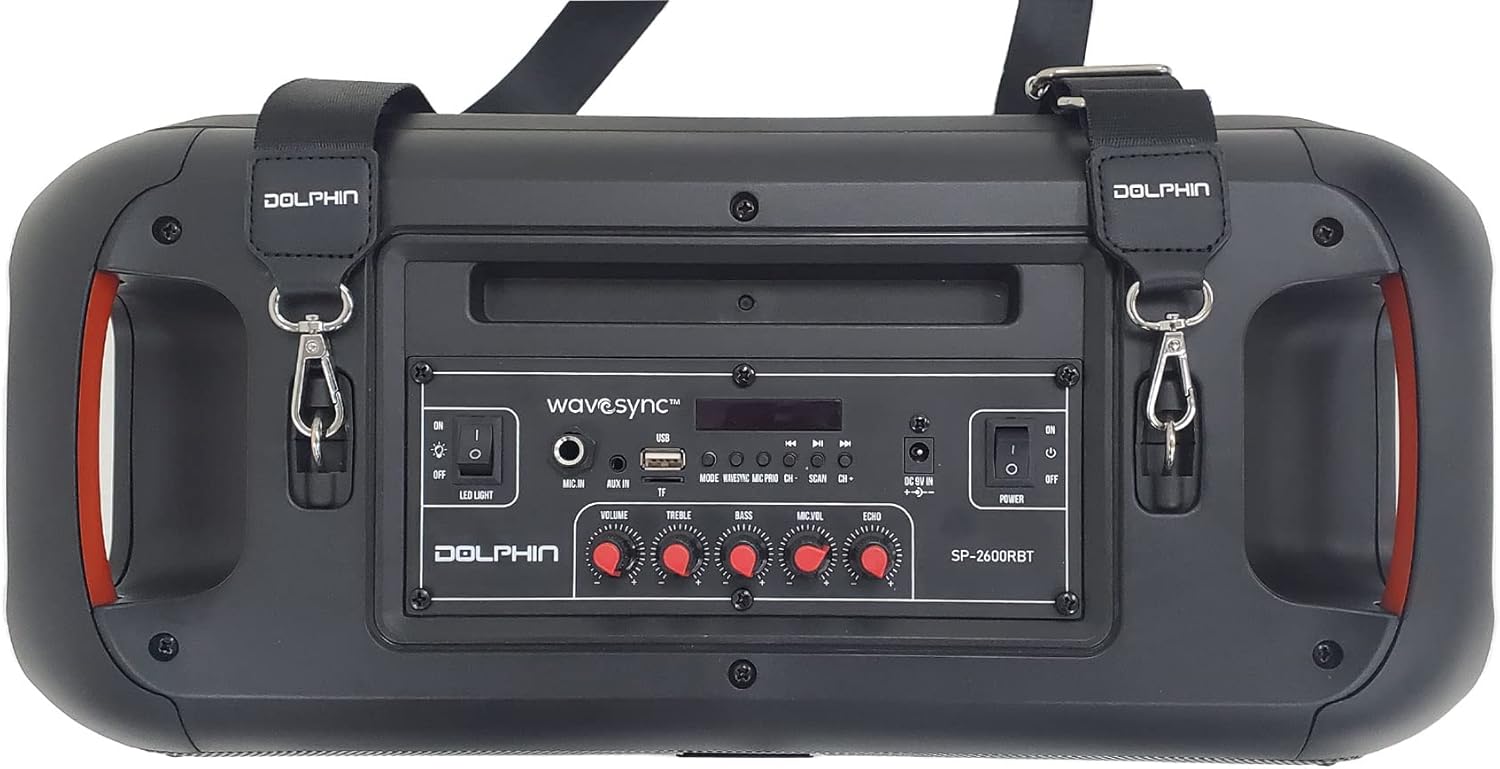
Imaj: Anlè view of the speaker showing the control panel, various ports, and attachment points for the shoulder strap.
The top panel of the speaker houses all the main controls and input ports for easy access.
- Dirije limyè switch: Toggles the rhythmic LED lights on/off.
- Mik nan: Yon jack 6.35mm pou konekte mikwofòn filaire la.
- Volim bouton: Ajiste volim prensipal la an jeneral.
- Treble bouton: Adjusts the high-frequency sound output.
- Bouton bas: Adjusts the low-frequency sound output.
- Mic Vol Knob: Ajiste volim mikwofòn la.
- Bouton eko: Ajiste efè eko a pou mikwofòn nan.
- bouton mòd: Switches between input modes (Bluetooth, USB, MP3, Micro SD, FM Radio, AUX).
- Bouton Anvan/Apre: Navigates tracks or FM radio stations.
- Bouton jwe/poz: Kontwole lèktur medya yo.
- Pò USB: Pou kle USB yo.
- Mikwo SD kat plas: For Micro SD memory cards.
- AUX nan: 3.5mm oksilyè Jack D '.
- Antre 9V kouran dirèk: Power input for the AC adaptor.
- Pouvwa switch: Limen oswa etenn oratè a.
- WaveSync™ Button: Initiates pairing with another SP-2600RBT speaker.

Imaj: Detaye view of the control panel highlighting the various media input options available on the speaker.
Konsepsyon ak Karakteristik Oratè

Image: The speaker emphasizing its dual 6.5-inch woofers and 2000W PMPO power output, with vibrant LED lighting.
The SP-2600RBT features dual 6.5-inch woofers and a 1-inch tweeter for powerful and clear audio. It also includes integrated handles for portability and a shoulder strap for easy transport.

Imaj: Devan view of the speaker with the shoulder strap attached, demonstrating its portability and active blue LED lights.
Enstalasyon
Chaje Oratè a
Before first use, it is recommended to fully charge the speaker's internal battery. The speaker is equipped with a 3600 mAh Li-ion battery providing up to 5 hours of music playback.
- Connect the supplied AC Adaptor to the "DC 9V In" port on the speaker's control panel.
- Plug the AC Adaptor into a standard wall outlet.
- The charging indicator light (if present) will illuminate. The speaker is fully charged when the indicator changes color or turns off (refer to specific indicator behavior on the device).
- Disconnect the adaptor once charging is complete.

Image: Visual representation of the speaker's long battery life, indicating over 5 hours of playtime on a single charge.
Tache senti zepòl la
For enhanced portability, attach the included shoulder strap to the designated loops on the speaker.
- Locate the metal rings on both sides of the speaker's top panel.
- Attach the clips of the shoulder strap to these rings.
- Ensure the clips are securely fastened before carrying the speaker.
Enstriksyon Operasyon
Power On/Off
- To turn on the speaker, slide the Chanjman pouvwa nan pozisyon "ON" an.
- To turn off the speaker, slide the Chanjman pouvwa nan pozisyon "OFF" la.
Pè Bluetooth
- Limen oratè a. Li pral antre otomatikman nan mòd koneksyon Bluetooth, sa ap parèt ak yon endikatè Bluetooth k ap flache.
- Sou aparèy mobil ou a (telefòn entelijan, tablèt, elatriye), aktive Bluetooth epi chèche aparèy ki disponib yo.
- Select "Dolphin SP-2600RBT" from the list of devices.
- Once paired, the speaker will emit a confirmation sound, and the Bluetooth indicator will stop flashing.
- Kounye a ou kapab jwe odyo soti nan aparèy ou an atravè oratè a.
Lekti Kat USB/Micro SD
- Insert a USB flash drive or Micro SD card into the respective port/slot on the control panel.
- Oratè a ap chanje otomatikman nan mòd USB/SD epi li pral kòmanse jwe odyo. files. If not, press the Bouton Mode to select the correct input.
- Sèvi ak la Bouton Anvan/Apre to skip tracks and the Bouton jwe/poz pou kontwole lekti a.
Antre Oksilyè (AUX)
- Connect an external audio device (e.g., MP3 player, laptop) to the AUX Nan pò a lè l sèvi avèk yon kab odyo 3.5mm (pa enkli).
- Peze a Bouton Mode until "AUX" mode is selected.
- Kontwole lekti a depi aparèy odyo konekte ou an.
Radyo FM
- Peze a Bouton Mode until "FM" mode is selected.
- Peze epi kenbe la Bouton jwe/poz to initiate an automatic scan for FM radio stations. The speaker will save all found stations.
- Sèvi ak la Bouton Anvan/Apre pou navige ant estasyon ki anrejistre yo.
Itilizasyon Mikwofòn
- Connect the wired microphone to the Mic Nan pò.
- Ajiste volim mikwofòn la lè l sèvi avèk Mic Vol Knob.
- Adjust the echo effect for the microphone using the Echo bouton.
WaveSync™ Technology (Pairing Two Speakers)
The WaveSync™ technology allows you to wirelessly connect two Dolphin SP-2600RBT speakers for a true stereo sound experience.
- Ensure both SP-2600RBT speakers are powered on and in Bluetooth mode (not connected to any device yet).
- Sou youn nan oratè yo, peze bouton an WaveSync™ Button. The speaker will emit a sound indicating it's searching for another speaker.
- The two speakers will automatically connect to each other. A confirmation sound will indicate successful pairing.
- Once connected via WaveSync™, pair your mobile device to one of the speakers via Bluetooth as described above. Audio will now play through both speakers in stereo.

Image: Illustration of the WaveSync™ feature, showing how two SP-2600RBT speakers can be wirelessly paired for enhanced audio output.
Ki ap dirije limyè kontwòl
The speaker features rhythmic LED lights that can be controlled independently.
- To turn the LED lights on or off, use the dedicated Dirije limyè switch sou panèl kontwòl la.

Image: The speaker showcasing its sound-activated rhythmic spinning LED lights, emphasizing the dedicated switch for control.
Sound Controls (Treble, Bass, Echo)
Adjust the audio output to your preference using the dedicated knobs:
- Vire a Treble bouton to increase or decrease the high-frequency sounds.
- Vire a Bas Knob to increase or decrease the low-frequency sounds.
- Vire a Echo bouton to adjust the echo effect, primarily for microphone use.
Antretyen
Bon antretyen asire lonjevite oratè ou a:
- Netwayaj: Use a soft, dry cloth to wipe the exterior of the speaker. Do not use liquid cleaners, aerosols, or abrasive chemicals.
- Depo: Lè w pa itilize oratè a pou yon bon bout tan, sere l nan yon kote ki fre epi sèk, lwen limyè solèy dirèk ak tanperati ekstrèm.
- Swen batri: Pou kenbe batri a an bon eta, evite dechaje l nèt souvan. Si w ap sere l pou yon bon bout tan, chaje l a anviwon 50% chak kèk mwa.
Depanaj
If you encounter issues with your Dolphin SP-2600RBT speaker, refer to the following common problems and solutions:
| Pwoblèm | Kòz posib | Solisyon |
|---|---|---|
| Pa gen pouvwa | Battery is drained; Power switch is off; AC adaptor not connected properly. | Charge the speaker; Ensure power switch is ON; Check AC adaptor connection. |
| Pa gen son | Volume is too low; Incorrect input mode selected; Device not paired (Bluetooth); Cable not connected (AUX). | Ogmante volim nan; Peze bouton Mòd la pou chwazi antre ki kòrèk la; Re-konekte aparèy Bluetooth la; Tcheke koneksyon kab AUX la. |
| Bluetooth pa konekte | Speaker not in pairing mode; Device Bluetooth is off; Speaker too far from device; Interference. | Ensure speaker is in pairing mode; Turn on device Bluetooth; Move device closer to speaker (within 10m); Avoid strong interference sources. |
| Mikwofòn pa mache | Microphone not plugged in; Mic Vol knob is too low. | Ensure microphone is securely plugged into "Mic In"; Increase Mic Vol knob. |
| WaveSync™ pairing fails | Speakers are too far apart; One speaker already connected to a Bluetooth device. | Ensure speakers are within close proximity; Disconnect any Bluetooth devices from both speakers before initiating WaveSync™. |
Espesifikasyon
| Karakteristik | Detay |
|---|---|
| Nimewo Modèl | SP-2600RBT |
| Mak | Dolphin |
| Oratè maksimòm pwodiksyon pouvwa | 2000 Watts |
| Koneksyon Teknoloji | Bluetooth, oksilyè, USB |
| Audio Sòti Mode | Stereo |
| Kalite aliye | Tabletop Mount, Freestanding Plug Mount |
| Dimansyon pwodwi | 22.86 x 46.99 x 24.13 cm |
| Pwa atik | 3.06 kg (6.75 liv) |
| Batri | 3600 mAh Li-ion (up to 5 hours playtime) |
Garanti ak sipò
This Dolphin SP-2600RBT speaker comes with a manufacturer's warranty. Please refer to the warranty card included in your package for specific terms and conditions, including warranty period and coverage.
For technical support, service, or warranty claims, please contact the retailer where you purchased the product or visit the official Dolphin brand website for contact information. Keep your proof of purchase for warranty validation.
Manufacturer: General Sound Co




