1. Entwodiksyon
This manual provides essential instructions for the safe and effective use of your Soundcore Motion Boom Plus IP67 Outdoor Speaker. Please read this guide thoroughly before operating the device and retain it for future reference.

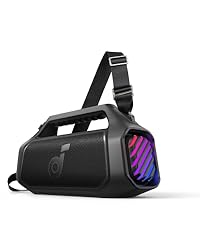
Image: The Soundcore Motion Boom Plus speaker, black, shown with its detachable shoulder strap attached, highlighting its portable design.
2. Ki sa ki nan bwat la
Verifye ke tout atik yo prezan nan anbalaj la:
- Soundcore Motion Boom Plus Speaker
- Kab USB-C pou USB-C (60cm)
- Quick Start Gid (QSG)
- Kat Enfòmasyon Sekirite
- Kat kè kontan
3. Kontwòl ak Endikatè
Familiarize yourself with the speaker's buttons and ports for optimal operation.

Image: A smartphone showing the Soundcore app's equalizer interface, positioned next to the Motion Boom Plus speaker, illustrating customization options.
Fonksyon bouton:
- Bouton pouvwa: Peze epi kenbe pou pouvwa sou / koupe.
- Bouton Bluetooth: Peze pou antre nan mòd appariement Bluetooth.
- Volim desann (-): Diminye volim.
- Volim moute (+): Ogmante volim.
- Bouton jwe/poz: Jwe/mete mizik sou poz, reponn/fini apèl.
- Bouton BassUp: Activate/deactivate BassUp technology for intensified bass.
- PartyCast Button: Initiate PartyCast mode for multi-speaker synchronization.
Pò:
- USB-C pò: Pou chaje oratè a.
- USB-A pò: Pou chaje aparèy ekstèn (fonksyon bank pouvwa).
- Antre AUX (3.5mm): Pou koneksyon odyo ak fil.
4. Chaje Oratè w la
Before first use, fully charge the speaker to ensure optimal battery performance.
- Connect the provided USB-C cable to the speaker's USB-C charging port and a compatible USB wall charger (not included).
- The charging indicator will illuminate during charging and turn off when fully charged.
- Yon chaj konplè pran apeprè 5.5 èdtan.
The speaker is equipped with a 13,400mAh battery, providing up to 20 hours of playtime on a single charge (actual performance may vary based on volume and audio content).
5. Power On/Off
- Pou limen: Peze epi kenbe bouton Pouvwa a pou 2 segonn.
- Pou etenn: Peze epi kenbe bouton Pouvwa a pou 2 segonn.
6. Pè Bluetooth
Connect your Soundcore Motion Boom Plus to a Bluetooth-enabled device.
- Power on the speaker. The Bluetooth indicator will flash blue, indicating it's ready for pairing.
- On your device, enable Bluetooth and search for "Soundcore Motion Boom Plus".
- Select the speaker from the list to connect. The Bluetooth indicator will turn solid blue when connected.
- Pou marye ak yon lòt aparèy, peze bouton Bluetooth la pou re-antre nan mòd appariement.
Oratè a gen yon distans Bluetooth ki rive jiska 10 mèt (33 pye).
7. Koneksyon Vrè Stereo San Fil (TWS)
Pair two Soundcore Motion Boom Plus speakers for a stereo sound experience.
- Asire ke tou de moun ki pale yo mache.
- On one speaker (the primary), press and hold the Bluetooth button for 2 seconds until the Bluetooth indicator flashes white.
- On the second speaker (the secondary), press the Bluetooth button once.
- The speakers will automatically connect. The Bluetooth indicator on both speakers will turn solid white when TWS is established.
- Konekte aparèy ou a ak oratè prensipal la atravè Bluetooth.
To exit TWS mode, press and hold the Bluetooth button on either speaker for 2 seconds.

Image: Multiple Soundcore speakers displayed together, illustrating the PartyCast feature for synchronized audio across several devices.
8. Using the Soundcore App
Download the Soundcore app to enhance your listening experience with customizable EQ settings and firmware updates.
- EQ personnalisable: Adjust treble, mids, and bass to your preference. The app offers various preset EQ modes and the ability to create custom profiles.
- Mizajou mikrolojisyèl: Ensure your speaker has the latest features and performance improvements by regularly checking for and installing firmware updates through the app.

Image: A smartphone displaying a "Firmware Update" screen within the Soundcore app, prompting the user to download an update for the speaker.
9. Aux Antre
Connect non-Bluetooth devices using a 3.5mm AUX cable (not included).
- Connect one end of a 3.5mm AUX cable to the speaker's AUX input port.
- Konekte lòt bout la nan priz pwodiksyon odyo aparèy ou an.
- Oratè a ap chanje otomatikman nan mòd AUX.
Imaj: Yon imaj detaye view of the rear panel of the Soundcore Motion Boom Plus speaker, highlighting the 3.5mm AUX input port for wired connections.
10. Fonksyonalite Bank Pouvwa a
The Motion Boom Plus can charge other devices using its built-in power bank feature.
- Connect your device to the speaker's USB-A output port using a compatible charging cable (not included).
- Chaje ap kòmanse otomatikman.

Image: A person's hand holding a smartphone connected via a charging cable to the Soundcore Motion Boom Plus speaker, demonstrating its power bank capability.
11. Rezistans dlo ak pousyè (IP67)
The Soundcore Motion Boom Plus is rated IP67, meaning it is protected against dust ingress and can withstand immersion in water up to 1 meter for 30 minutes.
- Ensure all port covers are securely closed before exposing the speaker to water or dust.
- Do not expose the speaker to saltwater or other chemicals. If exposed, rinse with fresh water and dry thoroughly.
- Avoid charging the speaker if it is wet.

Image: The Soundcore Motion Boom Plus speaker floating partially submerged in a body of water, demonstrating its IP67 waterproof rating.
12. Antretyen ak Swen
- Netwaye oratè a ak yon mou, damp twal. Pa sèvi ak pwodui netwayaj abrazif oswa solvang.
- Sere oratè a nan yon kote ki fre, sèk lè li pa itilize.
- Evite tanperati ekstrèm ak limyè solèy la dirèk.
- Pa eseye demonte oswa repare oratè a tèt ou. Kontakte sèvis kliyan pou jwenn asistans.
NAN. Depanaj
| Pwoblèm | Solisyon |
|---|---|
| Oratè a pa limen. | Asire w ke oratè a chaje. Konekte l nan yon sous kouran epi eseye ankò. |
| Pa ka asosye ak aparèy Bluetooth. |
|
| Pa gen son oswa volim nan ba. |
|
| Son deformation. |
|
| Cannot charge external devices. | Ensure the speaker has sufficient battery charge. Use a compatible USB-A cable. |
14. Espesifikasyon
| Karakteristik | Detay |
|---|---|
| Non modèl | A3129 |
| Kalite Oratè | Deyò |
| Koneksyon Teknoloji | Bluetooth, oksilyè |
| Teknoloji kominikasyon san fil | Bluetooth |
| Gamme Bluetooth | 10 mèt |
| Oratè maksimòm pwodiksyon pouvwa | 80 Watts |
| Audio Sòti Mode | Stereo |
| Repons Frekans | 20 KHz |
| Kapasite batri | 13400 Miliamp Orè |
| Tan pou chaje | 5.5 èdtan |
| Playtime | Jiska 20 èdtan |
| Nivo rezistans dlo | Ki enpèmeyab (IP67) |
| Dimansyon pwodwi | 15.31"D x 5.51"W x 7.7"H |
| Pwa atik | 5.03 liv |
| Antre Voltage | 5 Volts |
| Manifakti | Anker |
15. Enfòmasyon sou Sekirite
- Do not drop, puncture, or disassemble the speaker.
- Kenbe lwen tanperati ekstrèm, limyè solèy dirèk, ak flanm dife.
- Do not use the speaker in a thunderstorm.
- Use only original or certified cables for charging.
- Kenbe soti nan atenn timoun yo.
16. Garanti ak Sipò Kliyan
Soundcore provides a limited warranty for this product. For detailed warranty information and customer support, please refer to the official Soundcore website or the included safety information card.
Ou kapab jwenn tou Manyèl Itilizatè konplè a an fòma PDF isit la.


