Entwodiksyon
Thank you for choosing the Senicare Digital LED Alarm Clock. This manual provides detailed instructions for setting up, operating, and maintaining your new alarm clock. Please read this manual thoroughly before use to ensure proper functionality and to maximize your experience with its features, including dual alarms, a 7-color night light, a dimmable display, and a convenient USB charging port.
Enfòmasyon sou Sekirite
- Ensure the power adapter is compatible with your local power supply (100-240V AC).
- Pa ekspoze aparèy la nan dlo oswa imidite twòp.
- Avoid placing the clock in direct sunlight or near heat sources.
- Itilize sèlman adaptè pouvwa yo bay la.
- Kenbe lwen timoun piti yo.
- Pa eseye demonte oswa repare aparèy la tèt ou. Kontakte sèvis kliyan si gen pwoblèm.
- Insert batteries correctly, observing polarity (+/-).
Kontni pake
- Senicare Digital LED Alarm Clock (Model KT279)
- Adaptè pouvwa
- USB Chaje Kab
- Manyèl Itilizatè (dokiman sa a)

Figure 1: Senicare Digital LED Alarm Clock and included accessories.
Pwodwi souview
Devan View
The front of the clock features a large LED display for time, and indicators for PM, Alarm 1, and Alarm 2.
Top View (Kontwòl)
The top panel houses the main control buttons and the integrated night light bar.
- ALT SET: Alarm 1 Set button.
- AL2 SET: Alarm 2 Set button.
- TAN: Time setting button.
- KOULÈ: Night light color selection button.
- REPOZE / LIMYÈ: Snooze function and night light on/off.
- HOUR +: Adjusts hour, increases alarm volume.
- MIN -: Adjusts minute, decreases alarm volume.
Side View (Ports & Dimmer)
The side of the clock includes the power input, USB charging port, and display dimmer slider.
- DC 5V pouvwa pò: Konekte ak adaptè pouvwa a.
- USB Charging Port (5V-1A): Pou chaje aparèy ekstèn yo.
- DISPLAY DIMMER: Slider to adjust the brightness of the time display (0-100%).
Anba View (Battery Compartment)
The bottom of the clock contains the battery compartment for backup power.

Figi 2: Dèyè view highlighting the USB charging port and power input.

Figure 3: Battery compartment for backup power.
Enstalasyon
1. Koneksyon pouvwa
- Connect the provided power adapter to the DC 5V Power Port on the back of the clock.
- Branche adaptè kouran an nan yon priz miray estanda 100-240V AC.
- The LED display will light up, indicating the clock is powered on.
2. Batri rezèv (Si ou vle)
Pou pouvwa outage protection, install 2 x AAA batteries (not included) into the battery compartment on the bottom of the clock. This will preserve time and alarm settings during a power interruption, though the display will go black.

Figure 4: The clock retains settings during power outages with battery backup.
Enstriksyon Operasyon
1. Mete Tan an
- Peze epi kenbe la TAN bouton an jiskaske chif èdtan yo kòmanse flache.
- Peze a HOUR + bouton pou ajiste lè a.
- Peze a MIN - bouton pou ajiste minit la.
- Peze a TAN Peze bouton an ankò pou konfime epi sòti nan mòd reglaj tan an.
2. Setting Dual Alarms (Alarm 1 & Alarm 2)
The clock features two independent alarms for different schedules.

Figi 5: Egzample of dual alarm functionality.
- Pou mete Alam 1: Peze epi kenbe la ALT SET button until the hour digits for Alarm 1 flash.
- Sèvi ak la HOUR + epi MIN - bouton yo pou mete lè alam ou vle a.
- Peze ALT SET again to confirm and activate Alarm 1. The Alarm 1 indicator will appear on the display.
- Pou mete Alam 2: Swiv menm etap yo lè l sèvi avèk AL2 ANSANM bouton.
- Pou aktive oswa etenn yon alam, peze bouton ki koresponn lan yon ti tan. ALT SET or AL2 ANSANM button. The alarm indicator will appear/disappear.
3. Fonksyon repetisyon
Lè yon alam sonnen, peze gwo bouton an SNOOZE / limyè button on top of the clock to activate the 9-minute snooze function. The alarm will sound again after 9 minutes.

Figure 6: The SNOOZE / LIGHT button for snooze functionality.
4. Ajiste klète ekran an
The clock features a 0-100% full-range dimmer for the LED time display. Use the DISPLAY DIMMER slider located on the side of the clock to adjust the brightness to your preference.

Figure 7: Adjusting display brightness with the dimmer slider.
5. Karakteristik Limyè Lannwit
The integrated night light offers 7 different colors and adjustable brightness.

Figure 8: The 7-color night light feature.
- Chanje koulè: Tape yon ti tan an KOULÈ button to cycle through the 7 available colors.
- Color Loop Mode: Peze epi kenbe la KOULÈ button for 2 seconds to enter a continuous color-changing loop.
- Turning Off Night Light: Peze a SNOOZE / limyè button to turn the night light off.
- Adjusting Night Light Brightness: The night light brightness can also be adjusted from 0-100% using the DISPLAY DIMMER slider, similar to the main display.
6. Ajiste Volim Alam lan
The alarm volume has 5 adjustable levels, ranging from 45dB to 85dB.
- While an alarm is sounding, or when setting an alarm, press the HOUR + bouton pou ogmante volim.
- Peze a MIN - bouton pou diminye volim la.

Figure 9: Volume adjustment using HOUR + and MIN - buttons.
7. USB chaje Port
The clock includes a 5V-1A USB charging port on its side, allowing you to charge small electronic devices like smartphones or tablets while the clock is plugged into power.
Antretyen
- Netwaye revèy la avèk yon twal mou epi sèk. Pa sèvi ak pwodui netwayaj abrazif oswa solvan.
- Keep the clock away from dust and moisture.
- If not in use for an extended period, remove the backup batteries to prevent leakage.
Depanaj
| Pwoblèm | Kòz posib | Solisyon |
|---|---|---|
| Afich revèy la etenn. | No power, or display dimmer set to 0%. | Check power connection. Adjust DISPLAY DIMMER slider. |
| Alam lan pa sonnen. | Alam lan pa fikse, volim alam lan twò ba, oubyen alam lan etenn. | Ensure alarm is set and activated (indicator visible). Increase alarm volume. |
| Tan/paramèt pèdi apre kouran an koupetage. | No backup batteries installed, or batteries are dead. | Install fresh 2 x AAA batteries for backup. |
| Chaje USB a pa fonksyone. | Clock not powered by AC, or device requires more than 1A. | Ensure clock is plugged into AC power. Check device's charging requirements. |
Espesifikasyon
| Karakteristik | Detay |
|---|---|
| Modèl | KT279 |
| Kalite ekspozisyon | dirije |
| Sous pouvwa | Corded Electric (100-240V AC) |
| Sovgad batri | 2 x AAA pil (pa enkli) |
| Port chaje USB | 5V-1A |
| Koulè limyè lannwit | 7 koulè |
| Montre gradateur | 0-100% reglabl |
| Volim Alam | 5 nivo (45dB a 85dB) |
| Duration Snooze | 9 minit |
| Dimansyon pwodwi | 5.91" lajè x 3.15" wotè (apeprè 150mm x 80mm) |
| Pwa atik | 11.7 ons |
| Materyèl | Plastik |
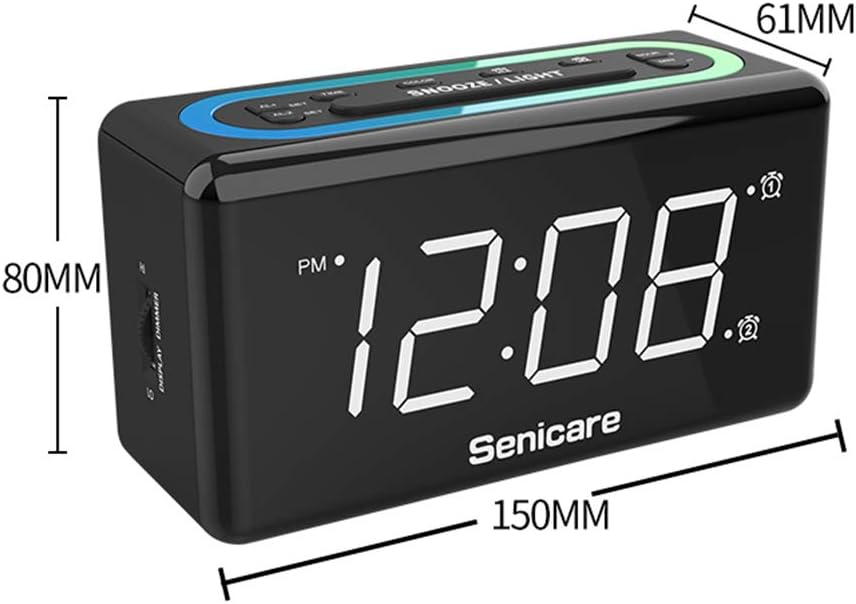
Figi 10: Dimansyon pwodwi a.
Garanti ak sipò
The Senicare Digital LED Alarm Clock comes with a yon ane garanti. We also offer a 30-jou garanti ranbousman. For any questions or assistance, please contact our customer service team, available 24 èdtan a day. Your satisfaction is our priority.