1. Entwodiksyon
This manual provides essential information for the proper use and maintenance of your VILTROX AF 13mm f/1.4 XF Ultra Wide Angle APS-C Lens. Designed for Fujifilm X-Mount mirrorless cameras, this lens offers a wide field of view and a bright maximum aperture, suitable for various photographic applications including environmental portraits, cityscapes, landscapes, architecture, and macro photography. Please read this manual thoroughly before using the lens to ensure optimal performance and longevity.
2. Pwodwi souview
The VILTROX AF 13mm f/1.4 XF lens is constructed with precision and features an advanced optical design. Key components include the lens barrel, focus ring, aperture ring, lens mount, and lens hood attachment point.

Figi 2.1: Devan view of the VILTROX AF 13mm f/1.4 XF lens with its included lens hood.

Figure 2.2: The VILTROX AF 13mm f/1.4 XF lens attached to a Fujifilm X-T2 camera body.
2.1. Optical Design and Features
The lens incorporates a sophisticated optical structure to deliver high image quality. It features a large aperture for shallow depth of field and excellent low-light performance.

Figure 2.3: Illustration of the lens's large aperture, internal construction (Aspheric, ED, and High Refractive Index lenses), and Modulation Transfer Function (MTF) chart.
3. Enstalasyon
3.1. Tache Lantiy la
- Asire w ke kamera ou etenn.
- Remove the rear lens cap from the VILTROX 13mm f/1.4 lens and the body cap from your Fujifilm X-Mount camera.
- Align the white dot on the lens barrel with the white dot on your camera's lens mount.
- Mete lantiy la dousman nan sipò kamera a epi vire l nan sans zegwi mont lan jiskaske li klike an plas. Pa fòse lantiy la.
- Attach the lens hood by aligning its mark with the mark on the front of the lens and twisting until it locks.
3.2. Detaching the Lens
- Asire w ke kamera ou etenn.
- Peze epi kenbe bouton deblokaj lantiy la sou kò kamera ou a.
- Vire lantiy la nan sans kontrè ak zegwi mont lan jiskaske li detache de kò kamera a.
- Imedyatman, mete bouchon dèyè lantiy la sou lantiy la epi bouchon kò a sou kamera a pou pwoteje detèktè yo ak optik yo kont pousyè.
4. Operasyon Enstriksyon
4.1. Sistèm otofokus (AF)
The lens features an STM motor for quick, quiet, and precise autofocus performance. It supports advanced camera features such as eye-focus tracking.
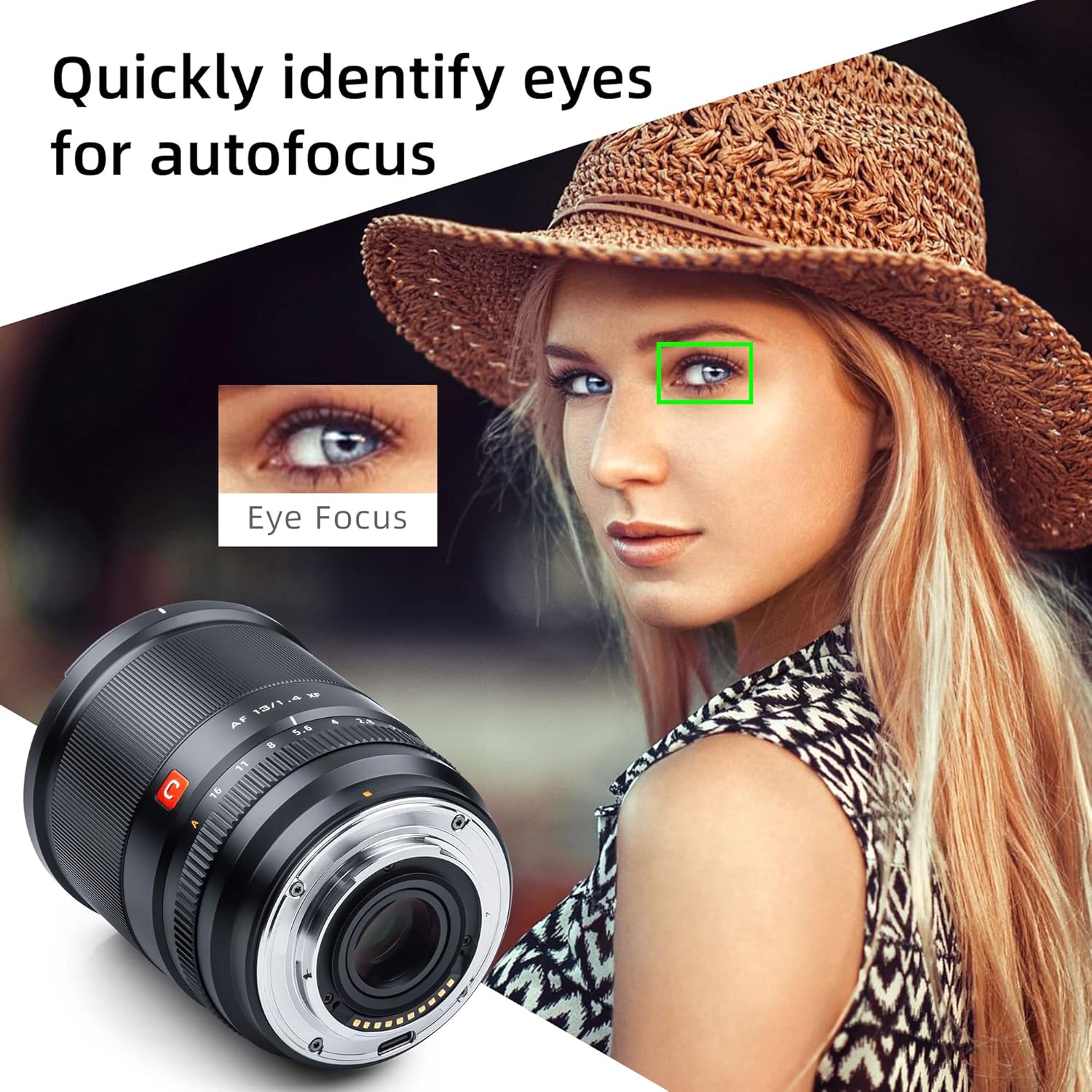
Figure 4.1: The lens's ability to quickly identify and focus on a subject's eyes for accurate portraits.
4.2. Manual Focusing and Aperture Control
The lens includes a manual focusing ring for precise focus adjustments and a manual aperture ring for direct control over depth of field. The aperture ring provides smooth rotation with distinct clicks for each stop, making it suitable for both photography and video recording.
4.3. Minimum Focusing Distance
With a minimum focusing distance of 8.6 inches (22 cm), the lens allows for close-up photography, enabling dynamic compositions by moving closer to your subject.

Figure 4.2: Demonstration of the lens's close-focusing capabilities, highlighting 0.1x maximum magnification and 0.22m closest focusing distance.
4.4. Mizajou Firmware
The lens supports USB firmware upgrades to improve performance and compatibility. Connect the lens to a computer via its USB port and follow the instructions on the VILTROX official website for the latest firmware and update procedures.

Figure 4.3: Key features of the lens including the USB upgrade port, robust metal construction, and advanced HD Nano Multilayer Coating.
5. Antretyen
5.1. Netwaye lantiy la
- Sèvi ak yon bwòs souflè pou retire pousyè ak patikil ki lach sou sifas lantiy yo.
- Pou tach oswa anprent dwèt, aplike yon ti kantite solisyon netwayaj lantiy sou yon twal mikwofib pwòp epi siye lantiy la dousman nan yon mouvman sikilè soti nan sant la rive deyò.
- Pa janm sèvi ak materyèl abrazif oswa pwodui chimik ki agresif, paske sa yo ka domaje kouch lantiy yo.
5.2. Depo
- When not in use, always attach the front and rear lens caps.
- Sere lantiy la nan yon kote ki fre epi sèk, lwen limyè solèy dirèk ak tanperati ekstrèm.
- Consider using a dehumidifying cabinet or silica gel packets in humid environments to prevent mold growth.
NAN. Depanaj
6.1. Lens Not Attaching Properly
- Ensure the lens and camera mount alignment marks are correctly matched.
- Check for any obstructions or debris on the lens mount or camera body mount.
6.2. Autofocus Not Working
- Verify that the camera's autofocus mode is enabled.
- Clean the electronic contacts on both the lens and the camera body with a clean, dry cloth.
- Ensure the lens firmware is up to date.
6.3. Image Quality Issues (e.g., Softness, Aberrations)
- Check if the lens is clean and free from smudges or dust.
- Ensure proper focus. If using autofocus, try manual focus to confirm.
- Review camera settings such as aperture, shutter speed, and ISO.
7. Espesifikasyon

Figure 7.1: The complete package contents for the VILTROX AF 13mm f/1.4 XF lens.
| Karakteristik | Detay |
|---|---|
| Mak | VILTROX |
| Nimewo Modèl | Q-0225-03279 |
| Longè Fokal | 13mm |
| Ouverture maksimòm | f/1.4 |
| Kalite lantiy | Ultra Wide Angle, APS-C |
| Montaj konpatib | Fujifilm X-Mount |
| Motè otofokus | STM |
| Distans Minimòm Konsantre | 0.22m (8.6 pous) |
| Dimansyon pwodwi | 3.54 x 2.91 x 2.91 pous |
| Pwa atik | 2.09 liv |
| Mizajou Firmware | Port USB |
8. Garanti ak sipò
For warranty information and customer support, please refer to the documentation included with your product or visit the official VILTROX websit la. Ou kapab jwenn tou lòt resous ak enfòmasyon pou kontakte sou VILTROX Official Store on Amazon.
Additional safety and compliance documents are available:


