1. Entwodiksyon
This manual provides detailed instructions for the operation and maintenance of your Jectse Bluetooth Speaker Alarm Clock. Please read this manual thoroughly before using the product to ensure proper function and longevity.
The Jectse Bluetooth Speaker Alarm Clock is a multi-functional device featuring a digital clock, dual alarm capabilities, an LED mirror display, FM radio, and Bluetooth connectivity for audio playback. It also supports music playback via a memory card.
2. Pwodwi souview
2.1. Karakteristik kle
- Koneksyon Bluetooth 5.0: Wirelessly stream audio from compatible devices.
- Doub Alam Revèy: Set two independent alarms for different wake-up times.
- LED Mirror Display: Clear digital time display that also functions as a mirror.
- Radyo FM: Digitally tuned FM radio (87.5MHz-108MHz) for news, music, and weather.
- Lektur kat memwa: Supports music playback from a memory card (up to 32GB, not included).
- Batri rechargeable entegre: 1600mAh lithium battery for portable use.
- Konsepsyon kontra enfòmèl ant: Product dimensions are approximately 116 x 51 x 33mm (4.6 x 2 x 1.3 inches).
2.2. Pake kontni
- 1 x Jectse Alarm Clock Speaker
- 1 x mikwo USB chaje kab
- 1 x Manyèl Itilizatè (dokiman sa a)
2.3. Pwodwi Dyagram
Refer to the image below for an overview of the device's components and controls.
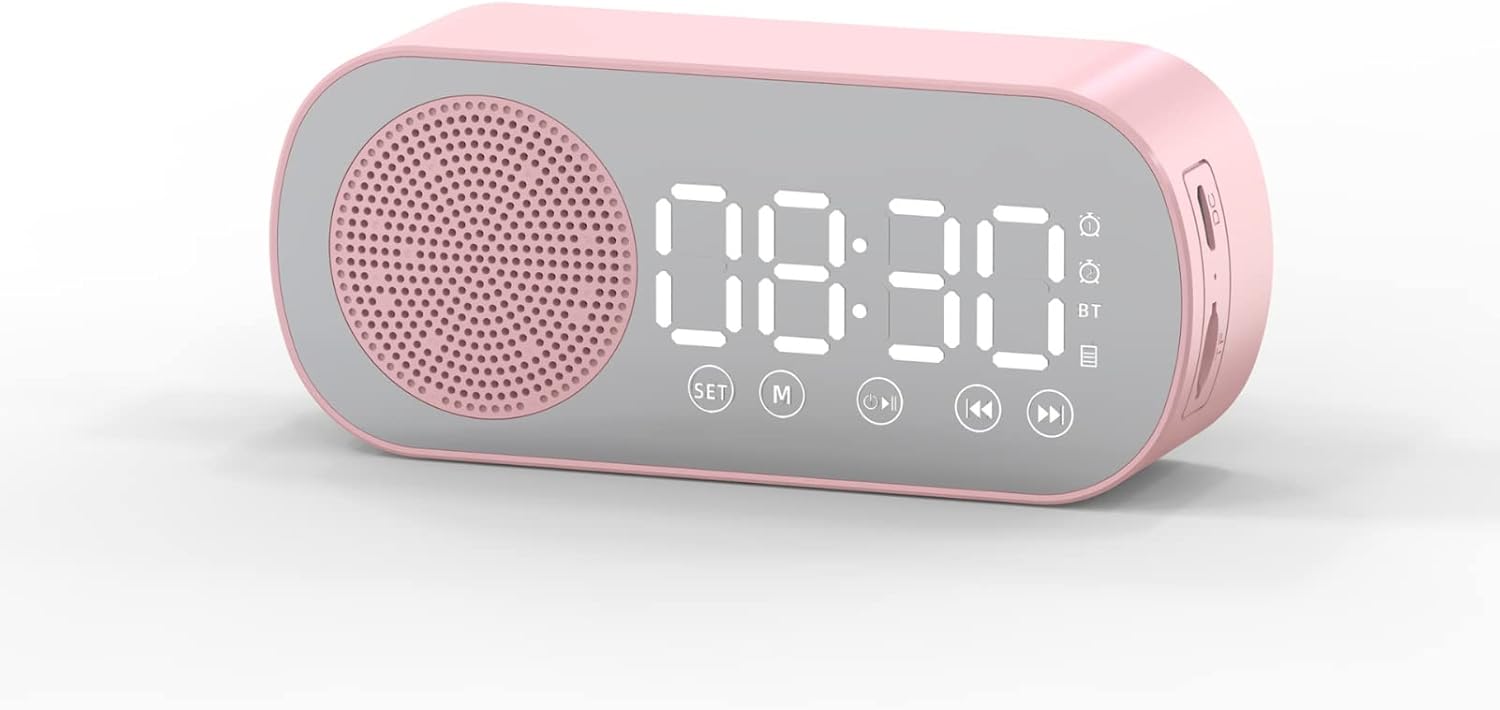
Figi 1: Devan view of the Jectse Bluetooth Speaker Alarm Clock, showing the speaker grille, LED display, and control buttons (SET, M, Play/Pause, Previous, Next).

Figi 2: Side view of the alarm clock with dimensions: 116mm (4.6in) length, 51mm (2in) height, and 33mm (1.3in) depth.
3. Enstalasyon
3.1. Premye Chajman
Before first use, fully charge the device. Connect the provided Micro USB charging cable to the charging port on the side of the alarm clock and the other end to a standard USB power adapter (not included).

Figi 3: The alarm clock and its Micro USB charging cable.
The battery indicator on the LED display will show charging status. A full charge typically takes a few hours.
4. Operasyon Enstriksyon
4.1. Power On/Off
Peze epi kenbe la Power/Mode (M) bouton pou limen oswa etenn aparèy la.
4.2. Mete Tan an
- Nan mòd revèy, peze epi kenbe la SET bouton an jiskaske chif èdtan yo kòmanse flache.
- Sèvi ak la Previous (◀◀) epi Next (▶▶) bouton pou ajiste lè a.
- Peze a SET button again to switch to minute adjustment. Use the Previous (◀◀) epi Next (▶▶) bouton pou ajiste minit yo.
- Peze a SET Peze bouton an yon twazyèm fwa pou konfime epi sòti nan mòd reglaj lè a.
4.3. Setting Alarms (Dual Alarm Function)
The device supports two independent alarms. Follow these steps for each alarm:

Figi 4: The alarm clock illustrating the dual alarm feature with two distinct alarm settings.
- In clock mode, short press the SET button once to enter Alarm 1 setting mode. The alarm icon and hour digits will flash.
- Sèvi ak la Previous (◀◀) epi Next (▶▶) bouton pou ajiste lè a.
- Peze SET again to adjust minutes. Use Previous (◀◀) epi Next (▶▶) pou ajiste.
- Peze SET a third time to select the alarm sound (e.g., buzzer, FM radio). Use Previous (◀◀) epi Next (▶▶) pou chanje opsyon yo.
- Peze SET a fourth time to confirm Alarm 1 settings.
- To set Alarm 2, repeat steps 1-5, but short press the SET button twice to enter Alarm 2 setting mode.
- To enable/disable an alarm, short press the SET button until the desired alarm icon flashes, then press the Play/Pause (▶▌▌) bouton pou aktive li sou oswa koupe.
Note: The alarm volume is independent of the main speaker volume and may be fixed or adjustable within the alarm settings. If the alarm sound is too loud, check if there's an option to adjust it during the alarm setup process.
4.4. Bluetooth mòd
- Peze a Power/Mode (M) button repeatedly until "BT" appears on the display, indicating Bluetooth mode.
- On your mobile device, enable Bluetooth and search for "Jectse Speaker" or a similar device name.
- Chwazi aparèy ou vle konekte a. Yon son konfimasyon ap endike koneksyon an reyisi.
- You can now play audio from your device through the speaker. Use the Play/Pause (▶▌▌), Previous (◀◀), ak Next (▶▶) bouton pou kontwole lèktur.
4.5. FM Radio Mode

Figi 5: The alarm clock functioning as an FM radio on a bedside table.
- Peze a Power/Mode (M) peze bouton an plizyè fwa jiskaske "FM" parèt sou ekran an.
- Peze a Play/Pause (▶▌▌) bouton an pou eskane epi sove estasyon FM ki disponib yo otomatikman.
- Sèvi ak la Previous (◀◀) epi Next (▶▶) bouton pou chanje ant estasyon ki anrejistre yo.
- For better reception, ensure the device is not obstructed and try repositioning it.
4.6. Lekti Kat Memwa
Insert a memory card (Micro SD card, up to 32GB, not included) into the designated slot on the device. The device will automatically switch to memory card mode and begin playing audio files. Sèvi ak la Play/Pause (▶▌▌), Previous (◀◀), ak Next (▶▶) bouton pou kontwole lèktur.
4.7. Ajisteman Volim
In any audio playback mode (Bluetooth, FM, Memory Card), press and hold the Previous (◀◀) button to decrease volume or the Next (▶▶) bouton pou ogmante volim.
4.8. LED Mirror Display

Figi 6: The alarm clock's LED display also functions as a mirror.
The front panel of the device features an LED display that shows the time and other information. When not actively displaying information, the surface can be used as a mirror.

Figi 7: The LED display showing multiple functions and indicators, including time, battery level, and Bluetooth status.
5. Antretyen
- Netwayaj: Sèvi ak yon twal mou epi sèk pou netwaye aparèy la. Pa sèvi ak pwodui netwayaj abrazif oswa solvan.
- Depo: Sere aparèy la nan yon kote ki fre epi sèk, lwen limyè solèy dirèk ak tanperati ekstrèm.
- Swen batri: Pou pwolonje lavi batri a, evite dechaje batri a nèt souvan. Chaje aparèy la regilyèman, menm si ou pa itilize li pandan yon bon bout tan.
- Ekspozisyon dlo: Aparèy sa a pa enpèmeyab. Evite ekspoze li nan dlo oswa imidite ki wo.
NAN. Depanaj
| Pwoblèm | Kòz posib | Solisyon |
|---|---|---|
| Aparèy pa limen. | Batri ki ba. | Chaje aparèy la lè l sèvi avèk kab USB yo bay la. |
| Pa ka konekte atravè Bluetooth. | Bluetooth not enabled on device or phone; device not in pairing mode. | Ensure the alarm clock is in Bluetooth mode ("BT" displayed) and your phone's Bluetooth is on and searching. Move devices closer. |
| Resepsyon radyo FM lan pa bon. | Siyal fèb; entèferans. | Reposition the device. Avoid placing near other electronic devices that may cause interference. |
| Alarm is too loud/quiet. | Alarm volume not adjusted during setup. | Re-enter alarm setting mode and check if there is an option to adjust alarm volume. Some models may have a fixed alarm volume. |
| Ekspozisyon difisil pou li. | Lighting conditions; display brightness setting. | Adjust ambient lighting. Check if there is a display brightness setting (refer to specific model instructions if available, not detailed in general description). |
7. Espesifikasyon
| Karakteristik | Detay |
|---|---|
| Modèl | Jectsesb81t679n01182 |
| Materyèl | ABS (akrylonitrile butadien stirèn) |
| Gwosè pwodwi | Apeprè 116 x 51 x 33mm (4.6 x 2 x 1.3 pous) |
| Kalite batri | Lithium Battery (Built-in) |
| Kapasite batri | 1600mAh |
| Bluetooth vèsyon | 5.0 |
| Jwe mòd | Bluetooth, Memory Card (Max 32G, not included) |
| Mòd revèy | Digital Clock, Dual Alarm Clock, FM Radio |
| Frekans Radyo FM | 87.5MHz-108MHz |
| Koneksyon Teknoloji | Bluetooth, USB |
| Pwa atik | 5.3 ons |
8. Garanti ak sipò
Pou enfòmasyon sou garanti a ak sipò kliyan, tanpri gade dokiman yo te bay lè w te achte a oswa kontakte machann ou an. Kenbe resi acha w la kòm prèv acha.