Entwodiksyon
Welcome to the user manual for your BEBEN Wireless Earbuds, Model 1. These earbuds are designed to provide a superior audio experience with features like 36 hours of playtime, smart touch controls, ergonomic design for sports, Hi-Fi sound, and active noise reduction for clear calls. This manual will guide you through the setup, operation, maintenance, and troubleshooting of your new earbuds.

Image: The BEBEN Wireless Earbuds, featuring the two earbuds with ear hooks and their compact charging case.
Ki sa ki enkli
- BEBEN Wireless Earbuds (Left and Right)
- Ka chaje san fil
- USB Kalite-C Chaje Kab
- Bout zòrèy silikon (gwosè S/M/L)
- Sak Depo pòtab
- Manyèl itilizatè
Espesifikasyon
| Karakteristik | Detay |
|---|---|
| Non modèl | 1 |
| Koneksyon Teknoloji | Bluetooth 5.0 |
| Total Playtime | Jiska 36 èdtan (ak bwat chaje) |
| Tan pou jwe nan ekoutè (yon sèl chaj) | Jiska 6 èdtan |
| Chaje rapid | 5 minutes charge for 2 hours standby |
| Kalite kontwòl | Kontwòl Smart Touch |
| Nivo rezistans dlo | Ki enpèmeyab |
| Kontwòl bri | Anilasyon Bri Aktif (pou apèl) |
| Fòm ekoutè | Kwòk zòrèy |
| Aparèy konpatib | Multiple Bluetooth-enabled devices (smartphones, tablets, laptops, smart speakers) |
Enstalasyon
1. Premye Chajman
Anvan premye itilizasyon an, chaje ekoutè yo ak bwat chaje a nèt.
- Mete tou de ekouteur nan ka chaje a.
- Konekte kab chaje USB Kalite-C a nan bwat chaje a ak yon sous kouran.
- The LED indicators on the case will show charging status. A full charge for the case takes approximately 6 hours.
- The earbuds themselves charge quickly, with 5 minutes of charging providing 2 hours of standby time.

Image: Earbuds inside the charging case, illustrating the Type-C charging port and battery life indicators.
2. Konekte ak aparèy ou an (Konekte otomatik nan yon sèl etap)
The earbuds feature one-step auto pairing for convenience.
- Asire w ke Bluetooth aktive sou telefòn entelijan ou, tablèt ou, oswa lòt aparèy konpatib ou.
- Louvri bwat chaje a epi retire tou de ekoutè yo. Y ap limen otomatikman epi antre nan mòd koneksyon.
- On your device, search for Bluetooth devices and select "C3" from the list.
- Yon fwa konekte, w ap tande yon mesaj konfimasyon, epi ekoutè yo pare pou itilize.

Image: A smartphone screen showing "C3" as a discoverable Bluetooth device, with the earbuds next to it, demonstrating the one-step auto pairing process.
Note: The earbuds support single or binaural mode, allowing you to use one earbud independently or both together.
Enstriksyon Operasyon
Kontwòl manyen
The earbuds feature smart touch controls for easy management of music and calls. Please keep your hands dry when touching the controls for optimal sensitivity.
- Limen/Etenyen:
- Automatically power on when taken out of the charging case.
- Automatically power off when placed back into the charging case.
- Jwe/Poz: Tape yon sèl sou chak ekoutè.
- Pwochen chante: Tape de fwa sou ekoutè dwat la.
- Chante Previous: Tape de fwa sou ekoutè gòch la.
- Volim moute: Peze ekoutè dwat la pandan lontan.
- Volim desann: Peze ekoutè gòch la pandan lontan.
- Reponn/Fen Apèl: Tape yon sèl sou chak ekoutè.
- Rejte apèl: Peze epi kenbe swa ekoutè pou 2 segonn.
- Aktive Asistan Vwa a (Siri/Asistan Google): Tape twa fwa sou nenpòt ekoutè.
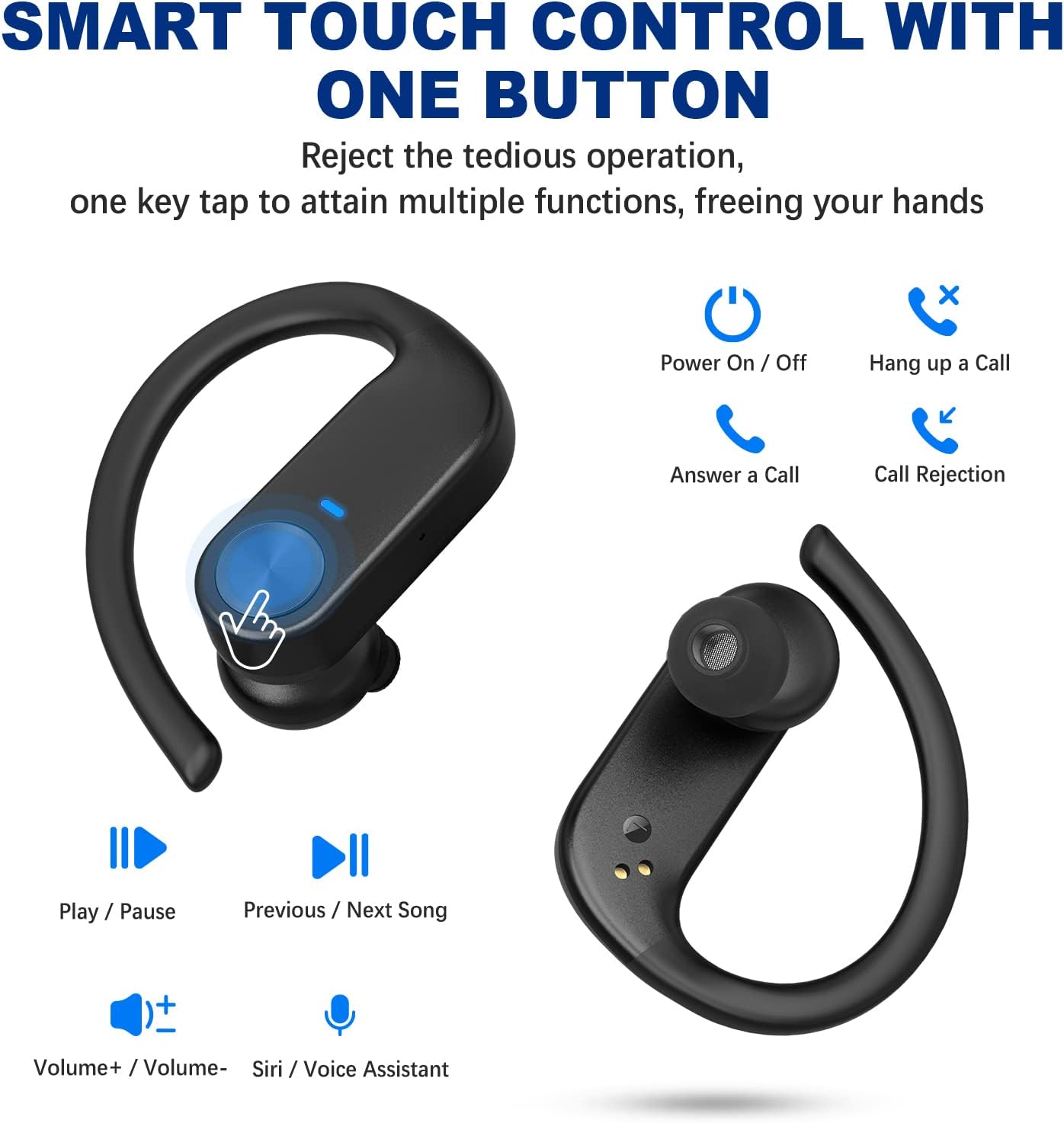
Image: Visual guide to the smart touch controls on the earbuds, showing functions like play/pause, volume, call management, and voice assistant activation.
Mete ekoutè yo
For optimal comfort and sound quality, choose the correct ear tips and adjust the ear hooks.
- Select the silicone ear tips (S/M/L) that best fit your ear canal.
- Mete earbud la nan kanal zòrèy ou.
- Place the ear hook over your ear and adjust it for a secure and comfortable fit. The ergonomic design ensures stability during activities like sports and workouts.

Image: Instructions on how to properly wear the earbuds, highlighting the soft ear tips and secure ear hooks for a comfortable and stable fit.
Antretyen ak Swen
- Regularly clean the earbuds, especially the ear tips and charging contacts, with a soft, dry cloth.
- Evite itilize pwodwi chimik piman bouk oswa materyèl abrazif pou netwaye.
- Sere ekoutè yo nan bwat chaje yo lè w pa ap itilize yo pou pwoteje yo epi asire yo rete chaje.
- Keep the earbuds away from extreme temperatures, humidity, and dust.
- While waterproof, avoid prolonged submersion in water. Dry thoroughly if exposed to moisture.
Depanaj
| Pwoblèm | Solisyon |
|---|---|
| Ekoutè yo pa konekte/pa konekte. |
|
| Se yon sèl ekoutè k ap fonksyone. |
|
| Volim ki ba oswa son ki pa bon kalite. |
|
| Ekoutè yo pa ap chaje. |
|
Garanti ak sipò
BEBEN products come with a standard manufacturer's warranty. For detailed warranty information, technical support, or customer service inquiries, please refer to the contact information provided on the product packaging or visit the official BEBEN websit.
Ou ka vizite tou BEBEN Store on Amazon pou plis enfòmasyon sou pwodwi a ak resous sipò.


