1. Entwodiksyon
This manual provides instructions for the proper setup, operation, and maintenance of your Lumens DC136 Portable USB Document Camera. Please read this manual thoroughly before using the device to ensure optimal performance and longevity.

Figure 1: Lumens DC136 Portable USB Document Camera with its flexible gooseneck fully extended, showcasing the camera head and base unit.
2. Enfòmasyon sou Sekirite
Obsève prekosyon sekirite sa yo pou evite domaje aparèy la oswa blese tèt ou:
- Pa ekspoze aparèy la nan dlo oswa imidite twòp.
- Evite mete aparèy la tou pre sous chalè.
- Sèvi sèlman ak kab USB ki vini ak li a pou koneksyon.
- Pa eseye demonte oswa repare aparèy la tèt ou. Kontakte pèsonèl sèvis kalifye.
- Kenbe lantiy la pwòp epi san pousyè.
3. Pake kontni
Verifye ke tout atik yo prezan nan pakè a:
- Lumens DC136 Document Camera Unit
- USB NAN KA
- Gid pou kòmanse rapidman (si sa aplikab)
4. Enstalasyon
4.1 Enstalasyon fizik
- Depake aparèy la: Carefully remove the DC136 from its packaging.
- Pozisyon kamera a: Place the document camera on a stable, flat surface. The flexible gooseneck allows for various positioning options.
- Konekte kab USB a: Insert one end of the supplied USB 3.0 cable into the USB port on the back of the DC136 base.
- Konekte ak òdinatè: Connect the other end of the USB cable to an available USB 3.0 port on your computer. The device is plug-and-play and typically does not require additional drivers.
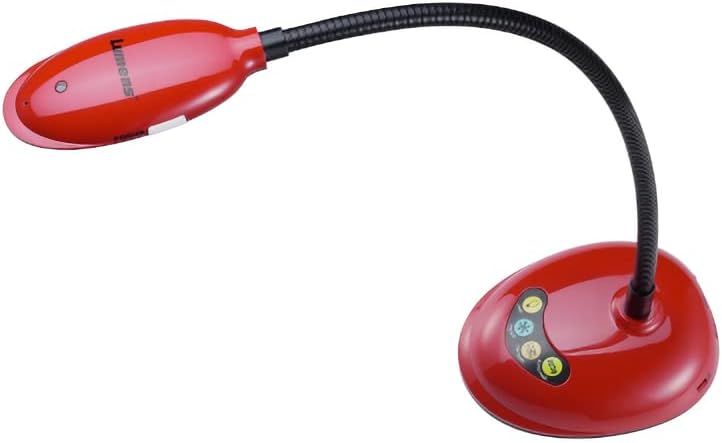
Figure 2: The Lumens DC136 Document Camera positioned with its gooseneck slightly bent, demonstrating its flexibility for various viewang ing.

Figi 3: Yon gwo plan view of the USB 3.0 port located on the rear of the Lumens DC136 document camera base, indicating the connection point.
4.2 Enstalasyon lojisyèl (opsyonèl)
While the DC136 is a plug-and-play device, Lumens may offer proprietary software for enhanced features. Refer to the Lumens websit la pou telechaje dènye lojisyèl yo ak enstriksyon enstalasyon yo.
5. Operasyon Enstriksyon
5.1 Limen/Etenyen
The DC136 powers on automatically when connected to a computer via USB. Disconnect the USB cable to power off the device.
5.2 Adjusting the Camera
- Ajisteman kou gwas: The flexible gooseneck allows you to position the camera head to capture documents, objects, or even use it as a webCam.
- Oto-Konsantre: The camera features hands-free auto-focus. For optimal clarity, ensure the object is within the camera's focal range.
- Dirije Lamp: Bati-an ki ap dirije lamp provides additional illumination for objects.
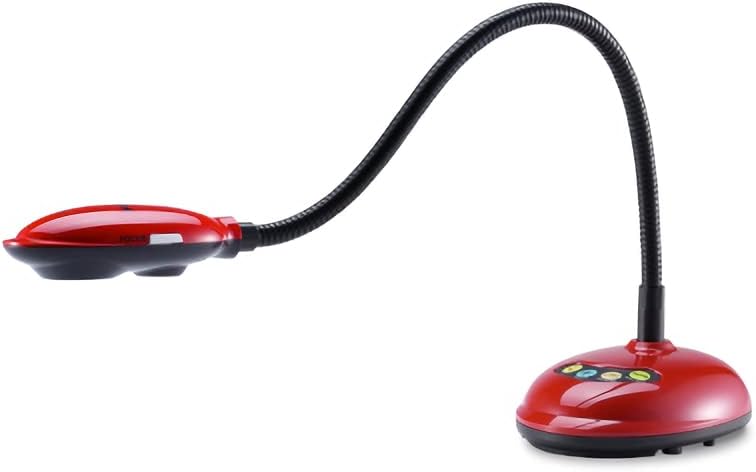
Figure 4: The Lumens DC136 Document Camera with its gooseneck folded into a compact position, illustrating its portability and storage convenience.
5.3 Using with Software
The DC136 is compatible with most video conferencing software, interactive whiteboards, and presentation applications that support USB cameras. Select "Lumens DC136" as your video input device within the software settings.
- Wotasyon imaj: Use software controls to rotate the image 0°, 180°, flip, or mirror as needed.
- Zoom: Utilize the 16x digital zoom via software for closer inspection of details.
- Anrejistreman videyo/odyo: If supported by your software, you can record video and audio using the built-in microphone.
6. Antretyen
- Netwaye lantiy la: Use a soft, lint-free cloth specifically designed for optical lenses to gently wipe the camera lens. Do not use abrasive cleaners.
- Netwaye kò a: Siye kò kamera a ak yon twal mou epi sèk. Pou pousyè tè ki difisil pou retire, yon ti kras twal mouye.amp Ou ka itilize yon twal, epi apre sa, yon twal sèk.
- Depo: When not in use, store the camera in a clean, dry place, preferably in its original packaging or a protective case.
NAN. Depanaj
| Pwoblèm | Kòz posib | Solisyon |
|---|---|---|
| Pa gen imaj ki parèt. | Kab USB a pa byen konekte. Kamera a pa kòrèk nan lojisyèl la. | Ensure USB cable is securely connected to both the camera and computer. Select "Lumens DC136" as the video input in your application. |
| Imaj la twoub. | Object out of focus range. Lens sal. | Adjust the gooseneck to bring the object into focus. Netwaye lantiy kamera a ak yon twal mou, ki pa gen pèl. |
| Bon kalite imaj pòv yo. | Ekleraj ensifizan. Anviwònman lojisyèl. | Turn on the built-in LED lamp or add external lighting. Check resolution settings in your software; ensure 4K or 1080p is selected if supported. |
| Aparèy la pa rekonèt pa òdinatè a. | Pò USB oswa kab ki gen pwoblèm. Pwoblèm sistèm operasyon an. | Eseye yon pò USB diferan oswa yon kab. Restart your computer. Check device manager for driver status. |
8. Espesifikasyon
| Karakteristik | Detay |
|---|---|
| Capteur | 1/3" 13MP CMOS |
| Total piksèl | 13.48M |
| Sòti Rezolisyon | 4K(2160p), 1600x1200, 1080p, 720p, XGA, 960x540, 640x480, 640x360 |
| To Frame | 30fps for 2160p; 60fps for 1080p / 720p |
| Total Zoom | 16x |
| Zoom dijital | 16x (via Software) |
| Mechanical Zoom | 7x |
| Close-up Distance | 2.4 pous (60 milimèt) |
| Shooting Area Max | 16.8" x 12.6" (428 mm x 321 mm) |
| Lamp | dirije |
| Kalite bra | Joint-free Gooseneck |
| Entèfas Sòti | USB 3.0 (konpatib ak USB 2.0) |
| Kontwòl | USB |
| Mikwofòn entegre | Wi |
| Oto Tune | Yes, One Button for Optimization Image |
| Konsantre mòd | Oto/Manyèl |
| Wotasyon Imaj | 0° / 180° / Flip / Mirror |
| Video / Audio Recording | Yes (via Software) |
| Fonksyon friz | Wi |
| VESA mòn | Wi, 75 mm x 75 mm |
| Pwodwi pou Telefòn enkli | USB NAN KA |
| Konsomasyon pouvwa | 2.25W (Maksimòm) |
| Pwa | 2.65 liv |
| Dimansyon (ki plwaye) | 4.2" x 11" x 5.4" |
| Dimansyon (louvri) | 4.2" x 15" x 13.8" |
9. Enfòmasyon sou Garanti
Lumens products typically come with a limited warranty. For detailed warranty terms and conditions, including duration and coverage, please refer to the warranty card included with your product or visit the official Lumens websit la. Kenbe prèv acha ou pou reklamasyon garanti.
10. Sipò pou Kliyan
If you encounter issues not covered in this manual or require further assistance, please contact Lumens customer support:
- Websit: Vizite ofisyèl Lumens yo websit pou kesyon yo poze souvan (FAQ), telechajman lojisyèl, ak enfòmasyon pou kontakte sipò.
- Imèl/Telefòn: Refer to the contact details provided on the Lumens websit la oubyen nan dokimantasyon pwodwi ou a.


