Entwodiksyon
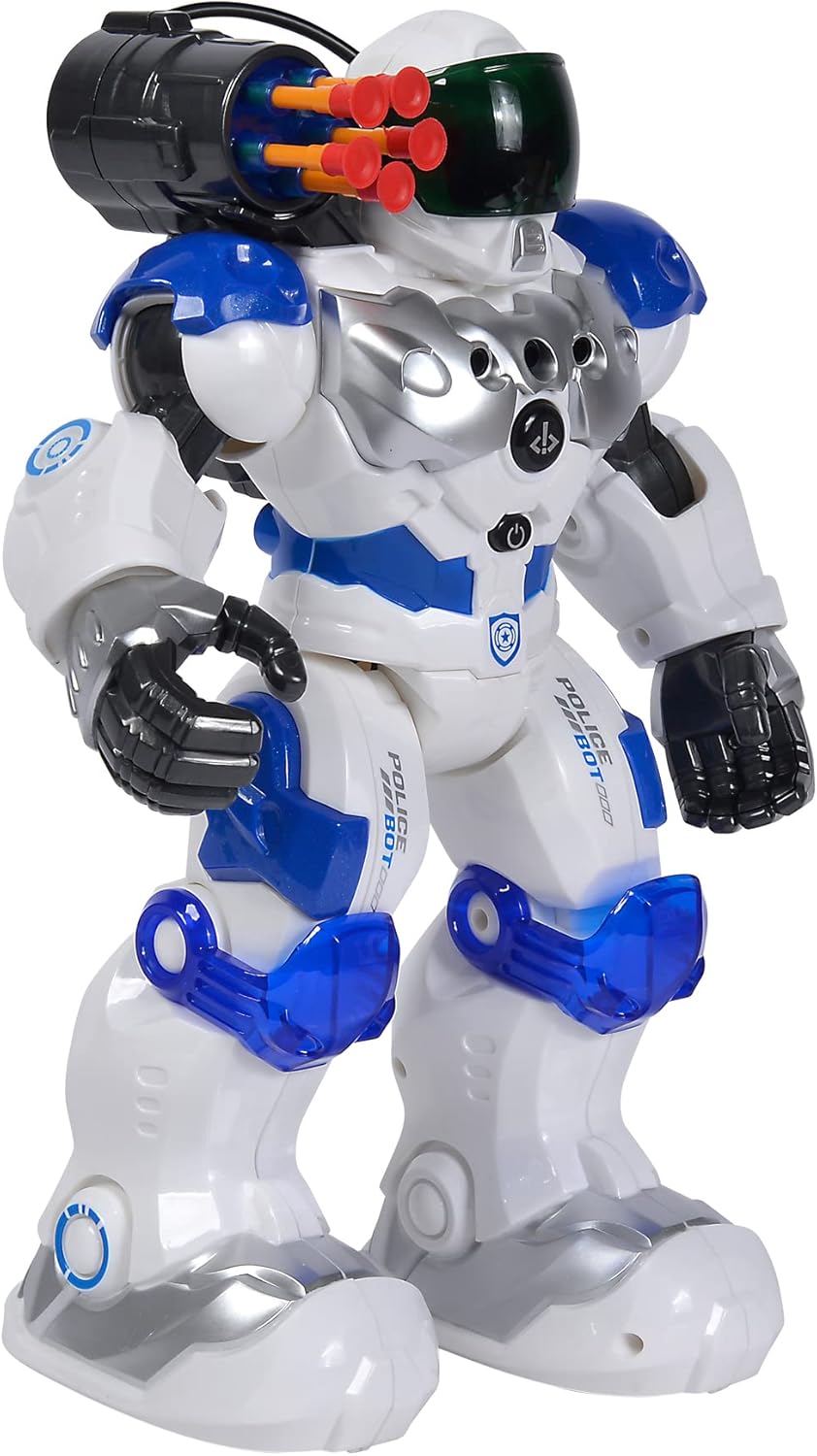
This manual provides comprehensive instructions for the safe and effective operation of your Simba Planet Fighter Robot, Model 108042509. Please read this manual thoroughly before use and retain it for future reference. This robot features infrared remote control, gesture control, light and sound effects, and a shooting function.
Enfòmasyon enpòtan sou sekirite
WARNING: Not suitable for children under 3 years due to small parts. Choking hazard.
- Toujou sipèvize timoun yo pandan y ap jwe.
- Do not aim the shooting mechanism at eyes or face.
- Kenbe lwen dlo ak imidite.
- Pa eseye demonte oswa modifye robo a oswa kontwòl remote la.
- Asire w ke pil yo mete ak polarite ki kòrèk la.
- Retire pil yo si pwodwi a pa pral itilize pou yon peryòd tan pwolonje.
Kontni pake
Verifye ke tout atik ki nan lis anba a yo prezan nan pakè ou a:
- Simba Planet Fighter Robot (Model 108042509)
- Envizib detèktè kontwòl
- USB Cable (for potential charging or data, specific function not detailed in specifications)
- Soft Darts/Arrows (for shooting function)
- Manyèl Itilizatè (dokiman sa a)

Enstalasyon
1. Battery Installation (Robot)
The robot requires 3 AAA batteries (not included).
- Locate the battery compartment on the back or bottom of the robot.
- Louvri kouvèti konpatiman batri a avèk yon tournevis si sa nesesè.
- Insert 3 AAA batteries according to the polarity markings (+/-).
- Fèmen kouvèti lòj batri a byen.

2. Enstalasyon pil (kontwòl remote)
The remote control typically requires 2 AA batteries (not included). Please check the remote control's battery compartment for specific requirements.
- Jwenn lòj batri a sou do a nan kontwòl remote la.
- Louvri kouvèti lòj batri a.
- Insert the required batteries according to the polarity markings (+/-).
- Fèmen kouvèti lòj batri a byen.
3. Limen
After installing batteries, turn on the robot using the power switch, usually located on its back or chest. Turn on the remote control using its power switch.
Enstriksyon Operasyon
Fonksyon kontwòl Remote
The infrared remote control allows you to command the robot's movements and actions. Ensure the remote is pointed towards the robot for optimal signal transmission.
- Kontwòl Mouvman: Use the directional buttons (Forward, Backward, Turn Left, Turn Right) to navigate the robot.
- Slide Movement: Specific buttons may allow the robot to slide forward or backward.
- Run/Dance: Activate pre-programmed running or dancing sequences.
- Fonksyon tire: Press the "SHOOT" button to fire the soft darts from the robot's shoulder-mounted launcher. Ensure darts are loaded correctly.
- Limyè & Son: Buttons for activating or deactivating the robot's visor light and various sound effects.
- Fonksyon pwogram: Some models allow programming a sequence of movements. Refer to the remote's specific button layout for programming instructions.
- Kontwòl Volim: Ajiste volim son robo a.
Kontwòl jès
The robot can respond to hand gestures. Specific sensors on the robot detect hand movements to initiate actions such as moving forward or turning. Experiment with different hand motions in front of the robot's sensors to discover its gesture-controlled responses.
Karakteristik kle
- Enfrawouj kontwòl remote: Full control over movement and actions.
- Kontwòl jès: Responds to hand movements for interactive play.
- Fonksyon tire: Fires soft darts from a shoulder-mounted launcher.
- Efè limyè ak son: Features a light-up visor and various robotic sounds.
- Multiple Movement Modes: Capable of driving, running, and dancing.
- Konstriksyon dirab: Made from plastic, designed for active play.

Antretyen
- Netwayaj: Siye robo a ak kontwòl remote la ak yon twal mou epi sèk. Pa sèvi ak pwodui chimik ki agresif oswa pwodui netwayaj abrazif.
- Swen batri: Remove batteries from both the robot and remote control if they will not be used for an extended period to prevent leakage.
- Depo: Store the robot and its accessories in a cool, dry place, away from direct sunlight and extreme temperatures.
Depanaj
| Pwoblèm | Kòz posib | Solisyon |
|---|---|---|
| Robo pa limen. | Pil yo mouri oswa yo mal enstale. | Check battery polarity and replace with fresh batteries. |
| Kontwòl remote la pa reponn. | Remote batteries are dead or robot is out of range/line of sight. | Replace remote batteries. Ensure remote is pointed at the robot within effective range. |
| Shooting function not working. | Darts not loaded correctly or mechanism jammed. | Ensure darts are fully inserted. Check for any obstructions in the launcher. |
| Robot moves erratically or not as expected. | Low batteries or interference. | Replace batteries. Move away from other infrared or radio-controlled devices. |
Espesifikasyon
| Karakteristik | Detay |
|---|---|
| Nimewo Modèl | 108042509 |
| Mak | Simba |
| Dimansyon (L x W x H) | 11 x 21 x 31.5 cm |
| Pwa | 1.34 kg |
| Laj Rekòmande | 5 ane ak plis |
| Robot Battery Type | 3 x AAA pil (pa enkli) |
| Kalite batri kontwòl remote | 2 x AA batteries (not included, typical for similar remotes) |
| Materyèl prensipal | Plastik |
| Metòd kontwòl | Infrared Remote Control, Gesture Control |
| Karakteristik | Light, Sound, Shooting Function, Various Movement Functions |
Garanti ak sipò
For warranty information and customer support, please refer to the documentation provided at the time of purchase or contact your retailer. Simba products are designed for quality and durability, and support is available for manufacturing defects.
For further assistance, please visit the official Simba websit oswa kontakte depatman sèvis kliyan yo.


