1. Entwodiksyon
This manual provides comprehensive instructions for the installation, operation, and maintenance of your COUGAR Archon 2 RGB Mid Tower Case. Please read this manual carefully before beginning installation to ensure proper setup and to maximize the performance and longevity of your product.

Figi 1.1: Angle view of the COUGAR Archon 2 RGB Mid Tower Case, showcasing the tempered glass side panel and front RGB fans.
2. Pwodwi Features
The COUGAR Archon 2 RGB Mid Tower Case is designed for PC enthusiasts seeking a balance of aesthetics, airflow, and functionality. Key features include:
- Elegant Design with Tempered Glass: A sleek black finish combined with a tempered glass side panel allows for a clear view of internal components and RGB lighting.
- Sikilasyon lè optimize: Supports multiple fan configurations and includes three pre-installed 120mm ARGB fans at the front for efficient cooling.
- Konpatibilite vaste: Accommodates Mini ITX, Micro ATX, and ATX motherboards.
- AmpOpsyon Depo yo: Provides bays for both 3.5" HDDs and 2.5" SSDs.
- Antre/Sòti Devan Pratik: Features USB 3.0 and USB 2.0 ports for easy peripheral connectivity.
- Kontwòl ekleraj RGB: Integrated ARGB fans offer customizable lighting effects.

Figi 2.1: Devan view of the COUGAR Archon 2 RGB case, highlighting the three pre-installed ARGB fans.
3. Gid Enstalasyon
Follow these steps to properly install your components into the COUGAR Archon 2 RGB case.
3.1. Lis Verifikasyon Pre-Enstalasyon
- Ensure you have all necessary components: motherboard, CPU, RAM, GPU, power supply, storage drives, and appropriate tools (screwdriver, zip ties).
- Work on a clean, static-free surface. Consider using an anti-static wrist strap.
3.2. Opening the Case
- Carefully remove the tempered glass side panel by unscrewing the thumbscrews located at the rear of the case. Set the panel aside on a soft, flat surface to prevent scratches.
- Remove the opposite metal side panel by unscrewing its thumbscrews and sliding it backward.
3.3. Enstalasyon mèr
- Install the I/O shield (if not pre-attached to your motherboard) into the rear opening of the case.
- Align your motherboard with the standoffs inside the case. Ensure all standoffs match the screw holes on your motherboard.
- Sere kat manman an byen sere avèk vis yo bay yo. Pa sere l twòp.
3.4. Enstalasyon Inite Alimantasyon (PSU)
- Locate the PSU mounting area at the bottom rear of the case.
- Slide your PSU into the designated bay from the rear of the case, ensuring the fan faces downwards for optimal cooling (if the case has a bottom vent).
- Fikse PSU a ak vis nan dèyè bwat la.
3.5. Enstalasyon Disk Depo
The Archon 2 RGB supports both 3.5" HDDs and 2.5" SSDs.
- For 3.5" HDDs: Locate the drive cage usually beneath the PSU shroud. Slide the HDD into the drive bay and secure it with screws.
- For 2.5" SSDs: Mount SSDs to the designated mounting points on the back of the motherboard tray or within the drive cage, securing them with screws.
3.6. Enstalasyon Kat Ekspansyon (GPU)
- Retire kouvèti fant PCIe ki nesesè yo nan dèyè bwat la.
- Insert your graphics card or other expansion cards into the appropriate PCIe slot on the motherboard.
- Secure the card with screws to the case.
3.7. Cable Management and Front Panel Connections
Route all power and data cables neatly behind the motherboard tray. Connect the front panel I/O cables (USB, audio, power switch, reset switch, LED indicators) to their respective headers on the motherboard according to your motherboard manual.

Figure 3.1: Dimensions of the COUGAR Archon 2 RGB case, useful for planning component fit and space.
4. Operasyon Enstriksyon
4.1. Limen
Once all components are installed and cables are connected, replace both side panels. Connect your monitor, keyboard, mouse, and power cable to the PSU. Press the power button on the top panel of the case to start your system.
4.2. Kontwòl ekleraj RGB
The pre-installed ARGB fans are typically controlled via a dedicated button on the case's front I/O panel or through your motherboard's RGB software (if connected to an ARGB header). Refer to your motherboard manual for software-based control options.
5. Antretyen
Antretyen regilye ede asire pèfòmans optimal ak lonjevite konpozan PC ou yo.
- Netwayaj pousyè: Netwaye filtè pousyè yo (si genyen) ak konpozan entèn yo detanzantan avèk lè konprese. Asire w ke sistèm nan etenn epi debranche anvan ou netwaye li.
- Jesyon kab: Ensure cables are neatly routed to avoid obstructing airflow.
- Enspeksyon fanatik: Check fans for dust buildup or obstructions that could impede their operation.
NAN. Depanaj
Si ou rankontre pwoblèm, gade etap depanaj komen sa yo:
- Sistèm nan pa limen:
- Check all power connections, including the PSU to the wall outlet, PSU to motherboard (24-pin and CPU 8-pin), and front panel power switch header.
- Asire w ke switch PSU a nan pozisyon 'ON'.
- Vantilatè yo pa ap vire / RGB a pa fonksyone:
- Verifye ke kab kouran fanatik yo byen konekte ak kat manman an oswa kontwolè fanatik la.
- Check ARGB headers for proper connection to the motherboard or RGB controller.
- Ensure RGB software or case button is correctly configured.
- Pa gen okenn rezilta ekspozisyon:
- Confirm the monitor cable is connected to the graphics card (not the motherboard integrated graphics, unless no dedicated GPU is present).
- Remete kat grafik la ak modil RAM yo.
7. Espesifikasyon
Detailed specifications for the COUGAR Archon 2 RGB Mid Tower Case:
| Karakteristik | Detay |
|---|---|
| Non modèl | ARCHON 2 RGB |
| Kalite Ka | Mid Tower |
| Mèr konpatibilite | Mini ITX, Micro ATX, ATX |
| Dimansyon (LxWxH) | 14.96 x 8.27 x 18.5 pous (380 x 210 x 470 mm) |
| Pwa atik | 11.37 liv (5.17 kg) |
| Materyèl | Metal, Vè apeze |
| Koulè | Nwa |
| Fanatik pre-enstale | 3 x 120mm ARGB fans (Front) |
| Sipò pou fanatik (devan) | 3 x 120mm oswa 2 x 140mm |
| Pò I/O | 1 x USB 2.0, 2 x USB 3.0, Audio In/Out |
| Kalite montaj ekipman pouvwa | Anba mòn |
| Metòd refwadisman | Air |
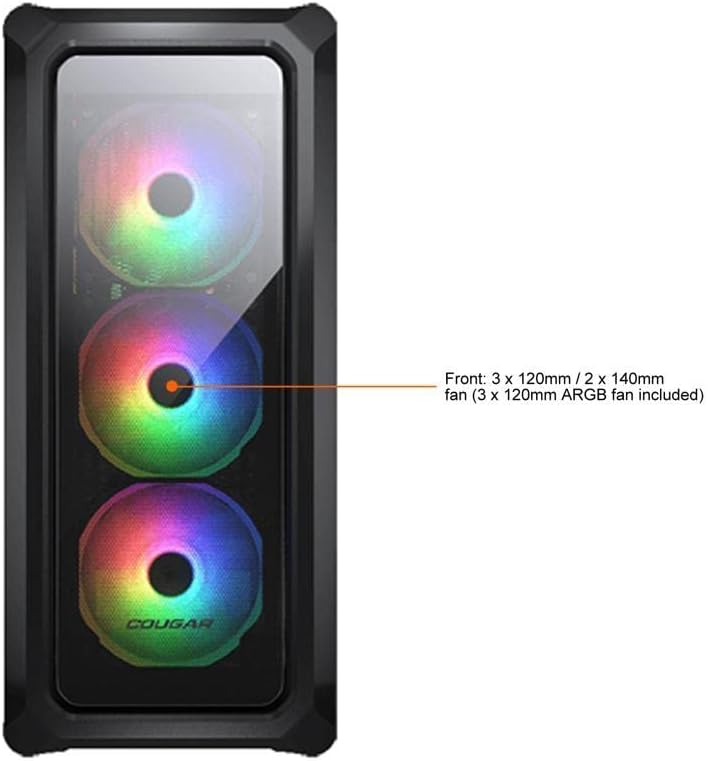
Figure 7.1: Front panel fan configuration and size options for the COUGAR Archon 2 RGB case.
8. Garanti ak sipò
For warranty information and technical support, please refer to the official COUGAR websit la oubyen kontakte depatman sèvis kliyan yo. Kenbe prèv acha ou pou reklamasyon garanti.
COUGAR Official Websit: cougargaming.com


