Enfòmasyon enpòtan sou sekirite
Tanpri li tout enstriksyon yo ak anpil atansyon anvan ou itilize aparèy la. Kenbe manyèl sa a pou referans pita.
- Inisyal chaj: Charge the device for at least 5 hours before the first use to activate the battery.
- Pa ekspoze aparèy la nan tanperati ekstrèm, imidite, oswa limyè solèy dirèk.
- Pa eseye demonte oswa modifye aparèy la. Sa ap anile garanti a epi li ka lakòz domaj.
- Sèvi ak sèlman kab USB yo bay la pou chaje.
Kontni pake
Verifye ke tout atik yo prezan nan pakè a:
- 1 x Aigital Bluetooth Car Speakerphone
- 1 x USB Chaje Kab
- 1 x manyèl itilizatè

Image: The Aigital T825 speakerphone, its packaging box, a USB charging cable, and the included user manual.
Pwodwi souview
The Aigital T825 is a hands-free Bluetooth car speakerphone designed to enhance driving safety by allowing you to manage calls and music without distraction. It features Bluetooth 5.0+EDR for stable connections, HD voice, noise cancellation technology, and a powerful 3-watt speaker for clear audio.
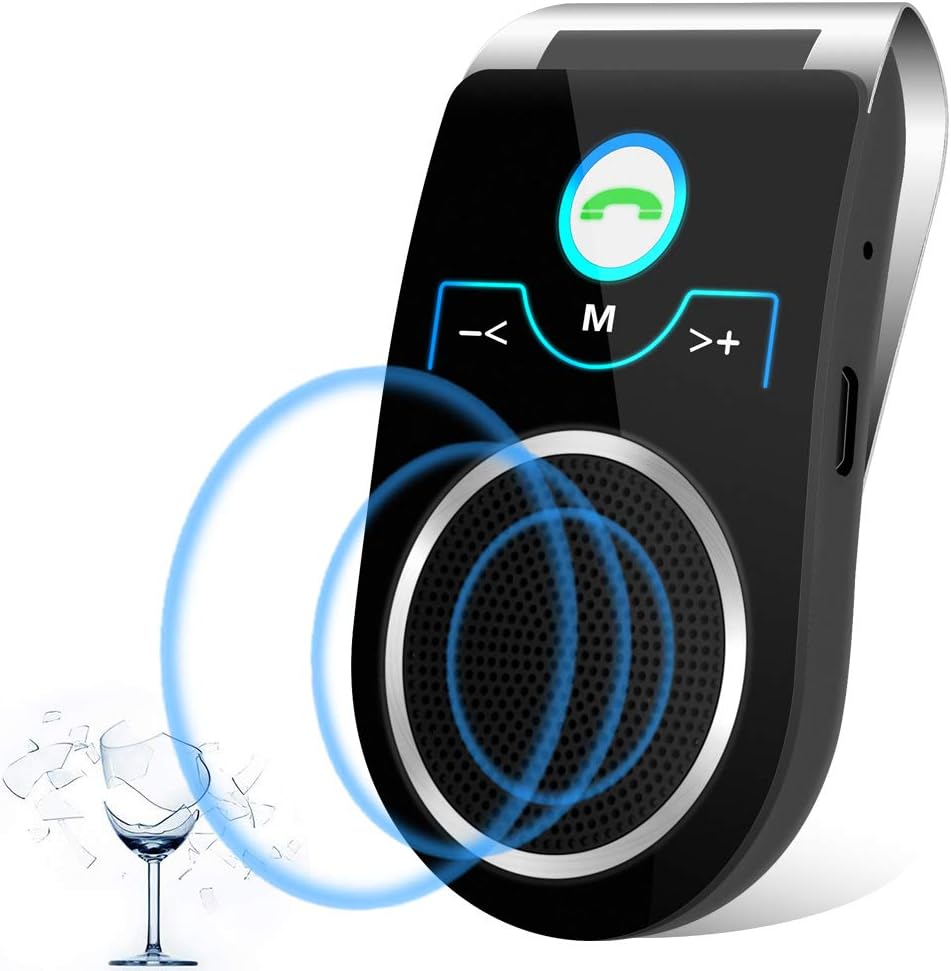
Imaj: Devan view of the Aigital T825 Bluetooth Car Speakerphone, highlighting its main buttons and speaker.

Image: A detailed diagram of the Aigital T825 speakerphone, showing the location and function of each button and port.
Enstalasyon
1. Chaje Aparèy la
Before first use, fully charge the speakerphone for at least 5 hours. Subsequent charges typically take 1-2 hours.
- Connect the provided USB charging cable to the Micro USB Charging Port on the speakerphone.
- Plug the other end of the USB cable into a USB power adapter (not included) or a car USB port.
- Limyè endikatè a ap montre eta chaj la (gade aparèy la pou konpòtman espesifik limyè a).
2. Mounting the Speakerphone
The T825 is designed to clip onto your car's sun visor for optimal microphone and speaker placement.
- Open the visor clip on the back of the speakerphone.
- Securely attach the speakerphone to your car's sun visor. Ensure it does not obstruct your view oubyen entèfere ak kontwòl kondwi yo.

Image: A woman driving, showing the Aigital T825 speakerphone securely clipped to the car's sun visor.
3. Powering On / Off
- Pou limen: Slide the ON/OFF switch to the 'ON' position. You will hear an audible confirmation.
- Pou etenn: Slide the ON/OFF switch to the 'OFF' position.
4. Pè Bluetooth
The speakerphone will automatically enter pairing mode when powered on for the first time or if no device is connected.
- Ensure the speakerphone is powered on and within 10 meters (33 feet) of your mobile phone.
- Pèmèt Bluetooth sou telefòn mobil ou.
- Chèche pou available Bluetooth devices. The speakerphone will appear as "T825" or "Aigital T825".
- Select "T825" to connect. You will hear a confirmation tone or voice prompt when successfully paired.
5. Dual Phone Connection
The T825 supports connecting two mobile phones simultaneously.
- Konekte premye telefòn nan jan sa dekri pi wo a.
- Once the first phone is connected, disable Bluetooth on the first phone temporarily.
- Pair the second phone to the T825.
- Re-enable Bluetooth on the first phone. Both phones should now be connected to the speakerphone.

Image: A man driving, illustrating the multi-point connection feature of the Aigital T825, allowing two phones to be connected at once.
Enstriksyon Operasyon
1. Fè ak resevwa apèl
- Reponn yon apèl: Peze a Green Phone Button yon fwa.
- Fini yon apèl: Peze a Green Phone Button yon fwa pandan yon apèl.
- Rejte yon apèl: Peze epi kenbe la Green Phone Button pou 2 segonn.
- Rekonpoze dènye nimewo a: Doub peze la Green Phone Button.
- Switching Call to Phone: Pandan yon apèl, peze epi kenbe Green Phone Button for 2 seconds to transfer the call to your phone. Repeat to transfer back to the speakerphone.

Image: A woman driving, engaged in a hands-free call using the Aigital T825 speakerphone, with a phone screen showing an active call.
2. Voice Command (Siri/Google Assistant)
Activate your phone's voice assistant (Siri or Google Assistant) with a single button press to make calls, send texts, or get directions while keeping your hands on the wheel.
- Aktive Asistan Vwa: Peze a Bouton M (Mode) yon fwa.
- Once activated, speak your command clearly.

Image: A man driving, demonstrating the voice guidance feature of the Aigital T825, with speech bubbles indicating "Siri, Ok Google.." and "Call Mom".

Image: A man driving, utilizing the Aigital T825 for GPS navigation audio, with a smartphone displaying a map application.
3. Difizyon Mizik
Stream music from your connected phone through the speakerphone.
- Jwe/Poz: Peze a Bouton M (Mode) once during music playback.
- Pwochen Track: Peze a >+ (Next) Button yon fwa.
- Track Previous: Peze a -< (Previous) Button yon fwa.

Image: Two individuals in a car, enjoying HiFi music streaming through the Aigital T825 speakerphone, with a smartphone displaying a music player interface.
4. Kontwòl Volim
- Ogmante Volim: Peze epi kenbe la >+ (Next) Button.
- Diminye Volim: Peze epi kenbe la -< (Previous) Button.
5. Chanjman Lang
- To switch the voice prompt language, double-press the Bouton M (Mode).
Antretyen
Proper care will ensure the longevity of your Aigital T825 speakerphone.
- Netwayaj: Siye aparèy la avèk yon twal mou epi sèk. Pa sèvi ak pwodui netwayaj abrazif oswa solvan.
- Depo: Lè w pa itilize aparèy la pou yon bon bout tan, sere l nan yon kote ki fre epi sèk, lwen limyè solèy dirèk ak tanperati ekstrèm.
- Swen batri: To preserve battery life, avoid fully discharging the battery frequently. Charge the device when the low battery indicator is active.
Depanaj
If you encounter issues with your Aigital T825, refer to the following common problems and solutions:
| Pwoblèm | Kòz posib | Solisyon |
|---|---|---|
| Aparèy pa limen. | Batri a fini; Entèriptè a etenn. | Charge the device for at least 5 hours initially, then 1-2 hours for subsequent charges. Ensure the ON/OFF switch is firmly in the 'ON' position. |
| Pa ka konekte ak telefòn nan. | Bluetooth is off on phone; Device is too far; Device is already connected to another phone. | Ensure Bluetooth is enabled on your phone. Move the device closer to your phone (within 10m). Disconnect from other devices or restart the speakerphone. |
| Low or unclear audio. | Volume is too low; Speakerphone position; Environmental noise. | Increase the volume on both the speakerphone and your phone. Ensure the speakerphone is positioned correctly on the visor, facing you. The device has noise cancellation, but extreme noise may still affect clarity. |
| USB charging cable is hard to plug in. | Misalignment; New port stiffness. | Ensure the cable is oriented correctly. The port may be stiff initially; apply gentle, firm pressure. Do not force it. |
| Lavi batri se pi kout pase espere. | Frequent use; Age of battery; Not fully charged. | Ensure the device is fully charged before use. Battery performance may degrade over time. Reduce usage time if possible. |
| No low battery alert before shutting off. | Limited warning period. | The device provides a short warning (1-2 minutes of beeps) before shutting off. It is recommended to charge regularly, especially before long trips. |
Espesifikasyon
- Nimewo Modèl: T825
- Dimansyon pwodwi: 2.36 x 1.57 x 4.33 pous
- Pwa atik: 4.2 ons
- Batri: 1 batri ityòm Ion (enkli)
- Koneksyon Teknoloji: Bluetooth 5.0 + EDR
- Sous pouvwa: Batri Powered
- Materyèl: Plastik
- Sòti Oratè: 3 Watts
- Tan pou pale: Jiska 22 èdtan
- Tan sibstiti: Jiska 45 jou
- Gamme Bluetooth: Jiska 10 mèt (33 pye)
Videyo pwodwi ofisyèl la
Video: This video demonstrates the key features of the Aigital T825 Bluetooth Car Speakerphone, including its hands-free conversation capabilities, DSP noise reduction technology for clear calls, long talk time, voice guidance for Siri and Google Assistant, HiFi music streaming, and its portable design.
Garanti ak sipò
Aigital is committed to providing high-quality products and customer satisfaction.
- Garanti: This product comes with a 60-day satisfaction guarantee. If you are not absolutely satisfied, you may return it within 60 days for a refund, no questions asked.
- Sipò Kliyan: For any questions, technical assistance, or warranty claims, please refer to the contact information provided on the product packaging or the official Aigital websit.


