1. Entwodiksyon
This manual provides detailed instructions for the setup, operation, and maintenance of your ITECH Fusion 2 S Smartwatch and accompanying Wireless Headphones. The ITECH Fusion 2 S is designed to help you monitor your health and fitness goals, offering features such as heart rate tracking, step counting, sleep monitoring, and multi-sport modes. The included wireless headphones provide an integrated audio experience.
2. Pake kontni
Tanpri verifye ke tout atik yo prezan nan pakè ou a:
- ITECH Fusion 2 S Smartwatch
- Ekoutè san fil
- USB Charging Cable (for smartwatch)
- USB Charging Cable (for headphones)
- Manyèl Itilizatè (dokiman sa a)

Image: The ITECH Fusion 2 S Smartwatch and Wireless Headphones displayed within their retail packaging.
3. Aparèy souview
3.1. ITECH Fusion 2 S Smartwatch

Image: The ITECH Fusion 2 S Smartwatch with a grey camouflage band shown alongside the matching wireless headphones.
The smartwatch features a touch screen display, a side button for navigation, and sensors on the rear for health monitoring. The display shows time, date, activity data, and notifications.

Image: A close-up of the ITECH Fusion 2 S Smartwatch display, highlighting features such as heart rate monitor, apps and notifications, multi-sports modes, water resistance, calorie tracker, music remote, pedometer, sleep monitor, hydration reminder, and extended 14-day battery life.
3.2. Wireless Headphones
The wireless headphones are over-ear style with cushioned earcups and an adjustable headband. Controls for audio playback and calls are located on the earcup.

Imaj: Yon bò view of the ITECH Wireless Headphones, illustrating features like powerful sound quality, convenient controls, comfort for hours, and a go-anywhere design.

Imaj: Yon imaj detaye view of the ITECH Wireless Headphones, emphasizing noise isolating fit, built-in microphone, Bluetooth wireless technology, and up to 8 hours of playback.

Image: A diagram of the ITECH Wireless Headphones highlighting the flexible headband, comfortable ear cushion, foldable design, and convenient controls, along with key technical specifications.
4. Enstalasyon
4.1. Chaje Aparèy ou yo
Before first use, fully charge both your smartwatch and wireless headphones.
- Smartwatch: Connect the USB charging cable to the charging port on the back of the smartwatch and to a USB power source. The battery icon on the screen will indicate charging status.
- Kas ekoutè san fil: Connect the USB charging cable to the charging port on the headphones and to a USB power source. An indicator light will show charging status and turn off when fully charged.
4.2. Power On/Off
- Smartwatch: To power on, press and hold the side button until the screen illuminates. To power off, navigate to the 'Settings' menu on the smartwatch, then select 'Power Off'.
- Kas ekoutè san fil: To power on, press and hold the power button until the indicator light flashes. To power off, press and hold the power button again until the indicator light turns off.
4.3. Konekte mont entelijan an ak telefòn entelijan ou an
The ITECH Fusion 2 S Smartwatch is compatible with both iPhone and Android devices.
- Telechaje la iTECH Wearables app soti nan Apple App Store oswa Google Play Store.
- Asire w ke Bluetooth aktive sou smartphone ou.
- Open the iTECH Wearables app and follow the on-screen instructions to create an account and pair your smartwatch.
- The app will guide you through connecting the smartwatch via Bluetooth. Confirm the pairing request on both your phone and smartwatch.
4.4. Pairing the Wireless Headphones
- Asire w ke kas ekoutè yo etenn.
- Peze epi kenbe bouton pouvwa a jiskaske limyè endikatè a flache rapidman, sa ki endike mòd koneksyon.
- On your smartphone or other Bluetooth-enabled device, go to Bluetooth settings and search for available devices.
- Select "ITECH Headphones" (or similar name) from the list to connect. The indicator light will change to a steady blue when successfully paired.
5. Kijan pou itilize mont entelijan an
5.1. Navigasyon
- Ekran manyen: Glise agoch/adwat, monte/anba pou navige nan meni ak fonksyon yo. Tape pou chwazi.
- Bouton bò: Peze pou retounen nan ekran prensipal la oswa pou reveye aparèy la.
5.2. Kadran Mont
Customize your smartwatch display by changing watch faces. On the home screen, press and hold the display, then swipe left or right to browse available watch faces. Tap to select your preferred design.
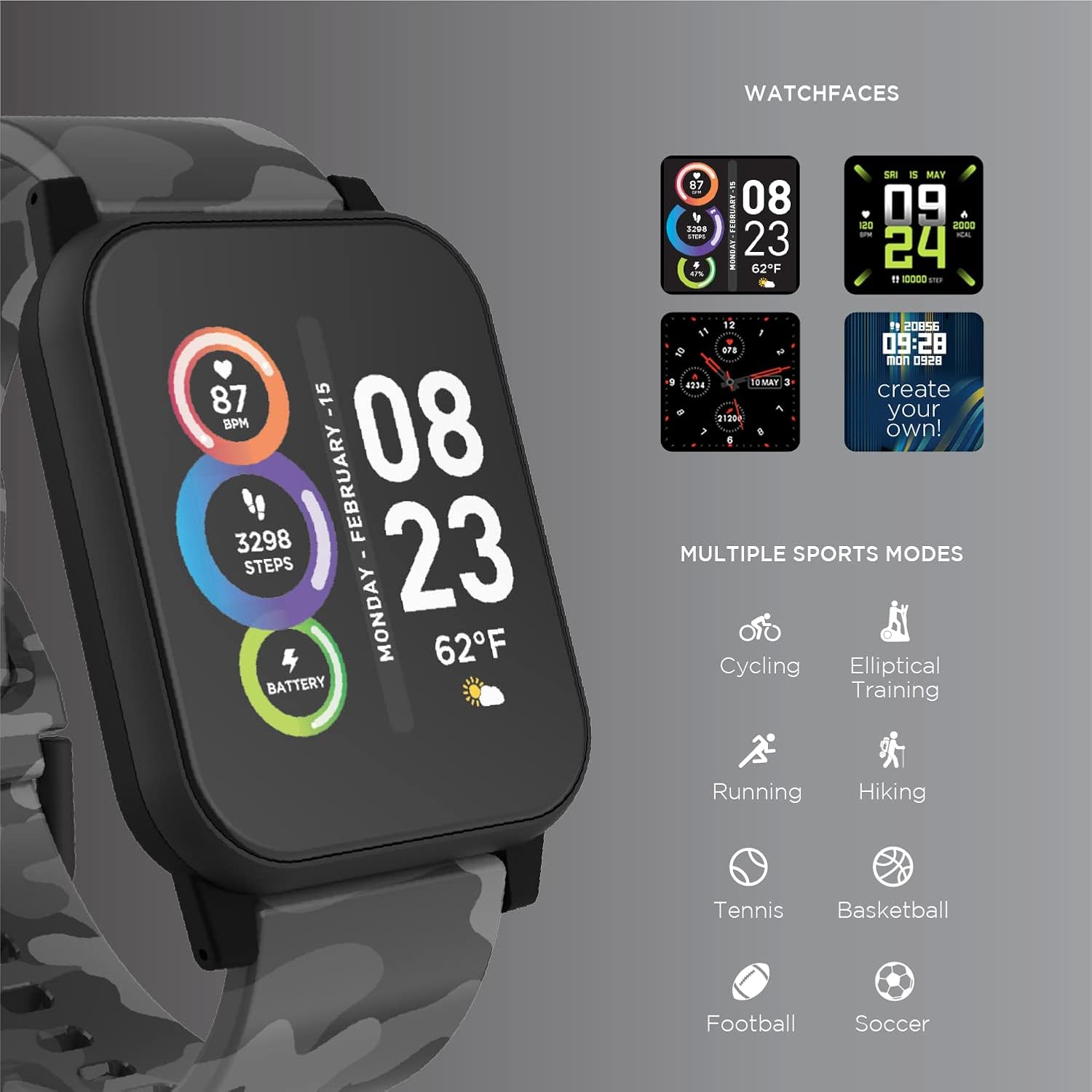
Image: The ITECH Fusion 2 S Smartwatch display showing various customizable watch faces and icons representing multiple sports modes including cycling, elliptical training, running, hiking, tennis, basketball, football, and soccer.
5.3. Core Features
- Monitè batman kè: Access the heart rate feature on your smartwatch to measure your heart rate using the built-in optical sensor. Ensure the watch is snug on your wrist for accurate readings.
- Step Counter (Pedometer): The smartwatch automatically tracks your daily steps, distance, and calories burned. View your progress on the device or in the iTECH Wearables app.
- Monitè dòmi: Wear your smartwatch to bed to track your sleep patterns, including light and deep sleep stages. Data is synchronized with the app for detailed analysis.
- Mòd milti-espò: Select from various sports modes (e.g., running, cycling, hiking) to track specific workout data, including duration, distance, and calories.
- Notifikasyon mesaj: Receive notifications for calls, texts, and app alerts directly on your smartwatch when connected to your smartphone.
- Tracker kalori: Monitors calories burned throughout the day based on your activity level.
- Rapèl idratasyon: Set reminders to drink water at regular intervals through the app.
- Mizik Remote: Control music playback on your smartphone directly from your smartwatch (play, pause, skip tracks).
5.4. App Entegrasyon
Pou yon complète view of your health and fitness data, regularly sync your smartwatch with the iTECH Wearables app. The app allows you to set goals, view historical data, customize settings, and manage notifications.
6. Operating the Wireless Headphones
6.1. Kontwòl
The headphones feature intuitive controls for media playback and call management:
- Bouton pouvwa: Peze epi kenbe pou limen/etenn. Peze yon ti kras pou jwe/pran yon poz.
- Bouton Volim: Press '+' to increase volume, '-' to decrease volume.
- Kontwòl Track: Peze epi kenbe '+' pou pwochen track la, '-' pou track anvan an.
- Jesyon apèl: Short press power button to answer/end calls. Press and hold to reject calls.
6.2. Karakteristik Odyo
- Powerful Sound Quality: Designed to deliver clear and rich audio.
- Noise Isolating Fit: The over-ear design helps to reduce external noise for an immersive listening experience.
- Mikwofòn entegre: Pèmèt apèl men lib.
6.3. Lavi batri
The wireless headphones provide up to 8 hours of playback on a single charge, depending on usage and volume levels.

Image: A person wearing the ITECH Fusion 2 S Smartwatch on their wrist and the matching wireless headphones, demonstrating typical use.
7. Antretyen
7.1. Netwayaj
- Smartwatch: Wipe the screen and band with a soft, damp, lint-free cloth. Avoid harsh chemicals or abrasive materials.
- kas ekoutè: Gently wipe earcups and headband with a soft, dry cloth. Do not immerse in water.
7.2. Water Resistance (Smartwatch)
The ITECH Fusion 2 S Smartwatch is IP67 water resistant. This means it is protected against dust and can withstand immersion in water up to 1 meter for up to 30 minutes. It is suitable for daily use and light splashes, but not recommended for swimming, showering, or prolonged water immersion.
7.3. Depo
Store your devices in a cool, dry place away from direct sunlight and extreme temperatures when not in use.
NAN. Depanaj
If you encounter issues with your ITECH Fusion 2 S devices, please refer to the following common solutions:
- Aparèy pa soumen: Asire w aparèy la byen chaje. Eseye konekte l ak yon lòt sous kouran USB.
- Smartwatch not pairing with phone: Ensure Bluetooth is enabled on your phone and the smartwatch is within range. Restart both devices and try pairing again through the iTECH Wearables app.
- Kas ekoutè yo pa konekte: Ensure headphones are in pairing mode (rapidly flashing indicator light). Check your device's Bluetooth settings and try reconnecting.
- Inaccurate heart rate/step readings: Asire w ke mont entelijan an byen sere sou ponyèt ou, ni twò sere ni twò lach. Netwaye detèktè ki dèyè mont lan.
- Notifikasyon yo pa parèt: Check app permissions on your smartphone to ensure the iTECH Wearables app has access to notifications. Verify notification settings within the app.
- Audio issues with headphones: Ensure headphones are fully charged and properly paired. Check volume levels on both the headphones and the connected device.
If problems persist, consider performing a factory reset (refer to the smartwatch settings menu or contact customer support for headphones). For further assistance, please contact Itech customer support.
9. Espesifikasyon
| Karakteristik | Detay |
|---|---|
| Dimansyon pwodwi | 22.86 x 5.08 x 22.86cm; 621g |
| Nimewo Modèl Atik | 900366B-40-G57 |
| Sistèm operasyon | Android (Compatible with iPhone and Android) |
| Karakteristik espesyal | Heart Rate Monitor, Step Counter, Sleep Monitor, Message Notifications, Multi-Sport Modes |
| Koneksyon Teknoloji | USB |
| Wireless Kominikasyon Creole | Bluetooth |
| Konpozisyon selil batri | Lityòm Ion |
| GPS | Se vre |
| Smartwatch Shape | Kare |
| Smartwatch Screen Size | 1.3 pous |
| Mak | Itech |
| Non modèl | Fusion 2 Bundle |
| Rezistans dlo | IP67 |
| Headphones Playback Time | Jiska 8 èdtan |
| Headphones Driver Diameter | 40mm |
| Headphones Connection Type | Bluetooth® 5.0 |
| Enpedans kas ekoutè | 32 Ohms ± 15% |
| Kònè Repons Frekans | 20Hz - 20KHz |
10. Garanti ak sipò
Your ITECH Fusion 2 S Smartwatch and Wireless Headphones are covered by a manufacturer's warranty. Please refer to the warranty card included in your package or visit the official Itech websit la pou wè tèm ak kondisyon garanti detaye yo.
For technical support, troubleshooting assistance, or warranty claims, please contact Itech customer service through their official websit la oswa enfòmasyon kontak yo bay nan dokimantasyon pwodwi ou a.