Entwodiksyon
Thank you for choosing the BUFFBEE Alarm Clock with Wireless Charging Station. This device combines a digital alarm clock with a versatile wireless charging stand, designed to charge your iPhone, Apple Watch, and AirPods simultaneously. It features a dimmable LED display, adjustable volume, and multiple safety protections to ensure efficient and secure charging. Please read this manual carefully before use to ensure proper operation and to maximize the lifespan of your product.
Ki sa ki nan bwat la
Lè w ap ouvri pakè a, tanpri verifye si tout atik sa yo ladan l:
- BUFFBEE Alarm Clock with Wireless Charging Station
- USB-C Chaje Kab
- Adaptè pouvwa
- Manyèl Itilizatè (dokiman sa a)
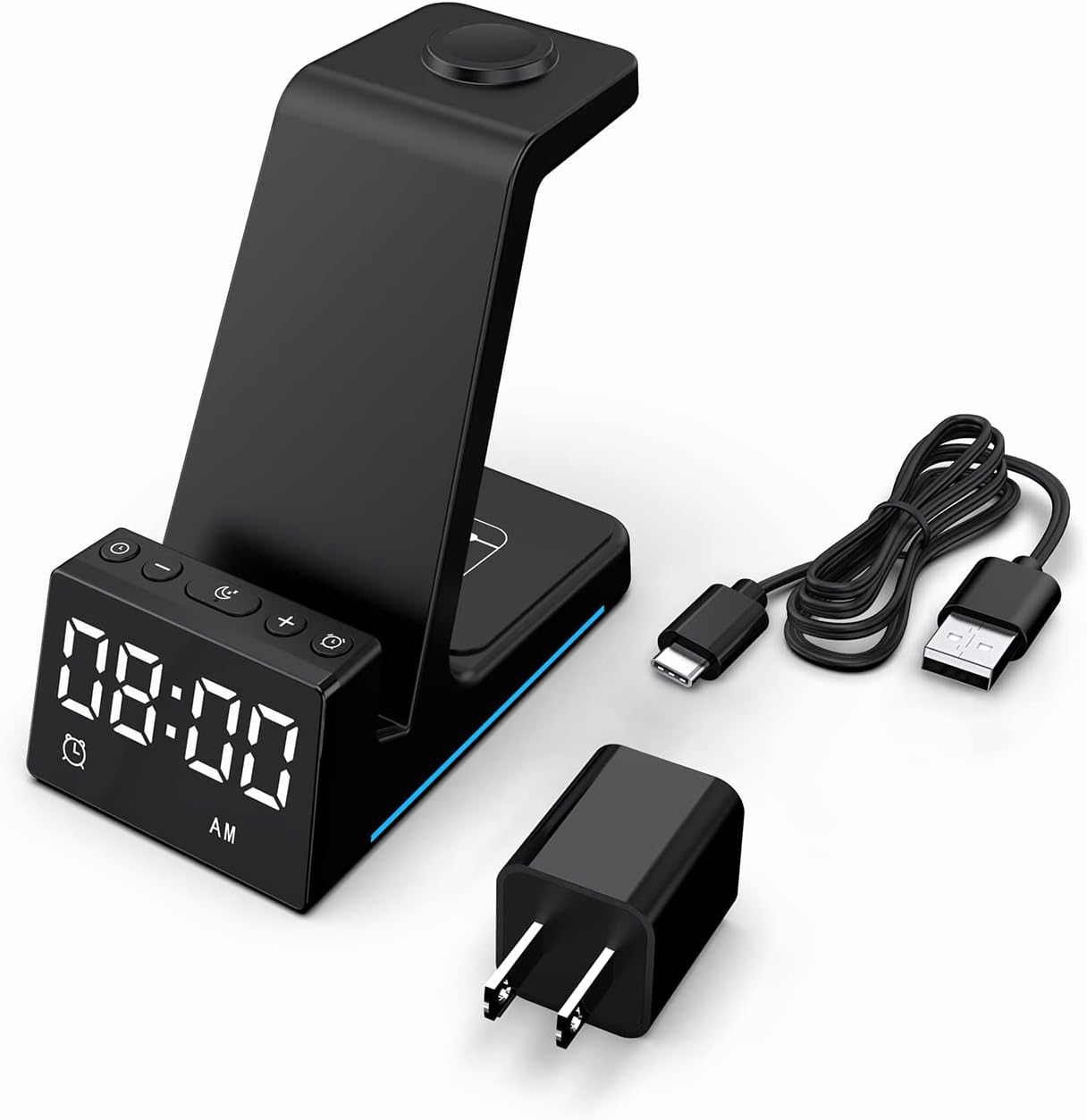
Imaj: Tout konpozan ki enkli nan anbalaj pwodwi a.
Pwodwi souview
The BUFFBEE Alarm Clock with Wireless Charging Station is designed for convenience and efficiency. It features dedicated charging areas for your smartphone, Apple Watch, and AirPods, alongside a clear digital clock display.
Karakteristik kle:
- Revèy dijital: Features adjustable brightness and volume, with 12/24 hour format options.
- Wireless Phone Charging: Supports 15W, 10W, 7.5W, and 5W output for various wireless charging enabled smartphones.
- Apple Watch chaje: Dedicated magnetic charging spot for Apple Watch Series 2-7, SE.
- Chaje AirPods: Wireless charging pad for AirPods 2 (with wireless charging case), AirPods 3, and AirPods Pro.
- Pwoteksyon Sekirite: Built-in overcharge, overvoltage, overheat, and overcurrent protection.

Image: The charging station with devices in place, highlighting its multi-device capability.

Image: Diagram illustrating the internal safety features and charging coils.
Enstalasyon
Follow these steps to set up your BUFFBEE Alarm Clock with Wireless Charging Station:
- Konekte pouvwa: Insert the USB-C end of the charging cable into the port on the back of the charging station. Plug the other end of the cable into the provided power adapter, then plug the adapter into a wall outlet. The digital display will light up, indicating power is connected.
- Place Devices:
- Smartphone: Place your wireless charging enabled smartphone vertically or horizontally on the main charging stand. Ensure it is centered for optimal charging.
- Apple Watch: Place your Apple Watch on the magnetic charging disc at the top of the stand.
- AirPods: Place your AirPods (with wireless charging case) on the flat charging pad at the base of the unit.
- Verifye chaj: A blue indicator light will briefly illuminate when a device is correctly placed and charging. Your device's screen will also show a charging icon.
Video: Official product video demonstrating the setup and charging capabilities of the BUFFBEE Alarm Clock with Wireless Charging Station for iPhone, Apple Watch, and AirPods.

Image: Universal compatibility chart for different devices and charging wattages.
Enstriksyon Operasyon
Mete tan an
- Peze epi kenbe la Tan Mete button (usually marked with a clock icon) for 3 seconds. The hour digits will begin to flash.
- Sèvi ak la + epi - bouton pou ajiste lè a.
- Peze a Tan Mete Peze bouton an ankò pou chanje pou ajisteman minit yo. Chif minit yo ap flache.
- Sèvi ak la + epi - bouton pou ajiste minit yo.
- Peze a Tan Mete Peze bouton an yon lòt fwa ankò pou konfime epi sòti nan mòd reglaj lè a.
- To switch between 12-hour and 24-hour format, briefly press the Tan Mete button when not in setting mode.
Mete Alam la
- Peze epi kenbe la Alam Mete button (usually marked with an alarm clock icon) for 3 seconds. The alarm hour digits will flash.
- Sèvi ak la + epi - bouton pou ajiste lè alam la.
- Peze a Alam Mete button again to switch to alarm minute adjustment. The alarm minute digits will flash.
- Sèvi ak la + epi - bouton pou ajiste minit alam lan.
- Peze a Alam Mete Peze bouton an yon lòt fwa ankò pou konfime epi sòti nan mòd konfigirasyon alam lan.
- Pou aktive oswa dezaktive alam lan, peze yon ti tan sou bouton an. Alam Mete bouton an. Yon ikòn alam ap parèt/disparèt sou ekran an.
- When the alarm sounds, press any button to activate the snooze function (typically 9 minutes). To turn off the alarm completely, press and hold the Alam Mete bouton.

Imaj: Plis paseview of the digital alarm clock features.
Ajiste klète ekspozisyon
The LED display has multiple brightness levels to suit your preference, especially for nighttime use.
- Peze a Klète button (usually marked with a sun icon) repeatedly to cycle through the available brightness levels (e.g., 100%, 40%, 3%, 1%, 0% off).
- Select the desired brightness level. The '0% off' setting turns the display completely off for undisturbed sleep.

Image: Visual representation of the 5-level adjustable brightness settings.
Ajiste Volim Alam
The alarm volume can be adjusted to your preferred level.
- While the alarm is sounding, or during alarm setting mode, press the Volim button (usually marked with a speaker icon) to cycle through the available volume levels.
- Chwazi volim ou vle a.

Image: Illustration of the 3-level adjustable volume feature.
Antretyen
Pou asire lonjevite ak pèfòmans optimal estasyon rechaje ou a, swiv gid antretyen sa yo:
- Netwayaj: Disconnect the power before cleaning. Use a soft, dry cloth to wipe the surface. Do not use abrasive cleaners, solvents, or chemical sprays.
- Evite likid: Keep the device away from water and other liquids. Do not operate with wet hands.
- Tanperati: Store and operate the device in a dry environment at room temperature. Avoid extreme heat or cold.
- Manyen: Manyen aparèy la avèk prekosyon. Evite lage l oswa sibi gwo chòk.
- Pwovizyon pou pouvwa: Only use the provided power adapter and cable. Using unauthorized power sources may damage the device and void the warranty.
Depanaj
If you encounter any issues with your BUFFBEE Alarm Clock with Wireless Charging Station, please refer to the following troubleshooting guide:
| Pwoblèm | Kòz posib | Solisyon |
|---|---|---|
| Device is not powering on. | Power cable not connected properly; Power adapter faulty; Wall outlet not working. | Ensure the USB-C cable is securely connected to both the station and the power adapter. Try a different wall outlet. Verify the power adapter is functioning. |
| Smartphone/AirPods not charging wirelessly. | Device not placed correctly; Device not wireless charging compatible; Phone case too thick; Foreign objects on charging pad. | Reposition the device to ensure it is centered on the charging pad. Remove any thick phone cases or metallic objects. Confirm your device supports Qi wireless charging. |
| Apple Watch pa chaje. | Watch not placed correctly; Watch charger not making contact; Watch model not supported. | Ensure the Apple Watch is securely placed on the magnetic charging disc. Remove any watch cases that might obstruct contact. This charger supports Apple Watch Series 2-7, SE. |
| Chaje se ralanti oswa tanzantan. | Using a non-original power adapter/cable; Device overheating; Multiple devices charging simultaneously. | Use the provided power adapter and cable. Ensure the device is in a well-ventilated area. Charging multiple devices may slightly reduce individual charging speeds. |
| Alarm clock display is too bright/dim. | Paramèt klète a bezwen ajisteman. | Peze a Klète button to cycle through the 5 brightness levels, including 'off'. |
| Alarm is not sounding or is too quiet/loud. | Alarm not set or deactivated; Volume level too low/high. | Verify the alarm is activated (alarm icon visible). Adjust the alarm volume using the Volim bouton. |
Espesifikasyon
| Karakteristik | Detay |
|---|---|
| Dimansyon pwodwi | 6.3 x 1.5 x 3.5 pous |
| Pwa atik | 15.8 ons |
| Mak | BUFFBEE |
| Kalite Connector | San fil |
| Aparèy konpatib | Cellular Phones, Apple Watch, AirPods (with wireless charging case) |
| Modèl Telefòn konpatib | Samsung Galaxy S10 series, iPhone 8 and newer, other Qi-enabled phones |
| Karakteristik espesyal | Adjustable, Fast Charging, Wireless Charger, Wireless Charging |
| Antre Voltage | 9 Volts |
| Total pò USB | 1 (pou antre pouvwa) |
| Wattage | 15 watts (max output) |
| Espesifikasyon Met | Qi |
| Sous pouvwa | AC Adapter (Battery Powered refers to internal clock battery backup, not main power) |
Garanti ak sipò
Your BUFFBEE Alarm Clock with Wireless Charging Station comes with a standard manufacturer's warranty. For specific warranty details, including duration and coverage, please refer to the warranty card included in your product packaging or contact BUFFBEE customer support directly.
If you require technical assistance, have questions about product operation, or need to report a defect, please reach out to BUFFBEE customer service through the contact information provided on the product packaging or the official BUFFBEE website. Please have your product model and purchase date ready when contacting support.


