Entwodiksyon
This manual provides essential information for the proper setup, operation, and maintenance of your HP Dhs-2111S 2.1 Wired Mini Multimedia Speaker. Please read these instructions carefully before using the product to ensure optimal performance and to prevent damage.
The HP Dhs-2111S is a 2.1 channel wired multimedia speaker system designed to deliver enhanced audio for computers, laptops, and other compatible devices. It features a compact design, easy connectivity via a 3.5mm audio jack, and convenient volume control.
Kontni pake
Verifye ke tout atik yo prezan nan pakè a:
- 1 x Subwoofer (Main Unit)
- 2 x Oratè Satelit
- 1 x USB Power Cable (integrated)
- 1 x 3.5mm Audio Cable (integrated)
Enstalasyon
Follow these steps to set up your HP Dhs-2111S speaker system:
- Pozisyon moun ki pale yo: Place the subwoofer on a stable surface. Position the two satellite speakers on either side of your listening area for optimal stereo separation.
- Konekte Oratè Satelit yo: Connect the cables from the two satellite speakers into their respective ports on the back of the subwoofer unit.
- Konekte Sous Odyo a: Plug the 3.5mm audio jack from the speaker system into the audio output port (headphone jack) of your computer, laptop, or other audio device.
- Konekte pouvwa: Insert the USB power cable into an available USB port on your computer or a compatible USB power adapter (not included). The speakers will power on automatically or indicate readiness.
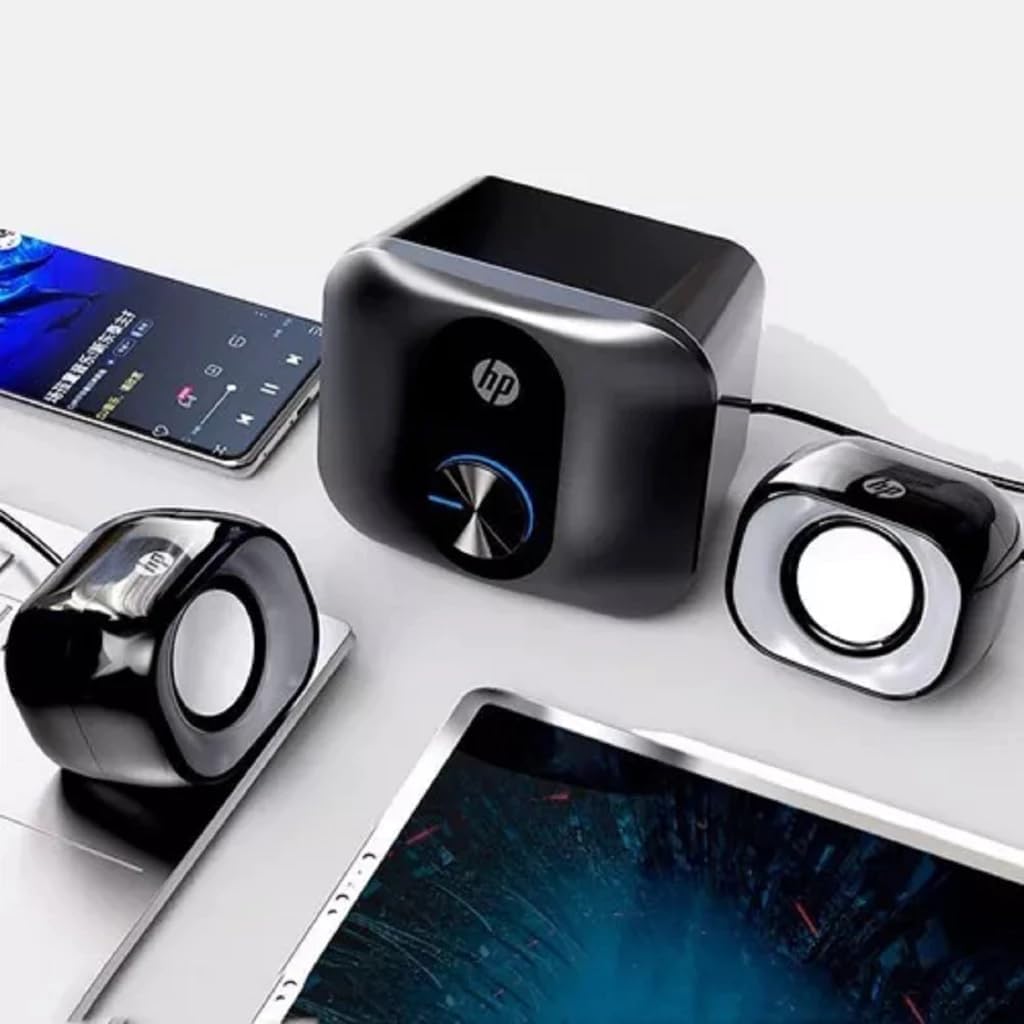
This image shows the HP Dhs-2111S speaker system, including the main subwoofer unit and two satellite speakers, connected to a laptop and a smartphone, illustrating a typical setup configuration.

This image displays the integrated USB cable for power supply and the 3.5mm audio jack for connecting to an audio source, which are essential for the speaker's functionality.
Enstriksyon Operasyon
Once the speakers are set up, follow these instructions for operation:
- Pouvwa sou: The speakers typically power on automatically when the USB power cable is connected to an active USB port. There is no separate power button.
- Kontwòl Volim: Use the rotary knob located on the front of the main subwoofer unit to adjust the volume. Turn clockwise to increase volume and counter-clockwise to decrease volume.
- Lektur odyo: Start playing audio from your connected device. Ensure the volume on your device is also set to an audible level.

Imaj sa a bay yon gwo plan view of the main subwoofer unit, highlighting the central rotary knob used for adjusting the speaker volume.
Antretyen
Pou asire lonjevite ak pèfòmans optimal oratè ou yo, swiv gid antretyen sa yo:
- Netwayaj: Use a soft, dry cloth to clean the speaker surfaces. Do not use liquid cleaners, aerosols, or solvents, as these may damage the finish or internal components.
- Evite likid: Keep the speakers away from water, moisture, and other liquids. Do not operate with wet hands.
- Vantilasyon: Ensure proper ventilation around the subwoofer unit to prevent overheating. Do not block any vents.
- Depo: Lè w pa itilize oratè yo pou yon bon bout tan, sere yo nan yon kote ki fre epi sèk, lwen limyè solèy dirèk ak tanperati ekstrèm.
Depanaj
If you encounter issues with your HP Dhs-2111S speakers, refer to the following troubleshooting steps:
- Pa gen son:
- Ensure the USB power cable is securely connected to a powered USB port.
- Verify the 3.5mm audio jack is fully inserted into the audio output of your device.
- Check the volume knob on the speaker unit and ensure it is turned up.
- Confirm the volume on your connected audio device is not muted or set too low.
- Test with a different audio source or USB port if possible.
- Son defòme:
- Diminye volim nan tou de oratè yo ak aparèy odyo ou a.
- Ensure the audio source is playing high-quality audio.
- Tcheke pou nenpòt koneksyon ki lach.
- Speakers Not Powering On:
- Confirm the USB power cable is connected to a functional USB port that provides power.
- Try connecting to a different USB port or a USB wall adapter.
Espesifikasyon
| Karakteristik | Spesifikasyon |
|---|---|
| Non modèl | Dhs-2111S |
| Kalite Oratè | 2.1 Surround Sound Multimedia Speaker |
| Koneksyon Teknoloji | Wired (USB for power, 3.5mm Jack for audio) |
| Audio Sòti Mode | Antoure |
| Oratè maksimòm pwodiksyon pouvwa | 3 Watts |
| Enpedans | 4 Ohms |
| Gwosè Oratè | 2 pous |
| Sous pouvwa | Fil elektrik (USB) |
| Metòd kontwòl | Manual Knob Control |
| Kalite aliye | Tabletop |
| Koulè | Nwa |
| Pwa atik | 553 gram |
| Dimansyon pwodwi | 10.5 x 9.5 x 12.8 cm |
| Itilizasyon Rekòmande | Pou Odinatè |
| Aparèy konpatib | Laptops, Desktop Computers, Televisions |
Enfòmasyon sou Garanti
This product comes with a limited warranty. For specific terms and conditions, please refer to the warranty documentation included with your purchase or contact HP customer support.
Sipò
For further assistance, technical support, or product information, please visit the official HP website or contact HP customer service in your region. Keep your product model number (Dhs-2111S) handy when seeking support.