Pwodwi souview

Image: The LTC SS-503 TWS Wireless Earbuds shown with their charging case, highlighting the sleek white design and RGB lighting on the case.
The LTC SS-503 TWS Wireless Earbuds are designed for an immersive audio experience, featuring Bluetooth 5.1 connectivity, dual music and gaming modes, and a distinctive RGB light charging case. They are built for comfort and durability, with an IPX4 waterproof rating suitable for various activities.
Karakteristik kle:
- Cool RGB Light: Customizable lighting modes on the charging case.
- IPX4 ki enpèmeyab: Resistant to splashes and sweat, ideal for workouts.
- Quick Charging & Long Playtime: Fast charging via USB-C or wireless, with extended battery life.
- Bluetooth 5.1 & Low Latency: Stable connection and minimal audio delay.
- Mòd Doub (Mizik ak Jwèt): Optimize son profiles for different uses.
- Son Stereo HiFi: Delivers clear audio with deep bass and crisp treble.
- Simply Pairing & Touch Controls: Easy device connection and intuitive touch-sensitive controls.
Enstalasyon
1. Ki sa ki nan bwat la
Upon unboxing, ensure the following components are present:
- LTC SS-503 TWS Wireless Earbuds (Left and Right)
- Ka chaje san fil
- USB-C Chaje Kab
- Manyèl Itilizatè (dokiman sa a)
2. Premye Chajman
Anvan premye itilizasyon an, chaje ekoutè yo ak bwat chaje a nèt.

Image: The charging case demonstrating both USB-C cable charging and wireless charging capabilities.
- Via kab USB-C: Connect the provided USB-C cable to the charging case and a power source. The charging case will indicate charging status.
- Chaje san fil: Place the charging case on a compatible wireless charging pad. Ensure the case is properly aligned for efficient charging.
- Tan pou chaje: The charging case takes approximately 1.5 hours to fully charge. Earbuds charge when placed inside the case.
Note: Wireless charging devices with fast charging functions may adversely affect the charging case. Avoid using such devices to charge the case.
3. Konekte ak aparèy ou an
The earbuds support hassle-free pairing with iOS/Android phones, Mac, or Windows laptops.

Image: A smartphone displaying Bluetooth settings, showing the "SS-503" earbuds available for connection, with the charging case open beside it.
- Koup premye fwa:
- Louvri bwat chaje a. Ekoutè yo ap limen otomatikman epi antre nan mòd koneksyon.
- Sou aparèy ou an (telefòn entelijan, tablèt, òdinatè pòtab), aktive Bluetooth epi chèche aparèy ki disponib yo.
- Select "SS-503" from the list of found devices to connect.
- Yon fwa konekte, yon mesaj vokal ap konfime koneksyon an reyisi.
- Konekte ak lòt aparèy:
- To connect to a new device or reset pairing, open the earbud compartment without removing the earbuds.
- Press and hold the function key (MFB) in the middle of the charging case for approximately 5 seconds until both earbud indicators light up simultaneously. This indicates a successful reset.
- When the earbud indicators begin single blinking, the headset is in pairing state and ready to connect to a new device.
Enstriksyon Operasyon
1. Power On/Off
- Pouvwa sou: Louvri bwat chaje a, ekoutè yo ap limen otomatikman epi konekte ak dènye aparèy ki te konekte a.
- Pouvwa Off: Mete ekoutè yo tounen nan bwat chaje a epi fèmen kouvèti a. Y ap etenn otomatikman epi y ap kòmanse chaje.
2. Touche Kontwòl
The earbuds feature intuitive touch controls on both the left and right earbuds (MFB - Multi-Function Button).
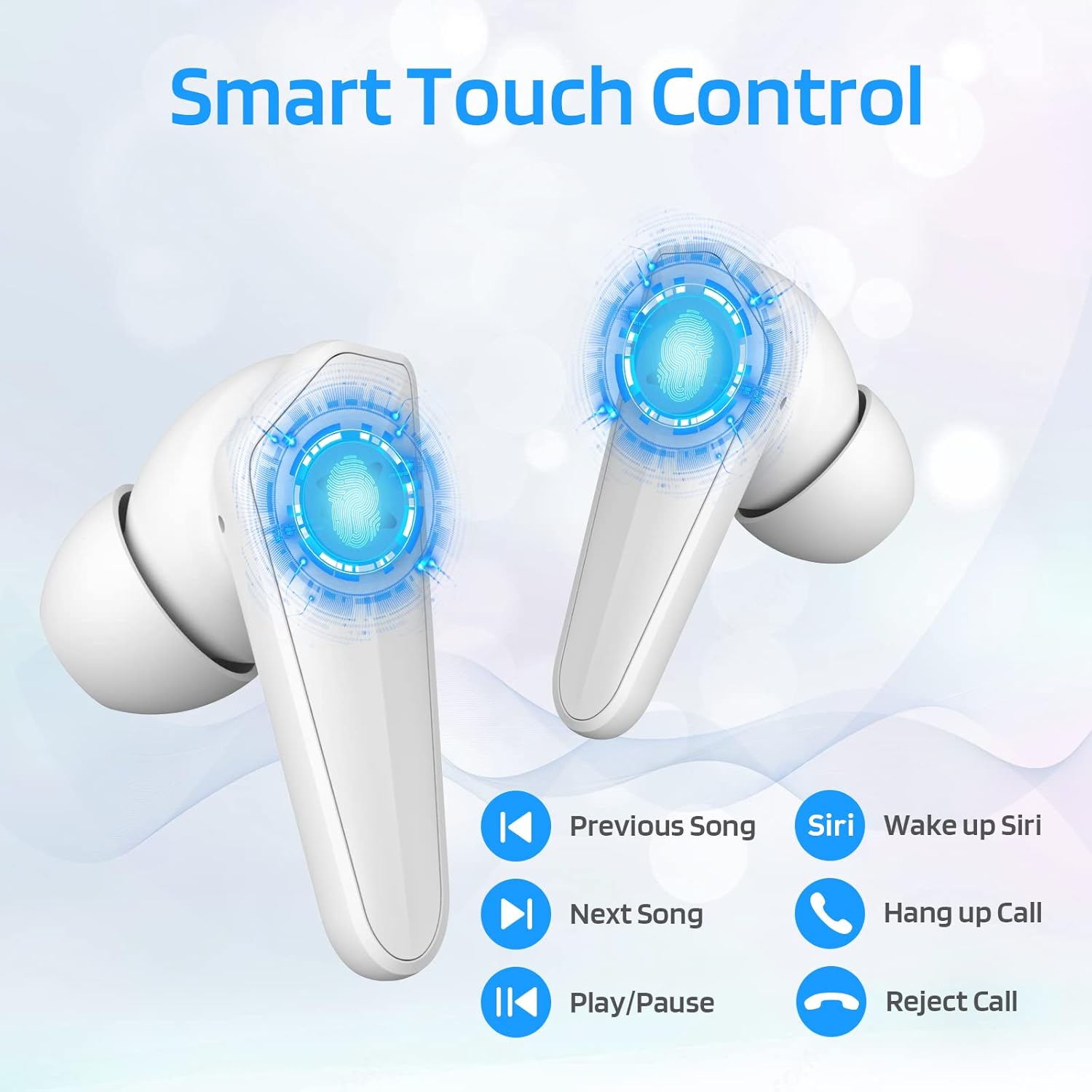
Image: Diagram illustrating the touch control functions on the earbuds, including play/pause, track navigation, call management, and voice assistant activation.
| Fonksyon | Aksyon |
|---|---|
| Jwe/Poz | Tape yon sèl sou chak ekoutè. |
| Next Song | Tape de fwa sou ekoutè dwat la. |
| Previous Song | Tape de fwa sou ekoutè gòch la. |
| Reponn/Fen Apèl | Tape yon sèl sou chak ekoutè. |
| Rejte apèl | Peze epi kenbe swa ekoutè pou 2 segonn. |
| Activate Voice Assistant (Siri/Google) | Tape twa fwa sou ekoutè gòch la. |
3. Dual Mode Switching (Music/Gaming)
The LTC SS-503 earbuds offer two distinct audio modes for optimized performance.

Image: A smartphone screen displaying both music playback and a gaming interface, with icons indicating "Music Mode" and "Gaming Mode" for the earbuds.
- Chanje mòd: Press the right earbud's MFB for 3 seconds to switch between modes.
- Mode Gaming: This mode is designed to weaken ambient sound and strengthen specific in-game audio cues, such as footsteps, providing a low-latency experience for immersive gaming.
- Mòd Mizik: This mode produces high-fidelity stereo sound with deep bass and clear treble, optimized for general music listening.
4. RGB Light Control (Charging Case)
The charging case features customizable RGB lighting.

Image: The charging case illuminated with vibrant RGB lights, emphasizing its colorful and fashionable design.
- Chanje mòd limyè: Short press the MFB (Multi-Function Button) in the middle of the charging box to cycle through 9 different light modes.
- Limen/Etenn Limyè yo: Double-press the MFB in the middle of the charging box to turn the RGB lights on or off.
Antretyen
Bon antretyen asire lonjevite ak pèfòmans optimal ekoutè ou yo.
- Netwayaj: Regularly wipe the earbuds and charging case with a soft, dry, lint-free cloth. Avoid using abrasive materials or harsh chemicals. For ear tips, remove them and clean with mild soap and water, then dry thoroughly before reattaching.
- Rezistans dlo (IPX4): The earbuds are IPX4 waterproof, meaning they are resistant to splashing water from any direction. This makes them suitable for workouts and light rain. However, they are not designed for submersion in water, swimming, or showering. Do not expose them to pressurized water or high-velocity water.
- Depo: When not in use, store the earbuds in their charging case to protect them and keep them charged. Store in a cool, dry place away from extreme temperatures and direct sunlight.
- Swen batri: Pou konsève lavi batri a, evite dechaje ekoutè yo ak bwat chaje a nèt souvan. Chaje yo regilyèman, menm si ou pa itilize yo pandan yon bon bout tan.

Image: The earbuds and charging case shown with water droplets, illustrating their IPX4 waterproof capability.
Depanaj
If you encounter issues with your LTC SS-503 earbuds, refer to the following common problems and solutions:
Issue 1: Only one earbud has sound.
This product supports a dual-host function, allowing use of a single earbud. If only one earbud has sound when both are in use, it may require a reset.
- Solisyon: Place both earbuds back into the charging case. Close the lid, then open it again. This will reset and re-pair the earbuds. If the issue persists, perform a full reset as described in the "Connecting to Other Devices" section under Setup.
Issue 2: Occasional disconnection or unstable connection.
Bluetooth 5.1 technology provides a stable connection, but environmental factors can affect performance.
- Solisyon:
- Ensure the effective connection distance (less than 10 meters) is maintained between the earbuds and your device.
- Avoid signal-blocking objects such as thick walls or large metal structures between your device and the earbuds.
- Ensure there is no significant electromagnetic interference from other electronic devices nearby.
- Try resetting the earbuds and re-pairing them with your device.
Issue 3: Earbuds or charging case not charging.
If your device is not charging as expected, check the following:
- Solisyon:
- Verify that the USB-C cable is securely connected to both the charging case and the power adapter.
- Asire w adaptè kouran an ap fonksyone byen epi li branche nan yon priz kouran.
- If using wireless charging, ensure the charging case is correctly positioned on the wireless charging pad and the pad is powered.
- Try using a different USB-C cable or power adapter to rule out faulty accessories.
- Clean the charging contacts on both the earbuds and inside the charging case with a dry cotton swab to ensure good connection.
Espesifikasyon
Detailed technical specifications for the LTC SS-503 TWS Wireless Earbuds:
| Karakteristik | Detay |
|---|---|
| Non modèl | Sound Slave (SS-503) |
| Koneksyon Teknoloji | San fil (Bluetooth 5.1) |
| Gamme Bluetooth | Jiska 10 mèt |
| Nivo rezistans dlo | IPX4 (rezistan dlo) |
| Lavi batri ekoutè | Jiska 5 èdtan |
| Tan total pou jwe (ak bwat chaje a) | Jiska 20 èdtan |
| Tan chaje (Ka) | 1.5 èdtan |
| Kalite kontwòl | Kontwòl Manyèl (Kontwòl Medya) |
| Kalite chofè odyo | Chofè dinamik |
| Gamme frekans | 20 Hz - 20,000 Hz |
| Materyèl | Plastik |
| Pwa atik | 5 ons (pakè total) |
| Koulè | Blan |
Garanti ak sipò
LTC products are manufactured with high standards of quality. For specific warranty details, please refer to the warranty card included with your product or visit the official LTC websit la. Kenbe resi acha ou kòm prèv acha pou nenpòt reklamasyon garanti.
For further assistance, technical support, or inquiries, please refer to the official user manual PDF available online or contact LTC customer service through their official channels. The user manual PDF can be accessed via this link: LTC SS-503 User Manual (PDF).


