Entwodiksyon
This manual provides essential information for the proper setup, operation, and maintenance of your National Geographic 50mm Refractor Telescope. Designed for beginners and young explorers, this telescope offers inspiring views of celestial objects like the Moon and bright star clusters, as well as terrestrial observations.
Enfòmasyon sou Sekirite
WARNING: Never look directly at the sun through your telescope or its finder scope, even for an instant, without a professionally made solar filter that completely covers the front of the instrument. Permanent and irreversible eye damage may result. Always supervise children using the telescope during daylight hours.
When observing terrestrial objects, be aware that images will appear flipped right to left, as is common with refractor telescopes due to the nature of their optics.
Kontni pake
- Telescope Optical Tube (50mm Refractor)
- Full-size Tripod
- 12.5mm oculaire
- 20mm oculaire
- Diagonal Holder

Image: The National Geographic 50mm Refractor Telescope, showing the optical tube, mount, and tripod. Included eyepieces are also visible.
Gid Enstalasyon
1. Asanblaj Tripod la
Unfold the tripod legs and extend them to your desired height. Secure the legs using the locking clamps. Ensure the tripod is stable on a flat surface.

Image: The tripod fully extended, ready for telescope attachment.
2. Attaching the Telescope Optical Tube
Locate the mounting screw on the top of the tripod head. Align the telescope's mounting hole with this screw and carefully attach the optical tube to the tripod. Tighten the screw securely to prevent movement.

Image: The telescope optical tube securely attached to the tripod, showing the complete assembly.
3. Installing the Diagonal Holder
Insert the diagonal holder into the focuser tube of the telescope. Secure it with the small thumbscrew on the focuser. The diagonal holder allows for comfortable viewang ing.
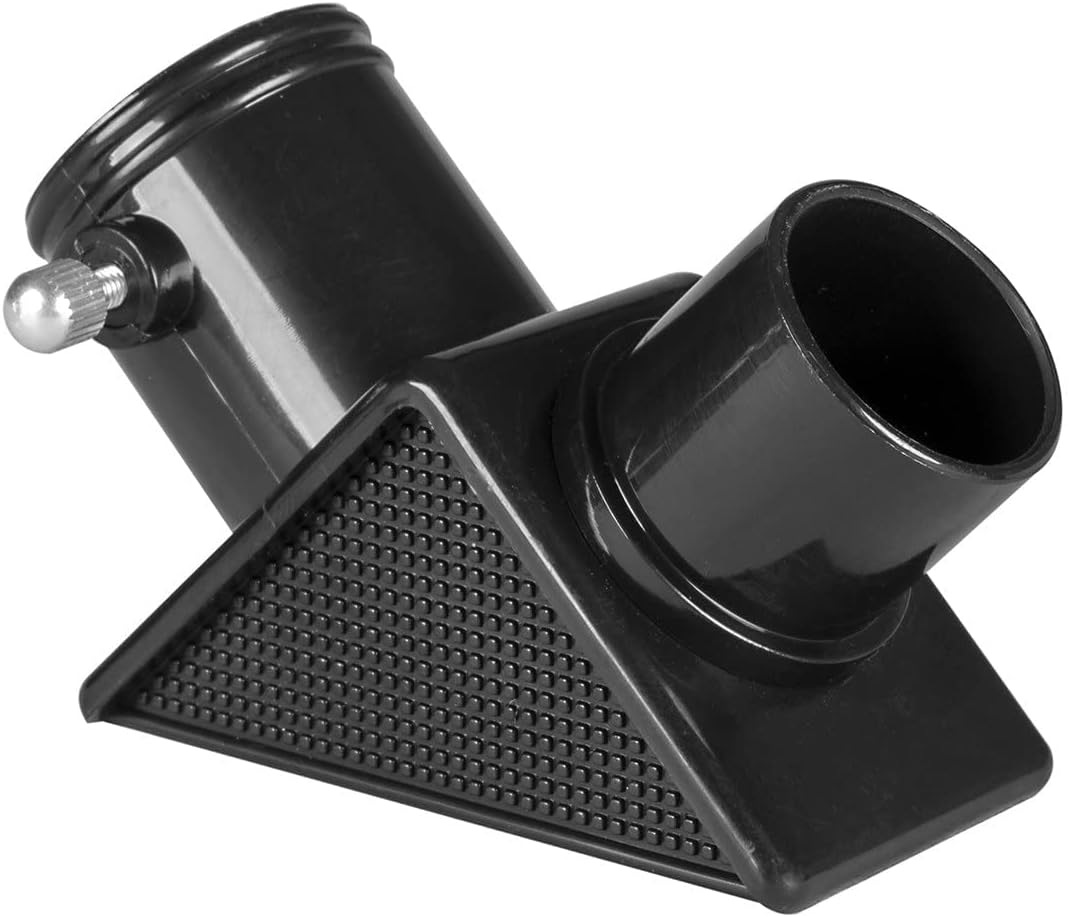
Imaj: Yon gwo plan view of the diagonal holder, which redirects the light path for easier viewing.
4. Inserting an Eyepiece
Choose either the 12.5mm or 20mm eyepiece. Insert the chosen eyepiece into the diagonal holder. Secure it with the thumbscrew on the diagonal holder. The 20mm eyepiece provides 18x magnification, while the 12.5mm eyepiece provides 28.8x magnification.

Image: The two included eyepieces, labeled 12.5mm and 20mm, offering different magnification levels.
Enstriksyon Operasyon
1. Pointing the Telescope
Use the panhandle mount control to move the telescope up, down, and side to side. Loosen the handle to adjust the telescope's position, then tighten it to lock the view an plas.
2. Focusing the Image
Once you have a target in view, turn the large focus knob located on the side of the focuser tube. Rotate it slowly until the image appears sharp and clear. You may need to adjust the focus slightly as objects move or as your eyes adjust.
3. Chanje Agrandisman
To change the magnification, simply remove the currently installed eyepiece and replace it with the other one. Start with the lower magnification (20mm eyepiece) to locate objects, then switch to the higher magnification (12.5mm eyepiece) for a more detailed view.
4. Terrestrial vs. Astronomical Viewing
This telescope is suitable for both astronomical observations (Moon, bright planets, star clusters) and terrestrial viewing (nature, distant landscapes). Remember that terrestrial images will appear horizontally flipped.
Antretyen ak Swen
- Netwayaj Lantiy: Use a soft, lint-free cloth specifically designed for optical lenses. Breathe lightly on the lens to create condensation, then gently wipe. Avoid touching the lens surfaces with your fingers.
- Netwaye kò a: Wipe the telescope body and tripod with a soft, damp twal. Pa sèvi ak pwodui chimik piman bouk oswa pwodui netwayaj abrazif.
- Depo: When not in use, store the telescope in a dry, dust-free environment. Keep the lens caps on to protect the optics from dust and scratches.
- Manyen: Always handle the telescope with care. Avoid sudden impacts or dropping the instrument.
Depanaj
| Pwoblèm | Kòz posib | Solisyon |
|---|---|---|
| Imaj la twoub oswa li pa byen fokus. | Focus knob not adjusted correctly. | Slowly turn the focus knob until the image is sharp. |
| Cannot see anything through the eyepiece. | Lens caps are still on. Eyepiece not inserted correctly. Telescope not pointed at an object. | Remove all lens caps. Ensure eyepiece is fully inserted and secured. Re-aim the telescope at a bright, distant object during the day to practice. |
| Image appears upside down or reversed. | Normal for astronomical telescopes. | This is normal for refractor telescopes. For terrestrial viewing, the image will be flipped horizontally. |
| Teleskòp la pa estab. | Tripod legs not fully extended or secured. | Asire w ke tout pye trépied yo byen fèmen.amps are tightened and the tripod is on a stable, level surface. |
Espesifikasyon
- Mak: Eksplore syantifik
- Nimewo Modèl: 80-51050
- Longè tib optik: 360 Milimèt
- Dyamèt lantiy objektif: 50 Milimèt
- Eyepiece Lens Description: Huygens
- Deskripsyon mòn teleskòp: Mòn Altazimit
- Kalite konsantre: Konsantre manyèl
- Finderscope: Reflèks
- Pwa atik: 1.25 liv
- Dimansyon pake: 16.93 x 7.64 x 3.82 pous
Garanti ak sipò
Your purchase helps support the global nonprofit National Geographic Society. For any questions or support regarding your National Geographic telescope, please contact the customer service team at Explore Scientific, located in Springdale, Arkansas. Refer to the product packaging or the Explore Scientific websit la pou jwenn detay kontak espesifik ak enfòmasyon sou garanti a.


