1. Entwodiksyon
Thank you for choosing the ENUOSUMA Retro FM Radio. This device combines classic aesthetics with modern functionality, offering FM radio, Bluetooth 5.0 connectivity, an alarm clock, and multiple media playback options. Its compact and portable design, along with a built-in rechargeable battery, makes it suitable for various environments.
This manual provides detailed instructions for setting up and operating your radio to ensure optimal performance and user experience.

Figi 1: Devan view of the ENUOSUMA Retro FM Radio, featuring a wooden casing, a black control panel with an LCD display showing '23:26', a speaker grille, and various buttons for alarm, mode, track control, and a rotary knob for power/volume and select/pause.
2. Pake kontni
Tanpri tcheke pake a pou atik sa yo:
- 1 x ENUOSUMA Retro FM Radio (Bluetooth Speaker)
- 1 x Audio kab
- 1 x USB Chaje Kab (Tip-C)
- 1 x manyèl itilizatè
3. Pwodwi Features
- Fonksyonalite milti-mòd: FM Radio, Bluetooth 5.0, Clock, Alarm.
- Odyo kalite siperyè: Built-in 5W stereo speaker with 3D stereo audio.
- Doub Alam: Mete de alam endepandan ak fonksyon repetisyon.
- Ekspozisyon dijital: Clear LCD display for time, mode, and frequency.
- Apèl men lib: Integrated microphone for Bluetooth calls.
- Plizyè Opsyon Antre: TF card slot, USB port, AUX input.
- Konsepsyon pòtab: Compact size with a 2000mAh rechargeable battery for up to 9 hours of playtime.
- Retro Aesthetic: Distinctive wooden casing for a classic look.
4. Controls and Ports Overview
Familiarize yourself with the buttons and ports on your ENUOSUMA Retro FM Radio:
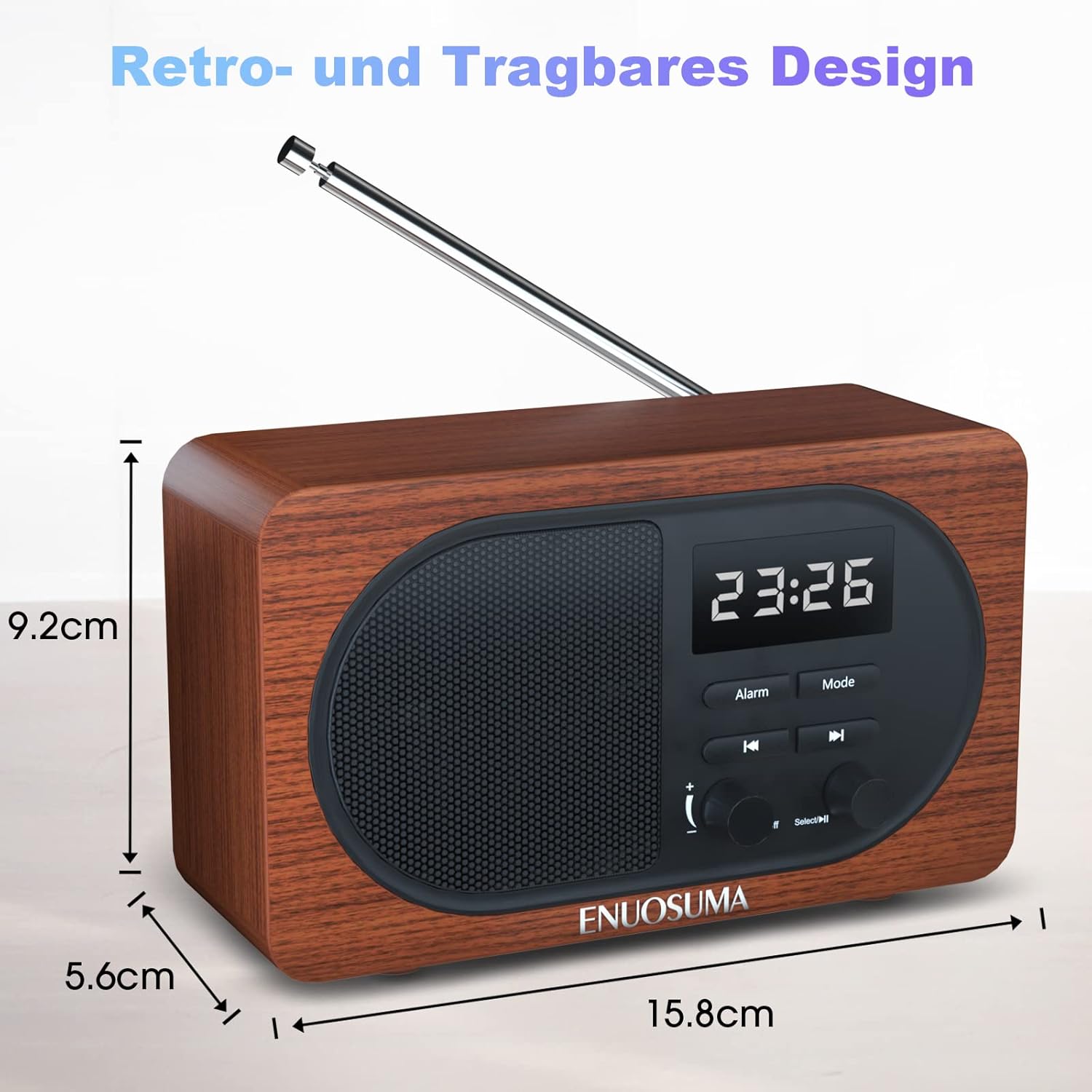
Figure 2: Detailed diagram labeling the front controls and rear ports of the ENUOSUMA Retro FM Radio.
- Power ON/OFF / Volume +/-: Rotate to adjust volume. Press and hold to power on/off.
- Select / Pause: Press to select or pause playback. Long press in FM mode for auto-search.
- Fonksyon alam: Button to set and manage alarms.
- Mòd: Press to switch between FM, Bluetooth, TF Card, USB, and AUX modes.
- Track Previous: Press to go to the previous track (in media playback modes) or tune down (in FM mode).
- Pwochen Track: Press to go to the next track (in media playback modes) or tune up (in FM mode).
- Aux Antre: Yon priz 3.5mm pou aparèy odyo ekstèn.
- USB Disk Port: For USB flash drives with audio files.
- TF Kat plas: For MicroSD/TF cards with audio files.
- Kalite-C chaje pò: Pou chaje batri entèn lan.
- Mikwofòn (MIC): Pou apèl san men.
5. Enstalasyon
5.1 Premye chaj
Before first use, fully charge the radio. Connect the supplied Type-C USB charging cable to the Type-C Charging Port (10) on the back of the radio and the other end to a USB power adapter (not included) or a computer's USB port. The charging indicator will show the charging status.
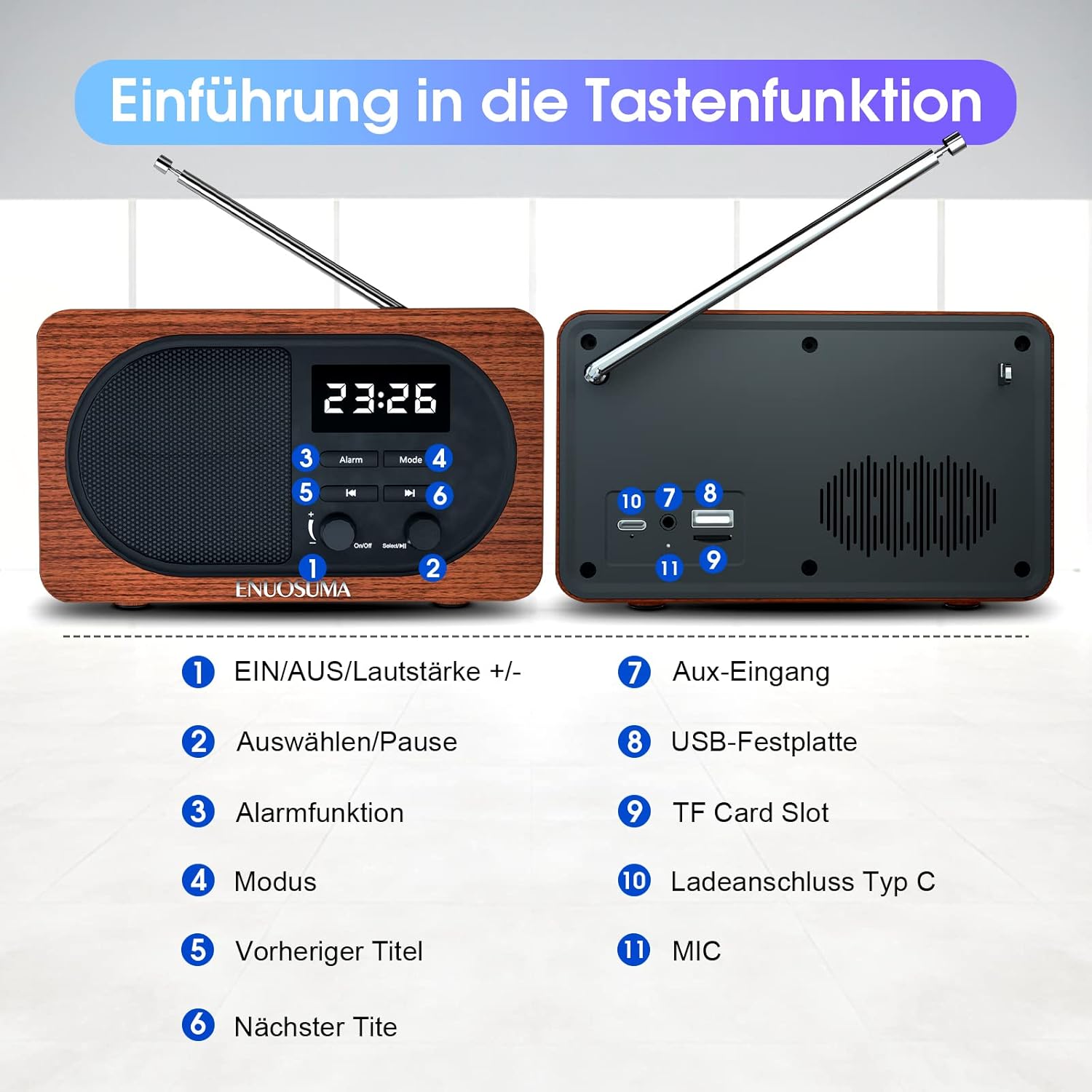
Figure 3: The radio's Type-C port can be used for charging the device. The image also illustrates the snooze function and the extendable antenna.
6. Operasyon Enstriksyon
6.1 Pouvwa pou limen/etenn ak kontwòl volim
- Pouvwa sou: Press and hold the Power ON/OFF / Volume +/- knob (1) until the display lights up.
- Pouvwa Off: Press and hold the Power ON/OFF / Volume +/- knob (1) again.
- Ajisteman Volim: Rotate the Power ON/OFF / Volume +/- knob (1) clockwise to increase volume and counter-clockwise to decrease volume.
6.2 Seleksyon mòd
Press the 'Mode' button (4) repeatedly to cycle through available modes: FM Radio, Bluetooth, TF Card, USB, and AUX.
6.3 Operasyon Radyo FM
- Enter FM Mode: Press the 'Mode' button (4) until 'FM' is displayed.
- Pwolonje antèn: For best reception, fully extend the telescopic antenna located on the back of the radio.
- Rechèch Chèn otomatik: Long press the 'Select / Pause' button (2). The radio will automatically scan and store available FM stations. The number of stations found depends on signal strength.
- Manyèl akor: In FM mode, briefly press the 'Previous Track' (5) or 'Next Track' (6) buttons to fine-tune the frequency.
- Navigate Stored Stations: After an auto-search, briefly press 'Previous Track' (5) or 'Next Track' (6) to cycle through stored stations.
6.4 Bluetooth Pairing
- Antre nan mòd Bluetooth: Press the 'Mode' button (4) until 'Bluetooth' or 'BT' is displayed, and you hear an audible prompt. The radio will enter pairing mode.
- Aktive Bluetooth sou aparèy ou an: On your smartphone, tablet, or other Bluetooth-enabled device, go to Bluetooth settings and enable Bluetooth.
- Chwazi Aparèy: Look for 'ENUOSUMA' (or similar name) in the list of available devices and select it to pair.
- Konfimasyon: Once paired, you will hear a confirmation sound from the radio. You can now play audio from your device through the radio.

Figure 4: The radio supports Bluetooth 5.0 for wireless connection to devices such as smartphones, laptops, and tablets.
6.5 Alarm Clock Setup
- Mete tan: In clock mode, press and hold the 'Alarm' button (3) to enter time setting. Use 'Previous Track' (5) and 'Next Track' (6) to adjust hours and minutes, and 'Select / Pause' (2) to confirm and move to the next setting.
- Fòma 12/24 èdtan: The radio supports both 12-hour and 24-hour time formats. This can typically be toggled during time setting or via a dedicated setting.
- Mete Alam: Briefly press the 'Alarm' button (3) to select Alarm 1 or Alarm 2. Press and hold the 'Alarm' button (3) to set the alarm time. Use 'Previous Track' (5) and 'Next Track' (6) to adjust, and 'Select / Pause' (2) to confirm.
- Fonksyon Snooze: When the alarm sounds, press any button (except power off) to activate the 5-minute snooze function.

Figure 5: This infographic highlights the 12/24 hour time display, clock and FM modes, built-in microphone, and various input interfaces.
6.6 Media Playback (TF Card, USB, AUX)
- Lektur kat TF/USB: Insert a TF card into the TF Card Slot (9) or a USB flash drive into the USB Disk Port (8) with compatible audio files. The radio will automatically switch to the respective mode or you can select it using the 'Mode' button (4). Use 'Previous Track' (5), 'Next Track' (6), and 'Select / Pause' (2) for playback control.
- Antre AUX: Connect an external audio device (e.g., MP3 player, smartphone) to the Aux Input (7) using the supplied audio cable. Select AUX mode using the 'Mode' button (4). Audio will be played through the radio's speaker.
6.7 Hands-Free Function
When connected via Bluetooth to a smartphone, the built-in Microphone (11) allows you to answer and make calls directly through the radio. Use the 'Select / Pause' button (2) to answer or end calls.
7. Antretyen
- Keep the device dry. Avoid exposure to water or excessive humidity.
- Clean the radio with a soft, dry cloth. Do not use abrasive cleaners or solvents.
- Sere radyo a nan yon kote ki fre epi sèk lè w pa itilize li pou yon bon bout tan.
- Pa eseye demonte oswa repare aparèy la tèt ou. Konsilte pèsonèl sèvis kalifye.
NAN. Depanaj
| Pwoblèm | Kòz posib | Solisyon |
|---|---|---|
| Radyo a pa limen. | Batri ki ba oswa pa gen pouvwa. | Charge the radio using the Type-C USB cable. Ensure the charging cable is properly connected. |
| Move resepsyon FM. | Antenna not extended, weak signal area. | Fully extend the telescopic antenna. Try repositioning the radio to an area with better signal reception. |
| Aparèy Bluetooth la pa ka konekte. | Radio not in pairing mode, Bluetooth off on device, device too far. | Ensure the radio is in Bluetooth mode. Make sure Bluetooth is enabled on your device and it's within range (approx. 10 meters). Restart both devices. |
| No sound from TF card/USB. | Incorrect mode, unsupported file format, corrupted files. | Ensure the radio is in TF Card or USB mode. Check if the audio files are in a supported format (e.g., MP3). Try another TF card or USB drive. |
| Pa ka mete lè/alam. | Sekans bouton ki pa kòrèk. | Refer to section 6.5 for detailed instructions on setting time and alarms. Ensure you are pressing and holding the correct buttons as indicated. |
9. Espesifikasyon
| Karakteristik | Spesifikasyon |
|---|---|
| Mak | ENUOSUMA |
| Nimewo Modèl | BS22 |
| Dimansyon pwodwi | 16 x 5.8 x 9.3 cm |
| Pwa atik | 0.64 Kilogram |
| Koneksyon Teknoloji | Bluetooth 5.0, USB, AUX |
| Karakteristik espesyal | Audio Input, FM Radio, Alarm Clock, Built-in Microphone |
| Oratè Sorti pouvwa | 5 Watts (Stereo) |
| Gamme frekans FM | Jiska 108 MHz |
| Kapasite batri | 2000mAh |
| Playtime | Jiska 9 èdtan |
| Port chaje | Kalite-C USB |
10. Garanti ak sipò
ENUOSUMA products are designed for reliability and performance. If you encounter any product quality problems or require assistance, please contact our customer service team. We are committed to providing 24-hour customer support to address your concerns.
Tanpri kenbe prèv ou achte pou reklamasyon garanti.


