Pwodwi souview
The Cosmic Byte CB-GK-22 Veritas is a Tenkeyless (TKL) membrane keyboard designed for various computing tasks, including gaming. It features RGB LED backlighting with multiple effects, double injection keycaps for durability, and 25-key anti-ghosting capabilities.

Figi 1: Anwo-anba view of the Cosmic Byte CB-GK-22 Veritas TKL Membrane Keyboard with RGB lighting activated.
Enstriksyon Enstalasyon
Follow these steps to set up your Cosmic Byte CB-GK-22 Veritas keyboard:
- Depake klavye a: Carefully remove the keyboard and any included accessories from the packaging.
- Konekte ak òdinatè: Locate an available USB port on your computer. Insert the USB connector of the keyboard into the USB port.
- Enstalasyon chofè: The keyboard is plug-and-play. Your operating system (Windows, Linux, macOS) should automatically detect and install the necessary drivers. No additional software installation is typically required.
- Verifye Fonksyonalite: Once connected, the keyboard's RGB lighting should illuminate. Test typing in a text editor to ensure all keys are responsive.
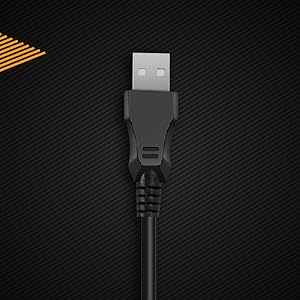
Figi 2: Close-up view of the keyboard's USB connector, ready for connection to a computer.

Figure 3: The keyboard is compatible with various operating systems, including Windows, Linux, and macOS.
Enstriksyon Operasyon
Fonksyon debaz klavye a
The CB-GK-22 Veritas functions as a standard TKL keyboard. All keys perform their labeled functions. The keyboard features 25-key anti-ghosting, allowing multiple key presses to be registered simultaneously, which is beneficial for fast-paced typing and gaming.
Kontwòl ekleraj RGB
The keyboard features 7-color RGB backlighting with various effects. Use the following key combinations to control the lighting:
- Ajisteman klète: Peze Fn + paj moute to increase brightness (5 levels). Press Fn + Page desann to decrease brightness (5 levels).
- Efè ekleraj: The keyboard supports 9 backlight effects, including 6 dazzling effects. Specific key combinations for cycling through effects are typically indicated on the keyboard itself or in a quick start guide. Common combinations include Fn + Scroll Lock or Fn + Mete.
- Sonic Spectrum Mode: This mode allows the RGB lighting to react to ambient sound. Activate this mode using the designated key combination, often Fn + Kay or Fn + Fen.

Figure 4: The keyboard features a Tenkeyless layout and includes Sonic Spectrum and sound-reactive LED lighting modes.
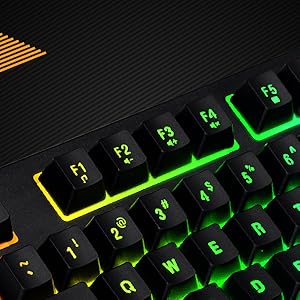
Figure 5: Detail of the function keys (F1-F12) with active RGB backlighting.
Double Injection Keycaps
The keycaps are manufactured using a double injection process, which ensures that the legends (characters on the keys) are scratch-resistant and will not fade over time. This design also makes the keys easier to clean.
Antretyen
Proper maintenance helps extend the lifespan of your keyboard:
- Netwayaj regilye: Use a soft, dry cloth to wipe down the keycaps and keyboard surface. For dust and debris between keys, use compressed air.
- Netwayaj pwofon: Pou pousyè tè ki difisil pou retire, yon ti kras dampen a cloth with water or a mild, non-abrasive cleaning solution. Ensure no liquid enters the keyboard.
- Evite devèsman: Keep liquids away from the keyboard to prevent damage to internal components. If a spill occurs, immediately disconnect the keyboard and allow it to dry completely before reconnecting.
- Depo: When not in use for extended periods, store the keyboard in a clean, dry environment away from direct sunlight or extreme temperatures.
Depanaj
Si ou rankontre pwoblèm ak klavye ou a, gade solisyon komen sa yo:
- Klavye a pa reponn:
- Asire w kab USB a byen konekte ak klavye a ak òdinatè a.
- Eseye konekte klavye a nan yon lòt pò USB sou òdinatè w la.
- Teste klavye a sou yon lòt òdinatè pou detèmine si pwoblèm nan soti nan klavye a oswa nan òdinatè orijinal la.
- Rekòmanse òdinatè w lan.
- Limyè dèyè a pa fonksyone oswa li pa kòrèk:
- Check if the brightness is set to the lowest level. Use Fn + paj moute pou ogmante klète.
- Cycle through backlight effects using the designated key combinations (e.g., Fn + Scroll Lock or Fn + Mete).
- Ensure no software is overriding the keyboard's lighting settings (though this keyboard typically does not require software).
- Kle yo pa anrejistre oswa yo pa parèt tankou fantom:
- Clean around the affected keys to remove any debris that might be obstructing the key mechanism.
- The keyboard supports 25-key anti-ghosting. If more than 25 keys are pressed simultaneously, some inputs may not register.
Espesifikasyon
| Karakteristik | Detay |
|---|---|
| Non modèl | CB-GK-22 Veritas |
| Mak | Cosmic Byte |
| Kalite klavye | TKL Membrane Keyboard |
| Ekleraj | 7-Color RGB Backlit, 9 Effects, Sonic Spectrum Mode |
| Nivo klète | 5 Nivo |
| Anti-Ghosting | 25 kle |
| Keycaps | Double piki |
| Koneksyon | USB |
| Dimansyon pwodwi | 37.2 x 15.1 x 3.7 cm |
| Pwa atik | 629 g |
| Konpozan ki enkli | USB kab |
| Lang | angle |
| ASIN | B09K5GYWBH |
Garanti ak sipò
Enfòmasyon sou Garanti
The Cosmic Byte CB-GK-22 Veritas TKL Membrane Keyboard comes with a 1-ane garanti limite apati dat acha a. Garanti sa a kouvri domaj fabrikasyon anba itilizasyon nòmal. Li pa kouvri domaj ki koze pa move itilizasyon, aksidan, modifikasyon san otorizasyon, oswa mete ak chire nòmal.
Tanpri kenbe prèv ou achte pou reklamasyon garanti.
Sipò pou Kliyan
Pou asistans teknik, reklamasyon garanti, oswa nenpòt kesyon ki gen rapò ak pwodwi, tanpri kontakte sèvis kliyan Cosmic Byte:
- Kontakte manifakti: 1800 31300 7700
- Mak Websit: Visit the official Cosmic Byte websit pou resous adisyonèl ak sipò.


