Entwodiksyon
This user manual provides comprehensive instructions for the operation and maintenance of your Albrecht DR 86 Small Senior Radio. Please read this manual carefully before using the device to ensure proper function and safety. Keep this manual for future reference.
Enstriksyon Sekirite
- Do not expose the radio to water, moisture, or extreme temperatures.
- Evite jete oswa sibi aparèy la nan gwo enpak.
- Do not attempt to disassemble or repair the radio yourself. Refer all servicing to qualified personnel.
- Sèvi ak sèlman ekipman pou pouvwa a bay pou chaje.
- Kenbe radyo a lwen sous chalè ak limyè solèy dirèk.
- Asire w ke gen bon vantilasyon lè w ap itilize aparèy la.
Kontni pake
Tanpri verifye ke tout atik yo prezan nan pakè a:
- Albrecht DR 86 Radio
- Integrated 2200 mAh Battery (pre-installed)
- Inite ekipman pou pouvwa
- Manyèl Itilizatè (dokiman sa a)
Pwodwi souview
Familiarize yourself with the main components and controls of your Albrecht DR 86 radio.

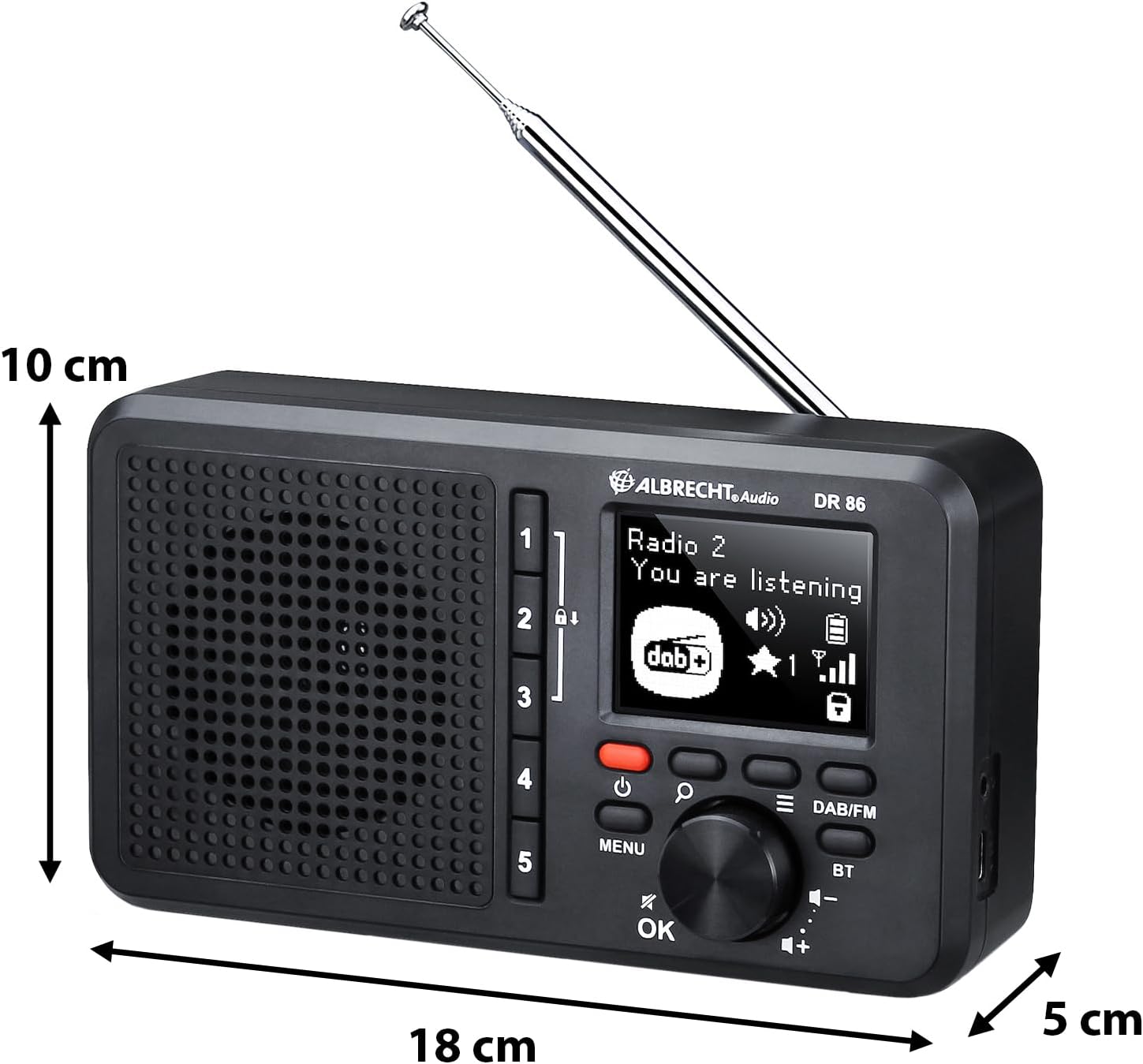
Figi 1: Devan view of the Albrecht DR 86 radio, showing the display, speaker grille, and control buttons. Key controls include the power button, menu button, OK button, navigation/volume knob, and dedicated preset buttons (1-5).
Kontwòl ak ekspozisyon
- 2.4-pous LCD Display: Shows station information, time, menu options, and battery status. Designed for clear readability with large fonts.
- Bouton pouvwa (●): Limen oswa etenn radyo a.
- Bouton meni: Accesses the radio's settings and options.
- OK bouton: Konfime seleksyon yo nan meni an.
- Navigation/Volume Knob: Rotates to navigate menus or adjust volume. Press to select.
- Bouton DAB/FM: Chanje ant mòd radyo DAB+ ak FM.
- Bouton BT: Activates Bluetooth mode for music streaming.
- Bouton Prereglaj (1-5): Directly access your stored favorite stations.
Pò ak Koneksyon
Figi 2: Side view of the Albrecht DR 86 radio, illustrating its compact dimensions and the location of the telescopic antenna and USB-C charging port.
- USB-C priz chaje: For connecting the power supply to charge the integrated battery.
- Kas ekoutè Jack: For private listening (headphones not included).
- Antèn teleskopik: Extend fully for optimal radio reception.
Enstalasyon
Premye Limen ak Chaje
- Connect the provided power supply to the USB-C charging socket on the radio and plug it into a wall outlet. The battery icon on the display will indicate charging status.
- Peze epi kenbe bouton pouvwa a (●) to turn on the radio.
- Upon first power-on, the radio will automatically perform a station scan for DAB+ and FM stations. This may take a few minutes.
Setting Up Senior Mode
The Senior Mode simplifies operation by limiting functions to only essential controls, preventing accidental changes. Follow these steps to activate it:
- Ensure the radio has completed its initial station scan.
- Tune to your desired DAB+ or FM stations using the standard mode (if not already in Senior Mode).
- To store a favorite station, tune to the station, then press and hold one of the Preset buttons (1-5) until "Preset Saved" appears on the display. Repeat for up to 5 favorite stations.
- To enable Senior Mode, navigate through the menu (using the Menu button and Navigation knob) to find the "Senior Mode" option and select "On". Once activated, only the Power button, Volume control, and Preset buttons (1-5) will be active.
Opere
Switching Operating Modes (Senior vs. Standard)
The radio offers two operating modes:
- Senior Mode: Provides simplified operation with only power on/off, volume adjustment, and direct access to 5 preset stations. All other settings are locked to prevent accidental changes.
- Mòd estanda: Offers full functionality, including station search, station list browsing, and access to all settings. This mode is used for initial setup and advanced configurations.
To switch between modes, access the "Senior Mode" option in the system settings menu. Note that Senior Mode can only be disabled from Standard Mode.
Operasyon radyo DAB +
- Peze a DAB / FM bouton an pou chwazi mòd DAB+ la.
- If a station scan has not been performed recently, the radio may initiate one.
- Rotate the Navigation knob to browse available DAB+ stations. Press the knob or OK yo chwazi yon estasyon.
- To save a favorite station, tune to it, then press and hold one of the Preset buttons (1-5).
Operasyon radyo FM
- Peze a DAB / FM bouton pou chwazi mòd FM.
- Rotate the Navigation knob to manually tune to a frequency.
- To auto-scan for the next available station, press and hold the Navigation knob briefly.
- To save a favorite station, tune to it, then press and hold one of the Preset buttons (1-5).
Music Streaming via Bluetooth

Figi 3: The Albrecht DR 86 radio connected via Bluetooth to a smartphone, ready for music streaming.
- Peze a BT button on the radio to enter Bluetooth pairing mode. The display will show "Pairing".
- On your smartphone or tablet, enable Bluetooth and search for available devices. Select "Albrecht DR 86" from the list.
- Once paired, the radio will indicate a successful connection. You can now stream audio from your device to the radio.
- Control playback (play/pause, skip tracks) from your connected device. Volume can be adjusted on both the radio and your device.
Chaje ak batri
The Albrecht DR 86 features an integrated 2200 mAh Lithium-Ion battery for portable operation.
- Chaje: Connect the radio to the power supply using the USB-C port. The battery indicator on the display will show charging progress.
- Lavi batri: A fully charged battery provides approximately 7 hours of playback at 50% volume. Actual battery life may vary depending on volume level and usage.
- Swen batri: For optimal battery longevity, avoid fully discharging the battery frequently. If storing the radio for an extended period, charge it to about 50% before storage.
Antretyen
- Netwayaj: Use a soft, dry cloth to clean the radio's exterior. Do not use abrasive cleaners, waxes, or solvents.
- Depo: Store the radio in a cool, dry place away from direct sunlight and extreme temperatures when not in use for extended periods.
- Antèn: Manyen antèn teleskopik la ak anpil atansyon pou evite li pliye oswa kraze.
Depanaj
| Pwoblèm | Kòz posib | Solisyon |
|---|---|---|
| Radyo a pa limen. | Batri a dechaje. | Connect the radio to the power supply and charge the battery. |
| Pa gen son oswa volim nan ba. | Volume is too low; Mute is active; Poor signal. | Increase volume; Check if headphones are connected; Extend antenna fully; Perform a station scan. |
| Resepsyon radyo ki fèb (DAB+/FM). | Antèn pa pwolonje; Zòn siyal fèb. | Fully extend the telescopic antenna. Try repositioning the radio. Perform a new station scan. |
| Bluetooth appariement echwe. | Radio not in pairing mode; Device too far; Bluetooth disabled on device. | Ensure radio is in BT pairing mode; Move devices closer; Enable Bluetooth on your smartphone/tablet. |
| Buttons are unresponsive (Senior Mode). | Radio is in Senior Mode. | This is normal behavior in Senior Mode. To access full functionality, disable Senior Mode via the menu (if accessible, or consult someone who can disable it). |
Espesifikasyon
| Karakteristik | Detay |
|---|---|
| Nimewo Modèl | 27861 |
| Dimansyon (L x W x H) | 18.1 x 4.9 x 10.1 cm |
| Pwa | 420 g |
| Batri | Integrated 2200 mAh Lithium Ion |
| Sous pouvwa | Battery Powered / USB-C |
| Pouvwa Sòti Audio | 3 wat |
| Ekspozisyon | 2.4 pous LCD |
| Radio Tuner | DAB +, FM |
| Koneksyon | Bluetooth, USB-C (charging), Headphone Jack |
Garanti ak sipò
For warranty information or technical support, please refer to the warranty card included with your product or visit the official Albrecht Audio website. You may also contact your local retailer for assistance.
Remak: Espesifikasyon ak karakteristik pwodwi yo ka chanje san avètisman alavans.


