1. Entwodiksyon
This manual provides essential information for the setup, operation, and maintenance of your Donner DDP-100 88-Key Weighted Action Digital Piano. Please read it thoroughly to ensure proper use and to maximize your instrument's lifespan.
Karakteristik kle:
- 88 Fully-Weighted Keys: Designed to precisely match finger strength changes, restoring the feel of an acoustic piano for stable and responsive touch.
- Son reyalis: Features a pure tone sampled from real acoustic grand pianos, utilizing AWM sampling technology for realistic and excellent sound quality.
- Koneksyon versatile: Supports MP3 input, external sound systems, and headphones for varied practice and performance needs.
- Entegre Amplifier: Bati-an amplifier for direct sound output.
- Konsepsyon senplifye: Wooden cabinet with a sliding key cover for key protection and a modern aesthetic.
- Polifoni 128 nòt: Ensures complex musical passages can be played without notes cutting off.

Figure 1: The Donner DDP-100 Digital Piano in white, showcasing its full 88-key keyboard, integrated music stand, and three foot pedals.
2. Enstriksyon Enstalasyon
2.1 Debalaj ak Verifikasyon Konpozan
Carefully unpack all components from the packaging. Ensure all items listed below are present:
- Donner DDP-100 Digital Piano Unit
- Furniture Stand
- Adaptè pouvwa
- Kouvèti kle glisman
- Inite Twa Pedal
- Repoze Klas Mizik
2.2 Asanble
- Assemble the Furniture Stand: Follow the instructions provided with the furniture stand to securely assemble its components.
- Attach the Piano Unit: Carefully place the DDP-100 digital piano unit onto the assembled furniture stand. Secure it using the provided screws or fasteners.
- Konekte inite pedal la: Locate the pedal unit cable and connect it to the corresponding port on the underside of the piano unit.
- Install the Music Rest: Insert the music rest into the designated slots on the top panel of the piano.
- Konekte adaptè pouvwa a: Plug the power adapter into the DC IN port on the piano's rear panel, then plug the adapter into a wall outlet.

Figure 2: Dimensions of the Donner DDP-100 Digital Piano, illustrating its compact design for home integration.
3. Operasyon Enstriksyon
3.1 Pouvwa pou limen/etenn ak kontwòl volim
- Pouvwa sou: Locate the 'POWER' button on the left side of the keyboard. Press it to turn on the piano. A red indicator light will illuminate.
- Ajisteman Volim: Use the 'VOLUME' knob to adjust the overall sound level. Turn clockwise to increase volume, counter-clockwise to decrease.
- Pouvwa Off: Press the 'POWER' button again to turn off the piano.
Videyo 1: Finiview of the Donner DDP-100 Digital Piano, demonstrating power on, volume control, and key action.
3.2 Playing the Piano
- Weighted Keys: The 88 fully-weighted keys provide a realistic piano feel, with heavier touch in lower registers and lighter touch in higher registers.
- Pedal: The three pedals (soft, sostenuto, sustain) allow for expressive playing, similar to an acoustic grand piano.
- Kalite son: The DDP-100 features a single, high-quality grand piano tone, sampled for authenticity.

Figure 3: Diagram illustrating the graded hammer action of the 88 weighted keys, providing a realistic playing experience.
3.3 Mòd kas ekoutè
For private practice, connect headphones to the 3.5mm headphone jack located on the rear panel. This mutes the internal speakers, allowing you to play without disturbing others.

Figure 4: Demonstrating the headphone mode for silent practice, ideal for shared living spaces.
3.4 Konektivite Aparèy Ekstèn
The rear panel of the DDP-100 offers various ports for connecting external devices:
- Entèfas MP3: Connect an MP3 player for audio playback.
- USB Transmission Interface: Connect to a computer for MIDI data transfer.
- Audio Interface (IN/OUT): Connect to external audio systems or recording devices.
- Priz pou pedal soutni: For connecting the included three-pedal unit.
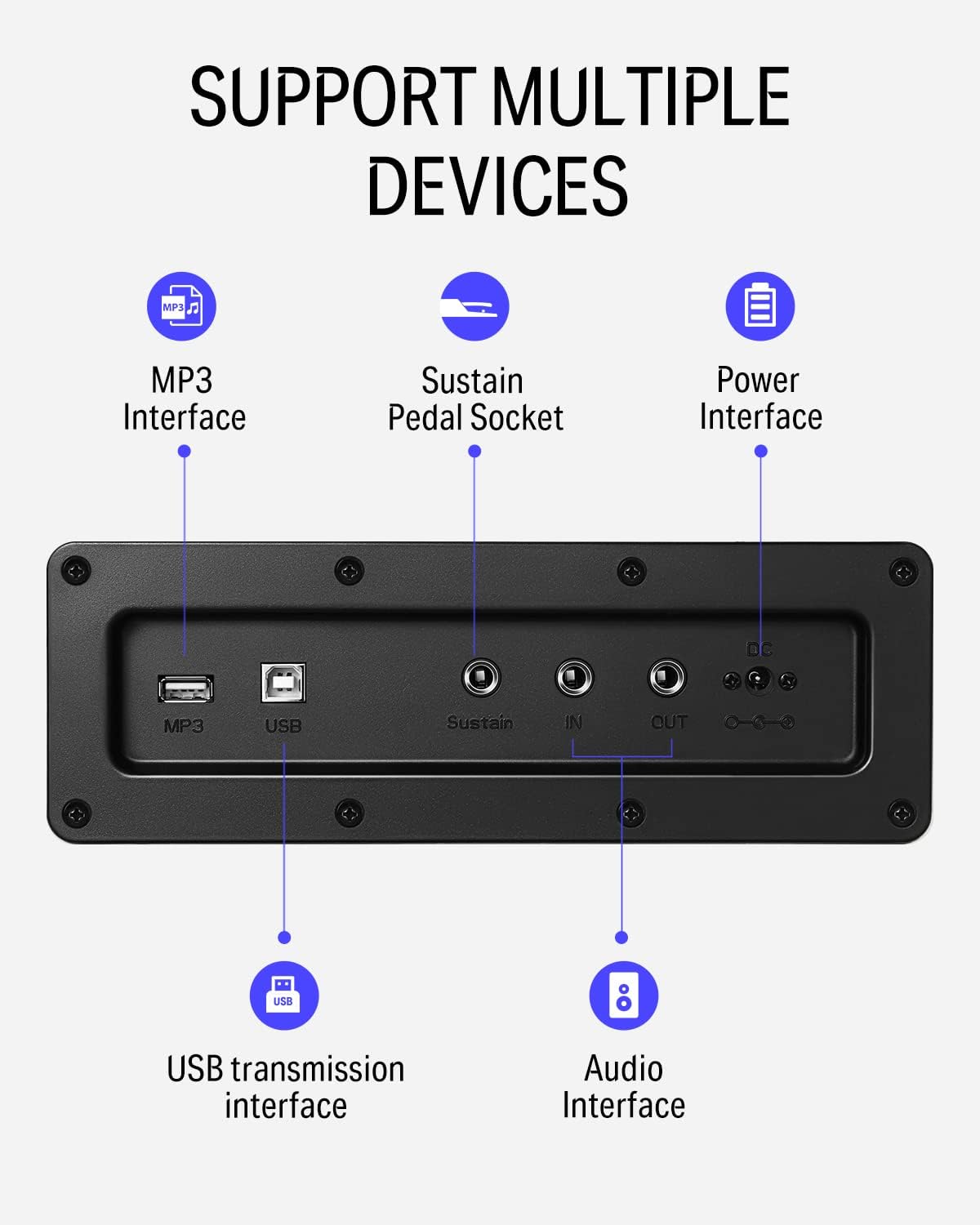
Figi 5: Detaye view of the rear panel connectivity options, including MP3, USB, Sustain, and Audio In/Out ports.
Video 2: Demonstrates the versatility of the DDP-100 when connected to other devices, such as DJ equipment.
4. Antretyen
4.1 Netwayaj
- Sèvi ak yon twal mou epi sèk pou siye sifas pyano a.
- Pou pousyè tè ki difisil pou retire, yon ti kras dampen the cloth with water and a mild, non-abrasive cleaner. Avoid excessive moisture.
- Do not use chemical solvents, alcohol, or abrasive cleaning agents, as these can damage the finish.
4.2 Depo ak Swen
- Keep the piano away from direct sunlight, heat sources, and excessive humidity to prevent damage to the wood and electronic components.
- Use the sliding key cover to protect the keys from dust and spills when not in use.
- Avoid placing heavy objects on the piano.
NAN. Depanaj
5.1 Pa gen son
- Asire w adaptè kouran an byen konekte epi pyano a limen.
- Check the volume knob and ensure it is turned up.
- Si kas ekoutè yo konekte, dekonekte yo pou aktive oratè entèn yo.
- If connected to an external sound system, check the system's volume and connections.
5.2 Kle yo pa reponn
- Asire w ke pyano a limen.
- If only certain keys are affected, contact customer support.
5.3 Son anòmal
- Check for loose connections of cables (power, pedals, audio).
- Ensure the volume is not set too high, causing distortion.
- If the issue persists, power cycle the unit (turn off, wait 10 seconds, turn on).
6. Espesifikasyon
| Karakteristik | Detay |
|---|---|
| Mak | Donner |
| Non modèl | DDP-100 |
| Kantite kle | 88 |
| Kalite kle | Fully-Weighted Action |
| Polifoni | 128-Note |
| Sous son | AWM Sampling Technology (Grand Piano Tone) |
| Pedal | 3-Pedal Unit (Sustain, Sostenuto, Soft) |
| Koneksyon | MP3 Interface, USB Transmission, Audio In/Out, 3.5mm Headphone Jack |
| Sous pouvwa | Adaptè, elektrik |
| Dimansyon pwodwi | 54.33"D x 16.14"W x 33.27"H |
| Pwa atik | 97.7 liv |
| Materyèl kò | Bwa |
| Koulè | Blan |
7. Garanti ak sipò
For warranty information, please refer to the documentation included with your purchase or contact Donner customer support. General customer support is available for assistance with product inquiries, troubleshooting, and service requests.
For additional support, visit the official Donner websit la oubyen kontakte chanèl sèvis kliyan yo.


