1. Entwodiksyon
This manual provides essential information for the safe and efficient use of your Samsung QM85R 85-inch 4K UHD LCD Display. Please read this manual thoroughly before operating the device and retain it for future reference. The Samsung QM85R is a commercial-grade display designed for continuous operation, featuring a 4K UHD resolution and integrated MagicINFO S6 and SSSP 6.0 for advanced content management.
2. Enfòmasyon sou Sekirite
Always observe the following safety precautions to prevent electric shock, fire, or damage to the display.
- Sous pouvwa: Use only the specified power supply. Ensure the power cord is securely plugged into an appropriate outlet.
- Vantilasyon: Do not block ventilation openings. Ensure adequate space around the display for proper airflow to prevent overheating.
- Ekspozisyon likid: Keep the display away from liquids. Do not expose it to rain or moisture.
- Netwayaj: Disconnect the power cord before cleaning. Use a soft, dry cloth. Avoid using liquid or aerosol cleaners directly on the screen.
- Montaj: If wall-mounting, ensure the wall mount is compatible with the display's weight and VESA standards. Professional installation is recommended for large displays.
- Sèvis: Pa eseye fè sèvis pwodui sa a tèt ou. Refere tout sèvis yo bay pèsonèl sèvis kalifye.
3. Pake kontni
Please check that the following items are included with your display. If any items are missing, contact your vendor.
- Samsung QM85R 85-inch 4K UHD LCD Display
- Kòd pouvwa
- Kontwòl Remote ak pil
- Manyèl Itilizatè (dokiman sa a)
- Kat garanti (ka varye selon rejyon an)
4. Enstalasyon
4.1 Enstalasyon Fizik
The Samsung QM85R display can be installed using a compatible wall mount or a floor stand (sold separately). Due to its size and weight (approximately 140.4 pounds), professional installation is highly recommended.
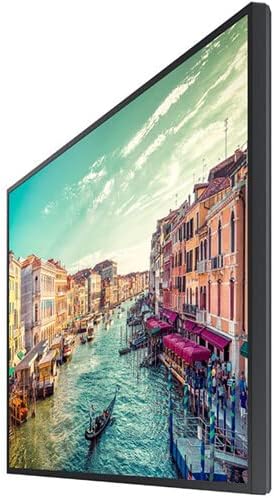
Figi 1: Side view of the Samsung QM85R display. Note the slim design suitable for various mounting options.
4.2 Konekte kab
Before connecting any cables, ensure the display and all connected devices are powered off.
- Koneksyon pouvwa: Konekte kòd kouran an nan antre kouran ekran an epi answit nan yon priz elektrik ki gen tè.
- Videyo Antre: Connect your video source (e.g., PC, media player) to one of the display's HDMI or DisplayPort inputs using appropriate cables. The display supports 4K UHD (3840x2160) resolution.
- Rezo Koneksyon: For MagicINFO S6 and SSSP 6.0 functionality, connect an Ethernet cable to the display's LAN port for network access.
- Lòt Koneksyon: Connect any other peripheral devices as required (e.g., USB devices, audio output).
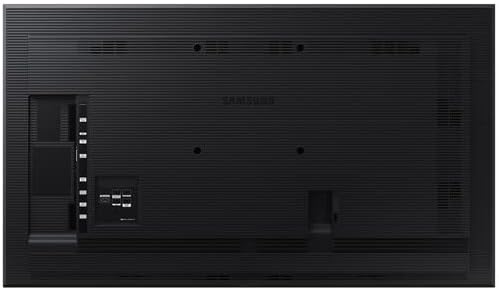
Figi 2: Dèyè view of the Samsung QM85R display, illustrating the location of power, video, and network ports.
4.3 Premye pouvwa-sou
After all connections are made, power on the display using the power button on the remote control or the display itself. Follow any on-screen prompts for initial setup, such as language selection and network configuration.
5. Opere
5.1 Kontwòl debaz yo
Use the provided remote control to access the display's functions:
- Bouton pouvwa: Vire oswa etenn ekspozisyon an.
- Sous bouton: Cycles through available input sources (HDMI1, HDMI2, DisplayPort, etc.).
- Bouton meni: Ouvri meni Afichaj sou ekran (OSD) la.
- Bouton Navigasyon (Anwo/Anba/Agoch/Dwat): Navige nan opsyon meni yo.
- Bouton Antre: Konfime seleksyon yo nan meni an.
5.2 Anviwònman ekspozisyon
Ale nan meni OSD a pou ajiste plizyè paramèt ekspozisyon:
- Mòd Foto: Select from preset modes (e.g., Standard, Dynamic, Custom) or adjust individual settings like brightness, contrast, sharpness, and color temperature.
- Rezolisyon: The display natively supports 3840x2160 (4K UHD) resolution. Ensure your source device is configured to output this resolution for optimal clarity.
- Pousantaj rafrechisman: The display operates at a 75Hz refresh rate, providing smooth motion for compatible content.
- Odyo: Adjust volume, mute, and select audio output options if external speakers are connected.
5.3 Smart Signage Platform (SSSP 6.0) and MagicINFO S6
The QM85R features Samsung's integrated Smart Signage Platform (SSSP 6.0) powered by MagicINFO S6. This allows for advanced content management, scheduling, and remote control capabilities. Refer to the dedicated MagicINFO S6 user guide for detailed instructions on utilizing these features.
6. Antretyen
6.1 Netwaye Display la
Pou kenbe aparans ak pèfòmans ekran an:
- Ekran: Siye ekran an dousman avèk yon twal mou ki pa gen pousyè. Pou mak ki difisil pou retire, siye l dousman.ampen the cloth with water or a specialized screen cleaner, then wipe dry immediately. Do not spray liquids directly onto the screen.
- Kò: Wipe the display's frame and back panel with a soft, dry cloth.
- Evite: Do not use abrasive cleaners, waxes, or solvents (e.g., alcohol, benzene, paint thinner) as they can damage the display surface.
6.2 Konsiderasyon Anviwònman
Ensure the display is operated within its specified temperature and humidity ranges to ensure longevity and optimal performance. Avoid direct sunlight exposure and extreme temperature fluctuations.
NAN. Depanaj
If you encounter issues with your display, refer to the following common problems and solutions before contacting support.
| Pwoblèm | Kòz posib | Solisyon |
|---|---|---|
| Pa gen pouvwa | Kòd kouran an dekonekte; pwoblèm priz kouran. | Tcheke koneksyon kòd kouran an. Teste priz la ak yon lòt aparèy. |
| Pa gen siyal | Incorrect input source selected; video cable disconnected. | Press the 'Source' button on the remote to select the correct input. Ensure video cables are securely connected. |
| Pòv bon jan kalite imaj | Incorrect resolution; display settings. | Ensure source device outputs 3840x2160 resolution. Adjust picture settings (brightness, contrast) in the OSD menu. |
| Remote kontwòl pa travay | Pil mouri; obstak. | Replace batteries. Ensure no obstructions between remote and display's IR receiver. |
8. Espesifikasyon
| Karakteristik | Spesifikasyon |
|---|---|
| Non modèl | QM85R |
| Gwosè ekran | 85 pous |
| Rezolisyon | 3840 x 2160 (4K UHD) |
| Rafrechisman pousantaj | 75Hz |
| Klète | 500 NIT |
| Orè Fonksyone | 24/7 |
| Karakteristik entegre | MagicINFO S6, SSSP 6.0 |
| Dimansyon pwodwi (LxWxH) | 82.52 x 49.02 x 10.51 pous |
| Pwa atik | 140.4 liv |
| Koulè | Nwa |
| Manifakti | Samsung |
9. Garanti ak sipò
Your Samsung QM85R display is covered by a manufacturer's warranty. For specific warranty terms and conditions, please refer to the warranty card included with your product or visit the official Samsung websit. Pou asistans teknik, depanaj ki depase manyèl sa a, oswa pou mande enfòmasyon sou sèvis, tanpri kontakte Sèvis Kliyan Samsung.
Sipò sou entènèt: Vizite www.samsung.com/us/support/
Sipò nan telefòn: Refer to your regional Samsung support contact information.