1. Entwodiksyon
This manual provides essential information for the proper use and maintenance of your Gateway 15.6-inch FHD Ultra Slim Laptop, Model GTW15G. This device is equipped with an AMD Ryzen 5 3450U Mobile Processor, 8GB of DDR4 RAM, and a 256GB Solid State Drive (SSD). It features a 15.6-inch Full HD (1920x1080) IPS display, a built-in fingerprint scanner, and runs on Windows 10, with an available free upgrade to Windows 11.
Please read this manual thoroughly before operating your laptop to ensure optimal performance and longevity.
2. Enstalasyon
2.1 Debalaj ak Premye Enspeksyon
Carefully remove the laptop and all accessories from the packaging. Verify that all components are present and undamaged. The package should include the laptop, power adapter, and this user manual.
2.2 Konekte adaptè kouran an
Before first use, connect the power adapter to the laptop's charging port and then to a power outlet. Allow the battery to charge for at least 30 minutes before powering on for the first time.

Figure 2.1: Gateway 15.6-inch Ultra Slim Laptop overview.
2.3 First Power On and Windows Setup
Press the power button located on the keyboard. The laptop will boot up and guide you through the Windows 10 initial setup process. Follow the on-screen instructions to configure your region, language, network connection, and user account.
2.4 Fingerprint Scanner Setup (Windows Hello)
During or after the initial Windows setup, you can configure the built-in fingerprint scanner for secure login using Windows Hello. Navigate to Anviwònman > Kont > Opsyon koneksyon and follow the prompts to set up your fingerprint.
3. Operasyon Enstriksyon
3.1 Mòd pou limen/etenn ak dòmi
- Pouvwa sou: Peze bouton pouvwa a.
- Fèmen: Klike sou Kòmanse bouton, lè sa a Power > Shut down.
- Mòd dòmi: Close the lid or click the Kòmanse bouton, lè sa a Pouvwa > Dòmi.
3.2 Using the Precision Touchpad
The laptop features a precision touchpad for navigation. It supports multi-touch gestures for scrolling, zooming, and other functions. Refer to Windows settings for customizing touchpad gestures.
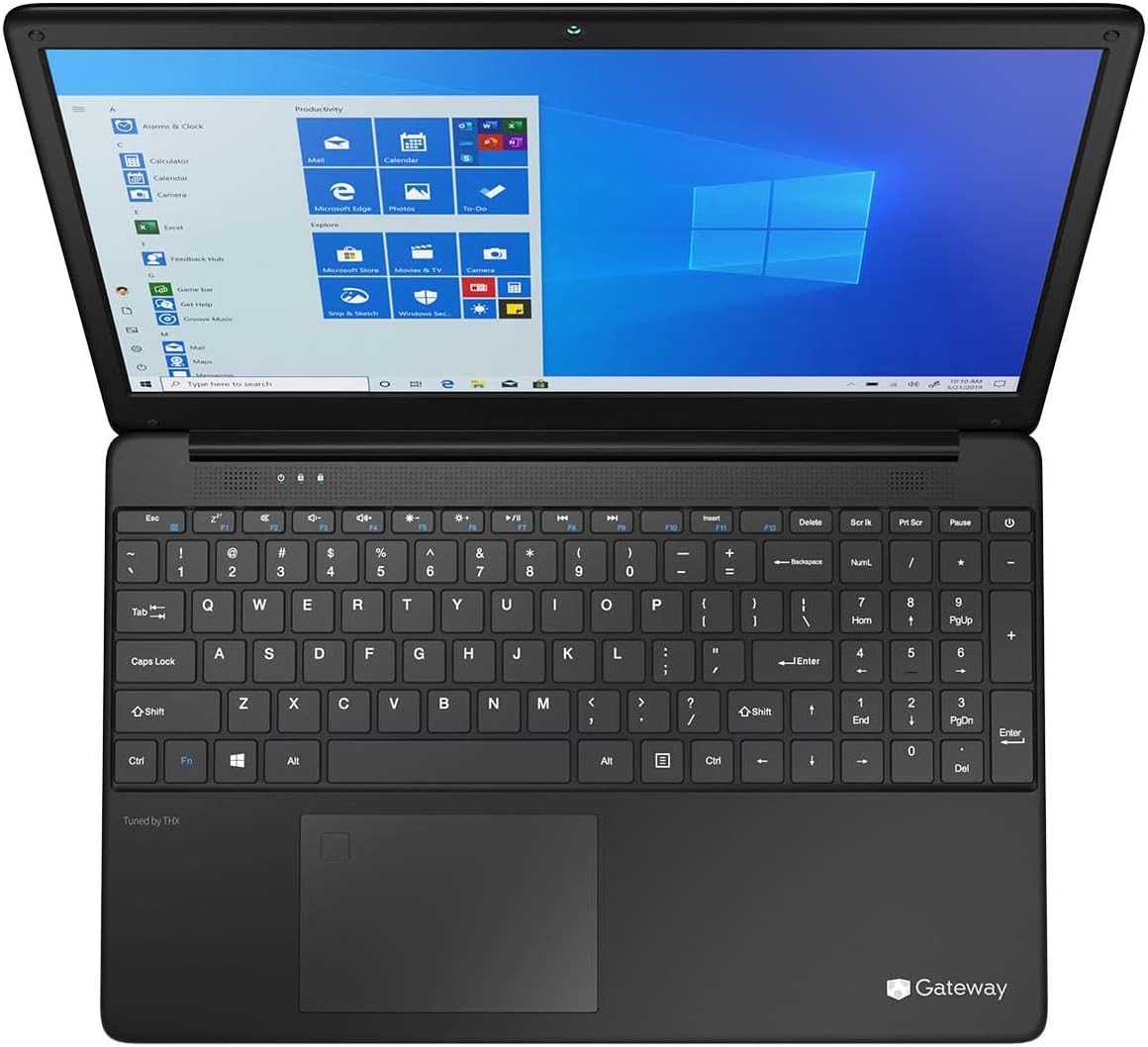
Figure 3.1: Keyboard and Precision Touchpad layout.
3.3 Konekte Aparèy Ekstèn yo
Laptop la gen plizyè pò pou konekte periferik:
- Pò USB 3.0 (x2): Pou konekte aparèy USB tankou disk di ekstèn, sourit, oswa klavye.
- Pò USB Kalite-C (x1): Supports both charging and data transfer.
- HDMI Output (x1): Konekte ak yon monitè ekstèn oswa yon televizyon.
- Micro SD Slot (x1): Supports Micro SD cards up to 512 GB for expanded storage.
- Kensington Lock: Pou sekirite fizik.
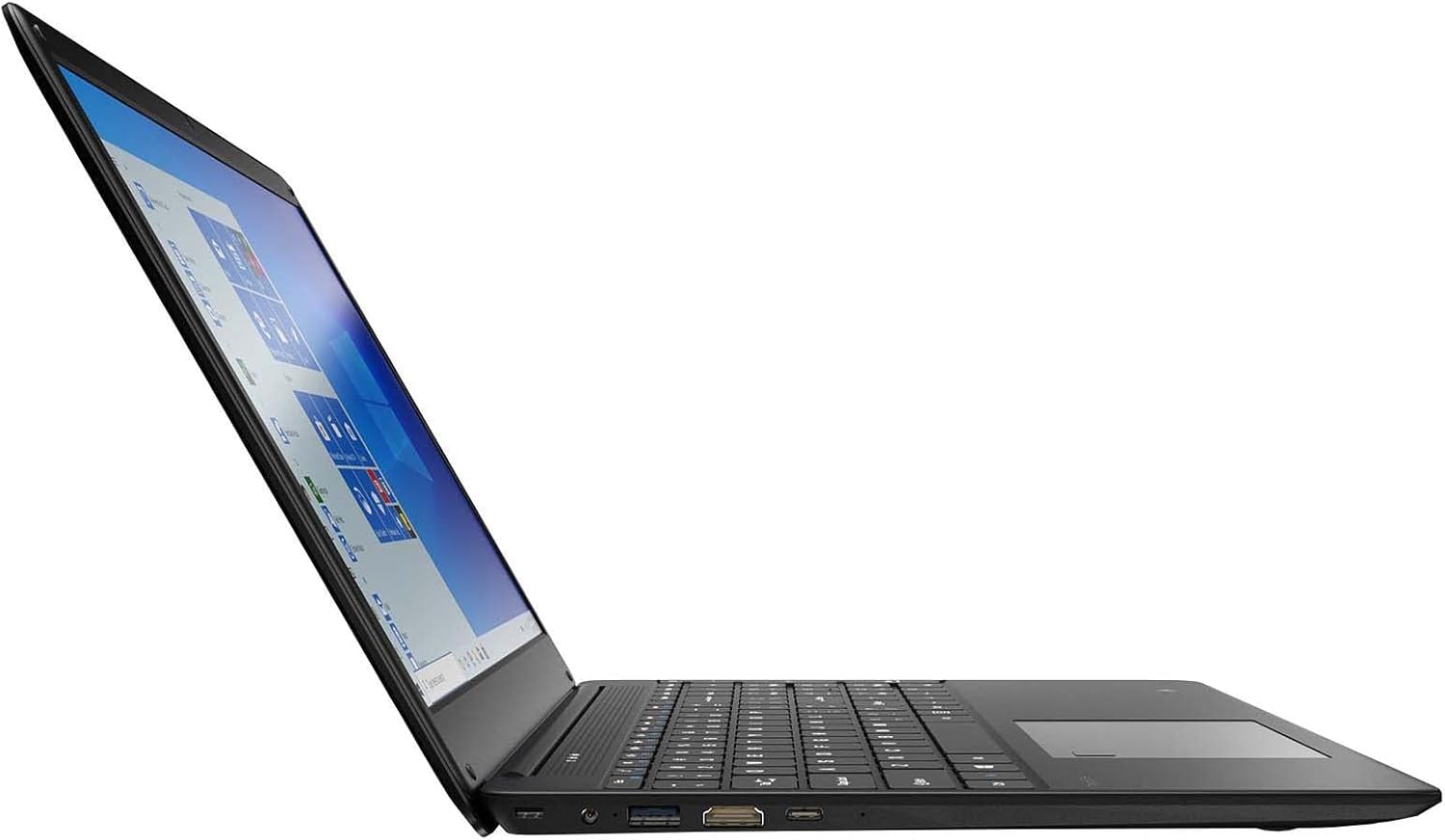
Figure 3.2: Left side ports (USB, HDMI, USB Type-C).
3.4 Koneksyon san fil
The laptop supports Wi-Fi and Bluetooth 5.1 for wireless connections. Access network settings via the Windows taskbar or Anviwònman> Rezo & Entènèt to connect to Wi-Fi networks or pair Bluetooth devices.
3.5 Karakteristik odyo
The built-in stereo speakers are tuned by THX Audio, providing enhanced sound quality. Adjust volume using the function keys on the keyboard or through Windows sound settings.
4. Antretyen
4.1 Netwaye òdinatè pòtab la
- Ekran: Sèvi ak yon ti moso twal mou, ki san pèl dampLave avèk dlo oswa yon pwodui netwayaj ekran. Pa flite likid dirèkteman sou ekran an.
- Chasi ak klavye: Sèvi ak yon twal mou epi sèk. Pou pousyè tè ki difisil pou retire, yon ti kras mouye.amp Ou ka itilize twal. Evite pwodui chimik ki agresif.
- Vantilasyon: Netwaye ouvèti vantilasyon yo detanzantan ak lè konprese pou anpeche pousyè akimile, sa ki ka afekte refwadisman an.
4.2 Swen Batri
Pou maksimize dire lavi ak lonjevite batri a:
- Evite dechaje batri a nèt souvan.
- Pa ekspoze laptop la nan tanperati ekstrèm.
- Si w ap sere laptop la pou yon peryòd tan pwolonje, asire w ke batri a chaje apeprè 50-70%.
- Optimize power settings in Windows to conserve battery power.
4.3 Mizajou lojisyèl
Regularly check for and install Windows updates to ensure your system has the latest security patches and performance improvements. Navigate to Anviwònman > Mizajou ak Sekirite > Mizajou Windows.
4.4 Sovgad Done
Fè kopi done enpòtan ou yo regilyèman sou yon disk ekstèn oswa yon depo nwaj pou evite pèt done.
NAN. Depanaj
Seksyon sa a adrese pwoblèm komen ou ka rankontre ak laptop ou a.
5.1 Laptop la pa limen
- Asire w adaptè kouran an byen konekte ak laptop la ak yon priz kouran ki fonksyone.
- Verifye si priz kouran an fonksyone byen lè w branche yon lòt aparèy.
- Allow the laptop to charge for some time before attempting to power it on again.
5.2 Pwoblèm koneksyon Wi-Fi
- Tcheke si Wi-Fi a aktive nan paramèt Windows yo.
- Rekòmanse routeur ou ak modèm ou.
- Asire w ou nan zòn rezo Wi-Fi a epi ou antre modpas ki kòrèk la.
- Kouri depanaj rezo Windows la (Anviwònman > Rezo ak Entènèt > Estati > Depanaj rezo).
5.3 Pèfòmans Ralanti
- Fèmen aplikasyon ki pa nesesè k ap fonksyone nan background nan.
- Tcheke epi enstale nenpòt mizajou Windows ki annatant.
- Asire w ke gen ase espas lib sou SSD ou a.
- Fè eskanè pou viris oswa malveyan.
5.4 Surchof
If the laptop feels excessively warm, ensure that the ventilation vents are not blocked. Operate the laptop on a hard, flat surface to allow for proper airflow. Avoid using it on soft surfaces like beds or couches that can obstruct vents.
5.5 Lòt Pwoblèm
For issues not covered here, refer to the Windows help documentation or contact Gateway customer support.
6. Espesifikasyon
| Karakteristik | Spesifikasyon |
|---|---|
| Non modèl | Gateway GWTN156 (GTW15G) |
| Gwosè ekspozisyon | 15.6 pous |
| Rezolisyon ekran | 1920 x 1080 piksèl (FHD) |
| Processeur | AMD Ryzen 5 3450U (2.1 GHz, Up to 3.50 GHz) |
| RAM | 8 GB DDR4 |
| Depo | 256 GB SSD |
| Koprosesè grafik | Grafik AMD Radeon Vega 8 |
| Sistèm operasyon | Windows 10 (Free Upgrade to Windows 11) |
| Kalite san fil | Wi-Fi, Bluetooth 5.1 |
| Pò | 1x HDMI, 1x USB Type-C (Charge + Data), 2x USB 3.0, 1x Micro SD Slot (Up to 512 GB) |
| Karakteristik espesyal | Built-in Fingerprint Scanner (Windows Hello), Stereo Speakers Tuned by THX Audio, HD Webkam |
| Pwa atik | 5.5 liv |
| Dimansyon pake | 16.65 x 11.73 x 2.8 pous |
7. Garanti ak sipò
For warranty information and technical support, please refer to the official Gateway website or contact Gateway customer service directly. Keep your proof of purchase for warranty claims.
This product may be eligible for separate protection plans. Details regarding these plans are available from your retailer at the time of purchase.


