1. Entwodiksyon
Thank you for choosing the Aerocool Crown AeroSuede Gaming Chair. This manual provides essential information for the safe and correct assembly, operation, and maintenance of your new chair. Please read these instructions thoroughly before assembly and retain this manual for future reference.
The Aerocool Crown AeroSuede Gaming Chair is designed for comfort and durability, featuring an ergonomic design and high-quality materials to support extended periods of use.
2. Pwodwi Features
The Aerocool Crown Gaming Chair incorporates several features designed to enhance user experience:
- High-Performance Comfort: Constructed with durable stitching on the backrest and seat, providing both aesthetic appeal and exceptional comfort.
- Konsepsyon ergonomique: Engineered to offer sustained ergonomic support, promoting relaxation and comfort during prolonged work, gaming, or study sessions.
- Tilt Control Mechanism: Allows for a rocking motion up to 18 degrees. A locking mechanism is included to secure the chair in a fixed position if preferred.
- Robust and Reliable Structure: Built with premium materials, including a sturdy steel frame and a durable nylon base, ensuring long-term stability and quality.
- Akoudwar reglabl: Provides customizable support for arms and shoulders.
- Sipò lonbèr reglabl: Offers personalized lower back support.
- Wotè reglabl: Allows for customization of the chair's height to suit individual preferences and desk setups.
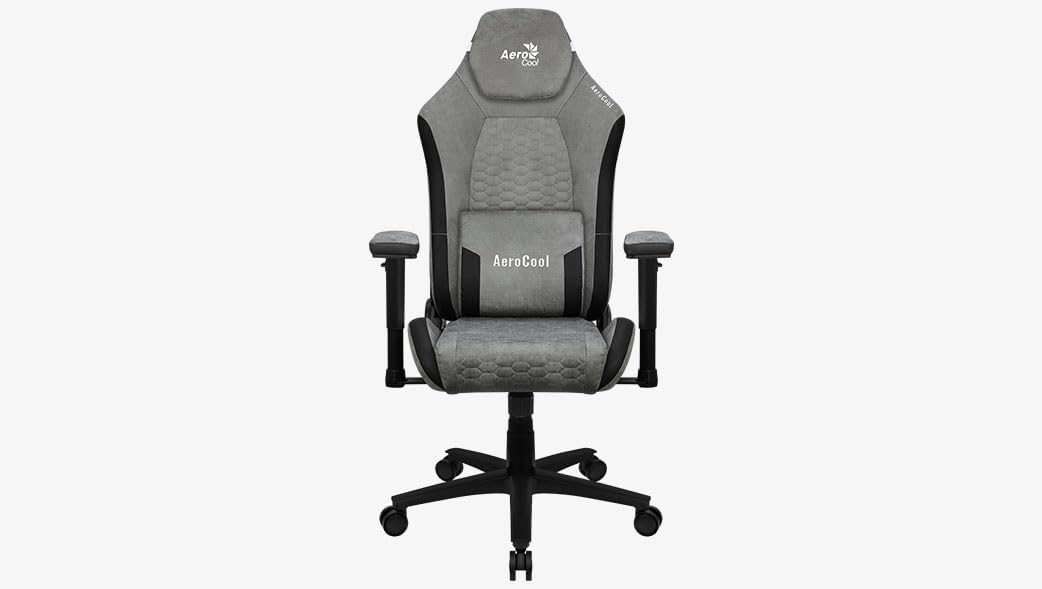
Figi 1: Devan view of the Aerocool Crown AeroSuede Gaming Chair. The chair features a grey AeroSuede material with black accents, adjustable armrests, a headrest, and a five-star base with casters.
3. Enstriksyon Asanble
Before beginning assembly, ensure all components are present and undamaged. It is recommended to assemble the chair on a soft, clean surface to prevent scratching. Two people may be required for certain steps.
- Depake konpozan: Retire tout pati yo nan anbalaj la avèk anpil atansyon epi mete yo deyò.
- Rasanble baz la: Insert the five casters into the holes at the end of each leg of the five-star base. Ensure they are securely seated.
- Enstale asansè gaz la: Place the gas lift cylinder into the central hole of the assembled five-star base.
- Atache mekanis lan nan chèz la: Secure the tilt mechanism to the underside of the seat using the provided screws. Ensure the front of the mechanism aligns with the front of the seat.
- Tache akoudwar: Fasten the armrests to the sides of the seat base using the designated screws. Do not overtighten initially.
- Konekte Dossier la ak Syèj la: Align the backrest with the seat and secure it using the screws. Once all screws are in place for the backrest and armrests, tighten them firmly.
- Monte Asanblaj Syèj la sou Asansè Gaz la: Mete chèz la ak dosye a ki reyini avèk anpil atansyon sou silenn asansè gaz la, epi asire li santre epi li stab.
- Attach Cushions (if separate): If your model includes separate headrest and lumbar cushions, attach them as desired using their integrated straps.
After assembly, test all functions and ensure all screws are tightened. Do not use the chair if any part feels loose or unstable.
4. Operasyon Enstriksyon
Your Aerocool Crown Gaming Chair offers several adjustment options for personalized comfort:
- Ajisteman wotè: To adjust the chair height, pull the lever located under the right side of the seat upwards. While seated, lift your weight off the seat to raise it, or remain seated to lower it. Release the lever to lock the height.
- Fonksyon enklinezon/balanse: To enable the rocking function, pull the lever located under the left side of the seat outwards. To disable it and lock the chair in an upright position, push the lever inwards.
- Ajisteman tansyon enklinezon: The round knob located under the front of the seat controls the tension of the rocking mechanism. Turn clockwise to increase tension (making it harder to rock) or counter-clockwise to decrease tension (making it easier to rock).
- Ajisteman akoudwar: The armrests can be adjusted in height. Press the button on the side of each armrest support and move the armrest up or down to your desired position. Release the button to lock.
- Recliner dosye: Pull the recline lever (typically on the right side, near the seat) upwards and lean back to adjust the backrest angle. Release the lever to lock the backrest in place.
5. Antretyen
Proper maintenance ensures the longevity and performance of your gaming chair:
- Netwayaj: Wipe the chair surfaces with a clean, damp cloth. For synthetic leather, use a mild soap solution if necessary, then wipe with a clean, dry cloth. Avoid harsh chemicals or abrasive cleaners.
- Enspeksyon regilye: Tcheke tout vis ak boulon yo detanzantan pou asire yo byen sere. Sere boulon yo si sa nesesè pou kenbe estabilite ak sekirite.
- Swen Roulèt: Keep the casters clean from hair and debris to ensure smooth movement.
- Evite limyè solèy la dirèk: Ekspozisyon pwolonje nan limyè solèy dirèk ka lakòz dekolorasyon ak degradasyon materyèl la.
NAN. Depanaj
This section addresses common issues you might encounter with your gaming chair:
- Chèz k ap kriye:
- Check and tighten all screws, especially those connecting the backrest, seat, and mechanism.
- Apply a small amount of silicone lubricant to moving parts or joints if the squeaking persists.
- Chèz la enstab/tranble:
- Asire ke tout vis yo byen sere.
- Verify that the gas lift is properly seated in the base and the seat mechanism.
- Check if the casters are fully inserted into the base.
- Ajisteman wotè a pa fonksyone:
- Asire w levye ajisteman wotè a byen angaje lè w ap eseye ajiste l.
- Tcheke pou nenpòt obstak alantou mekanis asansè gaz la.
- If the gas lift is completely unresponsive, it may need replacement.
- Chair Does Not Rock/Tilt:
- Ensure the tilt lock lever is disengaged (pulled outwards).
- Adjust the tilt tension knob (under the seat) to a looser setting (counter-clockwise).
7. Espesifikasyon
| Atribi | Detay |
|---|---|
| Mak | Aerocool |
| Nimewo Modèl | CROWNSG |
| Koulè | Sou entènèt jwèt Stone Grey |
| Dimansyon pwodwi (L x W x H) | 52 x 52 x 133 cm |
| Materyèl | Synthetic Leather (AeroSuede) |
| Materyèl ankadreman | Alloy Steel |
| Pwa atik | 18.9 Kilogram |
| Karakteristik espesyal | Armrest, Ergonomic, Adjustable Height, Adjustable Lumbar Support |
| Enstriksyon Swen | Clean (Wipe with damp twal) |
8. Garanti ak sipò
Specific warranty information for the Aerocool Crown AeroSuede Gaming Chair is not provided in the available product data. For details regarding warranty coverage, claims, or technical support, please contact Aerocool customer service directly or refer to the official Aerocool websit.
Toujou konsève prèv acha ou a pou nenpòt kesyon sou garanti a.


