Entwodiksyon
This manual provides detailed instructions for the setup, operation, and maintenance of your MZEIBO KY-2020D Bluetooth Sound Bar Home Theater Audio System. Please read this manual thoroughly before using the product to ensure proper function and longevity.

Image: The MZEIBO KY-2020D Bluetooth Sound Bar, remote control, and vertical speaker bases.
Ki sa ki nan bwat la
Depake tout konpozan yo ak anpil atansyon epi verifye ke ou te resevwa atik sa yo:
- 1 x TV Sound Bar (KY-2020D)
- 1 x kontwòl remote
- 1 x pouvwa adaptè
- 1 x HDMI kab
- 1 x kab optik
- 1 x kab RCA
- 1 x AUX kab
- 1 x Manyèl Itilizatè (dokiman sa a)
- 2 x Bases (left & right, for vertical setup)

Image: All components included in the MZEIBO KY-2020D Sound Bar package.
Enstalasyon
1. Assembly (Detachable Design)
The MZEIBO KY-2020D Sound Bar features a detachable design, allowing it to be used as a single horizontal sound bar or two vertical tower speakers. Follow these steps for assembly:
- Align the Notches: Locate the connection points on both halves of the sound bar. Align the shape of the notch on one part with the corresponding connector on the other.
- Insert and Connect: Gently insert the two parts together, ensuring the electrical contacts meet securely.
- Rotate to Lock: Once inserted, rotate one part slightly to lock the two halves together. You should feel a secure connection.
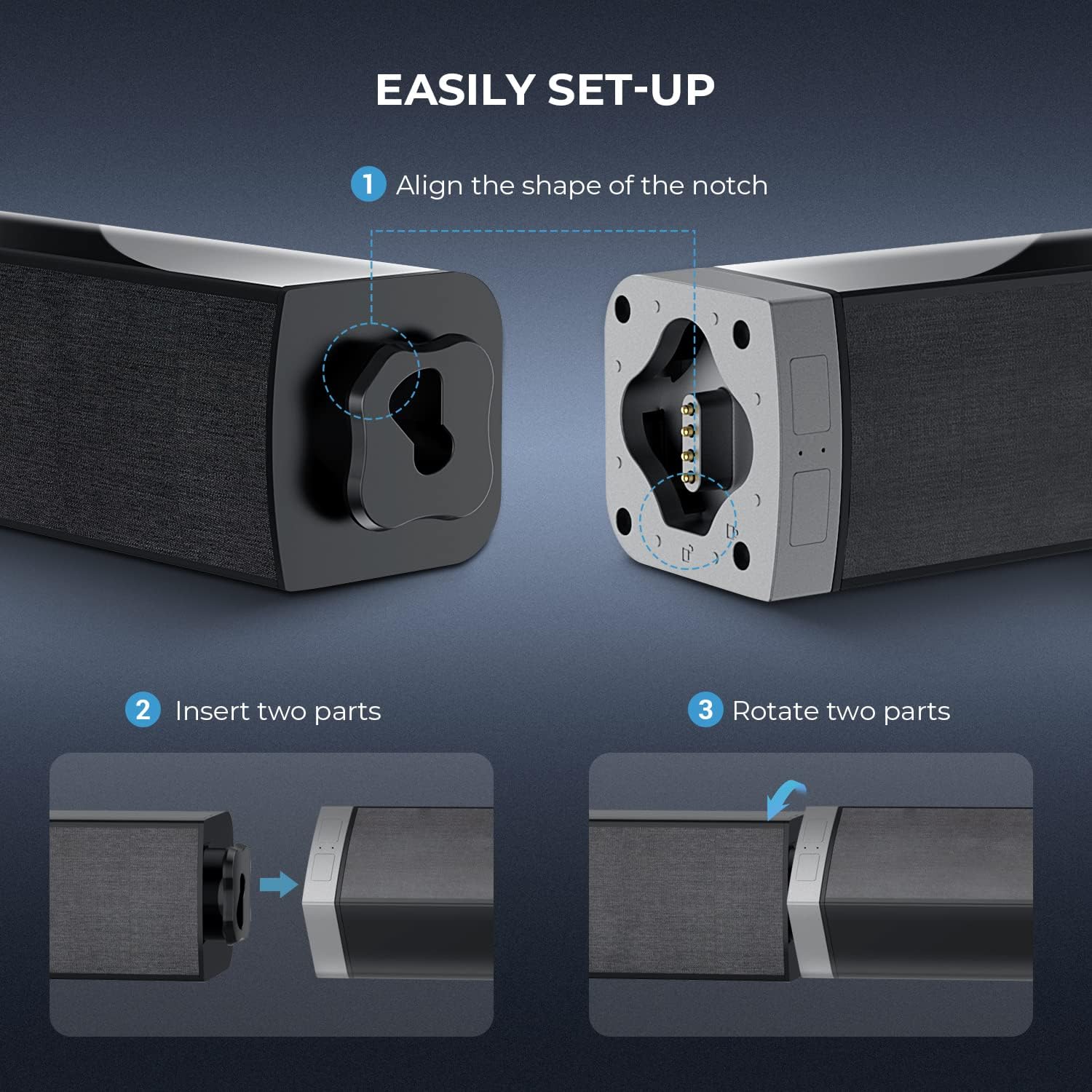
Image: Step-by-step guide for assembling the detachable sound bar.

Image: Illustration of the sound bar assembly process.
2. Opsyon Plasman
The sound bar can be placed in two configurations:
- Horizontal Sound Bar: Place the assembled sound bar horizontally below your television.
- Vertical Tower Speakers: Attach the included bases to each half of the sound bar and place them vertically on either side of your television.


Imaj: Egzamples of horizontal sound bar placement and vertical tower speaker placement.
3. Konekte ak pouvwa
Connect the provided power adapter to the DC IN port on the sound bar and then plug it into a standard electrical outlet.
4. Koneksyon odyo
The MZEIBO KY-2020D Sound Bar offers multiple connectivity options. Choose the method best suited for your device:
- HDMI (ARC): Connect an HDMI cable from the HDMI ARC port on the sound bar to the HDMI ARC port on your TV. This allows for audio return channel functionality.
- Optik: Connect an optical cable from the OPT port on the sound bar to the optical output on your TV or audio source.
- AUX: Use the AUX cable to connect the sound bar's AUX port to the 3.5mm audio output on your device.
- RCA: Connect the RCA cable to the RCA ports on the sound bar and your audio source.
- Bluetooth: For wireless connection, refer to the Bluetooth Pairing section under Operating.

Image: Rear panel connections of the sound bar, highlighting various input options.
Enstriksyon Operasyon
1. Power On/Off
Peze a Pouvwa bouton sou kontwòl remote la oswa sou ba son an pou limen oswa etenn aparèy la.
2. Seleksyon Mòd Antre
Press the corresponding input button on the remote control (e.g., HDMI, DAKÒ, AUX, PÈ for Bluetooth) to switch between audio sources. The LED indicator on the sound bar will change color to reflect the active mode.
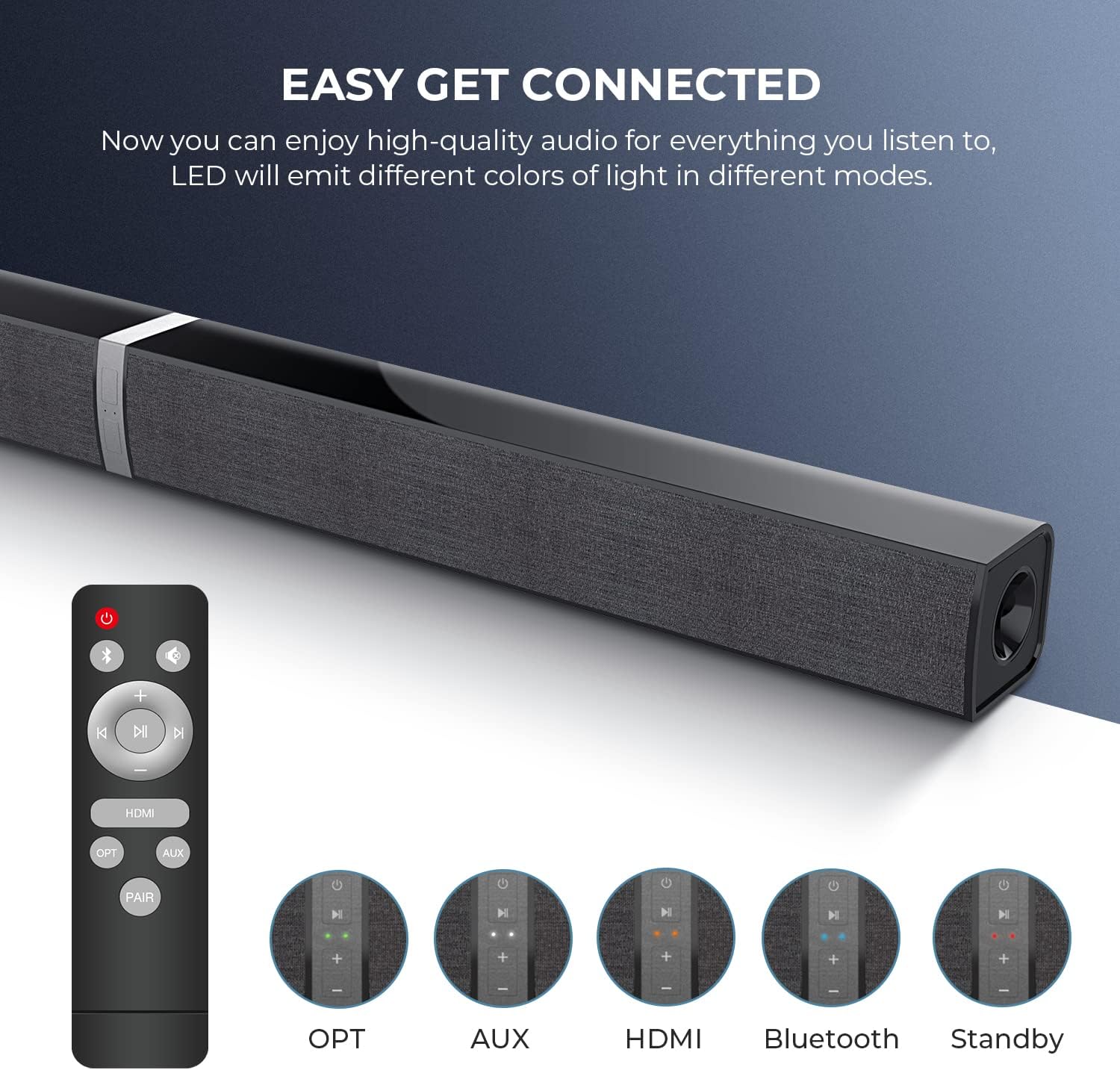
Image: Remote control and visual indicators for selecting audio input modes.
3. Kontwòl Volim
Sèvi ak la + epi - buttons on the remote control or the sound bar to adjust the volume. The sound bar has a maximum output power of 50 Watts.
4. Pè Bluetooth
- Limen ba son an.
- Peze a PÈ button on the remote control or the Bluetooth button on the sound bar. The LED indicator will flash, indicating it is in pairing mode.
- On your Bluetooth-enabled device (e.g., smartphone, tablet, laptop), search for available Bluetooth devices.
- Select "MZEIBO KY-2020D" from the list.
- Yon fwa konekte, endikatè LED la ap sispann flache epi li ap rete fiks.
The sound bar supports Bluetooth 5.0 for stable wireless audio streaming.
Antretyen
To ensure the longevity and optimal performance of your MZEIBO KY-2020D Sound Bar, follow these maintenance guidelines:
- Netwayaj: Use a soft, dry cloth to wipe the surfaces of the sound bar. Avoid using liquid cleaners, aerosols, or abrasive materials, as these can damage the finish or internal components.
- Plasman: Place the sound bar on a stable, flat surface. Ensure adequate ventilation around the unit to prevent overheating. Avoid placing it near heat sources or in direct sunlight.
- Depo: Si w ap sere ba son an pou yon peryòd tan pwolonje, dekonekte l nan kouran an epi sere l nan yon kote ki fre epi sèk, de preferans nan anbalaj orijinal li.
- Ekspozisyon dlo: This product is not waterproof. Avoid exposing it to water or excessive moisture.
Depanaj
If you encounter issues with your MZEIBO KY-2020D Sound Bar, refer to the following common problems and solutions:
| Pwoblèm | Kòz posib | Solisyon |
|---|---|---|
| Pa gen son ki soti nan ba son an. |
|
|
| Aparèy Bluetooth la pa ka konekte. |
|
|
| Intermittent sound or sound cutting out. |
|
|
Espesifikasyon
| Mak | MZEIBO |
| Non modèl | KY-2020D |
| Kalite Oratè | Soundbar (Detachable) |
| Koneksyon Teknoloji | Auxiliary, Bluetooth, HDMI (ARC), Optical, RCA |
| Teknoloji kominikasyon san fil | Bluetooth 5.0 |
| Audio Sòti Mode | Stereo, Antoure |
| Oratè maksimòm pwodiksyon pouvwa | 50 Watts |
| Konfigirasyon chanèl son antoure | 2.0 |
| Dimansyon pwodwi | 2.36"D x 2.36"W x 31.5"H |
| Pwa atik | 4.07 liv |
| Materyèl | Metal, Plastik |
| Koulè | Nwa |
| Metòd kontwòl | Remote |
| Sous pouvwa | Fil elektrik |
| Karakteristik espesyal | Bass Pouse |
| Itilizasyon Rekòmande Pou Pwodwi | Teyat lakay |
| Aparèy konpatib | Laptop, Phones, Tablet, Television |
Enfòmasyon sou Garanti
The MZEIBO KY-2020D Sound Bar comes with a Garanti limite. Please refer to the warranty card included in your package for specific terms, conditions, and duration of coverage. Keep your proof of purchase for warranty claims.
Sipò pou Kliyan
For further assistance, technical support, or inquiries regarding your MZEIBO KY-2020D Sound Bar, please contact MZEIBO customer service. Contact details can typically be found on the official MZEIBO websit la oubyen sou materyèl anbalaj yo.
You can also visit the official MZEIBO store for more product information: MZEIBO Store on Amazon


