Byenvini
Thank you for choosing the HTC HS01 Bluetooth Headphones. This manual provides essential information for setting up, operating, maintaining, and troubleshooting your new headphones. Please read it carefully to ensure optimal performance and longevity of your device.
Kontni pake
Verifye ke tout atik ki nan lis anba a yo enkli nan pakè ou a:
- 1 x HTC HS01 Bluetooth Headphones
- 1 x USB Chaje Kab
- Plizyè gwosè bout zòrèy (Ti, Mwayen, Gwo)
- 1 x manyèl itilizatè
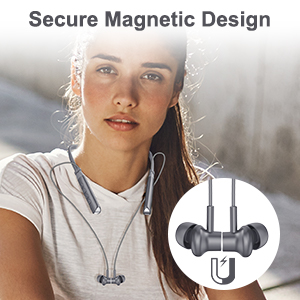
Image: The package contents, including the headphones, charging cable, various ear tips, and the user manual.
Pwodwi souview
The HTC HS01 features a lightweight neckband design with in-ear earbuds, equipped with intuitive controls for easy operation.
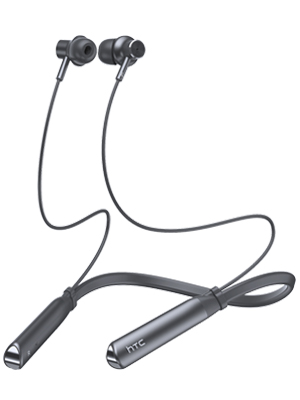
Imaj: Yon plen view of the HTC HS01 Bluetooth Headphones, showcasing the neckband and earbuds.
Kontwòl
The control panel is located on the neckband for easy access:
- Bouton ANC: Aktive oswa dezaktive Anilasyon Bri Aktif la.
- Volim + / Next Track: Ogmante volim nan oubyen sote nan pwochen track la.
- Power / Multi-function Button: Powers the device on/off, plays/pauses music, answers/ends calls.
- Volim - / Tras anvan: Diminye volim nan oswa ale nan track anvan an.
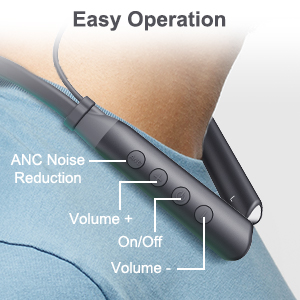
Imaj: Yon gwo plan view of the control buttons on the HTC HS01 neckband, detailing their functions.
Enstalasyon
1. Chaje kas ekoutè yo
- Konekte kab chaje USB a nan pò chaje ki sou kas ekoutè a.
- Plug the other end of the cable into a USB power source (e.g., computer, wall adapter).
- Limyè endikatè a ap montre eta chaj la. Yon chaj konplè anjeneral pran apeprè 2 èdtan.
A fully charged battery provides up to 12 hours of music playback, 10 hours of talk time, and 180 days of standby time.
2. Pairing ak yon Aparèy Bluetooth
- Asire w ke kas ekoutè yo etenn.
- Press and hold the Power/Multi-function button until the indicator light flashes red and blue, indicating pairing mode.
- Sou aparèy ou an (telefòn entelijan, tablèt, òdinatè), aktive Bluetooth epi chèche aparèy ki disponib yo.
- Select "HTC HS01" from the list of found devices.
- Yon fwa konekte, limyè endikatè a ap vin ble fiks oswa ap flache ble dousman.
The headphones utilize Bluetooth 5.0 technology for stable and efficient wireless transmission.
Enstriksyon Operasyon
Power On/Off
- Pou limen: Peze epi kenbe bouton Pouvwa/Milti-fonksyon an pandan 3 segonn.
- Pou etenn: Peze epi kenbe bouton Pouvwa/Milti-fonksyon an pandan 5 segonn.
Lèktur Klas Mizik
- Jwe/Poz: Peze bouton Pouvwa/Milti-fonksyon an yon fwa.
- Pwochen Track: Peze epi kenbe bouton Volim + la.
- Track Previous: Peze epi kenbe bouton Volim - la.
- Volim moute: Press the Volume + button briefly.
- Volim desann: Press the Volume - button briefly.

Image: A woman enjoying music with the HTC HS01 headphones, illustrating the 9D stereo sound experience.
Jesyon Rele
- Reponn/Fen Apèl: Peze bouton Pouvwa/Milti-fonksyon an yon fwa.
- Rejte apèl: Peze epi kenbe bouton Pouvwa/Milti-fonksyon an pandan 2 segonn.
Anilasyon bri aktif (ANC)
- Press the dedicated ANC button to activate or deactivate the noise cancellation feature.
The ANC+ENC technology uses both outward-facing and inward-facing microphones to detect and counteract environmental noise, providing a clearer audio experience.

Image: A man wearing the HTC HS01 headphones in an outdoor setting, highlighting the ANC feature.
Antretyen
Netwayaj
Regularly clean your headphones to maintain optimal performance:
- Wipe the earbuds and neckband with a soft, dry cloth.
- Retire bout zòrèy yo epi netwaye yo avèk savon dou ak dlo si sa nesesè, asire w ke yo byen sèk anvan ou mete yo ankò.
- Pa sèvi ak pwodui netwayaj abrazif oswa solvang.
Depo
When not in use, store your headphones in a cool, dry place away from direct sunlight and extreme temperatures. The earbuds feature a secure magnetic design for tangle-free storage.
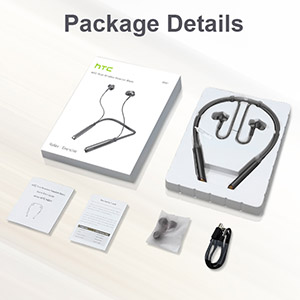
Image: A woman wearing the headphones, demonstrating the magnetic earbuds that secure them around the neck.
Rezistans dlo (IPX5)
The HTC HS01 headphones are IPX5 water-resistant, meaning they can withstand light rain and sweat. They are suitable for sports and outdoor activities. However, they are not designed for submersion in water.

Image: A man exercising, highlighting the IPX5 waterproof design of the headphones, suitable for workouts.
Depanaj
If you encounter any issues with your HTC HS01 headphones, refer to the following common problems and solutions:
- Kas ekoutè pa pral limen:
Ensure the battery is charged. Connect the headphones to a power source using the USB charging cable. - Pa ka konekte ak yon aparèy:
Make sure the headphones are in pairing mode (indicator light flashing red and blue). Ensure Bluetooth is enabled on your device and it is within range. Try restarting both the headphones and your device. - Pa gen son oswa volim ki ba:
Check the volume levels on both the headphones and your connected device. Ensure the headphones are properly paired and connected. Try re-pairing the headphones. - Kalite son pòv:
Ensure the ear tips provide a secure and comfortable seal in your ear canal. Clean the earbuds to remove any debris that might be obstructing the sound. Move closer to your paired device to avoid interference. - Short Bluetooth range or frequent disconnections:
Bluetooth range can be affected by obstacles and interference. Try to keep your paired device closer to the headphones, ideally within 10 meters (33 feet) in an open environment.
Espesifikasyon
| Nimewo Modèl | HS01 |
| Koneksyon Teknoloji | Bluetooth 5.0 |
| Kontwòl bri | Active Noise Cancellation (ANC+ENC) |
| Inite Oratè | 10mm |
| Kapasite batri | 130 mAh Lityòm Ion |
| Mizik Playtime | Jiska 12 èdtan |
| Tan pale | Jiska 10 èdtan |
| Tan sibstiti | Jiska 180 jou |
| Tan pou chaje | Apeprè. 2 èdtan |
| Evalyasyon rezistans dlo | IPX5 |
| Pwa atik | 35 gram (1.23 ons) |
| Materyèl | Plastik |
| Plasman Zòrèy | Nan Zòrèy |
| Metòd kontwòl | Manyen, Bouton |
Garanti ak sipò
HTC products are designed for reliability and performance. For warranty information or technical support, please refer to the warranty card included in your package or visit the official HTC support websit la. Kenbe resi acha ou kòm prèv acha pou nenpòt reklamasyon garanti.


