1. Entwodiksyon
The Elitech ECS-2280neo is an all-purpose digital temperature controller designed for precise temperature management in various applications. It features both Fahrenheit and Celsius display options, a copy card function for easy parameter setting, and a UPS port for power backup. This manual provides detailed instructions for the installation, operation, and maintenance of the ECS-2280neo controller.
2. Enfòmasyon sou Sekirite
- Li tout enstriksyon yo ak anpil atansyon anvan enstalasyon ak operasyon.
- Ensure the power supply matches the controller's specifications.
- Installation and wiring should only be performed by qualified personnel.
- Do not expose the controller to excessive moisture or extreme temperatures outside its operating range.
- Disconnect power before performing any maintenance or wiring.
3. Pwodwi souview
The ECS-2280neo is a compact and robust temperature controller with a clear digital display and intuitive button interface.

Figi 3.1: Devan view Kontwolè Tanperati Dijital Elitech ECS-2280neo a, ki montre ekspozisyon dijital la ak bouton kontwòl yo.
Karakteristik kle:
- Widely used in medical cupboards, kitchen cabinets, supermarket split cabinets, air curtain cabinets, island cabinets, and wine cabinets.
- Sensor error alarm for enhanced safety.
- Easy parameter setting via a copy card.
- Chanjman ant Sèlsiyis ak Farennayt.
- One-piece front panel design with IP65 protection against dust and water.

Figi 3.2: Icons representing key functions: Cooling, Defrost, Fan, Buzzer, Celsius & Fahrenheit conversion, Copy Card, RS485, and Elitech iCold compatibility.
4. Enstalasyon ak Enstalasyon
4.1 Dimansyon
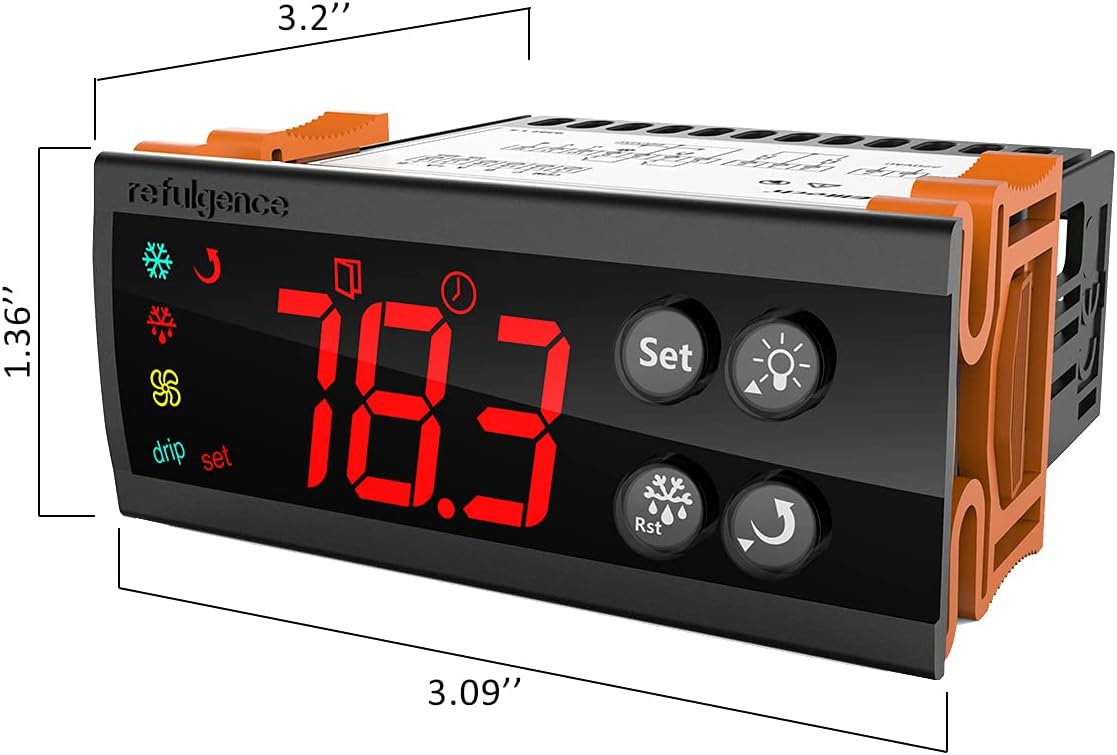
Figi 4.1: Dimensions of the ECS-2280neo controller, approximately 3.2 inches wide, 1.36 inches high, and 3.09 inches deep.
4.2 Dyagram fil elektrik
Refer to the following diagram for proper wiring connections. Ensure all connections are secure and comply with local electrical codes.

Figi 4.2: Wiring diagram for the ECS-2280neo, showing connections for UPS, power input (L, N), outputs (10A/17A), 12V GND, communication interface (A, B), and inputs for freeze and door sensors.
4.3 Koneksyon Panèl Retounen
The back panel provides access to the wiring terminals. Ensure correct polarity and secure connections for all wires.
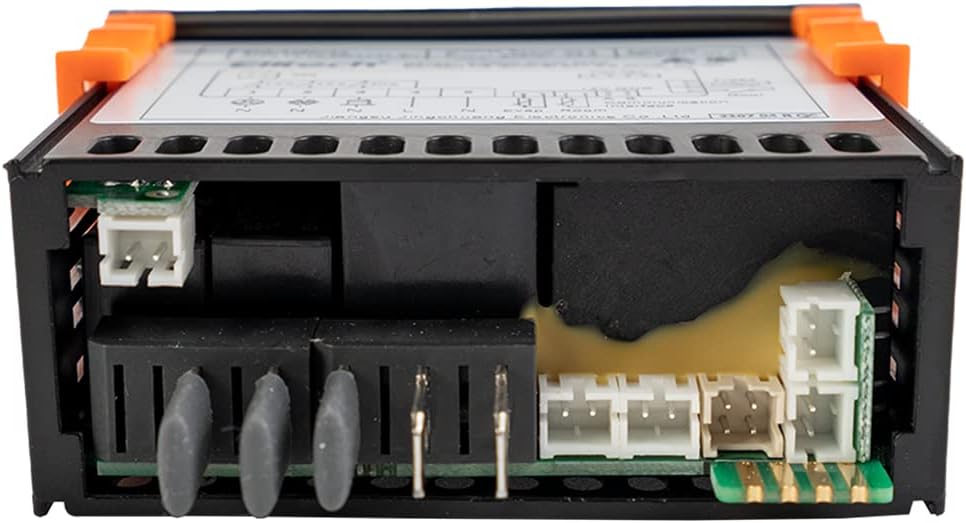
Figi 4.3: Dèyè view of the ECS-2280neo, showing the various terminal blocks for electrical connections and sensor inputs.
5. Operasyon Enstriksyon
5.1 Operasyon debaz
Upon power-up, the controller will display the current temperature. Use the "Set" button to access and modify parameters. The up and down arrows adjust values, and the "Rst" button typically confirms settings or resets alarms.

Figi 5.1: Close-up of the ECS-2280neo front panel, highlighting the digital temperature display and control buttons for 'Set', 'Light', 'Rst', and 'Up/Down' functions.
5.2 Parameter Setting with Copy Card
The ECS-2280neo supports parameter configuration using a copy card. This feature allows for quick and consistent setup across multiple units. Refer to the detailed instructions provided with your copy card for the specific procedure.
6. Antretyen
- Netwayaj: Siye panèl la devan ak yon mou, damp twal. Pa sèvi ak pwodui netwayaj abrazif oswa solvang.
- Enspeksyon: Tcheke koneksyon fil elektrik yo detanzantan pou wè si gen dezòd oswa korozyon.
- Swen Capteur: Ensure temperature sensors are clean and free from obstructions for accurate readings.
NAN. Depanaj
| Pwoblèm | Kòz posib | Solisyon |
|---|---|---|
| Ekspozisyon an vid | Pa gen pouvwa oswa fil elektrik kòrèk. | Tcheke ekipman pou pouvwa a ak koneksyon fil yo. Asire w ke vòltaj la kòrèk.tage. |
| Lekti tanperati a pa kòrèk | Faulty sensor or sensor not properly installed. | Check sensor connection. Replace sensor if damaged. |
| Kontwolè a pa reponn lè w peze bouton yo | Controller locked or internal error. | Refer to the full manual for specific lock/unlock procedures. Power cycle the device. |
| Alam kontinyèlman aktif | Temperature outside set limits or sensor error. | Check temperature and set points. Verify sensor functionality. Press 'Rst' to clear alarm. |
8. Espesifikasyon
| Paramèt | Valè |
|---|---|
| Mak | Elitech |
| Modèl | ECS-2280neo-sp |
| Kalite ekspozisyon | Digital |
| Batri obligatwa | Non |
| Peyi/Rejyon orijin | Lachin |
| ASIN | B0991KHS1N |
| UPC | 781454242771 |
9. Garanti ak sipò
For warranty information and technical support, please contact Elitech Technology, Inc. directly. Details regarding product returns and support can often be found on the official Elitech websit la oubyen atravè pwen acha ou a.
Nòt: The product is usually dispatched within 3 to 4 weeks. Return policy allows for refund/replacement within 15 days.


