1. Entwodiksyon
This manual provides comprehensive instructions for the setup, operation, and maintenance of your DIGITUS 2D Barcode Scanner (Model: DA-81002). This device is designed for efficient and accurate scanning of 1D and 2D barcodes, including QR codes, supporting bi-directional scanning at 200 scans/sec. Please read this manual thoroughly before using the scanner to ensure proper functionality and longevity.
2. Ki sa ki nan bwat la
Lè w ap ouvri pake a, tanpri verifye ke tout konpozan yo prezan epi yo pa domaje:
- 1 x 2D barcode hand scanner, QR code compatible
- 1 x scanner holder
- 1 x cable, USB - RJ45, 2 m
- 1 x Gid Enstalasyon Rapid (GIP)
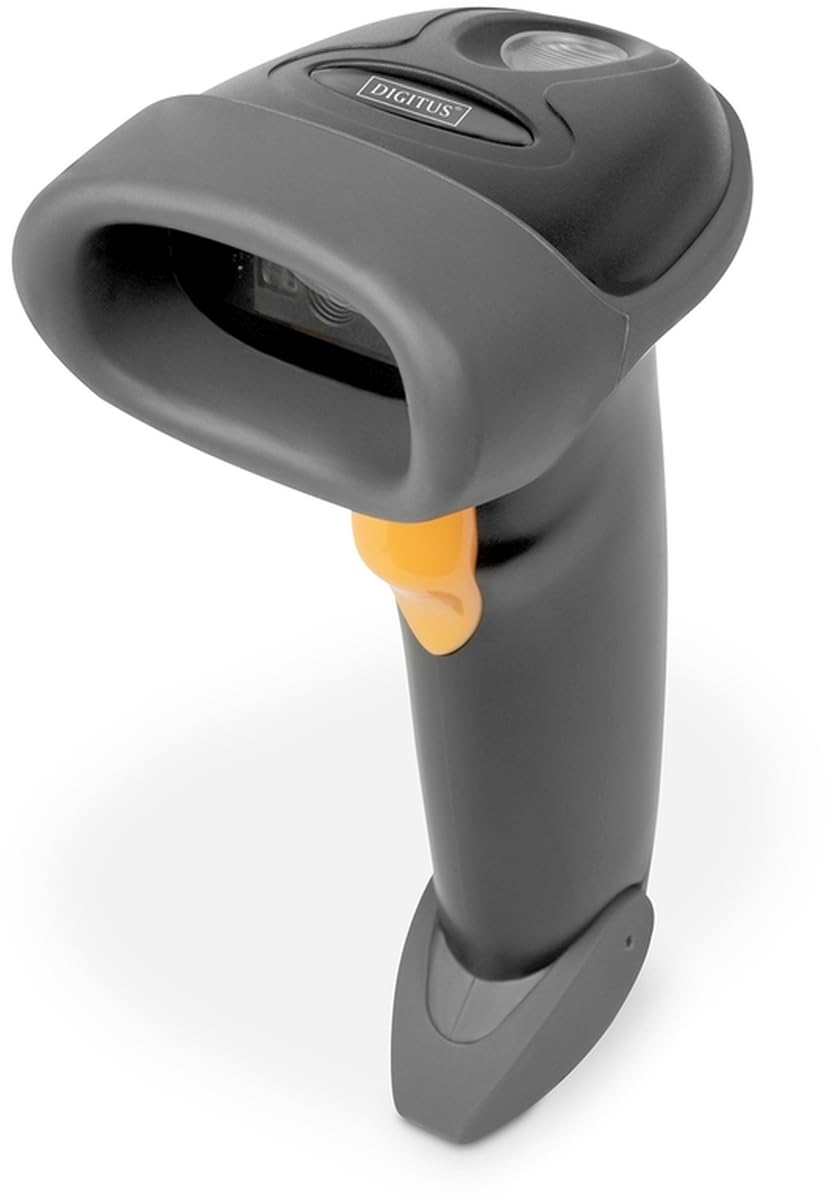
Image: The DIGITUS 2D Barcode Scanner, shown with its included stand and USB-RJ45 cable. The scanner is dark grey with an orange trigger button.
3. Enstalasyon
- Konekte kab la: Insert the RJ45 end of the provided cable into the port at the base of the barcode scanner. Ensure it clicks securely into place.
- Konekte ak aparèy lame a: Plug the USB end of the cable into an available USB port on your computer or point-of-sale (POS) system.
- Enstalasyon Chofè (Plug & Play): The scanner is typically plug-and-play and should be recognized automatically by most operating systems (Windows, macOS, Linux). No specific driver installation is usually required. If prompted, allow the system to install necessary drivers.
- Pozisyone eskanè a: Place the scanner in its holder for hands-free operation, or hold it comfortably for handheld scanning.
- Tès eskanè: Open a text editor (e.g., Notepad, Word) or a compatible application. Scan a known barcode. The data should appear in the open application.
4. Operasyon Enstriksyon
The DIGITUS 2D Barcode Scanner is designed for ease of use. Follow these steps for effective scanning:
- Pouvwa sou: The scanner powers on automatically when connected to a powered USB port. A successful power-on is usually indicated by a short beep and/or a light indicator.
- Vize: Point the scanning window towards the barcode you wish to scan. Ensure the entire barcode is within the scanner's field of view.
- Analyse: Press and hold the trigger button (orange button on the handle). A red aiming beam or illumination light will appear. Position the scanner so the aiming beam crosses the center of the barcode.
- Successful Scan: Upon a successful scan, the scanner will emit a short beep and/or the indicator light will flash. The scanned data will be transmitted to your connected device as if typed via a keyboard.
- Bi-Directional Scanning: The scanner supports bi-directional scanning, meaning it can read barcodes regardless of their orientation, improving scanning efficiency.
- QR Code Compatibility: This scanner is fully compatible with QR codes, allowing for versatile data capture.
5. Antretyen
Proper maintenance ensures the longevity and optimal performance of your barcode scanner:
- Netwaye Fenèt Eskanè a: Netwaye fenèt eskanè a regilyèman avèk yon twal mou ki pa gen pousyè. Pou tach ki difisil pou retire, siye yon ti kras.ampen the cloth with water or a mild, non-abrasive cleaner. Avoid harsh chemicals or abrasive materials that could scratch the window.
- Netwayaj jeneral: Siye deyò eskanè a avèk yon twal mou epi sèk pou retire pousyè ak salte.
- Swen kab: Evite pliye oswa tòde kab USB a twòp, paske sa ka domaje fil entèn yo.
- Depo: Lè w pa ap itilize eskanè a, sere l nan yon anviwònman pwòp epi sèk, lwen tanperati ekstrèm ak limyè solèy dirèk.
- Evite gout: While designed for durability, avoid dropping the scanner, as impact can damage internal components.
NAN. Depanaj
If you encounter issues with your DIGITUS 2D Barcode Scanner, refer to the following common problems and solutions:
| Pwoblèm | Kòz posib | Solisyon |
|---|---|---|
| Eskanè a pa limen. | No power from USB port; loose cable connection. | Ensure USB cable is securely connected to both scanner and host device. Try a different USB port or host device. |
| Eskanè a pa li kòd bar yo. | Barcode damaged/unreadable; incorrect aiming; scanner not configured for barcode type. | Ensure barcode is clear and undamaged. Aim the scanner correctly. Refer to the QIG for advanced configuration options if specific barcode types are not recognized. |
| Done eskane yo pa kòrèk oswa enkonplè. | Partial scan; software/application issue. | Ensure the entire barcode is within the scanning area. Test with a simple text editor to rule out application-specific issues. |
| Eskanè a bipe men pa gen done ki parèt. | Host device not receiving data; application not in focus. | Ensure the cursor is active in the target input field. Restart the application or host device. |
7. Espesifikasyon
Key technical specifications for the DIGITUS 2D Barcode Scanner (Model: DA-81002):
- Dimansyon pwodwi: 1.1 x 9.7 x 6.5 pous
- Pwa atik: 3.88 ons
- Nimewo Modèl Atik: DA-81002
- Manifakti: CHIFF
- Aparèy konpatib: Scanner (general purpose)
- Sous pouvwa: Elektrik ak fil (via USB)
- Koneksyon Teknoloji: USB kab
- To Scan: 200 fps (ankadreman pou chak segonn)
- Barcode konpatibilite: 1D and 2D barcodes, including QR Code
- Longè kab: 2 meters (USB - RJ45)
8. Garanti ak sipò
For warranty information and technical support, please refer to the Quick Installation Guide (QIG) included in your product package or visit the official Digitus websit la. Kenbe resi acha ou kòm prèv acha pou reklamasyon garanti.
For further assistance, you may contact Digitus customer support through their official channels. Details are typically provided in the product documentation or on the manufacturer's websit.


