Entwodiksyon
This manual provides comprehensive instructions for the safe and efficient use of your Tronsmart Apollo Air TWS Bluetooth Earphones. Please read this manual thoroughly before using the product and retain it for future reference.
Enfòmasyon sou sekirite:
- Do not expose the earphones or charging case to extreme temperatures, humidity, or corrosive environments.
- Evite lage l, frape l, oswa demonte aparèy la.
- Kenbe lwen timoun ak bèt kay.
- Sèvi sèlman ak kab chaje yo bay oswa ki sètifye.
- Prolonged exposure to high volume levels may cause hearing damage.
Pwodwi souview
Kontni pake
- Tronsmart Apollo Air TWS Bluetooth Earphones (Left and Right)
- Ka chaje
- USB Chaje Kab
- Konsèy zòrèy (divès gwosè)
- Manyèl Itilizatè (dokiman sa a)
Idantifikasyon konpozan
Familiarize yourself with the main components of your Tronsmart Apollo Air earphones and charging case.
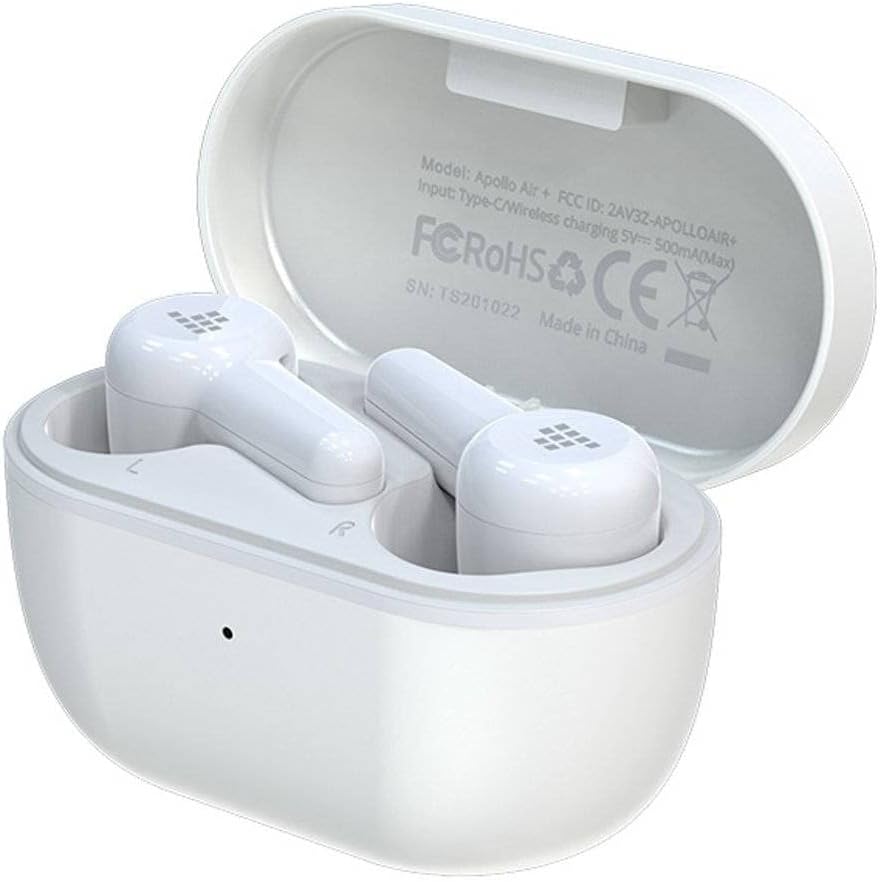
Image: Tronsmart Apollo Air TWS Earphones placed inside their open charging case. The case lid displays model information and certifications.

Image: Tronsmart Apollo Air TWS Earphones. One earbud is shown outside the charging case, highlighting its design and the charging contacts within the case.

Imaj: Yon gwo plan view of the two Tronsmart Apollo Air TWS Earbuds, showcasing their ergonomic shape, ear tips, and touch control areas.
Enstalasyon
Chaje ekoutè yo ak ka
- Chaje ka a: Connect the provided USB charging cable to the charging port on the case and to a USB power adapter (not included) or a computer's USB port. The indicator light on the case will show charging status.
- Chaje ekoutè yo: Place the earphones into the charging case. Ensure they are correctly seated in their respective slots (L for left, R for right). The earphones will automatically begin charging. The indicator lights on the earphones will show charging status.
- Fully charge the earphones and case before first use.
Pè Bluetooth
- Pwen inisyal: Open the charging case. The earphones will automatically enter pairing mode, indicated by flashing lights (refer to product for specific light patterns).
- Sou aparèy ou an (telefòn entelijan, tablèt, elatriye), aktive Bluetooth epi chèche aparèy ki disponib yo.
- Select "Tronsmart Apollo Air" from the list of found devices.
- Yon fwa konekte, yon enstriksyon vokal oswa yon limyè endikatè ap konfime koneksyon an reyisi.
- Re-paire: If the earphones do not connect automatically, ensure Bluetooth is enabled on your device and the earphones are charged. You may need to manually select "Tronsmart Apollo Air" from your device's Bluetooth menu.
Itilizasyon ekoutè yo
Power On/Off
- Pouvwa sou: Louvri bwat chaje a, oubyen retire kas ekoutè yo nan bwat la. Y ap limen otomatikman.
- Pouvwa Off: Mete ekoutè yo tounen nan bwat chaje a epi fèmen kouvèti a. Y ap etenn otomatikman.
- Manyèl koupe: (If supported) Long press the touch control area on both earbuds for approximately 5 seconds until the indicator light turns off.
Touch Controls (General)
The Tronsmart Apollo Air earphones feature touch-sensitive controls. Specific functions may vary slightly, but common operations include:
- Jwe/Poz: Tape yon sèl sou chak ekoutè.
- Pwochen Track: Tape de fwa sou ekoutè dwat la.
- Track Previous: Tape de fwa sou ekoutè gòch la.
- Reponn/Fen Apèl: Tape yon sèl sou chak ekoutè.
- Rejte apèl: Peze lontan sou nenpòt ekoutè pandan 2 segonn.
- Aktive Asistan Vwa: Tape twa fwa sou nenpòt ekoutè.
- Kontwòl Volim: (If supported) Long press on the right earbud to increase volume, long press on the left earbud to decrease volume.
Note: Refer to the quick start guide included in your package for precise touch control mappings if different from above.

Image: A smartphone screen showing an equalizer application with various sound presets (e.g., Default, Deep Bass, Hi-Fi, Rock, Vocal). The Tronsmart Apollo Air earphones and charging case are visible in the background, suggesting compatibility with audio customization apps.
Antretyen
Netwayaj
- Siye ekoutè yo ak bwat chaje a dousman avèk yon twal mou, sèk e ki pa gen pousyè.
- Pa sèvi ak pwodui netwayaj abrazif, alkòl, oswa solvan chimik.
- Retire bout zòrèy yo epi netwaye yo separeman avèk savon dou ak dlo si sa nesesè, asire w ke yo byen sèk anvan ou mete yo ankò.
- Ensure charging contacts on both the earphones and case are clean and free of debris.
Depo
- Lè w pa ap itilize ekoutè yo, toujou mete yo nan bwat chaje yo pou pwoteje yo epi kenbe yo chaje.
- Sere aparèy la nan yon kote ki fre epi sèk, lwen limyè solèy dirèk ak tanperati ekstrèm.
Depanaj
If you encounter issues with your Tronsmart Apollo Air earphones, please refer to the following common solutions:
Kas ekoutè yo pa konekte oswa konekte
- Ensure both earphones are charged and taken out of the charging case.
- Etenn epi aktive Bluetooth sou aparèy ou an.
- Delete "Tronsmart Apollo Air" from your device's Bluetooth list and attempt to re-pair.
- Try resetting the earphones (refer to product-specific reset instructions if available, otherwise, place them back in the case, close, then reopen).
Pa gen son oswa volim ki ba
- Tcheke nivo volim nan tou de aparèy ki konekte a ak kas ekoutè yo.
- Asire w ke ekoutè yo byen chita nan zòrèy ou.
- Confirm the earphones are connected to the correct audio output on your device.
- Clean any debris from the earphone speaker grilles.
Pwoblèm chaje
- Asire w ke kab chaje a byen konekte ak tou de bwat la ak sous kouran an.
- Verifye si sous kouran an fonksyone.
- Netwaye kontak chaje yo sou ekoutè yo ak anndan bwat la.
- Eseye yon lòt kab chaje USB oswa adaptè kouran.
Espesifikasyon
| Karakteristik | Detay |
|---|---|
| Mak | Tronsmart |
| Non modèl | Apollo Air |
| Nimewo Modèl Atik | 372452 |
| Koneksyon | Bluetooth, San fil |
| Koulè | Blan |
| Faktè fòm | In-Ear, Basic Case |
| Materyèl | Kawotchou |
| Pwa atik | 100 g |
| Dimansyon pwodwi | 10 x 5 x 3 cm |
| Nivo rezistans dlo | Pa reziste dlo |
| Modèl Telefòn konpatib | Please check description (Generally compatible with most Bluetooth-enabled devices) |

Image: Technical diagram illustrating the precise dimensions of the Tronsmart Apollo Air charging case and individual earbuds in millimeters and inches.
Garanti ak sipò
Tronsmart products are designed and manufactured to the highest quality standards. For detailed warranty information, please refer to the warranty card included with your purchase or visit the official Tronsmart websit.
For technical support, troubleshooting assistance, or to inquire about replacement parts, please contact Tronsmart customer service through their official channels. Contact information can typically be found on the product packaging or the official Tronsmart websit.


