Entwodiksyon
This manual provides detailed instructions for the Google Pixel Buds A-Series wireless earbuds. These earbuds are designed to deliver high-quality audio and feature a comfortable, secure fit with multiple eartip sizes and a stabilizer arc. They are compatible with Android, iOS, and other Bluetooth 4.0+ devices.
Ki sa ki nan bwat la
- Ekoutè Google Pixel Buds seri A yo
- Ka chaje
- USB-C Chaje Kab
- Bouton zòrèy (Ti, Mwayen, Gwo)
- Gid demaraj rapid (pa enkli nan manyèl dijital sa a)

Image: Google Pixel Buds A-Series earbuds securely placed within their white charging case, which is open to reveal the earbuds.
Enstalasyon
1. Inisyal Pairing
For Android Devices (One-Tap Pairing):
- Ensure your Android device is unlocked and has Bluetooth enabled.
- Open the charging case of your Pixel Buds A-Series next to your Android device.
- A pairing notification will appear on your device's screen. Tap to connect.
- Follow any on-screen prompts to complete the setup, including installing the Pixel Buds app for additional features.
For iOS and Other Bluetooth 4.0+ Devices:
- With the earbuds in the charging case, open the lid.
- Press and hold the pairing button on the back of the charging case until the status light begins to pulse white.
- On your device, navigate to Bluetooth settings and select "Pixel Buds A-Series" from the list of available devices.
- Confirm the pairing on your device.
2. Reyalize yon anfòm ki an sekirite
The Pixel Buds A-Series come with three sizes of eartips (small, medium, large) and a flexible stabilizer arc to ensure a comfortable and secure fit.
- Experiment with different eartip sizes to find the best seal for your ears. A good seal is crucial for optimal sound quality and bass response.
- Gently insert each earbud into your ear, rotating slightly until the stabilizer arc tucks comfortably into your ear's concha.

Imaj: Yon gwo plan view of a single Google Pixel Bud A-Series earbud, highlighting its ergonomic design, eartip, and stabilizer arc.
Enstriksyon Operasyon
1. Touche Kontwòl
The Pixel Buds A-Series feature touch controls on the outer surface of each earbud.
- Tap sèl: Jwe/Pòz odyo a, Reponn/Fen apèl la.
- Double Tap: Skip forward a track, Decline call.
- Triple Tap: Skip backward a track.
- Peze epi kenbe: Activate Google Assistant (Android only), or hear notifications.
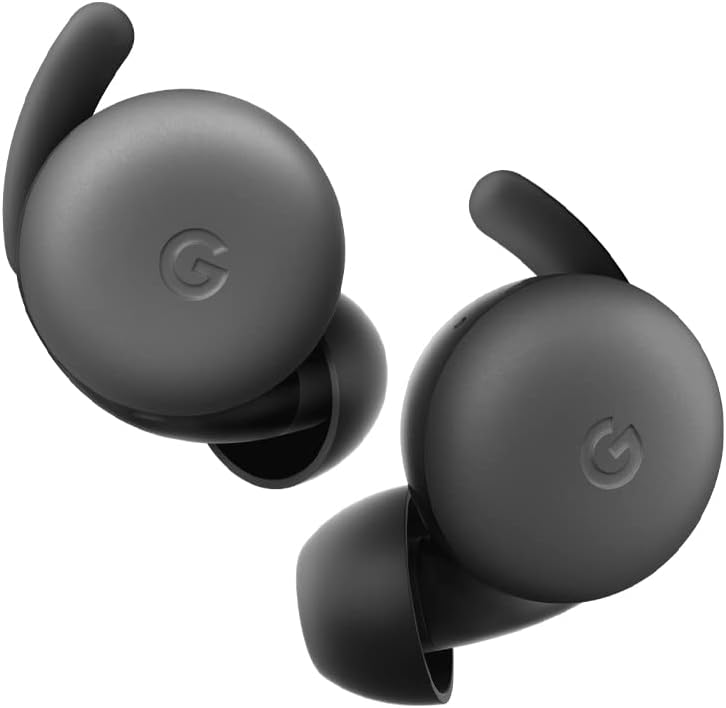
Image: A pair of Google Pixel Buds A-Series earbuds, showcasing their compact design and the 'G' logo on the touch-sensitive surface.
2. Google Assistant Integration
With a compatible Android device, you can access Google Assistant directly from your Pixel Buds A-Series.
- Say "Hey Google" or "Ok Google" to activate the Assistant hands-free.
- Alternatively, press and hold either earbud to speak to Google Assistant.
- You can ask for directions, check weather, control music, or have notifications read aloud.
3. Chaje
The Pixel Buds A-Series provide up to 5 hours of listening time or 2.5 hours of talk time on a single charge. The charging case extends this to up to 24 hours of total listening time.
- To charge the earbuds, place them inside the charging case. The indicator light on the case will show their charging status.
- To charge the case, connect it to a USB-C power source using the provided cable. The case's indicator light will show its charging status.
Antretyen
1. Netwayaj
- Regularly clean your earbuds and charging case to maintain performance and hygiene.
- Use a soft, dry, lint-free cloth to wipe the exterior of the earbuds and case.
- For eartips, gently remove them and clean with a mild soap solution and water, then rinse and dry thoroughly before reattaching.
- Evite itilize materyèl abrazif oswa pwodwi chimik piman bouk.
2. Depo
- Always store the Pixel Buds A-Series in their charging case when not in use to protect them and keep them charged.
- Sere nan yon kote ki fre epi sèk, lwen tanperati ekstrèm ak limyè solèy dirèk.
Depanaj
Si w rankontre pwoblèm ak Pixel Buds A-Series ou yo, eseye etap sa yo:
- Pa gen son oswa koneksyon tanzantan:
- Asire ke tou de ekoutè yo chaje.
- Tcheke si Bluetooth la aktive sou aparèy ou an epi ekoutè yo konekte.
- Try placing the earbuds back in the case, closing the lid for a few seconds, then reopening to reset the connection.
- Bliye aparèy la nan paramèt Bluetooth telefòn ou an epi re-asosye li.
- Asire w aparèy ou an nan zòn Bluetooth la (jiska 10 mèt).
- Ekoutè pa chaje:
- Asire w ke bwat chaje a li menm chaje.
- Verify that the earbuds are correctly seated in the charging case.
- Netwaye kontak chaje yo sou tou de ekoutè yo ak anndan bwat la ak yon ti sèvyèt koton sèk.
- Eseye yon lòt kab USB-C ak yon lòt adaptè kouran.
- Kalite son pòv:
- Ensure you have a secure fit with the correct eartip size.
- Clean the earbud mesh and eartips.
- Tcheke paramèt odyo ak egalizatè aparèy ou an.
Espesifikasyon
| Non modèl | Pixel Buds Seri A |
| Koneksyon Teknoloji | San fil (Bluetooth 5.0) |
| Aparèy konpatib | Android, iOS, and Bluetooth 4.0+ devices |
| Dire batri (ekoutè) | Jiska 5 èdtan koute, 2.5 èdtan pale |
| Dire batri (ak bwat chaje) | Up to 24 hours listening |
| Nivo rezistans dlo | Water Resistant (IPx4 rating for earbuds) |
| Kalite kontwòl | Touch (Media Control, Google Assistant) |
| Pwa atik | 1.9 ons (total) |
| Dimansyon (Ekoutè) | 0.81 x 1.15 x 0.69 pous |
| Gamme frekans | 20 Hz - 20,000 Hz |
| Gamme Bluetooth | 10 mèt |
Garanti ak sipò
For detailed warranty information and customer support, please refer to the official Google Pixel Buds support websit la. Anjeneral, ou ka jwenn resous sipò, FAQ, ak opsyon kontak nan g.co/pixelbuds/help.
The Pixel Buds A-Series are designed to be repairable, but any repair, disassembly, or damage may affect the water resistance rating.


