Entwodiksyon
The EGLOO S4 is a versatile 1080P Wi-Fi smart camera designed for comprehensive home monitoring. It functions as a security camera, baby monitor, and pet camera, offering advanced features such as integrated temperature and humidity monitoring, remote appliance control, motion and sound detection with real-time alerts, clear IR night vision, and two-way audio communication. Its wide field of view and digital zoom capabilities provide comprehensive coverage for various indoor environments.
Enfòmasyon sou Sekirite
- Ensure the camera is placed on a stable, flat surface to prevent falling.
- Kenbe aparèy la lwen dlo, imidite, ak tanperati ekstrèm.
- Pa eseye demonte oswa repare aparèy la tèt ou. Konsilte pèsonèl sèvis kalifye.
- Sèvi sèlman ak adaptè kouran ki vini ak li a pou evite domaj.
- Keep out of reach of children and pets to avoid accidental damage or injury.
- Evite mete kamera a anba limyè solèy dirèk oswa toupre sous chalè.
Kontni pake
Tanpri verifye ke tout atik yo prezan nan pakè ou a:
- EGLOO S4 Smart Home Security Camera
- Adaptè pouvwa
- Manyèl Itilizatè (dokiman sa a)
- Mounting Accessories (if applicable, not specified but common)
Pwodwi souview

Devan view of the EGLOO S4 camera, showcasing its compact dome design with a black camera head and a light-colored base.

The EGLOO S4 camera held in a hand, illustrating its small and portable size.
Karakteristik kle:
- Videyo 1080P Full HD: Provides clear and detailed video monitoring.
- Capteur Tanperati ak Imidite: Real-time environmental monitoring.
- Deteksyon Mouvman ak Son: Receive instant alerts on your mobile device.
- Motion Tracking (AI Supported): Swiv mouvman detekte a otomatikman.
- Remote Appliance Control: Control compatible appliances from anywhere.
- Clear IR Night Vision: Asire vizibilite nan kondisyon ki pa twò klere.
- Lantiy gran ang 140°: Ofri yon pakèt domèn view.
- Zoom dijital 8x: Zoom in for closer details.
- De-fason odyo: Kominike avèk moun oswa bèt kay atravè kamera a.
- 4-Channel Simultaneous Screen: Monitor multiple cameras or views nan yon fwa.
- Enstalasyon fasil: Designed for quick and straightforward installation.

Diagram illustrating the key features of the EGLOO S4 camera, including temperature/humidity, motion/sound alerts, motion tracking, 1080P video, and easy setup.

A smartphone screen displaying a 4-channel simultaneous view from the EGLOO S4 camera, highlighting features like night vision, wide angle, digital zoom, and two-way audio.
Gid Enstalasyon
1. Download the EGLOO App:
Chèche pou "EGLOO" in your mobile device's app store (App Store for iOS or Google Play Store for Android) and download the official application. Alternatively, scan the QR code below:

Scan this QR code to quickly download the EGLOO application.
Pou plis enfòmasyon, vizite: http://m.site.naver.com/0ZStX
2. Souvwa Kamera a:
Connect the provided power adapter to the camera's power port and plug it into a wall outlet. The camera will power on automatically.
3. Add Device in App:
- Open the EGLOO app and create an account or log in.
- Follow the in-app instructions to add a new device. This typically involves selecting your camera model and connecting it to your Wi-Fi network (2.4GHz Wi-Fi is supported).
- Ensure your mobile device is connected to the same Wi-Fi network during the setup process.

A hand holding a smartphone displaying the EGLOO application logo, indicating readiness for setup.
Enstriksyon Operasyon
Viv View ak Kontwòl:
Once connected, you can access the live video feed from your camera through the EGLOO app. Use the on-screen controls to pan, tilt, and zoom the camera, activate two-way audio, or take snapshots/record video.
Siveyans Tanperati ak Imidite:
The EGLOO S4 continuously monitors the ambient temperature and humidity. View real-time data directly within the app to ensure optimal environmental conditions, especially for baby or pet monitoring.
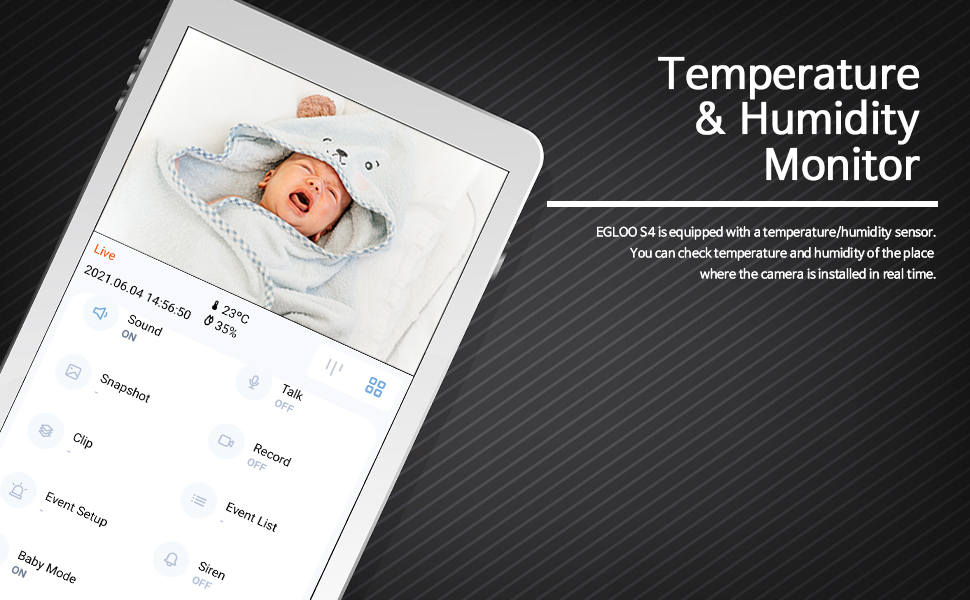
The EGLOO app interface displaying real-time temperature and humidity readings alongside the live camera feed, useful for monitoring a baby's room.
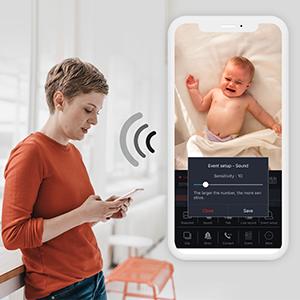
Deteksyon Mouvman ak Son:
Configure motion and sound detection settings in the app to receive instant push notifications when activity is detected. Adjust sensitivity levels to minimize false alerts.

A woman checking her smartphone, which displays notification alerts from the EGLOO S4 camera for motion and sound detection.
Remote Appliance Control:
The EGLOO S4 can act as a smart remote control for various home appliances. Follow the in-app guide to pair your appliances with the camera for remote operation.

An illustration showing the EGLOO S4 camera positioned in a living room, with lines indicating its ability to connect and control various home appliances remotely.

A smartphone screen displaying controls for an air conditioner, demonstrating the remote appliance control feature of the EGLOO S4 camera.
Vizyon lannwit:
The camera automatically switches to infrared (IR) night vision in low-light conditions, providing clear black-and-white video. The "Night Color" technology enhances visibility.
A split image demonstrating the difference between normal lighting and the clear infrared night vision capability of the camera in a room setting.
De-fason Audio:
Utilize the two-way audio feature to speak through the camera and hear responses. This is ideal for comforting a baby, communicating with a pet, or interacting with family members.

An image of a puppy with a speech bubble saying "Hi, puppy!", illustrating the two-way audio communication feature of the camera for interacting with pets.
Antretyen
- Netwayaj: Siye lantiy kamera a ak kò a dousman avèk yon twal mou epi sèk. Pa sèvi ak pwodui chimik ki agresif oswa pwodui netwayaj abrazif.
- Depo: Si w ap sere kamera a pou yon bon bout tan, dekonekte l nan kouran an epi mete l nan yon kote ki fre epi sèk.
- Mizajou lojisyèl: Regularly check the EGLOO app for firmware updates to ensure optimal performance and security.
Depanaj
| Pwoblèm | Kòz posib | Solisyon |
|---|---|---|
| Kamera a pa konekte ak Wi-Fi a. | Modpas Wi-Fi ki pa kòrèk; kamera a twò lwen routeur la; rezo Wi-Fi 5GHz. | Verify Wi-Fi password. Move camera closer to router. Ensure you are connecting to a 2.4GHz Wi-Fi network. Restart camera and router. |
| No notifications received. | App notification settings disabled; phone notification settings disabled; incorrect detection sensitivity. | Check notification settings within the EGLOO app. Verify phone's system notification settings for the EGLOO app. Adjust motion/sound detection sensitivity. |
| Move kalite videyo. | Weak Wi-Fi signal; insufficient bandwidth. | Ensure strong Wi-Fi signal. Reduce other network activity. Consider moving camera closer to router or upgrading internet plan. |
| Kamera a pa reponn. | Pwoblèm kouran; pwoblèm lojisyèl. | Unplug the power adapter, wait 10 seconds, then plug it back in to restart the camera. If the issue persists, contact customer support. |
Espesifikasyon
| Karakteristik | Detay |
|---|---|
| Non modèl | S4 |
| Nimewo Modèl Atik | TSC-221P |
| Koneksyon Teknoloji | San fil (Wi-Fi) |
| Rezolisyon Capture Videyo | 1080p |
| Maksimòm WebCam Imaj Rezolisyon | 200 MP |
| Jaden nan View | 360 Degre |
| Kalite Zoom | Zoom dijital |
| Teknoloji limyè ki ba | Koulè lannwit |
| Kalite Alèt | Odyo ak Mouvman |
| Dimansyon atik (L x W x H) | 4.34 x 3.1 x 4.34 pous |
| Pwa atik | 0.44 liv (7 ons) |
| Sous pouvwa | AC Adapter (Batteries Not Required) |
| Rating Pwoteksyon Entènasyonal | IP65 |
| Manifakti | VRE |
Garanti ak sipò
For warranty information and technical support, please refer to the official EGLOO website or contact the manufacturer directly. The installation manual is available as a PDF document for further reference.
Manifakti: VRE
Manyèl Enstalasyon (PDF): Telechaje PDF


