Entwodiksyon
Thank you for choosing the Dolphin BoxParty 2120 Dual 12-inch Party Speaker. This manual provides essential information for the safe and efficient operation of your new speaker. Please read it thoroughly before use and retain it for future reference.
Kontni pake
Asire w tout atik ki nan lis anba a yo nan pake w la:
- Dolphin BoxParty 2120 Speaker Unit
- Gid itilizatè (dokiman sa a)
- Kat Garanti
- Kontwòl Remote
- Mikwofòn branche
- Kòd pouvwa
- External Battery Cable
- AUX kab

Image: Dolphin BoxParty 2120 speaker and its accessories.
Pwodwi souview
The Dolphin BoxParty 2120 is a portable and rechargeable party speaker designed for powerful audio output and versatile connectivity. It features dual 12-inch woofers, a Hi-Fi amplifier, a 5-band equalizer, and dynamic LED lights.

Imaj: Devan view of the Dolphin BoxParty 2120 speaker highlighting the dual 12-inch woofers and LED lights.

Imaj: Bò kote view of the Dolphin BoxParty 2120 speaker, illustrating its portability with a retractable trolley handle and wheels.
Enstalasyon
- Debake: Retire oratè a ak tout akseswa yo nan anbalaj la avèk prekosyon.
- Inisyal chaj: Before first use, connect the speaker to a power outlet using the provided power cord. Allow the unit to charge fully. The charging indicator light will change when charging is complete.
- Pouvwa sou: Locate the power switch on the rear control panel and switch it to the 'ON' position.
Enstriksyon Operasyon
The BoxParty 2120 offers multiple ways to play audio and customize your sound experience.

Imaj: Detaye view nan panèl kontwòl oratè a.
Bluetooth Koneksyon
- Asire w ke oratè a limen.
- Press the 'MODE' button on the control panel or remote until 'BLUE' appears on the LED display, indicating Bluetooth mode.
- Sou aparèy mobil ou, aktive Bluetooth epi chèche aparèy ki disponib.
- Select 'Dolphin SP-2120RBT' from the list. A confirmation tone will sound upon successful pairing.
- Kounye a ou kapab difize odyo san fil soti nan aparèy ou an nan oratè a.
Lektur kat USB/SD
- Insert a USB drive or SD card (with MP3 files) into the corresponding slot on the control panel.
- The speaker will automatically switch to USB/SD mode and begin playing audio. If not, press the 'MODE' button to select.
- Use the playback controls (Play/Pause, Next/Previous Track) on the control panel or remote to manage your music.
Antre oksilyè
- Connect an external audio device (e.g., smartphone, tablet, MP3 player) to the 'AUX IN' port on the control panel using the provided AUX cable.
- Press the 'MODE' button until 'LINE' appears on the LED display.
- Jwe odyo soti nan aparèy konekte ou an.
Mikwofòn ak Guitar Antre
- Connect the wired microphone to the 'MIC IN' port.
- Connect a guitar to the 'JITAR IN' port.
- Adjust the 'M.VOL' (Microphone Volume) and 'JITAR.VOL' (Guitar Volume) knobs to your desired levels.
- Use the 'M.ECHO' knob to add echo effects to the microphone.
Equalizer and Sound Controls
The speaker features a 5-band equalizer and individual control knobs for fine-tuning your audio:
- Volim: Kontwòl volim mèt.
- X-Bass: Amelyore frekans bas yo.
- M.Bass / M.Treble: Adjusts bass and treble for the microphone.
- 5-Band egalize: Adjust specific frequency ranges (200Hz, 500Hz, 1KHz, 5KHz, 12KHz) to customize the overall sound profile.
Dirije Limyè
The speaker features dynamic LED lights that can sync with the music. Use the 'LED LIGHT' switch on the control panel to turn the lights ON or OFF.

Image: Speaker with LED lights active, demonstrating the visual effect and the control switch.
WaveSync Technology
The BoxParty 2120 supports WaveSync technology, allowing you to wirelessly pair two compatible Dolphin speakers for a true stereo sound experience. Refer to the WaveSync pairing instructions in the full user guide for detailed steps.
Video: Official Dolphin video showcasing the BoxParty 2120 speaker's features, including sound quality, LED lights, and connectivity options.
Chaje ak batri
The speaker is equipped with a built-in rechargeable 12V 7000mAh lead-acid battery, providing over 7 hours of continuous music playback on a full charge.
- Chaje: Connect the power cord to the 'POWER INPUT (AC110-240V)' port and a wall outlet. The 'CHARGE' indicator light will illuminate during charging.
- Ekstèn batri: For extended playtime, you can connect an external 12V battery to the 'EXTERNAL BATTERY INPUT 12V DC' terminals using the provided external battery cable. Ensure correct polarity (red to positive, black to negative).

Image: Speaker used outdoors, highlighting its long battery life.
Antretyen
- Netwayaj: Sèvi ak yon twal mou epi sèk pou netwaye deyò oratè a. Pa sèvi ak pwodui netwayaj abrazif oswa solvan.
- Depo: Sere oratè a nan yon kote ki fre epi sèk, lwen limyè solèy dirèk ak tanperati ekstrèm.
- Swen batri: To prolong battery life, fully charge the speaker before storing it for extended periods. Recharge every 3-6 months if not in use.
Depanaj
| Pwoblèm | Kòz posib | Solisyon |
|---|---|---|
| Pa gen pouvwa | Batri a fini; Kòd kouran an pa konekte | Charge the battery; Ensure power cord is securely connected |
| Pa gen son | Volim twò ba; Mòd antre ki pa kòrèk; Aparèy pa konekte (Bluetooth) | Increase volume; Select correct input mode; Pair Bluetooth device |
| Pwoblèm appariement Bluetooth | Device too far; Speaker not in pairing mode; Interference | Move device closer; Ensure speaker is in Bluetooth mode; Restart both devices |
| Limyè ki ap dirije pa travay | LED switch is OFF | Toggle the 'LED LIGHT' switch to ON |
Espesifikasyon
- Modèl: SP-2120RBT
- Mak: Dolphin
- Kalite montaj: Otonòm
- Sous pouvwa: Fil elektrik, batri
- Koneksyon Teknoloji: Bluetooth, USB, Kat SD, AUX, Radyo FM
- Antre odyo: 1/4" Microphones, Guitars
- Kantite chanèl: 2
- Enpedans: 4 Ohm
- Materyèl: Metal (grille), ABS Plastic (cabinet)
- Pwa atik: 36 liv
- Dimansyon pwodwi (L x W x H): 14 x 14 x 32 pous
- Batri: 1 x 12V 7000mAh (enkli)
- UPC: 850006218578
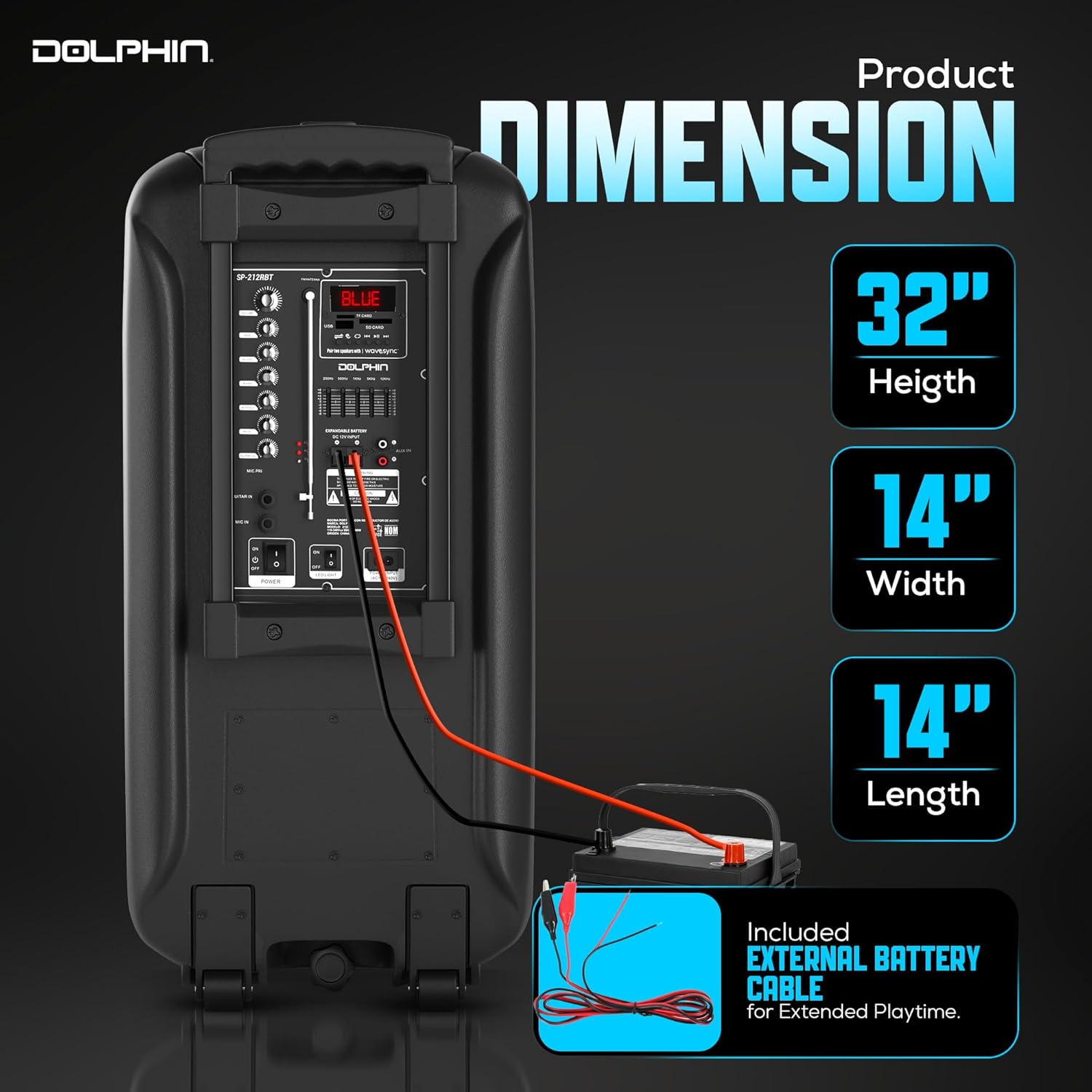
Image: Speaker dimensions for reference.
Garanti ak sipò
This product includes a Warranty Card. Please refer to the card for detailed warranty information, terms, and conditions. For technical support or service inquiries, please contact Dolphin customer service through the contact information provided on your Warranty Card or the official Dolphin websit.


