1. Entwodiksyon
The Lenco Xemio-560BU is a versatile MP3/MP4 player designed for portable entertainment. It features 8GB of internal storage, expandable up to 128GB via a microSD card slot, a 1.8-inch color TFT screen, and a built-in voice recorder. This manual provides essential information for setting up, operating, and maintaining your device, ensuring you get the most out of its features.
2. Enfòmasyon sou Sekirite
Please read and understand all safety instructions before using the device. Failure to follow these instructions may result in injury or damage to the device.
- Pa ekspoze aparèy la nan dlo, imidite, oswa tanperati ekstrèm.
- Evite koute mizik pandan lontan ak yon volim ki wo pou anpeche domaj nan zòrèy ou.
- Use only the supplied USB cable and compatible power sources for charging.
- Pa eseye demonte, repare, oswa modifye aparèy la tèt ou. Konfye tout antretyen bay pèsonèl kalifye.
- Keep the device and accessories out of reach of small children.
3. Pwodwi souview
3.1 Konpozan Aparèy

This image displays the front of the Lenco Xemio-560BU MP3/MP4 player. The device features a blue casing with yellow control buttons shaped like a paw print. The 1.8-inch color TFT screen is visible at the top, displaying icons for music, photos, videos, and settings. Below the screen are the 'M' (Menu), 'Return', 'Previous/Rewind', 'Next/Fast Forward', 'Play/Pause', 'Volume Up (+)', and 'Volume Down (-)' buttons.
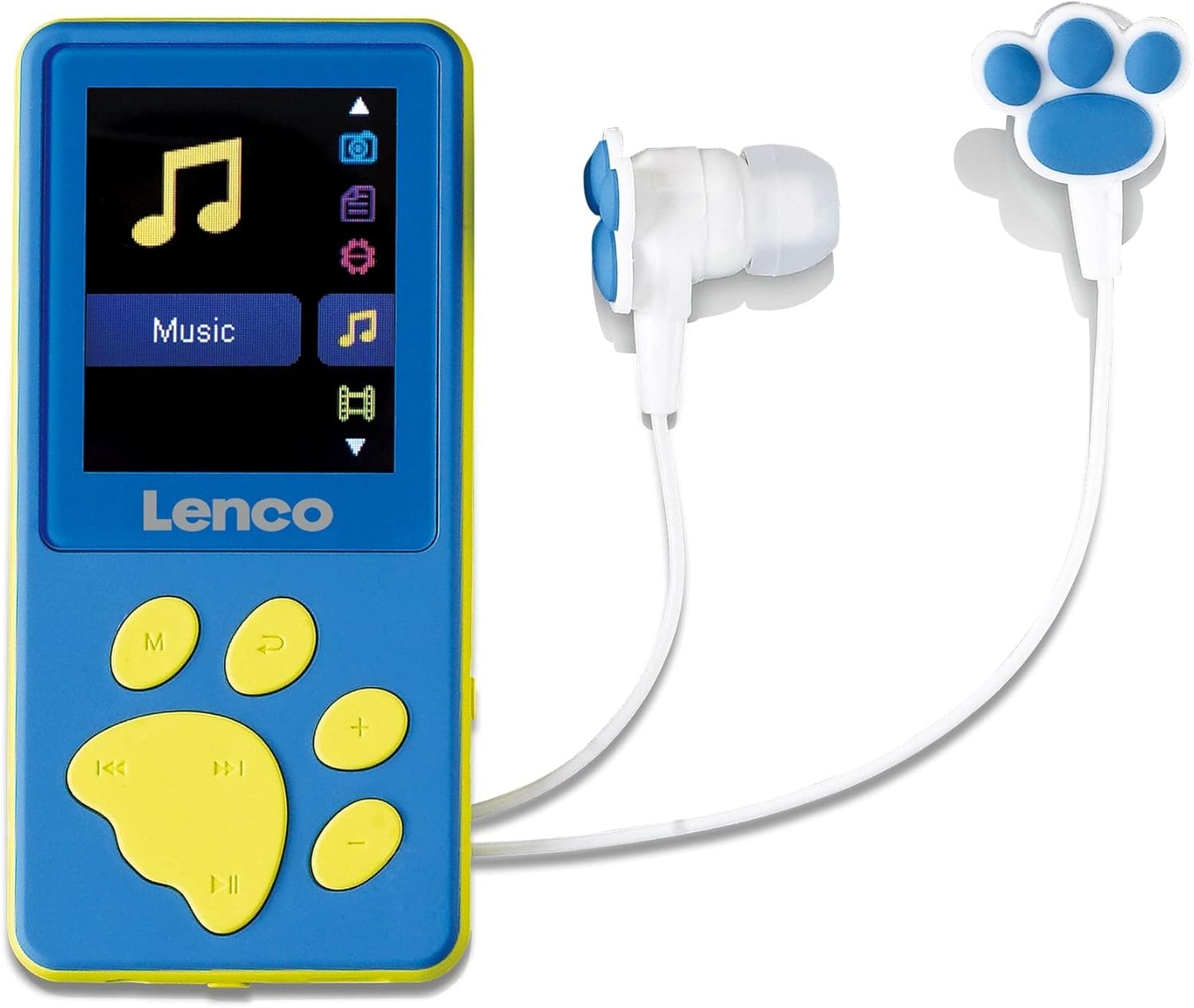
This image shows the Lenco Xemio-560BU MP3/MP4 player alongside its included earbuds. The player is blue with yellow paw-print shaped buttons. The earbuds are white with blue paw print accents on the earpieces, designed for comfortable listening.

This image presents the back of the Lenco Xemio-560BU MP3/MP4 player. The casing is solid blue, and visible markings include 'Made in PRC', 'CE', and 'FC' logos, indicating compliance with various standards.
3.2 Konpozan ki enkli yo
The following items are included with your Lenco Xemio-560BU MP3/MP4 Player:
- Lenco Xemio-560BU MP3/MP4 Player
- In-ear headphones (earbuds with paw print design)
- 3 pairs of ear tips (various sizes)
- USB kab
4. Enstalasyon
4.1 Chaje Aparèy la
Before first use, fully charge the player. Connect the supplied USB cable to the player's USB port and to a computer's USB port or a compatible USB power adapter (not included). The battery status indicator on the screen will show charging progress. A full charge typically takes a few hours.
4.2 Mete yon Kat MicroSD
The Xemio-560BU has 8GB of internal memory, which can be expanded. Locate the microSD card slot on the side of the player. Insert a microSD card (up to 128GB, not included) into the slot until it clicks into place. Ensure the card is inserted with the correct orientation to avoid damage. To remove, gently push the card in until it springs out.
4.3 Limen/Etenyen
To turn the device on, press and hold the 'Play/Pause' button or the 'M' button for a few seconds until the screen lights up. To turn it off, press and hold the same button until the screen goes blank.
5. Operasyon Enstriksyon
5.1 Navigasyon debaz
- Bouton M (Meni): Press to access the main menu or return to the previous menu level.
- Previous/Rewind (⏪) and Next/Fast Forward (⏩) Buttons: Use to navigate through menu options, select tracks, or fast forward/rewind during playback.
- Play/Pause (⏸) Button: Press to select an option, start/pause playback, or confirm an action.
- Bouton pou monte volim (+) ak bouton pou desann volim (-): Ajiste volim lekti a.
5.2 Mizik lèktur
- From the main menu, select the 'Music' icon.
- Browse your audio files and folders using the navigation buttons.
- Press the 'Play/Pause' button to select a song and begin playback.
- Use the 'Previous/Rewind' and 'Next/Fast Forward' buttons to skip tracks. Hold them down to fast forward or rewind within a track.
- Adjust the volume using the '+' and '-' buttons. Note: The device may display a warning message when increasing volume to prevent hearing damage. Press the '+' button again to confirm and proceed with volume adjustment.
5.3 lèktur videyo
The player supports MP4 (XVID) video format.
- From the main menu, select the 'Video' icon.
- Navige nan videyo ou a files.
- Press the 'Play/Pause' button to start playback.
5.4 Image and E-book Viewing
The player supports BMP and JPEG image formats, and TXT e-book formats.
- Select the 'Photos' or 'E-books' icon from the main menu.
- Browse epi chwazi sa ou vle a file pou view.
5.5 Anrejistreman vwa
The Xemio-560BU features an integrated microphone for voice recording.
- From the main menu, select the 'Voice Recorder' icon.
- Press the 'Play/Pause' button to start recording.
- Press the 'Play/Pause' button again to stop and save the recording.
5.6 File Transfè
Pou transfere files to or from your player:
- Connect the player to your computer using the supplied USB cable.
- The player will be recognized as a removable disk drive on your computer.
- Open the player's drive and drag and drop your desired audio, video, image, or text files into the appropriate folders (e.g., 'Music', 'Video', 'Photos').
- Retire aparèy la nan òdinatè w la san danje anvan ou dekonekte kab USB a.
6. Antretyen
6.1 Netwayaj
Wipe the device with a soft, dry, lint-free cloth. Do not use liquid cleaners, aerosols, or harsh chemicals, as these may damage the surface or internal components.
6.2 Swen Batri
To prolong the life of the internal Lithium Polymer battery, avoid fully discharging it frequently. Charge the device regularly, even if not in constant use. Store the device with a partial charge if it will not be used for an extended period.
6.3 Depo
When not in use, store the Lenco Xemio-560BU in a cool, dry place, away from direct sunlight and extreme temperatures.
NAN. Depanaj
7.1 Device is Unresponsive or Frozen
If the device becomes unresponsive, especially after a volume warning message, it may be temporarily frozen. In such cases, allow the battery to fully discharge. Once discharged, recharge the device to reset it. If the issue persists, check the Lenco support website for potential firmware updates or further troubleshooting steps.
7.2 Cannot Transfer Files
- Asire w kab USB a byen konekte ak tou de jwè a ak òdinatè a.
- Eseye konekte nan yon pò USB diferan sou òdinatè w lan.
- Verify that the player is recognized as a removable disk drive in your computer's file eksploratè.
- Asire w la files you are trying to transfer are in a supported format (MP3, MP4 (XVID), BMP, JPEG, TXT).
7.3 No Sound from Headphones
- Check that the headphones are fully plugged into the 3.5mm headphone jack.
- Ensure the volume is not set to zero or muted. Increase the volume using the '+' button.
- Test with a different pair of headphones to rule out a faulty headphone issue.
- Asire odyo a file format is supported (MP3).
8. Espesifikasyon
| Karakteristik | Spesifikasyon |
|---|---|
| Nimewo Modèl | Xemio-560BU |
| Kapasite Depo Entèn | 8GB |
| Maximum Expandable Storage | 128GB (Micro SD card) |
| Kalite ekspozisyon | TFT LCD |
| Gwosè ekran | 1.8 pous |
| Rezolisyon ekran | 160x120 piksèl |
| Fòma odyo sipòte | MP3 |
| Sipò pou Fòma Imaj | BMP, JPEG |
| Sipòte fòma videyo | MP4 (XVID) |
| Fòma tèks ki sipòte yo | TXT |
| Kalite batri | 1 Lityòm Polymère (enkli) |
| Dimansyon pwodwi (L x W x H) | 4.72 x 4.33 x 1.57 pous |
| Pwa atik | 3.17 ons |
| Enpedans kas ekoutè | 32.00 ohm |
| Karakteristik espesyal | Voice Recorder, Integrated Microphone |
9. Garanti ak sipò
9.1 Garanti manifakti a
The Lenco Xemio-560BU MP3/MP4 Player is covered by a Garanti manifakti 24 mwa from the original date of purchase. This warranty covers defects in materials and workmanship under normal use. It does not cover damage caused by misuse, accidents, unauthorized modifications, or normal wear and tear.
9.2 Sipò pou Kliyan
For technical assistance, warranty claims, or further information regarding your Lenco Xemio-560BU, please visit the official Lenco website or contact their customer service department. You may also find additional resources, FAQs, and updated manuals available for download on the product support page.


