1. Entwodiksyon
The ISOtunes Pro Aware Bluetooth Hearing Protection Earbuds are designed to provide both hearing protection and enhanced situational awareness in noisy environments. Featuring Aware Technology, these earbuds allow users to hear their surroundings while protecting against sudden loud noises. They offer Bluetooth connectivity for audio streaming and calls, a 26 dB Noise Reduction Rating (NRR), and IP67 dust, sweat, and water resistance.

Image 1.1: ISOtunes Pro Aware Bluetooth Hearing Protection Earbuds. These earbuds feature a black cable connecting two green and black earbuds, with an inline control panel.
2. Pake kontni
Verifye ke tout atik yo prezan nan pakè ou a:
- ISOtunes Pro Aware Earbuds
- Ka pote
- Kab chaje (USB)
- 4 Pairs of Trilogy™ Eartips (XS, S, M, L)
- 1 Pair of Silicone Triple Flange Eartips
- Clip Rad
- Klip kòd

Image 2.1: Contents of the ISOtunes Pro Aware package, including the earbuds, carrying case, charging cable, and various ear tip sizes.
3. Enstalasyon
3.1 Ear Tip Selection and Insertion
Proper ear tip selection and insertion are crucial for achieving the advertised 26 dB Noise Reduction Rating (NRR) and optimal sound quality. Experiment with the included Trilogy™ foam eartips and silicone triple flange eartips to find the best fit for your ears.
- Chwazi gwosè ki kòrèk la: Choose the eartip size that provides a snug, comfortable seal in your ear canal.
- Compress Foam Eartips: For foam eartips, roll the foam between your fingers into a thin, creased cylinder.
- Insert into Ear Canal: Gently insert the compressed foam eartip or silicone eartip into your ear canal.
- Pèmèt elaji: Hold the eartip in place until the foam fully expands, creating a tight seal. For silicone tips, ensure a secure fit.
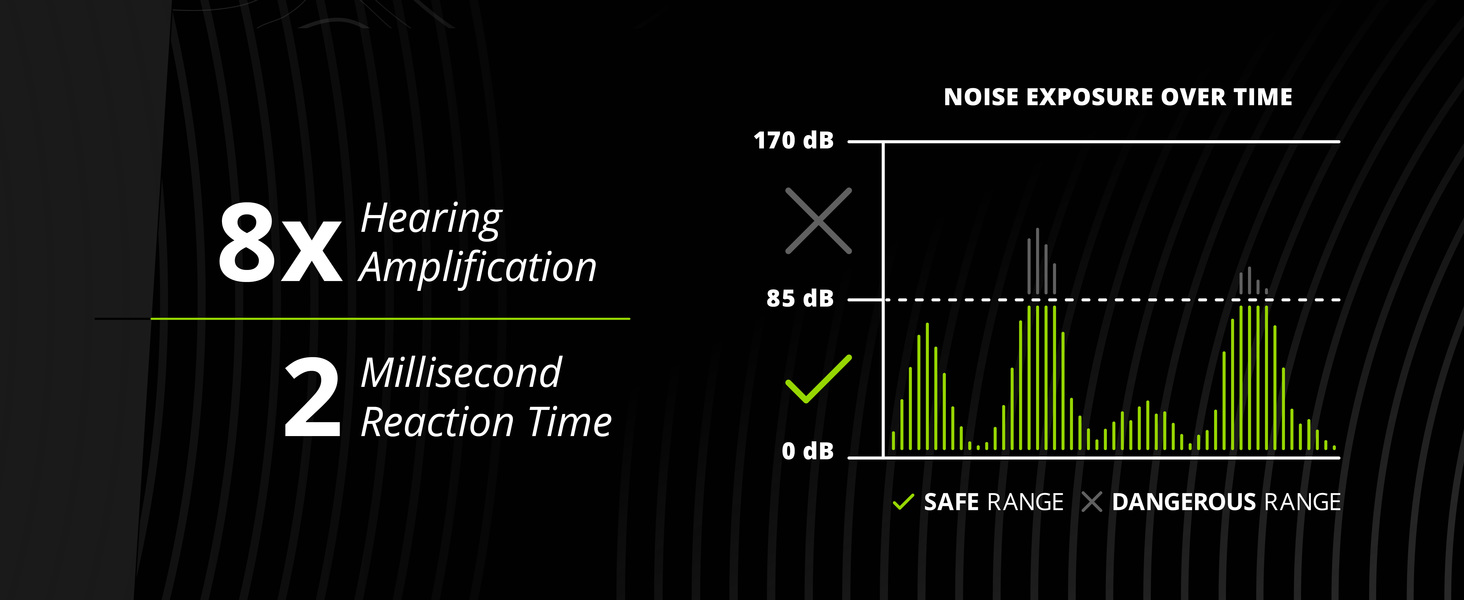
Image 3.1: Visual guide for selecting and inserting ear tips, showing silicone, short foam, and tall foam options, and the process of rolling and inserting foam tips.
3.2 Chaje ekoutè yo
Before first use, fully charge your ISOtunes Pro Aware earbuds. A full charge provides up to 10 hours of battery life for audio playback or up to 20 hours for Aware Technology use.
- Connect the provided USB charging cable to the charging port on the inline control panel.
- Konekte lòt bout kab USB a nan yon sous kouran USB konpatib (pa egzanp, òdinatè, adaptè miray).
- The indicator light on the control panel will show charging status (refer to LED indicator section for details).
3.3 Bluetooth Pairing
The ISOtunes Pro Aware uses Bluetooth 5.0 for wireless connectivity.
- Pouvwa sou: Press and hold the multi-function button (center button) on the inline control panel for approximately 3 seconds until the indicator light flashes blue and red, indicating pairing mode.
- Aktive Bluetooth: Sou aparèy ou an (telefòn entelijan, tablèt, òdinatè), aktive Bluetooth.
- Chwazi Aparèy: In your device's Bluetooth settings, search for "ISOtunes PRO Aware" and select it to pair.
- Konfimasyon: Once paired, the indicator light on the earbuds will flash blue, and you may hear an audio confirmation.

Imaj 3.2: Yon ansyenample of a device's Bluetooth settings screen, showing "ISOtunes PRO Aware" available for connection.
4. Operasyon Enstriksyon
4.1 Power On/Off
- Pouvwa sou: Press and hold the multi-function button (center button) on the inline control panel for approximately 3 seconds until the LED indicator lights up.
- Pouvwa Off: Peze epi kenbe bouton milti-fonksyon an pou apeprè 5 segonn jiskaske endikatè LED la etenn.
4.2 Aware Technology
Aware Technology utilizes omnidirectional microphones to allow you to hear your surroundings while providing protection from sudden loud impact noises. This feature enhances situational awareness without compromising hearing safety.
- Activate/Deactivate Aware: Press the dedicated Aware button on the control panel to toggle the feature on or off.
- Adjust Aware Volume: Use the volume up (+) and volume down (-) buttons to adjust the amplification level of ambient sounds.

Imaj 4.1: Plis paseview of ISOtunes Pro Aware features, including OSHA compliance, Aware Technology, 26 NRR, IP67 rating, 10-hour battery, and Bluetooth 5.0.
4.3 Music Playback and Phone Calls
Once paired via Bluetooth, you can stream audio and manage phone calls.
- Jwe/Poz Mizik: Peze bouton milti-fonksyon an yon fwa.
- Sote Track: Double-press the volume up (+) button.
- Track Previous: Double-press the volume down (-) button.
- Reponn/Fen Apèl: Peze bouton milti-fonksyon an yon fwa.
- Rejte apèl: Peze epi kenbe bouton milti-fonksyon an pou 2 segonn.
- Ajisteman Volim: Sèvi ak bouton pou monte volim nan (+) ak bouton pou desann volim nan (-).

Image 4.2: Close-up of the ISOtunes Pro Aware inline control panel, showing the volume buttons, multi-function button, and Aware button.
5. Antretyen
5.1 Netwayaj
- Regularly clean the eartips with a damp twal ak savon dou. Asire w ke yo byen sèk anvan ou tache yo ankò.
- Wipe the earbuds and control panel with a soft, dry cloth. Avoid using harsh chemicals or abrasive materials.
5.2 Depo
- When not in use, store the earbuds in the provided carrying case to protect them from dust and damage.
- Evite estoke nan tanperati ekstrèm oswa nan limyè solèy dirèk.
5.3 Rezistans dlo ak pousyè
The ISOtunes Pro Aware earbuds are rated IP67, meaning they are protected against dust ingress and can withstand immersion in water up to 1 meter for 30 minutes. While resistant, avoid prolonged exposure to water and ensure the charging port cover is securely closed.

Image 5.1: Illustration of the IP67 rating, showing an earbud being splashed with water, indicating its dust, sweat, and waterproof capabilities.
NAN. Depanaj
| Pwoblèm | Kòz posib | Solisyon |
|---|---|---|
| Pa gen pouvwa / Pa pral limen | Batri ki ba | Charge the earbuds fully using the provided USB cable. |
| Pa ka konekte via Bluetooth | Earbuds not in pairing mode; Device Bluetooth off; Interference | Ensure earbuds are in pairing mode (flashing blue/red). Turn Bluetooth off and on on your device. Move closer to your device. |
| Poor sound quality / Intermittent audio | Weak Bluetooth connection; Improper ear tip fit; Obstruction | Ensure earbuds are within range of your device. Re-seat ear tips for a proper seal. Check for debris in earbud nozzles. |
| Aware Technology issues (static, distortion) | High ambient noise levels; Microphone obstruction | Adjust Aware volume. Ensure microphones are clear of debris. In extremely loud environments, the system may struggle to filter all noise perfectly. |
| Mikwofòn nan pa fonksyone pandan apèl yo | Microphone obstruction; Device settings | Ensure the microphone on the inline control panel is not covered. Check your device's audio input settings. |
7. Espesifikasyon
| Karakteristik | Detay |
|---|---|
| Non modèl | IT-36 |
| Evalyasyon Rediksyon Bri (NRR) | 26 dB |
| Koneksyon Teknoloji | Bluetooth 5.0 |
| Battery Life (Audio) | Jiska 10 èdtan |
| Battery Life (Aware Technology) | Jiska 20 èdtan |
| Nivo rezistans dlo | IP67 (Rezistan a pousyè, swè ak dlo) |
| Mikwofòn | Noise-suppressing with echo cancellation |
| Kalite kontwòl | Kontwòl Medya, Manyen |
| Fòm ekoutè | Nan zòrèy |
| Pwa atik | 0.01 ons |
| Manifakti | Haven Technologies, Inc |
8. Enfòmasyon sou Sekirite
The ISOtunes Pro Aware earbuds are designed to protect your hearing. Adhere to the following safety guidelines:
- Always ensure a proper seal with the ear tips to achieve the stated 26 dB NRR.
- Do not modify the device. Unauthorized modifications may compromise hearing protection and void the warranty.
- Use caution when using Aware Technology in environments where complete isolation from ambient sound is critical for safety.
- Kenbe soti nan atenn timoun yo.
- Jete pil ak konpozan elektwonik yo dapre règleman lokal yo.

Image 8.1: Graph illustrating noise exposure over time, showing how the ISOtunes Pro Aware limits harmful impact and continuous noise to a safe 85 dB level.
9. Garanti ak sipò
ISOtunes Pro Aware earbuds typically come with a 1-year limited warranty from the date of purchase, covering manufacturing defects. For warranty claims, technical support, or further assistance, please contact ISOtunes customer service. Refer to the official ISOtunes websit la pou jwenn enfòmasyon ki pi resan sou garanti a ak detay pou kontakte yo.
Manifakti: Haven Technologies, Inc.


