Enstriksyon Sekirite Enpòtan
Please read these instructions carefully before using the appliance and keep them for future reference. Failure to follow these instructions may result in electric shock, fire, or serious personal injury.
- Asire voltagVolim ki endike sou etikèt klasman an koresponn ak vòltaj prensipal ou a.tage.
- Pa plonje aparèy la, ploge oswa kòd nan dlo oswa nan nenpòt lòt likid.
- Debranche vantilatè a nan priz kouran an lè w pa ap itilize l, lè w ap deplase l soti yon kote al nan yon lòt, epi anvan w netwaye l.
- Pa opere nenpòt aparèy ki gen yon kòd oswa ploge ki domaje, oswa apre aparèy la fonksyone byen oswa apre yo te tonbe oswa domaje nan nenpòt fason.
- Kenbe fanatik la lwen timoun ak bèt kay.
- Pa mete dwèt ou oswa okenn lòt objè nan griy la lè vantilatè a ap fonksyone.
- Mete vantilatè a sou yon sifas ki plat e ki estab pou anpeche li chavire.
- Do not use the fan near windows, as rain may create an electrical hazard.
- Do not use the fan in areas where gasoline, paint, or flammable liquids are stored.
Pwodwi souview
The Jocca Desk Fan (Model 1468N) is designed to provide efficient air circulation for personal comfort. It features a 30cm diameter, 3 blades, 3 speed settings, an oscillation function, and an inclinable head for directional airflow.

Figi 1: Devan view of the Jocca Desk Fan, showcasing its black finish and protective grille.

Figi 2: Angle view of the fan, highlighting the base and control buttons.

Figi 3: Side view of the fan, showing the motor housing and power cord connection.

Figure 4: The Jocca Desk Fan placed on a coffee table in a living room, demonstrating its compact size.
Enstalasyon ak Asanble
The Jocca Desk Fan typically comes pre-assembled or requires minimal assembly. Follow these steps for initial setup:
- Debake: Carefully remove the fan and all packaging materials from the box. Retain packaging for future storage or transport.
- Plasman: Place the fan on a firm, level, and stable surface. Ensure there is adequate space around the fan for proper air circulation and to prevent obstruction of the air intake/outlet.
- Koneksyon pouvwa: Ensure the fan is switched off (speed setting '0'). Insert the power plug into a suitable electrical outlet (220V).
Enstriksyon Operasyon
Your Jocca Desk Fan offers multiple settings for customized comfort.
Kontwòl vitès
The fan features 3 speed settings, controlled by buttons located on the base of the unit.
- 0: Off
- 1: Vitès ki ba
- 2: Vitès Mwayen
- 3: Gwo vitès
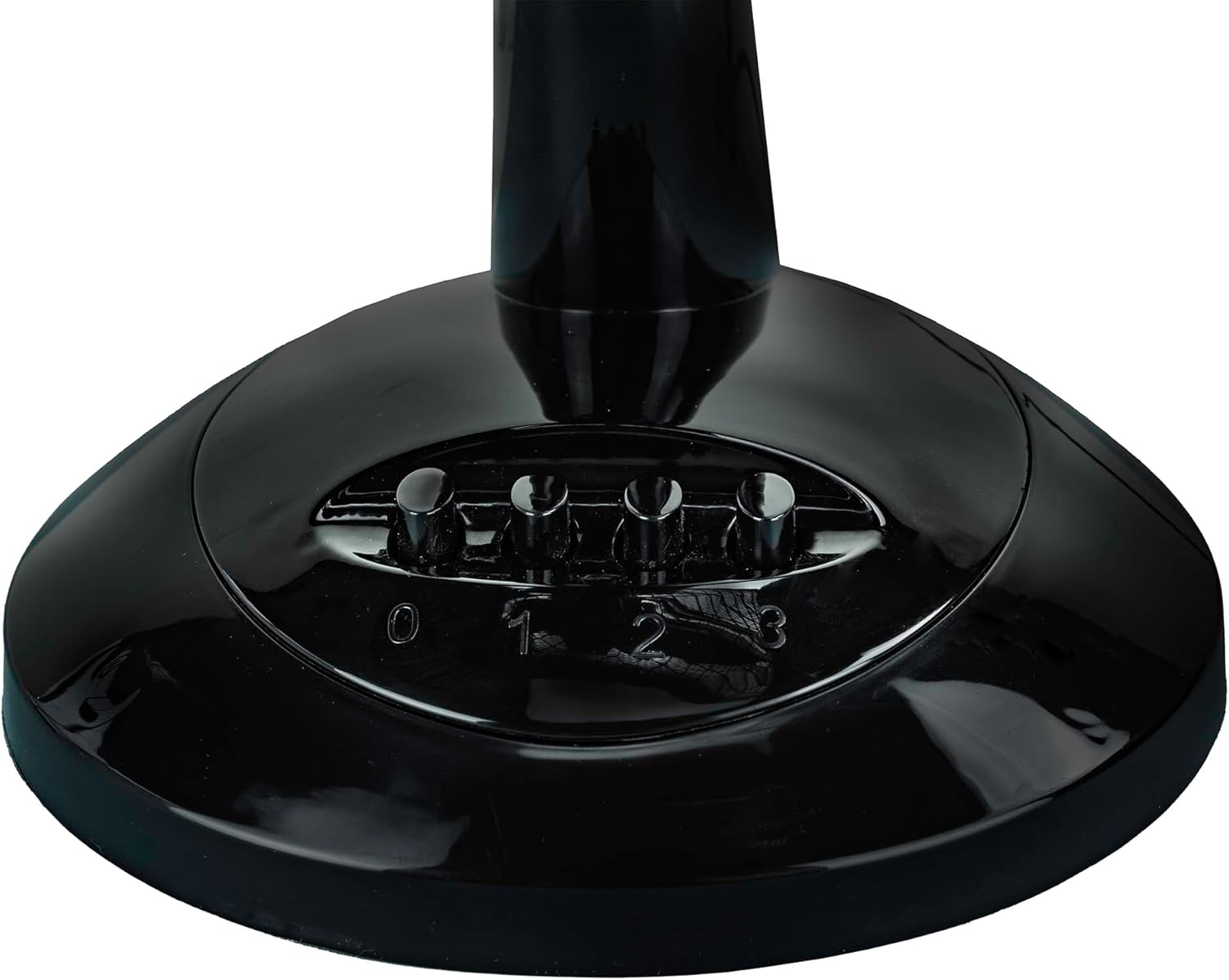
Figure 5: The control panel on the fan base with buttons for speed settings (0, 1, 2, 3).
Fonksyon osilasyon
To distribute air across a wider area, activate the oscillation function.
- Aktive: Press down the oscillation knob located on top of the motor housing. The fan head will begin to swing from side to side.
- Pou dezaktive: Pull up the oscillation knob. The fan head will stop oscillating and remain in a fixed position.

Figure 6: A hand demonstrating how to press the oscillation knob located on the top rear of the fan motor housing.
Ajiste ang enklinezon
The fan head can be tilted up or down to direct airflow precisely where needed.
- Pou ajiste: Gently push the fan head up or down to the desired angle. The fan is designed to hold its position once adjusted.

Figi 7: Close-up view of the fan's tilt adjustment mechanism, showing the pivot point.
Antretyen ak netwayaj
Netwayaj regilye ap ede kenbe pèfòmans vantilatè a epi pwolonje dire lavi li.
- Anvan Netwayaj: Toujou debranche vantilatè a nan priz kouran anvan ou netwaye li.
- Netwayaj eksteryè: Sèvi ak yon mou, damp twal pou siye sifas ekstèn vantilatè a. Pa sèvi ak pwodui netwayaj abrazif oswa solvan, paske yo ka domaje fini an.
- Griyaj ak lam: Dust may accumulate on the grille and blades. Use a vacuum cleaner with a brush attachment or a soft, dry cloth to remove dust. For thorough cleaning, the front grille may be removable (refer to assembly instructions if applicable, though typically not required for routine cleaning).
- Depo: When not in use for extended periods, store the fan in its original packaging or cover it to protect it from dust. Store in a cool, dry place.
Depanaj
If you encounter issues with your Jocca Desk Fan, please consult the following table before contacting customer support.
| Jocca Desk Fan (Model 1468N) | |
|---|---|
| Mak | Jocca |
| Nimewo Modèl | 1468N |
| Kalite | Fan Biwo |
| Koulè | Nwa |
| Pouvwa | 40 Watts |
| Voltage | 220 Volts |
| Dimansyon (L x W x H) | 34.5 x 16.5 x 37 cm |
| Pwa | 1.79 Kilogram |
| Karakteristik | 3 Speed Settings, Oscillation Function, Inclinable Head |
Garanti ak sipò
Jocca products are manufactured to high-quality standards. For information regarding warranty terms and conditions, please refer to the warranty card included with your purchase or visit the official Jocca websit.
For technical support, spare parts inquiries, or any other assistance, please contact Jocca customer service through their official channels. Contact details can typically be found on the product packaging or the brand's official websit.
Note: Information on spare parts availability for this specific model (1468N) is not readily available at the time of this manual's publication.


