Entwodiksyon
Thank you for choosing the Explore Scientific Travel Alarm Clock. This compact and versatile device is designed to provide accurate timekeeping, alarm functions, and indoor temperature readings, making it an ideal companion for travel or home use. Its radio-controlled feature ensures precise time synchronization, while the clear digital display offers easy readability.

Figi 1: Devan view of the Explore Scientific Travel Alarm Clock. The display shows 12:38 PM, December 28, Saturday, and 78.5°F.
Karakteristik kle
- Radio-Controlled Time: Time is automatically set via DCF radio signal for precise accuracy.
- Ekspozisyon Tanperati Andedan kay la: Shows temperature in Celsius or Fahrenheit.
- Ekspozisyon konplè: Clearly displays time, date, and day of the week.
- Doub Alam ak Snooze: Two independent alarms with a convenient snooze function.
- Multi-Language Day Display: Day of the week display available in 7 languages.
- Ekleraj ble: Provides illumination for easy viewing nan kondisyon limyè ki ba.
- Endikatè batri ki ba: Avèti ou lè pil yo bezwen chanje.
- Konsepsyon pòtab: Konpak e ideyal pou vwayaj.
Kontni pake
Tanpri verifye sa ki nan pake a pou asire w tout atik yo la:
- Explore Scientific Travel Alarm Clock (RDC1008)
- 2x AAA pil
- Manyèl Enstriksyon (dokiman sa a)
Enstalasyon
1. Enstalasyon batri
The clock requires 2x AAA batteries for operation. These are included in the package.
- Jwenn kouvèti konpatiman batri a sou dèyè aparèy la.
- Glise kouvèti a anba pou ouvri konpatiman an.
- Insert 2x AAA batteries, ensuring the correct polarity (+ and -) as indicated inside the compartment.
- Remèt kouvèti konpatiman batri a lè w glise l anlè jiskaske li fè yon klik pou l antre nan plas li.
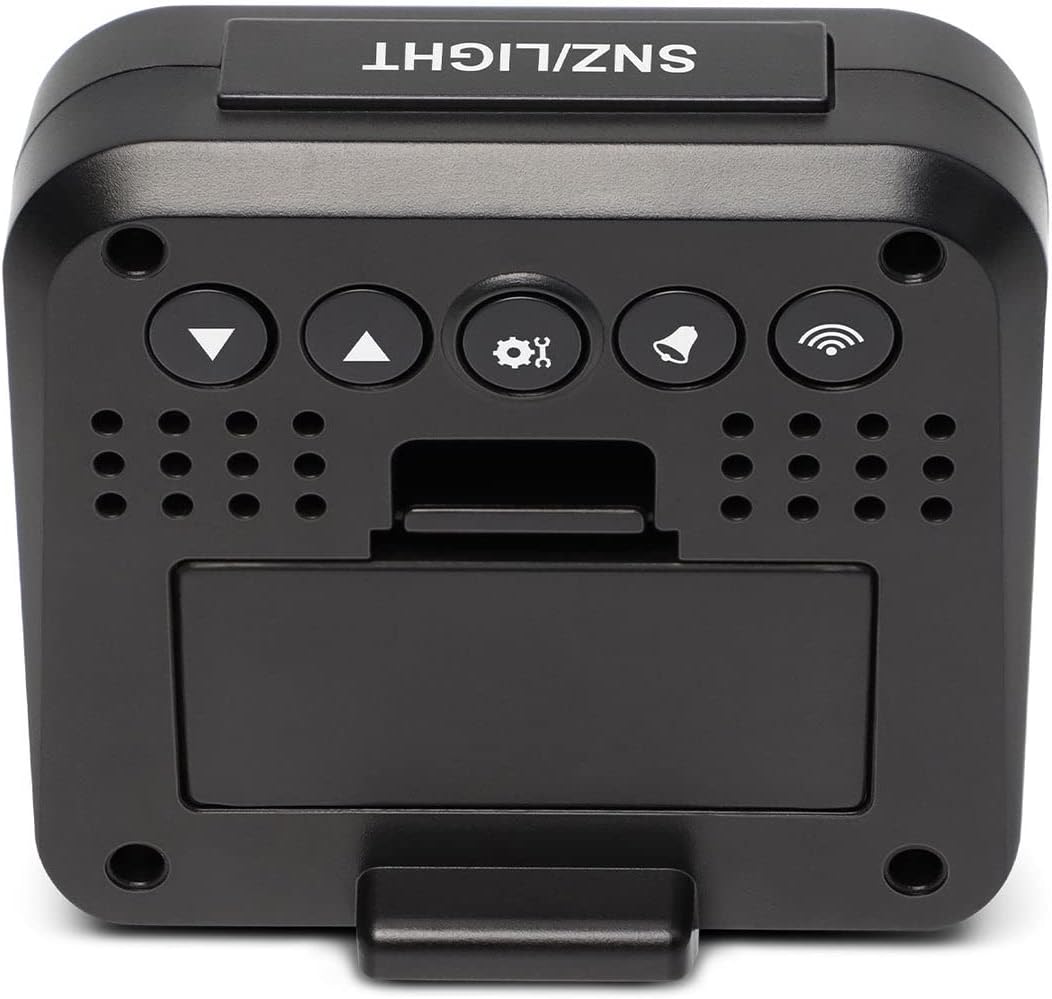
Figi 2: Retounen view of the clock, highlighting the battery compartment and control buttons.
2. Initial Power-On and Radio Signal Reception
Upon battery installation, the clock will power on and automatically begin searching for the DCF radio time signal. This process may take several minutes to an hour, depending on your location and signal strength. During this time, the radio signal icon (📶) ap flash sou ekspozisyon an.
- Mete revèy la toupre yon fenèt pou yon resepsyon siyal optimal.
- Evite mete l toupre aparèy elektwonik ki ka lakòz entèferans.
- Once the signal is successfully received, the time will be set automatically, and the radio signal icon will appear solid.
Enstriksyon Operasyon
Bouton souview
Refer to Figure 2 for the location of the buttons on the back of the clock:
- SNZ/LIGHT Button (Top): Activates snooze during an alarm, or illuminates the backlight.
- ▼ (Down) Button: Decreases values, navigates menus.
- ▲ (Up) Button: Increases values, navigates menus.
- ⚙ (SET) Button: Antre nan mòd paramèt yo, konfime seleksyon yo.
- 🔔 (ALARM) Button: Antre nan mòd konfigirasyon alam, aktive/dezaktive alam yo.
- 📶 (WAVE) Button: Manually initiates radio signal search.
1. Anrejistreman Manyèl Dat ak Lè
While the clock primarily relies on the radio signal, you can manually set the time and date if needed (e.g., outside signal range or for specific time zones).
- Peze epi kenbe la ⚙ (SET) button for approximately 3 seconds to enter time setting mode. The hour digits will flash.
- Sèvi ak la ▲ (Anlè) or ▼ (Desann) bouton pou ajiste lè a.
- Peze ⚙ (SET) again to confirm the hour and move to minutes. Adjust minutes using ▲ (Anlè) or ▼ (Desann).
- Kontinye peze ⚙ (SET) to cycle through and set the year, month, date, and 12/24 hour format.
- Peze ⚙ (SET) one last time to exit setting mode, or wait 15 seconds for it to automatically exit.
2. Mete Alam yo (Alam 1 ak Alam 2)
Revèy la gen de alam endepandan.
- Peze a 🔔 (ALARM) bouton yon fwa nan view Alarm 1 time. Press it again to view Alam 2 tan.
- Pandan ke viewing the desired alarm (e.g., Alarm 1), press and hold the 🔔 (ALARM) button for 3 seconds. The alarm hour will flash.
- Sèvi ak ▲ (Anlè) or ▼ (Desann) pou ajiste lè alam lan. Peze 🔔 (ALARM) pou konfime epi ale nan minit yo.
- Adjust alarm minutes using ▲ (Anlè) or ▼ (Desann). Peze 🔔 (ALARM) pou konfime ak sòti.
- Pou aktive oswa dezaktive yon alam, peze bouton an 🔔 (ALARM) button repeatedly until the corresponding alarm icon (SNZ1 or SNZ2) appears or disappears on the display.
3. Fonksyon repetisyon
Lè yon alam sonnen, peze gwo bouton an SNZ / limyè button on top of the clock to activate the snooze function. The alarm will temporarily stop and sound again after approximately 5 minutes.
To stop the alarm completely, press any other button on the back of the clock.
4. Temperature Display (°C/°F)
The clock displays indoor temperature. To switch between Celsius (°C) and Fahrenheit (°F):
- Nan mòd ekspozisyon tan nòmal, peze la ▼ (Desann) button. The temperature unit will toggle between °C and °F.
5. Ekleraj
Peze gwo a SNZ / limyè button on top of the clock to briefly illuminate the display backlight for easy viewnan kondisyon fè nwa.
6. Day of the Week Language Setting
The day of the week can be displayed in 7 languages.
- Nan mòd ekspozisyon tan nòmal, peze la ▲ (Anlè) button repeatedly to cycle through the available languages for the day of the week display.
Antretyen
Ranplasman batri
When the low battery indicator appears on the display, it is time to replace the batteries. Follow the "Battery Installation" steps in the Setup section to replace the 2x AAA batteries.
Netwayaj
To clean the clock, use a soft, dry cloth. Do not use abrasive cleaners or solvents, as these may damage the display or casing.
Depanaj
| Pwoblèm | Kòz posib | Solisyon |
|---|---|---|
| Ekran an vid oswa li fèb. | Pil yo fèb oswa yo mal enstale. | Replace batteries with new 2x AAA batteries, ensuring correct polarity. |
| Clock does not set time automatically or time is incorrect. | Poor DCF radio signal reception; interference; incorrect time zone setting. |
|
| Alam lan pa sonnen. | Alam lan pa aktive. | Ensure the alarm icon (SNZ1 or SNZ2) is visible on the display. Re-set the alarm time. |
| Lekti tanperati a sanble pa egzak. | Yo mete revèy la toupre yon sous chalè oswa yon vantilasyon. | Move the clock to a location with stable ambient temperature. |
Espesifikasyon
| Karakteristik | Detay |
|---|---|
| Mak | Eksplore syantifik |
| Nimewo Modèl | RDC1008 |
| Kalite ekspozisyon | Digital |
| Sous pouvwa | 2x pil AAA (enkli) |
| Karakteristik espesyal | Alarm, Radio-Controlled, Snooze, Indoor Temperature |
| Inite Tanperati | ° C / ° F. |
| Day of Week Languages | 7 lang |
| Ekleraj | Ble |
| Materyèl | Acrylonitrile Butadiene styrene |
| Kalite aliye | Tabletop |
Garanti ak sipò
Explore Scientific products are designed for quality and reliability. For warranty information and technical support, please refer to the warranty card included with your product or visit the official Explore Scientific website. Please have your model number (RDC1008) and purchase details ready when contacting support.
Websit: explorescientific.com


