Entwodiksyon
Mèsi pou acha aasing the Explore Scientific Radio Controlled Projection Clock. This device offers precise timekeeping through radio control, an internal temperature display, and a convenient projection feature to display the time on your wall or ceiling. This manual provides detailed instructions for setup, operation, and maintenance to ensure optimal performance of your clock.
Enfòmasyon sou Sekirite
- Li tout enstriksyon ak anpil atansyon anvan ou itilize.
- Pa ekspoze aparèy la nan tanperati ekstrèm, limyè solèy dirèk, oswa imidite ki wo.
- Evite lage aparèy la oswa soumèt li a gwo enpak.
- Pa eseye demonte oswa repare aparèy la tèt ou. Konfye tout antretyen bay pèsonèl kalifye.
- Sèvi sèlman ak adaptè kouran espesifye a (si sa aplikab) ak pil yo.
- Kenbe soti nan atenn timoun yo.
Kontni pake
- Explore Scientific Radio Controlled Projection Clock (Model RDP1001GYE000)
- Batri (Enkli)
- AC Power Adapter (Optional, not explicitly stated as included but mentioned in features)
- Manyèl itilizatè (dokiman sa a)
Pwodwi souview
Familiarize yourself with the various parts and controls of your projection clock.

Figi 1: Devan view of the clock, displaying time, date, and temperature, with control buttons below the screen.
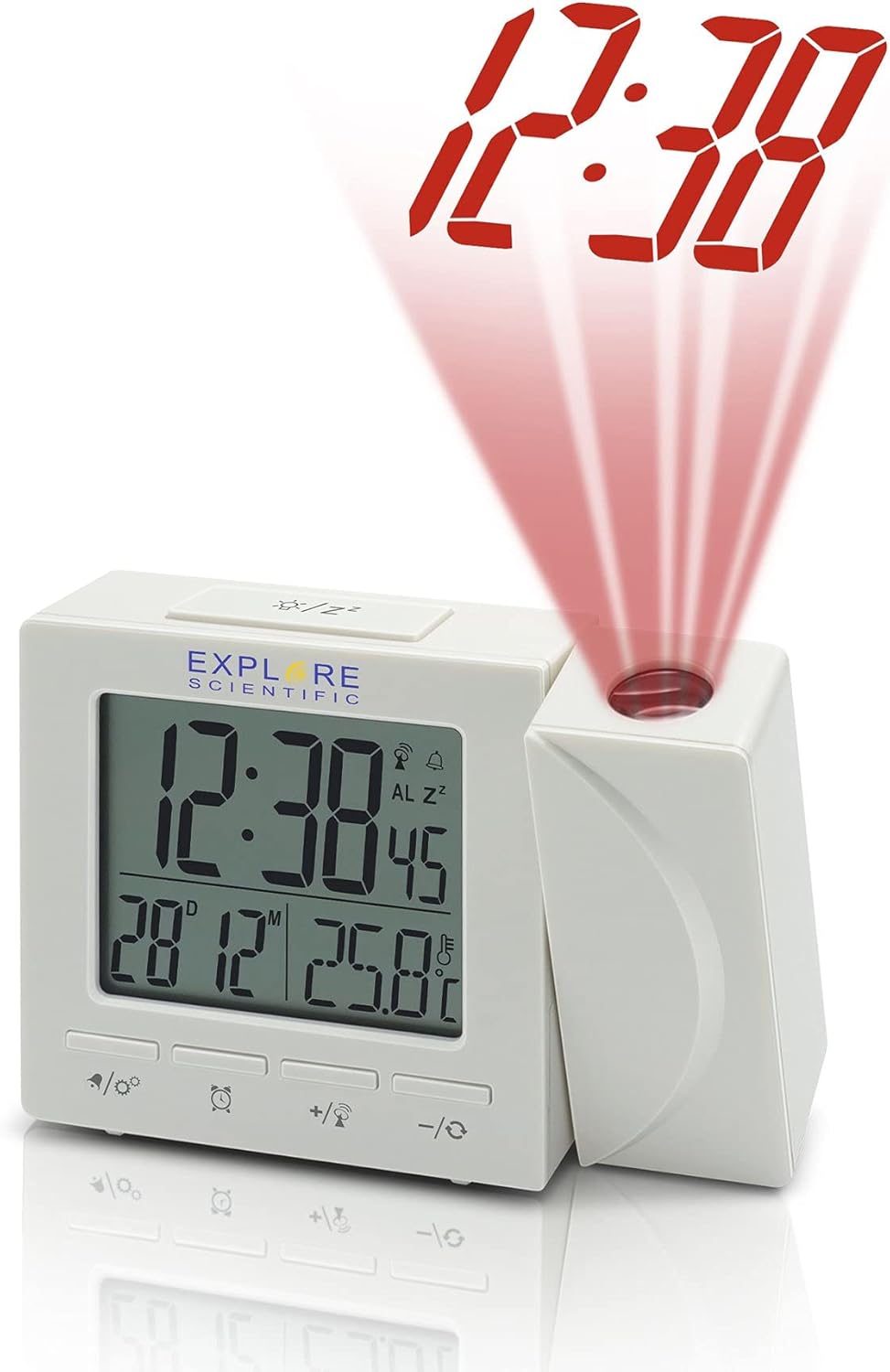
Figi 2: Side view of the clock, illustrating the time projection feature with red digits.
Eleman:
- Ekspozisyon dijital: Shows time, date, day of the week, and indoor temperature.
- Lantiy pwojeksyon: Projects the time onto a wall or ceiling.
- Bouton kontwòl:
- MÒD/SET: To switch display modes and enter setting mode.
- ALARM/SNOOZE: To set alarms and activate snooze.
- +/°C/°F: To adjust values up and switch temperature units.
- -/12/24: To adjust values down and switch time format.
- PROJECTION ON/OFF/FLIP: To control projection and flip its orientation.
- Lòj batri: Located at the back/bottom for backup batteries.
- DC IN Jack: Pou konekte adaptè kouran AC a.
Enstalasyon
1. Powering the Unit:
The clock can be powered by batteries for backup or continuously by the AC power adapter.
- Enstalasyon batri: Open the battery compartment cover. Insert the included batteries, observing the correct polarity (+ and -). Close the cover. Batteries provide backup power and allow for temporary use without the adapter.
- AC Power Adapter (Optional): For continuous display and projection, connect the AC power adapter to the DC IN jack on the back of the unit and plug it into a standard wall outlet.
2. Initial Setup and Radio Control Synchronization:
Upon first power-up or after a reset, the clock will attempt to synchronize with the NIST WWVB radio signal for accurate time.
- Place the clock near a window for better reception.
- The radio control icon will flash during synchronization. This process may take several minutes or even hours depending on signal strength and location.
- Once synchronized, the icon will become solid, and the time will be automatically set.
- If synchronization fails, you may need to manually set the time (see Operating section).
3. Setting Temperature Unit (°F/°C):
Peze a +/°C/°F button to toggle between Celsius and Fahrenheit temperature display.
4. Setting 12/24 Hour Format:
Peze a -/12/24 button to switch between 12-hour (with AM/PM indicator) and 24-hour time formats.
Opere
1. Manual Time and Date Setting:
If radio control synchronization is not desired or fails, you can manually set the time and date.
- Peze epi kenbe la MODE/SET bouton an jiskaske ekran an flache.
- Sèvi ak la + or - bouton yo pou ajiste valè ki ap flache a (pa egzanp, èdtan, minit, ane, mwa, jou).
- Peze MODE/SET ankò pou konfime konfigirasyon an epi ale nan pwochen paramèt la.
- Repeat until all settings are complete. The clock will exit setting mode automatically after a few seconds of inactivity.
2. Fonksyon Alam:
The clock features a dual alarm and snooze function.
- Mete lè alam lan: Peze a ALAM/SNOOZE button once to display Alarm 1 time. Press and hold ALAM/SNOOZE to enter Alarm 1 setting mode. Use + or - to adjust hour/minute, then press ALAM/SNOOZE to confirm. Repeat for Alarm 2.
- Aktive / Dezaktive Alam: Pandan ke viewlè alam lan, peze ALAM/SNOOZE repeatedly to toggle Alarm 1 ON/OFF, Alarm 2 ON/OFF, or both ON/OFF. An alarm icon will appear on the display when active.
- Fonksyon Snooze: Lè alam la son, peze la ALAM/SNOOZE button to activate snooze. The alarm will temporarily stop and sound again after approximately 5-10 minutes.
- Sispann Alam: To stop the alarm completely, press any other button (except ALARM/SNOOZE for snooze) or let it ring for its duration.
3. Projection Control:
The projection feature allows you to display the time on a surface.
- Pwojeksyon ON/OFF: Peze a PROJECTION ON/OFF/FLIP bouton pou aktive oubyen etenn pwojeksyon an.
- 180° Flip: Peze epi kenbe la PROJECTION ON/OFF/FLIP button to rotate the projected image 180 degrees, useful for ceiling projection or different viewang ing.
- Ajisteman konsantre: Rotate the focus ring on the projection lens (if available) to sharpen the projected image.
4. Weekday Display Language:
The clock supports five language options for the weekday display: German (GE), English (EN), French (FR), Italian (IT), and Dutch (DU).
To change the language, enter the manual time setting mode (as described above) and cycle through the options when the weekday language setting appears.
Antretyen
- Netwayaj: Siye aparèy la avèk yon twal mou epi sèk. Pa sèvi ak pwodui netwayaj abrazif oswa solvan.
- Ranplasman batri: Replace batteries when the display dims or the clock functions become erratic. Always replace all batteries at the same time with new ones of the same type. Dispose of old batteries responsibly.
- Depo: Si w ap sere revèy la pou yon peryòd tan pwolonje, retire pil yo pou anpeche likid koule.
Depanaj
| Pwoblèm | Kòz posib | Solisyon |
|---|---|---|
| Ekran an vid oswa li fèb. | Low or dead batteries; AC adapter not connected or faulty. | Replace batteries. Ensure AC adapter is securely connected and working. |
| Lè a pa kòrèk oswa li pa fikse otomatikman. | Poor radio signal reception; manual setting required. | Move the clock closer to a window or to a different location. Manually set the time if radio control is consistently poor. |
| Pwojeksyon an twoub. | Pa konsantre. | Adjust the focus ring on the projection lens. |
| Alam lan pa sonnen. | Alam lan pa aktive; lè alam lan pa kòrèk. | Ensure the alarm icon is displayed. Verify the alarm time is set correctly. |
Espesifikasyon
- Modèl: RDP1001GYE000
- Kalite ekspozisyon: Digital
- Fòma tan: 12/24 Hour Selectable
- Inite Tanperati: ° F / ° C Chanje
- Kontwòl Radyo: NIST WWVB Receiver
- Pwojeksyon: 180 Degree Rotatable Projection Head
- Alam: Dual Alarm with Snooze Function
- Weekday Display Languages: GE, EN, FR, IT, DU
- Ekleraj: Ble
- Sous pouvwa: Batteries (Included), AC Adaptor (Optional)
- Dimansyon: Apeprè 7 x 5 x 2 pous (Dimansyon pake a)
- Pwa: Apeprè 8 ons
- Materyèl: Acrylonitrile Butadiene styrene
- UPC: 811803033214
Garanti ak sipò
Explore Scientific products are designed for quality and reliability. For specific warranty information, please refer to the warranty card included with your purchase or visit the official Explore Scientific website. If you encounter any issues or require technical assistance, please contact Explore Scientific customer support.
Pou kesyon jeneral oswa sipò, ou ka vizite Explore Scientific brand page on Amazon or the seller's page if purchased from a third-party seller.


