Jetson Spin All-Terrain Hoverboard User Manual
Model: JAERO-RED | Brand: Jetson
Entwodiksyon
Welcome to the Jetson Spin All-Terrain Hoverboard user manual. This guide provides essential information for the safe operation, maintenance, and troubleshooting of your new hoverboard. Please read this manual thoroughly before first use to ensure optimal performance and rider safety.
Ki sa ki nan bwat la
- Jetson Spin All-Terrain Hoverboard
- Adaptè chaje
- Manyèl itilizatè

The Jetson Spin All-Terrain Hoverboard, showcasing its sleek design and integrated LED lights on the wheels and front deck.
Official product video demonstrating the Jetson All-Terrain Hoverboard's features and design.
Enstalasyon
Charging Your Hoverboard
- Locate the charging port on the side of the hoverboard.
- Connect the charging adapter to the hoverboard's charging port.
- Branche adaptè a nan yon priz elektrik estanda.
- The indicator light on the charger will change (e.g., red to green) when fully charged.
- Dekonekte plato a yon fwa chaje fini.

The charging port and power button are located on the side of the hoverboard for easy access.
Operating Your Hoverboard
Limen / Off
- Press and hold the power button located on the side of the hoverboard for 3 seconds to turn it on.
- The indicator lights will illuminate, and the hoverboard will self-balance.
- To power off, press and hold the power button again for 3 seconds.
Debaz monte
- Place one foot on a footpad, ensuring the hoverboard is level.
- Quickly step onto the other footpad with your second foot.
- Panche yon ti kras pi devan pou avanse, epi panche yon ti kras pa dèyè pou ralanti oswa pou fè bak.
- To turn, apply pressure with the foot on the side you wish to turn towards.
- To dismount, step off backward, one foot at a time.

The hoverboard features full-spectrum LED light-up wheels and front deck headlights for enhanced visibility and style.
Kalibrasyon
If your hoverboard is not balancing correctly or drifting, it may need to be recalibrated.
- Ensure the hoverboard is powered off and placed on a flat, level surface.
- Press and hold the power button for approximately 10-15 seconds until the indicator lights begin to flash rapidly.
- Release the button and wait for the lights to stop flashing and remain solid.
- Power off the hoverboard, then power it back on to complete the calibration.
Antretyen
- Netwayaj: Sèvi ak anonsamp cloth to wipe down the exterior. Avoid using harsh chemicals or abrasive cleaners.
- Depo: Store the hoverboard in a cool, dry place, away from direct sunlight and extreme temperatures.
- Swen batri: Charge the battery fully before storing for extended periods (charge once a month if stored for long). Avoid completely draining the battery.
- Enspeksyon kawotchou: Regularly check the 6.5-inch all-terrain tires for wear and tear.

The durable 6.5-inch all-terrain tires are designed for various surfaces, providing a stable ride.
Depanaj
| Pwoblèm | Kòz posib | Solisyon |
|---|---|---|
| Hoverboard not turning on | Batri ki ba | Charge the hoverboard fully. |
| Hoverboard not balancing | Bezwen kalibrasyon | Perform a calibration as described in the 'Calibration' section. |
| Limyè pa travay | Pwoblèm elektrik | Kontakte sipò kliyan. |
| Beeping sound during use | Low battery or improper riding technique | Charge the hoverboard. Adjust riding posture to ensure even pressure on footpads. |
Espesifikasyon
| Karakteristik | Detay |
|---|---|
| Non modèl | JAERO-WOUJ |
| Mak | Jetson |
| Top vitès | 7 kilomèt alè |
| Max Range | Jiska 7 mil sou yon sèl chaj |
| Motè | 300 dual watt motor |
| Run Tan | 30 minutes (actual time may vary) |
| Laj Rekòmande | 12+ |
| Max Weight Limit | 220 liv |
| Gwosè kawotchou | 6.5 inches (all-terrain) |
| Karakteristik espesyal | LED Lights (wheels, headlights), Active Balance Technology |
| Sètifikasyon UL | UL-2272 sètifye |
Gid Sekirite
- Toujou mete yon kas ak ekipman sekirite apwopriye (pwoteksyon jenou, pwoteksyon koud, pwoteksyon ponyèt) lè w ap monte bisiklèt.
- Pa monte anba enfliyans alkòl oswa dwòg.
- Evite monte sou sifas mouye, inegal, oswa glise.
- Pa monte nan trafik oswa sou wout piblik yo.
- Maintain a safe distance from other riders and pedestrians.
- Pa eseye fè kaskad oswa manèv toudenkou.
- Ensure the hoverboard is fully charged before each use.
- Sipèvize pasaje ki pi jèn yo.
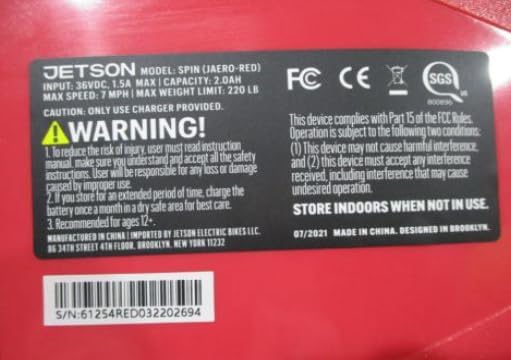
Important safety warnings and product information, including recommended age (12+) and charging instructions.
Garanti ak sipò
For warranty information, please refer to the official Jetson websit la oswa dokiman ki vini ak pwodwi ou a.
For customer support, technical assistance, or replacement parts, please visit the Magazen Jetson sou Amazon oubyen kontakte sèvis kliyan yo dirèkteman.
You can also find the official user manual in PDF format isit la.


