1. Entwodiksyon
The OnePlus 7 Pro (Model GM1917) is a high-performance smartphone designed to deliver a smooth and immersive user experience. It features a 6.67-inch Fluid AMOLED display with a 90 Hz refresh rate and QHD+ resolution, offering exceptional clarity and fluidity. The device is equipped with a versatile camera system, including a 48 MP main camera, an ultra-wide-angle lens, and 3x optical zoom, enhanced by smart scene recognition and Nightscape 2.0 technology. This manual provides essential information for setting up, operating, and maintaining your OnePlus 7 Pro.

Figi 1: Devan view of the OnePlus 7 Pro smartphone.
2. Inisyal Enstalasyon
2.1. Pake kontni
Anvan ou kontinye, asire w ke tout atik yo prezan nan pakè w la:
- Telefòn entelijan OnePlus 7 Pro (Modèl GM1917)
- Adaptè pouvwa
- USB Kalite-C kab
- Zouti èkstrè SIM
- Gid Quick Start
- Enfòmasyon sou Sekirite
2.2. Mete kat SIM
- Jwenn plato kat SIM lan sou bò aparèy ou an.
- Insert the SIM ejector tool into the small hole on the tray and press firmly until the tray ejects.
- Place your Nano-SIM cards into the tray with the gold contacts facing down. The OnePlus 7 Pro supports Dual SIM functionality.
- Ak anpil atansyon reinserte plato a nan aparèy la.
2.3. Limen ak Inisyal Konfigirasyon
- Peze epi kenbe bouton Power la (ki sitiye sou bò dwat la) jiskaske logo OnePlus la parèt.
- Swiv enstriksyon yo sou ekran an pou chwazi lang ou, konekte ak yon rezo Wi-Fi, epi konfigire kont Google ou.
- You will be guided through setting up security features such as fingerprint unlock and face unlock.
3. Operating Your OnePlus 7 Pro
3.1. Karakteristik ekspozisyon
The OnePlus 7 Pro features a 6.67-inch Fluid AMOLED display with a QHD+ resolution (2560 x 1440 pixels) and a 90 Hz refresh rate. This combination provides incredibly smooth scrolling, fluid animations, and vibrant colors. Adjust display settings such as brightness, color mode, and refresh rate (if applicable) in the Settings menu under 'Display'.
3.2. Pèfòmans ak Depo
Powered by a Qualcomm Snapdragon 855 processor and 6GB of RAM, the OnePlus 7 Pro delivers robust performance for multitasking, gaming, and demanding applications. The device comes with 128GB of internal storage, providing ampespas pou aplikasyon, foto ak videyo.
3.3. Navigasyon
Your device offers various navigation options, including traditional on-screen navigation buttons or gesture navigation. These can be customized in the Settings menu under 'Buttons & gestures'.
4. Sistèm Kamera
The OnePlus 7 Pro is equipped with a triple rear camera setup and a unique pop-up front camera.
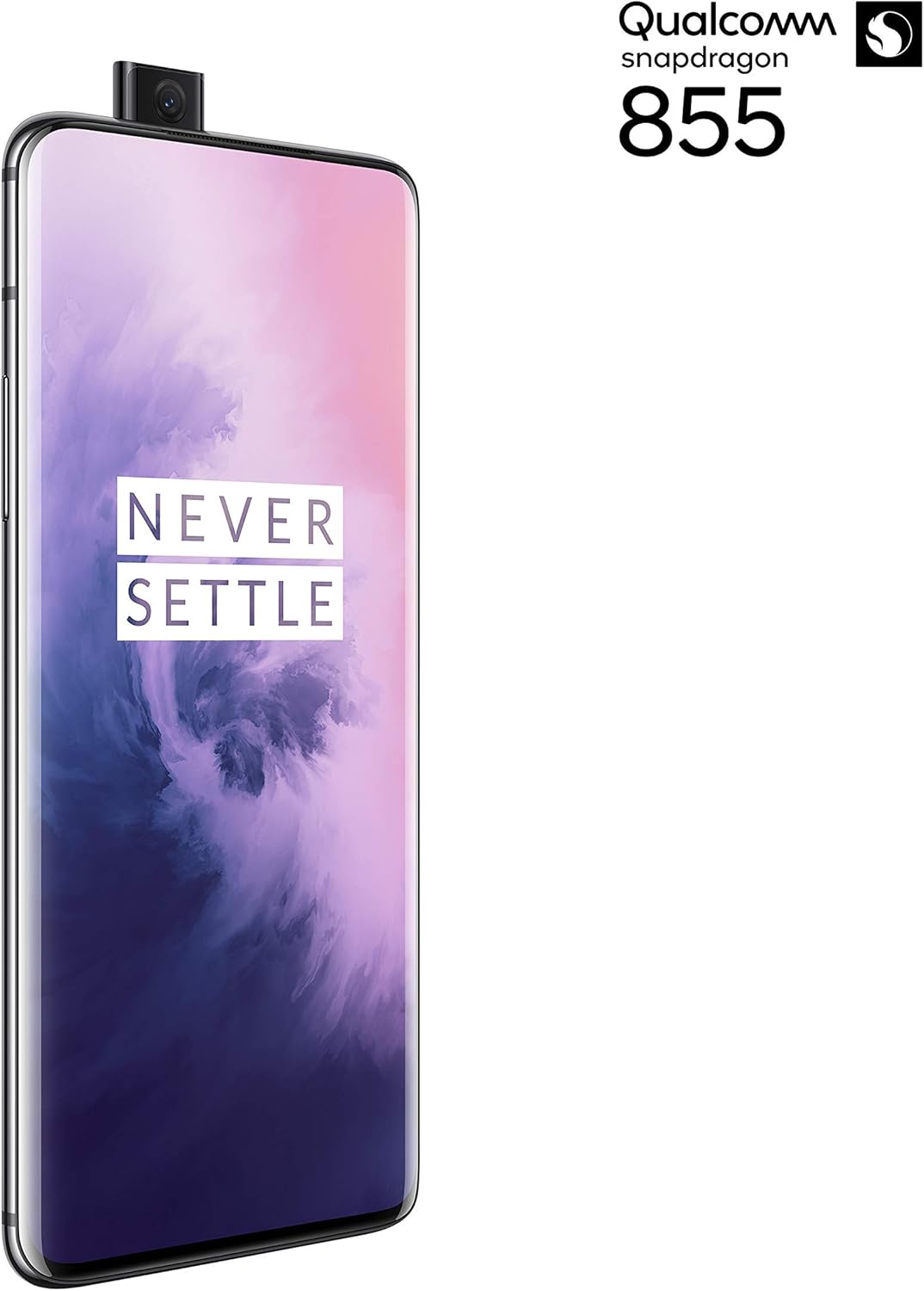
Figi 2: Devan view of the OnePlus 7 Pro with its pop-up selfie camera.
4.1. Kamera dèyè
- Kamera prensipal: 48 MP sensor for high-resolution photos.
- Ultra-Wide Angle Lens: Kaptire yon domèn ki pi laj view, ideyal pou peyizaj ak foto gwoup.
- Lantiy teleobjèktif: Offers 3x optical zoom for clear, detailed shots from a distance.
4.2. Kamera devan
The device features a motorized pop-up front camera, ensuring an uninterrupted full-screen display. This camera is designed for high-quality selfies and video calls.
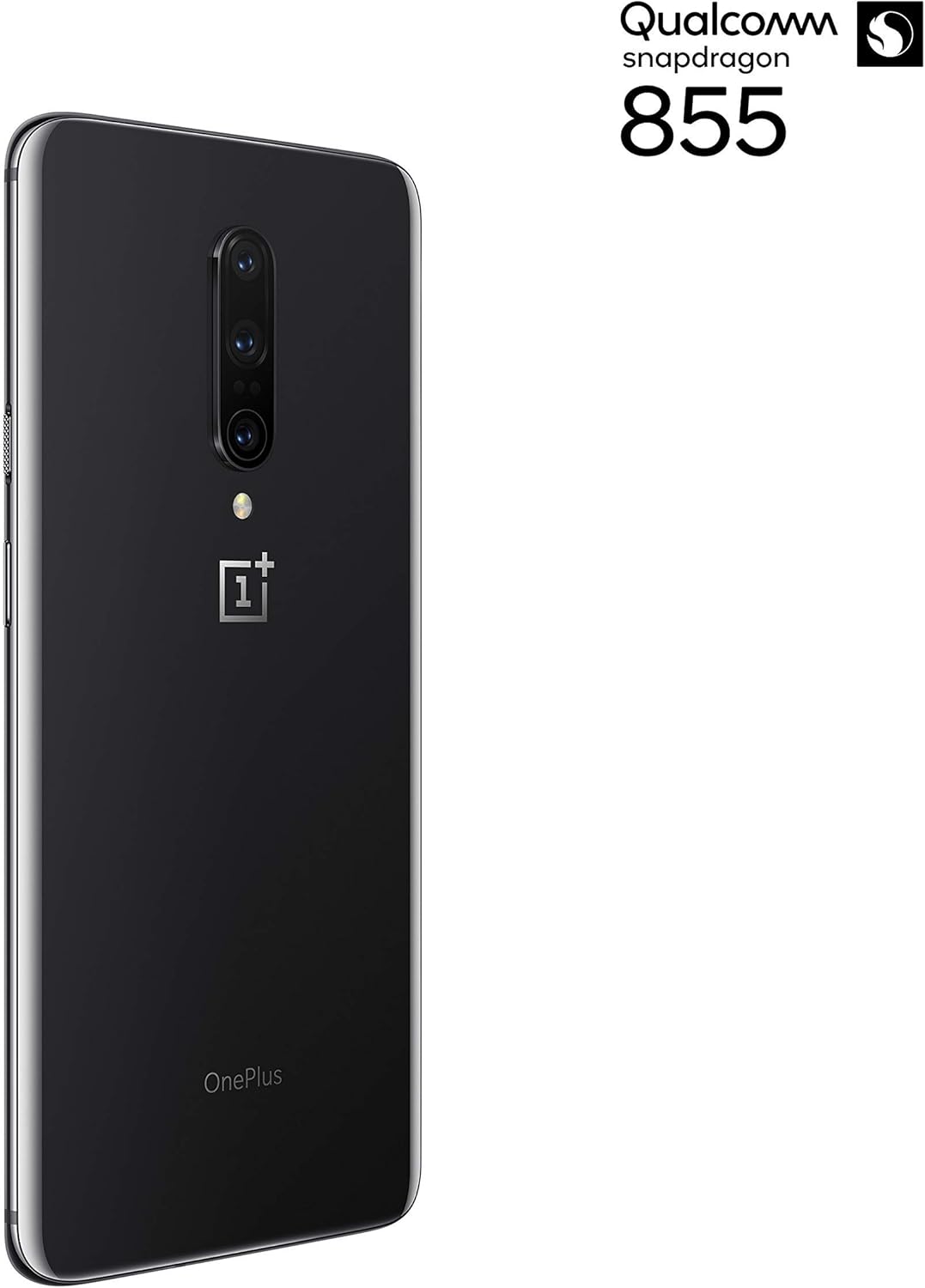
Figi 3: Dèyè view of the OnePlus 7 Pro highlighting the triple camera module.
4.3. Camera Modes
Explore various camera modes to enhance your photography:
- Foto: Standard mode for everyday shots.
- Pòtre: Creates a depth-of-field effect, blurring the background.
- Peyizaj lannwit 2.0: Optimizes photos taken in low-light conditions for brighter and clearer results.
- Mode Pro: Li ofri kontwòl manyèl sou paramèt tankou ISO, vitès obturateur, ak balans blan.
- Videyo: Records high-quality videos.
5. Batri ak Chaje
The OnePlus 7 Pro is equipped with a 4000 mAh battery, designed to provide extended usage. It supports Warp Charge technology for rapid charging.
5.1. Chaje aparèy ou an
To charge your device, connect the provided USB Type-C cable to the phone's charging port and the power adapter. Plug the adapter into a wall outlet. For optimal charging speed, use only the official OnePlus Warp Charge adapter and cable.
5.2. Optimizasyon Batri
To maximize battery life, consider the following:
- Ajiste klète ekran an.
- Aktive mòd Ekonomi Batri a lè sa nesesè.
- Fèmen aplikasyon ou pa itilize k ap fonksyone nan background nan.
- Limite itilizasyon done an background pou sèten aplikasyon.
6. Espesifikasyon teknik
| Karakteristik | Spesifikasyon |
|---|---|
| Nimewo Modèl | GM1917 |
| Ekspozisyon | 6.67-inch Fluid AMOLED, QHD+ (2560 x 1440), 90 Hz |
| Processeur | Qualcomm Snapdragon 855 |
| RAM | 6 GB |
| Depo Entèn | 128 GB |
| Kamera dèyè | 48 MP Main, Ultra-Wide, 3x Optical Zoom Telephoto |
| Kamera devan | Pop-up Selfie Camera |
| Kapasite batri | 4000 mAh |
| Sistèm operasyon | Android |
| Koneksyon | Wi-Fi, 4G LTE (AT&T, Verizon, T-Mobile compatible) |
| Kalite SIM | Doub Nano-SIM |
NAN. Depanaj
If you encounter issues with your OnePlus 7 Pro, try the following steps:
- Aparèy pa reponn: Press and hold the Power button for approximately 10 seconds to force restart the device.
- Pwoblèm aplikasyon: Clear the cache and data for the problematic app in Settings > Apps > [App Name] > Storage. If the issue persists, uninstall and reinstall the app.
- Koneksyon rezo: Aktive oubyen dezaktive Mòd Avyon an. Rekòmanse aparèy ou an. Tcheke kijan kat SIM ou an te antre.
- Drenaj batri: Review 'Battery Usage' in Settings to identify apps consuming excessive power. Reduce screen brightness and disable unnecessary features.
- Pwoblèm lojisyèl: Ensure your device's software is up to date via Settings > System > System updates.
- Reset faktori: Kòm yon dènye rekou, ou ka fè yon Reyajisteman faktori (Anviwònman > Sistèm > Opsyon Reyajisteman > Efase tout done). Avètisman: Sa ap efase tout done ki sou aparèy ou an. Fè yon kopi enfòmasyon enpòtan yo anvan ou kontinye.
8. Swen ak Antretyen
To ensure the longevity and optimal performance of your OnePlus 7 Pro:
- Keep the device clean using a soft, lint-free cloth. Avoid harsh chemicals.
- Protect the screen with a screen protector and use a protective case.
- Evite ekspoze aparèy la nan tanperati ekstrèm, limyè solèy dirèk, oswa imidite.
- Regularly back up your data to a cloud service or external storage.
- Install software updates to benefit from the latest features and security enhancements.
9. Garanti ak sipò
Pou enfòmasyon konsènan garanti a, sipò teknik, oswa sèvis, tanpri al gade dokimantasyon ki vini ak acha ou a oswa vizite sipò ofisyèl OnePlus la. website. As this is a renewed product, specific warranty terms may vary; please consult your seller for details on their renewed product warranty and return policy.


