1. Entwodiksyon
Thank you for choosing the DIGITEN DHTC1011 Humidity and Temperature Controller. This integrated plug-and-play device is designed to precisely control both temperature and humidity, making it ideal for various applications such as homebrewing, pet breeding, incubation, greenhouse management, and more. This manual provides detailed instructions for setting up, operating, and maintaining your controller to ensure optimal performance and longevity.
2. Pwodwi souview
The DHTC1011 features a large LCD screen for simultaneous display of measured and set values, a sensitive 2-in-1 temperature and humidity probe, and two pre-wired outlets for independent control of heating/cooling and humidifying/dehumidifying devices.

Figure 2.1: Main components of the DHTC1011 controller, including the main unit, integrated probe, and dual power outlets.
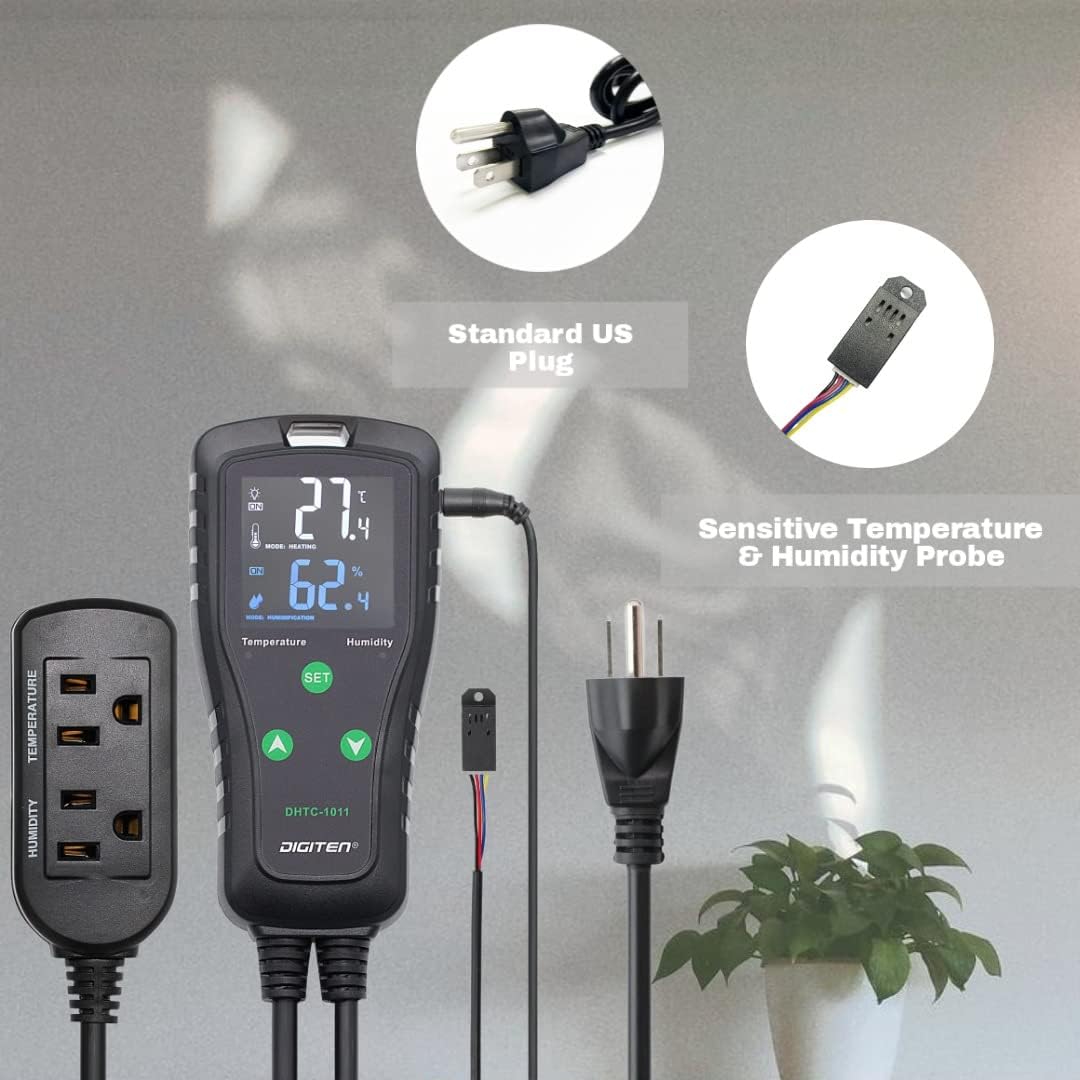
Figure 2.2: Key features of the DHTC1011, highlighting dual outlets, Celsius/Fahrenheit support, alarm function, and control over heating/cooling and humidifying/dehumidifying.
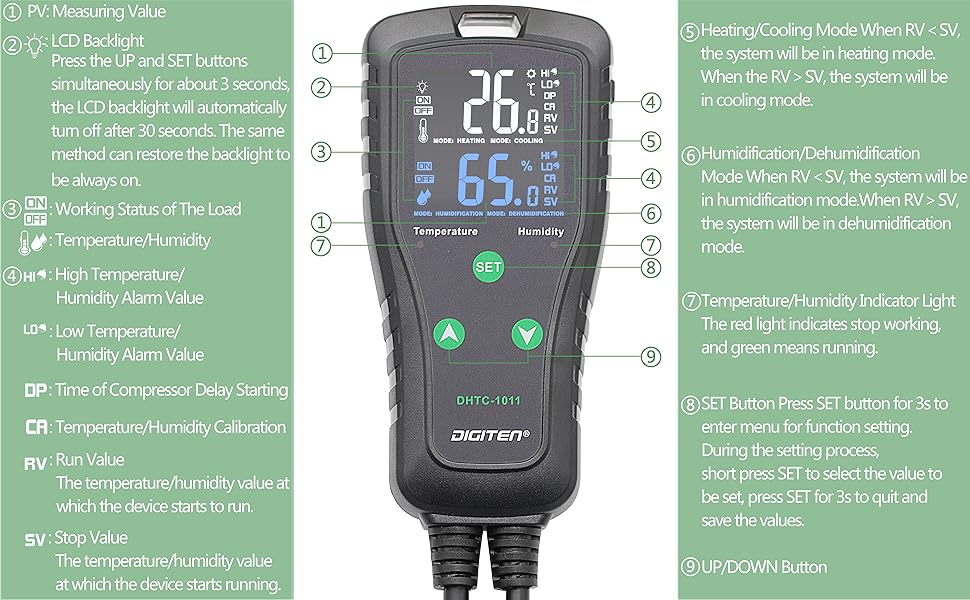
Figi 2.3: Detaye view of the controller's display and buttons. (1) PV: Measuring Value, (2) LCD Backlight, (3) Working Status of the Load (ON/OFF), (4) High/Low Temperature/Humidity Alarm Value (HI/LO), (5) Heating/Cooling Mode (RV < SV: Heating, RV > SV: Cooling), (6) Humidification/Dehumidification Mode (RV < SV: Humidification, RV > SV: Dehumidification), (7) Temperature/Humidity Indicator Light (Red: Stop, Green: Running), (8) SET Button, (9) UP/DOWN Button. DP: Time of Compressor Delay Starting, CA: Temperature/Humidity Calibration, RV: Run Value, SV: Stop Value.
2.1 Eleman
- Main Controller Unit: Features a large LCD display and control buttons.
- Temperature & Humidity Probe: A 2-in-1 sensor for accurate environmental readings.
- Plòg pouvwa doub: One for temperature control (heating/cooling) and one for humidity control (humidifying/dehumidifying).
- Kòd pouvwa: Standard US plug for power supply.
3. Karakteristik kle
- Wide Control Range: Temperature control from -40℉ to 248℉ (-40℃ to 120℃), humidity control from 1%RH to 100%RH.
- Multi-functional Setting: Supports calibration, compressor delay, and saving reset setting values.
- Seleksyon inite: Easily switch between Centigrade (℃) and Fahrenheit (℉) display.
- Alam yo: Configurable high or low temperature and humidity alarms.
- Konsepsyon pratik: Large LCD screen with simple 3-button interface and pre-wired plug-and-play setup.
- Doub Relè Sòti: Independent control for temperature and humidity equipment simultaneously.
- Aplikasyon versatile: Suitable for home brewing, fermentation, greenhouses, terrariums, reptile enclosures, planting, meat storage, wine cellars, and more.
4. Enstalasyon
- Depakete kontwolè a: Ak anpil atansyon retire tout eleman nan anbalaj la.
- Konekte sond la: Insert the temperature and humidity probe's jack into the designated port on the top of the main controller unit. Ensure it is securely connected.
- Pozisyone sond lan: Place the probe in the environment where you wish to monitor and control temperature and humidity. Ensure it is not directly exposed to heat sources, moisture, or airflow that could skew readings.
- Plug in Devices:
- Plug your temperature-controlling device (e.g., heater, cooler) into the outlet labeled "TEMPERATURE" on the power strip.
- Plug your humidity-controlling device (e.g., humidifier, dehumidifier) into the outlet labeled "HUMIDITY" on the power strip.
- Pouvwa sou: Plug the main controller unit's power cord into a standard electrical outlet. The LCD display will illuminate, showing current temperature and humidity readings.
5. Operasyon Enstriksyon
5.1 Basic Display Information
- The top large number displays the current measured temperature (PV).
- The bottom large number displays the current measured humidity (PV).
- Below the measured values, the set temperature and humidity values (SV) are displayed.
- Indicator lights (red/green) show the working status of connected devices.
5.2 Anviwònman Paramèt
To enter the function setting menu, press and hold the SET button for approximately 3 seconds. Use the UP (▲) ak DESANN (▼) buttons to navigate through the parameters and adjust values. Press SET briefly to confirm a selection or move to the next parameter. To exit the menu and save changes, press and hold SET pou 3 segonn ankò.
| Paramèt | Deskripsyon | Range | Default |
|---|---|---|---|
| TS (Temperature Start) | Temperature at which heating/cooling starts. | -40 a 248 ° F (-40 a 120 ° C) | 77 ° F (25 ° C) |
| TC (Temperature Stop) | Temperature at which heating/cooling stops. | -40 a 248 ° F (-40 a 120 ° C) | 78.8 ° F (26 ° C) |
| HS (Humidity Start) | Humidity at which humidifying/dehumidifying starts. | 1 a 100% RH | 50% RH |
| HC (Humidity Stop) | Humidity at which humidifying/dehumidifying stops. | 1 a 100% RH | 55% RH |
| CA (Temperature Calibration) | Adjusts temperature reading for accuracy. | -10 a 10 ° F (-5 a 5 ° C) | 0 |
| HA (Humidity Calibration) | Adjusts humidity reading for accuracy. | -10 a 10% RH | 0 |
| DP (Compressor Delay) | Tan reta pou pwoteksyon konpresè. | 0 a 10 minit | 0 |
| AH (High Temp Alarm) | Sets high temperature alarm threshold. | -40 a 248 ° F (-40 a 120 ° C) | 248 ° F (120 ° C) |
| AL (Low Temp Alarm) | Sets low temperature alarm threshold. | -40 a 248 ° F (-40 a 120 ° C) | -40°F (-40°C) |
| HH (High Hum Alarm) | Sets high humidity alarm threshold. | 1 a 100% RH | 100% RH |
| HL (Low Hum Alarm) | Sets low humidity alarm threshold. | 1 a 100% RH | 1% RH |
| CF (Celsius/Fahrenheit) | Switches temperature unit. | C / F | F |
5.3 Setting Heating/Cooling Mode
The controller automatically determines heating or cooling mode based on your set values (TS and TC).
- If TS < TC: The controller operates in Mòd chofaj. The heating device will turn on when the measured temperature drops below TS and turn off when it reaches TC.
- If TS > TC: The controller operates in Mòd refwadisman. The cooling device will turn on when the measured temperature rises above TS and turn off when it drops to TC.
5.4 Setting Humidifying/Dehumidifying Mode
Similar to temperature, the controller determines humidifying or dehumidifying mode based on your set values (HS and HC).
- If HS < HC: The controller operates in Mòd imidite. The humidifying device will turn on when the measured humidity drops below HS and turn off when it reaches HC.
- If HS > HC: The controller operates in Dezumidifye Mode. The dehumidifying device will turn on when the measured humidity rises above HS and turn off when it drops to HC.
5.5 LCD Backlight Control
Peze a UP (▲) ak SET buttons simultaneously for about 3 seconds. The LCD backlight will automatically turn off after 30 seconds. Repeat the same method to restore the backlight to be always on.
6. Antretyen
- Netwayaj: Wipe the controller unit and probe with a soft, dry cloth. Do not use abrasive cleaners or immerse the unit in water.
- Swen Sonde: Keep the probe clean and free from dust or debris. Avoid bending or damaging the probe cable. Ensure the probe is not submerged in liquid unless specifically designed for it (this probe is not).
- Depo: If storing the device for an extended period, unplug it from the power source and store it in a cool, dry place away from direct sunlight.
NAN. Depanaj
| Pwoblèm | Kòz posib | Solisyon |
|---|---|---|
| Ekran an vid oswa li pa limen. | Pa gen kouran; koneksyon ki lach. | Ensure the power cord is securely plugged into a live outlet. Check the outlet with another device. |
| Lekti tanperati/imidite yo pa egzak. | Probe dirty or damaged; calibration needed; probe not positioned correctly. | Clean the probe. Perform temperature/humidity calibration (CA/HA parameter). Reposition the probe away from direct influences. |
| Connected device (heater/humidifier) is not turning on/off as expected. | Incorrect TS/TC or HS/HC settings; device not plugged into correct outlet; device malfunction. | Verify your TS/TC and HS/HC settings are appropriate for your desired control. Ensure the device is plugged into the correct temperature or humidity outlet. Test the connected device directly in a wall outlet. |
| Alam son souvan. | Alarm thresholds (AH/AL/HH/HL) are set too close to operating range or current conditions. | Adjust the alarm thresholds to a wider range or to values that reflect critical conditions. |
| "Error" code displayed. | Probe connection issue or sensor malfunction. | Unplug and re-plug the probe firmly. If the error persists, the probe may be faulty and require replacement. |
8. Espesifikasyon
| Karakteristik | Detay |
|---|---|
| Mak | DIGITEN |
| Non modèl | DHTC1011 |
| Kalite kontwolè | Pouse bouton |
| Karakteristik espesyal | Cooling Heating Humidifier Dehumidifier |
| Koulè | Nwa |
| Itilizasyon espesifik pou pwodwi | Humidifier, Reptile, Greenhouse |
| Kalite Kontwòl Tanperati | Chofaj, refwadisman |
| Kalite Kontwòl Imidite | Humidifying, Dehumidifying |
| Koneksyon Teknoloji | Wi-Fi (Note: Product description mentions Wi-Fi, but the physical device and manual details suggest it's a standalone controller. User should verify if Wi-Fi features are present or require additional components.) |
| Sous pouvwa | Fil elektrik |
| Voltage | 240 Volts (Note: Standard US plug implies 120V, but spec says 240V. User should verify product label for correct voltage.) |
| Fòm | Rektangilè |
| Kalite ekspozisyon | Digital |
| Kalite kontwòl | Kontwòl bouton |
| Metòd kontwòl | Remote (Note: This likely refers to the ability to control connected devices, not necessarily a separate remote control unit.) |
| Kalite aliye | Mi mòn |
| Ekleraj | Wi |
| Dimansyon pake | 8.19 x 8.07 x 1.69 pous |
| Pwa atik | 15.8 ons |
Note: Some specifications like "Connectivity Technology: Wi-Fi" and "Voltage: 240 Volts" appear in the product data but may not align with the typical functionality or standard plug type (US plug is typically 120V). Please refer to the product label for definitive electrical ratings and actual Wi-Fi capabilities.
9. Garanti ak sipò
DIGITEN provides a one-year warranty term for any product quality problems. For technical support, troubleshooting assistance, or warranty claims, please contact DIGITEN customer service through the retailer's platform or visit the official DIGITEN websit pou enfòmasyon kontak.
For more information, you may also refer to the official DIGITEN store: Visit the DIGITEN Store


