1. Entwodiksyon
This manual provides essential instructions for the safe operation, setup, and maintenance of your Ruko F11GIM2 drone. Please read this manual thoroughly before operating the drone to ensure proper function and to prevent damage or injury. Keep this manual for future reference.
2. Gid Sekirite
Adherence to safety guidelines is crucial for drone operation. Failure to follow these instructions may result in damage to the drone, property, or personal injury.
- Tcheke anvan vòl: Always inspect the drone and remote controller for any damage before each flight. Ensure batteries are fully charged.
- Anviwònman vòl: Operate the drone in open areas, away from people, animals, buildings, and power lines. Avoid flying in strong winds (above Level 6 wind resistance limits), rain, or fog.
- Kenbe liy vizyon an: Always keep the drone within your visual line of sight during flight.
- Respect Local Regulations: Be aware of and comply with all local aviation laws and regulations, including no-fly zones and altitude restrictions. The F11GIM2 is FAA Remote ID compliant; ensure you understand and follow all FAA requirements for drone registration and operation.
- Sekirite batri: Use only official Ruko chargers for optimal performance and battery life. Avoid third-party or high-voltage chargers (over 12V) to prevent damage and ensure safe charging.
- Pwosedi pou Ijans: Familiarize yourself with emergency landing procedures and the Auto-Return Home function.
3. Pake kontni
Verify that all items are present in your Ruko F11GIM2 package:
- Ka pote
- F11GIM2 Drone
- Remote Controller
- Intelligent Batteries x2 (1 in the drone)
- Kalite-C USB kab x2
- RC Cable x3
- Spare Parts (Blades and Joysticks)
- Kouvri kamera
- Allen kle
- Manyèl itilizatè
- Vis x12

Image: All components included in the Ruko F11GIM2 drone package.
4. Pwodwi souview
4.1 Konpozan Dròn yo

Image: The Ruko F11GIM2 drone with its arms unfolded.
The Ruko F11GIM2 drone features a foldable design for portability. Key components include:
- 4K Camera with 2-Axis Gimbal and EIS: Captures high-resolution photos and stable 4K/30fps video. The lens is 80° adjustable with 5x digital zoom.
- Motè san bwòs: Provide strong power and Level 6 wind resistance for stable flight.
- Intelligent Batteries: Two batteries are included, each providing up to 32 minutes of flight time.
- GPS Modil: Enables smart flight features like Auto-Return Home, Follow Me, Waypoint Flight, and Point of Interest.
- Remote ID Module: Built-in and FAA compliant. The serial number is located on a sticker on the bottom of the drone.
4.2 Kontwolè Remote

Image: Ruko F11GIM2 remote controller with a smartphone connected.
The remote controller connects directly to your smartphone via a USB cable for stable video transmission up to 5KM (16404ft). It features dual joysticks for flight control and dedicated buttons for various functions.
5. Enstalasyon
5.1 Chaje Batri
Before first use, fully charge both intelligent batteries and the remote controller. Use the provided Type-C USB cables and a compatible 5V/3A charger (not included).

Image: Charging the drone batteries and remote controller.
Konsèy pou chaje: For optimal performance and battery life, use the official Ruko charger. Avoid third-party or high-voltage chargers (over 12V) to ensure safe and efficient charging.
5.2 Enstalasyon Propeller
Ensure propellers are securely attached to the correct motor arms. Refer to the markings on the propellers and motors for proper alignment. Use the provided Allen wrench and screws.
5.3 Telechaje Aplikasyon an ak Koneksyon
Download the official Ruko flight application from your smartphone's app store. Connect your smartphone to the remote controller using one of the provided RC cables. This direct USB connection ensures stable video transmission without relying on Wi-Fi.

Image: Remote controller connected to a smartphone via USB cable.
6. Operasyon Enstriksyon
6.1 Lis Verifikasyon Pre-Vòl
- Ensure drone and remote controller batteries are fully charged.
- Tcheke elis yo pou wè si yo domaje epi asire w yo byen tache.
- Verify the camera cover is removed.
- Confirm GPS signal acquisition (indicated in the app and on the controller).
- Check for clear flight path and safe operating environment.
6.2 Dekolaj ak Aterisaj
Follow the in-app instructions for one-key takeoff and landing. Ensure the drone is on a flat, stable surface before initiating takeoff.
6.3 Kontwòl vòl debaz yo
Use the joysticks on the remote controller to control the drone's ascent/descent, forward/backward movement, left/right strafing, and rotation. Familiarize yourself with these controls in a safe, open environment.
6.4 Smart GPS Features
The F11GIM2 utilizes GPS for enhanced flight stability and intelligent features:
- Auto-Return Home (RTH): The drone will automatically return to its takeoff point if the battery is low, signal is lost, or the RTH button is pressed.

Image: GPS Auto Return feature in action.
- GPS Follow Me: The drone will follow the remote controller, capturing footage pandan w ap deplase.
- Pwen enterè: The drone will circle a designated point, keeping it centered in the frame.

Image: Circle Fly feature.
- Vòl pwen de vi: Plan a custom flight path by setting multiple waypoints in the app. The drone will follow this pre-programmed route.

Image: Waypoint Flight feature.
6.5 Operasyon Kamera
The integrated 4K camera with a 2-axis gimbal and Electronic Image Stabilization (EIS) captures clear photos and smooth videos. Control camera functions (photo/video, zoom, gimbal tilt) directly from the remote controller or the Ruko app.
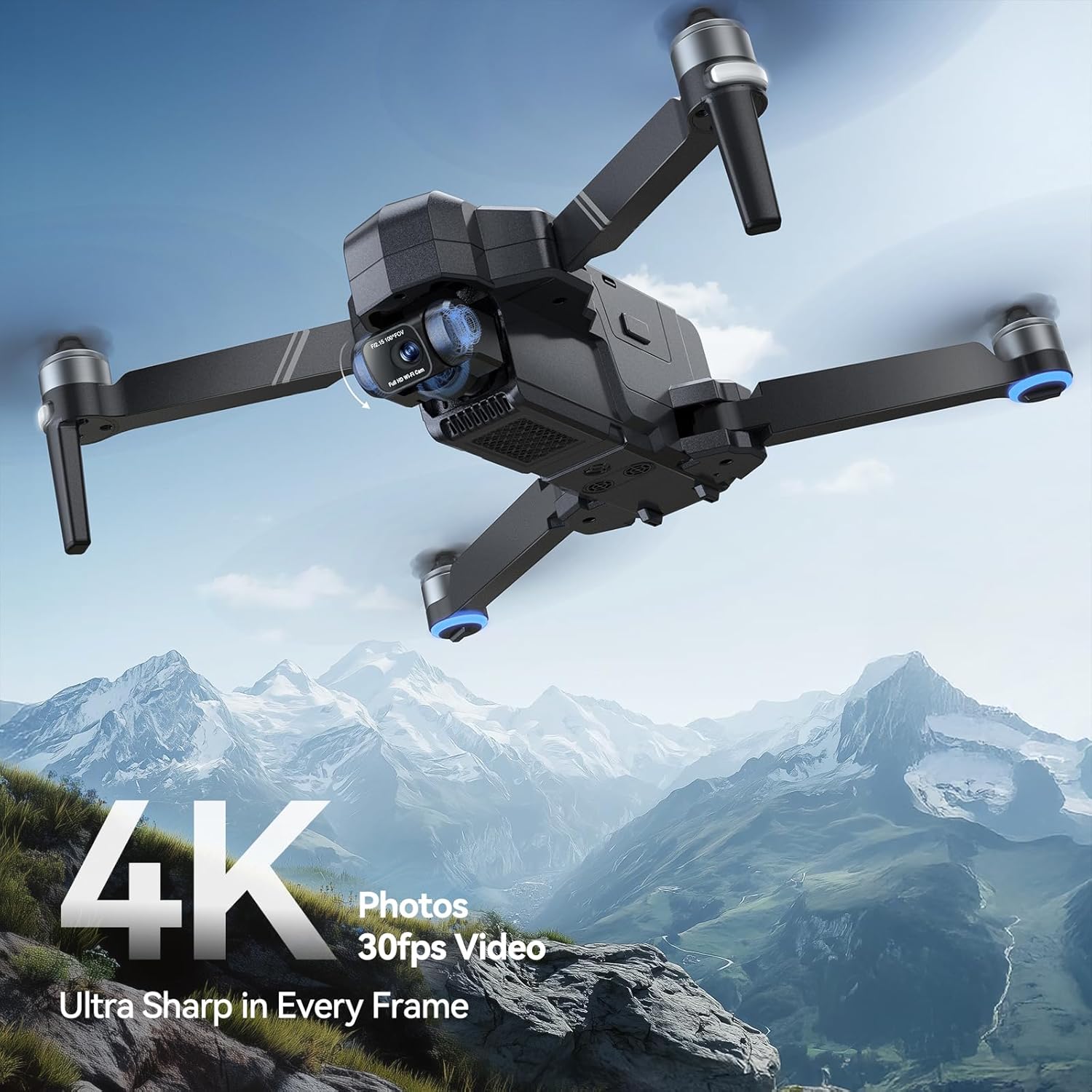
Image: 4K camera capabilities of the Ruko F11GIM2 drone.
7. Antretyen
- Enspeksyon elis: Regularly check propellers for cracks, bends, or wear. Replace damaged propellers immediately using the spare parts provided.
- Netwayaj: Sèvi ak yon twal mou epi sèk pou netwaye dron an ak kontwòl remote la. Evite itilize likid oswa solvan.
- Depo: Store the drone and accessories in the provided carrying case in a cool, dry place, away from direct sunlight.
- Swen batri: Do not overcharge or over-discharge batteries. If storing for extended periods, charge batteries to approximately 50-60%.
NAN. Depanaj
If you encounter issues with your Ruko F11GIM2 drone, refer to the following common solutions:
| Pwoblèm | Solisyon posib |
|---|---|
| Dròn nan pa limen | Asire w ke pil yo byen chaje epi yo byen mete. |
| No video feed on smartphone | Check USB cable connection between phone and remote. Ensure the Ruko app is open and updated. |
| Dron an ap derive pandan vòl la | Perform IMU calibration as per app instructions. Ensure GPS signal is strong. Avoid flying in strong winds. |
| Remote controller not connecting | Ensure both drone and controller are powered on. Re-pair the controller with the drone as per manual. |
| Move kalite imaj/videyo | Clean camera lens. Ensure sufficient lighting. Check for propeller interference in the frame. |
For persistent issues, please contact Ruko Customer Support.
9. Espesifikasyon
| Karakteristik | Detay |
|---|---|
| Mak | Ruko |
| Non modèl | F11GIM2 |
| Rezolisyon Capture Videyo | 4K (3840 x 2160 piksèl) |
| Rezolisyon toujou efikas | 8.3 MP |
| Karakteristik Kamera | 2-Axis Gimbal, EIS, 5x Digital Zoom, 80° Adjustable Lens |
| Tan vòl | Up to 32 minutes per battery (64 minutes total with 2 batteries) |
| Maksimòm Range | 16404 Feet (5 KM) |
| Rezistans van | Nivo 6 |
| Koneksyon Teknoloji | USB (for remote controller to phone) |
| Kalite kontwòl | Remote Control, App-Controlled |
| Kapasite batri | 3100 Miliamp Èdtan (pa batri) |
| Pwa atik | 585 gram (1.29 liv) |
| Dimansyon pwodwi | 11.25"L x 10.5"L x 5.6"H |
| Konfòmite FAA | Built-in Remote ID Module |
10. Enfòmasyon sou Garanti
Ruko products are designed for reliability and performance. For specific warranty terms and conditions, please refer to the documentation included with your purchase or contact Ruko Customer Support directly. Warranty coverage typically addresses manufacturing defects and may vary based on region and purchase date.
11. Sipò pou Kliyan
For any questions, technical assistance, or support needs, please contact Ruko Customer Support:

Image: Ruko Customer Support contact details.
- Telefòn: +1 (888) 892-0155
- Imèl: sèvis@rukotoy.com
- Orè operasyon:
Mon-Fri: 8 AM to 2 AM (next day) PST
Sat-Sun: 8 AM to 5 PM PST
You can also visit the official Ruko websit pou resous adisyonèl ak FAQ.


