1. Entwodiksyon
This manual provides comprehensive instructions for the installation, operation, and maintenance of your CALEX Smart Mini Indoor IP Camera. Please read this manual thoroughly before using the product to ensure proper functionality and safety.
The CALEX Smart Mini Indoor IP Camera is a Wi-Fi surveillance camera offering 1080P Full HD resolution, night vision capabilities, two-way audio communication, and flexible storage options via MicroSD card or cloud.
2. Pake kontni
Verifye ke tout atik yo prezan nan pakè a:
- 1 x CALEX Smart Mini Indoor IP Camera
- 1 x Power Adapter (AC 220-240 V, 50/60 Hz input; DC 5 V output)
- 1 x USB kab
- 1 x Manyèl Itilizatè (dokiman sa a)
- Mounting accessories (if applicable, not explicitly listed but common for cameras)

Figure 2.1: CALEX Smart Mini Indoor IP Camera and its retail packaging. The packaging highlights 1080P Full HD, Wi-Fi 2.4 GHz, and compatibility with the Calex Smart app.
3. Pwodwi souview
Familiarize yourself with the components of your CALEX Smart Mini Indoor IP Camera.
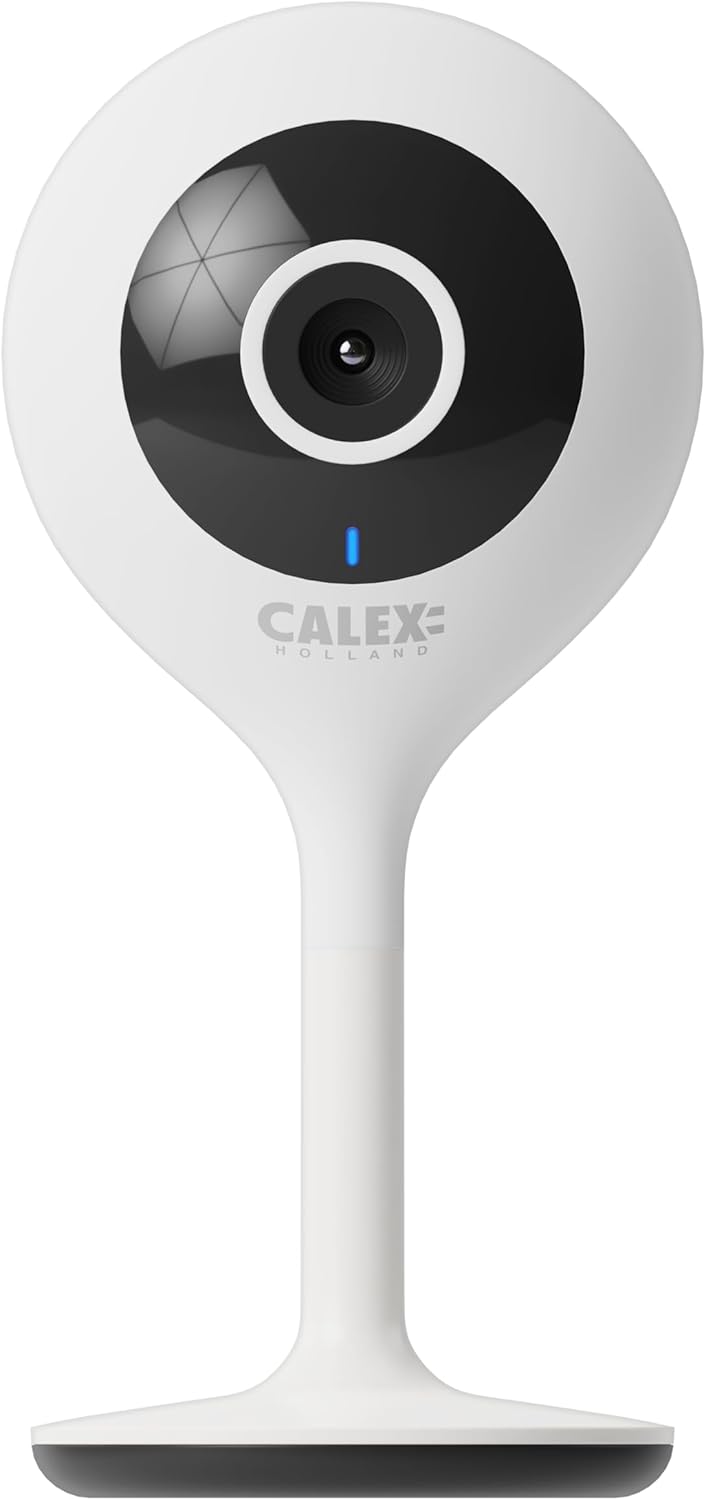
Figi 3.1: Devan view of the CALEX Smart Mini Indoor IP Camera. It features a central lens, an indicator light, and the CALEX HOLLAND logo.

Figi 3.2: Dèyè view of the CALEX Smart Mini Indoor IP Camera. This view shows the speaker grille, a reset button, and the MicroSD card slot. The USB power input is located at the base.
Karakteristik kle:
- Full HD 1080P Rezolisyon: Bay videyo klè ak detaye footage.
- Vizyon lannwit: Equipped with infrared LEDs for clear monitoring in low-light or dark conditions.
- De-fason Audio: Mikwofòn ak oratè entegre pou kominikasyon.
- Koneksyon Wi-Fi: Connects to your home Wi-Fi network (2.4 GHz only).
- Depo lokal: Supports MicroSD card for continuous recording or event-triggered recording.
- Depo nwaj: Sèvis depo nwaj opsyonèl pou anrejistreman an sekirite andeyò sit la.
- Deteksyon Mouvman: Alerts and records upon detecting movement.
- Kontwòl aplikasyon mobil: Jere ak view live feed via the Calex Smart app.
- Asistan vwa konpatibilite: Li fonksyone avèk Amazon Alexa ak Google Home.
4. Enstalasyon ak Enstalasyon
4.1 Anvan w kòmanse
- Ensure your Wi-Fi network is 2.4 GHz. The camera does not support 5 GHz Wi-Fi.
- Kenbe non rezo Wi-Fi ou a (SSID) ak modpas ou a pare.
- Download the "Calex Smart" app from your mobile device's app store.
- Place the camera within range of your Wi-Fi router.

Figure 4.1: QR codes for downloading the Calex Smart app. Scan the appropriate QR code for your device (iOS or Android) to download the application.
Download the Calex Smart app here: iOS App Store | Google Play Store
4.2 Etap Inisyal Enstalasyon yo
- Pouvwa sou: Konekte kamera a nan yon priz kouran avèk kab USB ak adaptè kouran ki vini avèk li a. Limyè endikatè kamera a ap kòmanse flache, sa vle di li pare pou koneksyon.
- Open Calex Smart App: Launch the Calex Smart app on your smartphone. If you are a new user, register an account. If you already have an account, log in.
- Ajoute Aparèy: Tap the "+" icon in the top right corner of the app to add a new device. Select "Security & Video Surveillance" and then "Smart Camera".
- Konfime Estati Endikatè a: Follow the in-app instructions. Confirm that the indicator light on your camera is flashing rapidly.
- Antre detay Wi-Fi yo: Enter your 2.4 GHz Wi-Fi network name and password when prompted.
- Fè eskanè kòd QR: The app will generate a QR code. Hold your phone with the QR code approximately 15-20 cm (6-8 inches) in front of the camera lens. The camera will emit a sound when it successfully scans the QR code.
- Koneksyon: Tap "I heard a prompt" in the app. The camera will then attempt to connect to your Wi-Fi network. Once connected, the indicator light will turn solid blue.
- Non Aparèy: Once connected, you can name your camera (e.g., "Living Room Camera", "Nursery Camera").


Figi 4.2: Egzamples of the Calex Smart app interface. The left image shows a live camera feed with options for screenshot, speaking, and recording. The right image shows a settings screen within the app.
5. Itilizasyon Kamera w la
5.1 Viv View
Open the Calex Smart app and select your camera from the device list to access the live video feed. You can view the feed in portrait or landscape mode.

Figi 5.1: Yon itilizatè viewing the live feed from the CALEX Smart Mini Indoor IP Camera on their smartphone.
5.2 Odyo De-fason
Pandan w ap viv la view, tape ikòn mikwofòn nan pou pale nan oratè kamera a. Tape ikòn oratè a pou koute odyo ki soti nan mikwofòn kamera a.
5.3 Anrejistreman ak Lektur
- Anrejistreman manyèl: Tap the "Record" button in the live view interface to start or stop manual recording. Recordings are saved to your phone's gallery.
- Ekran: Tap the "Screenshot" button to capture a still image from the live feed.
- Anrejistreman sou Kat MicroSD: Insert a MicroSD card (up to 128GB, not included) into the camera's slot for continuous or event-triggered recording. Ensure the card is formatted within the app settings.
- Depo nwaj: Subscribe to the cloud storage service via the app for secure, off-site storage of event recordings.
- Lektur: Aksè anrejistre footage from the "Playback" section within the camera's settings in the app.

Figure 5.2: The Calex Smart app interface displaying options for cloud storage and video playback. This allows users to review evènman anrejistre yo.
5.4 Deteksyon Mouvman ak Alèt
Configure motion detection sensitivity and alert settings in the app. You will receive push notifications on your smartphone when motion is detected.
5.5 Kontwòl Vwa (Alexa/Google Home)
To integrate your camera with Amazon Alexa or Google Home, follow the instructions in the respective voice assistant app to enable the "Calex Smart" skill/action. You can then use voice commands to view the camera feed on compatible smart displays.

Figure 5.3: A couple using voice commands with an Amazon Echo device, demonstrating the camera's compatibility with smart home ecosystems like Alexa and Google Home.
6. Antretyen
- Netwayaj: Sèvi ak yon twal mou epi sèk pou netwaye lantiy kamera a ak kò a. Pa sèvi ak pwodui netwayaj likid oswa ayewosòl.
- Mizajou mikrolojisyèl: Periodically check the Calex Smart app for available firmware updates for your camera. Keeping the firmware updated ensures optimal performance and security.
- Reyajiste kamera a: If you experience connectivity issues or need to reconfigure the camera, locate the reset button on the back of the device (refer to Figure 3.2). Use a pin or a straightened paperclip to press and hold the reset button for approximately 5-10 seconds until the indicator light flashes rapidly. This will restore the camera to factory settings.
NAN. Depanaj
| Pwoblèm | Kòz posib | Solisyon |
|---|---|---|
| Kamera a pa ka konekte ak Wi-Fi a. | Incorrect Wi-Fi password; 5 GHz Wi-Fi network; camera too far from router; Wi-Fi signal interference. |
|
| Pa gen okenn videyo an dirèk. | Camera offline; poor internet connection; app issue. |
|
| Kat MicroSD a pa rekonèt. | Card not inserted correctly; card corrupted; unsupported card size/format. |
|
| Odyo bidireksyonèl la pa fonksyone. | Microphone/speaker muted in app; low volume; app permissions. |
|
8. Espesifikasyon
| Karakteristik | Detay |
|---|---|
| Non modèl | Sekirite entelijan |
| Nimewo Modèl | 5501000300 |
| Rezolisyon | 1080p plen HD |
| Koneksyon | Wi-Fi (2.4 GHz sèlman) |
| Antre pouvwa | AC 220-240 Volts, 50/60 Hz |
| Sòti pouvwa (adaptè) | DC 5 Volts |
| Konsomasyon pouvwa | 5 Watts |
| Dimansyon (L x W x H) | 3.2 x 5.3 x 11 cm (1.26 x 2.09 x 4.33 pous) |
| Pwa | 167 gram (0.37 liv) |
| Materyèl | Plastik |
| Koulè | Blan |
| Opsyon Depo | MicroSD (jiska 128GB), Depo nan nwaj la |
| Karakteristik espesyal | Night Vision, Two-Way Audio, Motion Detection, Compatible with Alexa/Google Home |
| Itilizasyon Anviwònman | Andedan kay la |
9. Garanti ak sipò
CALEX products are designed and manufactured to the highest quality standards. For warranty information and technical support, please refer to the official CALEX websit la oubyen kontakte sèvis kliyan yo dirèkteman.
Manifakti: CALEX
Pou plis asistans, vizite CALEX Official Websit.
10. Enfòmasyon sou Sekirite
- Pa ekspoze kamera a nan dlo oswa imidite. Pwodui sa a fèt pou itilizasyon andedan kay la sèlman.
- Pa eseye demonte oswa repare kamera a tèt ou. Konfye tout antretyen bay pèsonèl kalifye.
- Use only the provided power adapter and cable to prevent damage or fire.
- Kenbe kamera a lwen limyè solèy dirèk, sous chalè, ak chan mayetik fò.
- Ensure the camera is placed on a stable surface to prevent it from falling.


