Entwodiksyon
This manual provides essential instructions for the proper use, setup, and maintenance of your Tronsmart MUC03 Micro USB Cable. Please read this manual thoroughly before using the product to ensure optimal performance and safety.
Pwodwi souview
The Tronsmart MUC03 is a high-quality Micro USB cable designed for charging and data transfer. It features a durable braided nylon material and supports fast charging up to 2.4A and data transfer speeds up to 480 Mbps.
- Modèl: MUC03
- Kalite kab: Mikwo USB
- Materyèl: Nylon trese
- Sòti: Jiska 2.4 A
- Transfè Done: Jiska 480 Mbps
- Longè: 3 mèt
- Koulè: Nwa
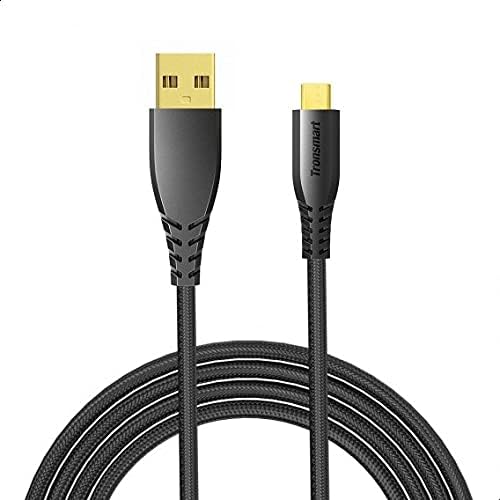
Image 1: The Tronsmart MUC03 Micro USB Cable, showcasing its black braided design and gold-plated connectors.
Enstalasyon
Using the Tronsmart MUC03 Micro USB Cable is straightforward. Follow these steps to connect your device:
- Idantifye pò yo: Locate the Micro USB port on your device (e.g., smartphone, tablet, power bank) and a standard USB-A port on your charging adapter, computer, or other power source.
- Connect Micro USB: Gently insert the Micro USB connector of the cable into the Micro USB port of your device. Ensure it is oriented correctly to avoid damage.
- Konekte USB-A a: Insert the standard USB-A connector of the cable into the USB-A port of your power source or computer.
- Verifye Koneksyon: Once connected, your device should indicate that it is charging or connected for data transfer.
Enstriksyon Operasyon
Chaje Aparèy
To charge your device using the Tronsmart MUC03 Micro USB Cable:
- Connect the cable as described in the "Setup" section.
- Ensure your power source (wall adapter, power bank) is active and providing power.
- Monitor your device's screen for the charging indicator. The cable supports up to 2.4A output for efficient charging.
Transfè Done
To transfer data between your device and a computer:
- Connect the cable between your device and a computer's USB-A port.
- Your device may prompt you to select a connection mode (e.g., "File Transfè," "MTP," "PTP"). Chwazi mòd ki apwopriye pou transfè done yo.
- Access your device's storage from your computer's file explorer to transfer files. The cable supports data transfer speeds up to 480 Mbps.
Antretyen ak Swen
To ensure the longevity and optimal performance of your Tronsmart MUC03 Micro USB Cable, follow these care guidelines:
- Depo: Store the cable in a cool, dry place away from direct sunlight and extreme temperatures. Avoid tightly coiling or bending the cable at sharp angles.
- Netwayaj: If the cable or connectors become dirty, gently wipe them with a soft, dry cloth. Do not use liquid cleaners or abrasive materials.
- Manyen: Always grasp the connector head when plugging or unplugging the cable, rather than pulling on the cable itself. This prevents damage to the internal wires and connectors.
- Evite estrès: Do not subject the cable to excessive pulling, twisting, or bending, especially near the connectors. The braided nylon design offers enhanced durability, as shown in the image below.

Image 2: An illustration comparing the durability of Tronsmart cables, highlighting their robust construction and bend lifespan compared to conventional cables.

Image 3: A cross-section diagram illustrating the internal structure of the Tronsmart Micro USB cable, showing multiple protective layers including nylon braided, shielded tinned copper braid, aluminum foil, and various gauge power and data wires.
Depanaj
If you encounter issues with your Tronsmart MUC03 Micro USB Cable, consider the following common solutions:
- Aparèy pa chaje:
- Asire ke tou de bout kab la byen konekte.
- Eseye yon adaptè pouvwa diferan oswa pò USB.
- Test the cable with another device to rule out a device-specific issue.
- Tcheke si sous kouran an aktif.
- Chaje dousman:
- Ensure your power adapter provides sufficient output (e.g., 2.4A for fast charging).
- Evite sèvi ak aparèy la twòp pandan l ap chaje.
- Check for any debris in the device's charging port or the cable's connector.
- Pwoblèm Transfè Done:
- Ensure your device is set to "File Mòd "Transfè" oswa "MTP" lè w konekte ak yon òdinatè.
- Eseye yon pò USB diferan sou òdinatè w lan.
- Rekòmanse tou de aparèy ou an ak òdinatè a.
- Verify that your computer's drivers for the device are up to date.
- Domaj nan kab:
- Visually inspect the cable for any signs of fraying, cuts, or bent connectors. Discontinue use if damage is found.
Espesifikasyon
| Karakteristik | Detay |
|---|---|
| Modèl | MUC03 |
| Kalite kab | Mikwo USB |
| Materyèl | Nylon trese |
| Sòti (USB) | Jiska 2.4 A |
| Vitès Transfè Done | Jiska 480 Mbps |
| Longè | 3 mèt |
| Koulè | Nwa |
| Manifakti | Tronsmart |
| Dimansyon pake | 16 x 8 x 4 cm |
| Pwa atik | 96 g |
Enfòmasyon sou Sekirite
Tanpri obsève prekosyon sekirite sa yo:
- Do not expose the cable to water or excessive moisture.
- Avoid using the cable in environments with extreme temperatures.
- Keep the cable out of reach of children and pets.
- Do not attempt to modify or disassemble the cable.
- Use only with compatible devices and power adapters.
- If the cable shows signs of damage, discontinue use immediately to prevent potential hazards.
Garanti ak sipò
For warranty information or technical support, please refer to the official Tronsmart websit la oubyen kontakte sèvis kliyan yo. Kenbe resi acha w la kòm prèv acha.
Remak: Kondisyon garanti espesifik yo ka varye selon rejyon an ak détayan an.


