1. Entwodiksyon
The Quectel EG06-E is an LTE Advanced Category 6 module specifically engineered for Machine-to-Machine (M2M) and Internet of Things (IoT) applications. This module leverages 3GPP Release 11 LTE technology to provide high-speed data communication, supporting maximum data rates of up to 300Mbps for downlink and 50Mbps for uplink.
Designed in an LGA (Land Grid Array) form factor, the EG06-E is suitable for integration into various host devices. It also incorporates Qualcomm IZat location technology Gen8C Lite, offering support for GPS, GLONASS, BeiDou/Compass, Galileo, and QZSS, which simplifies product design and enhances positioning capabilities.
Karakteristik kle:
- LTE Advanced Category 6 connectivity
- Maximum data rates: 300Mbps (downlink), 50Mbps (uplink)
- LGA form factor for compact integration
- Integrated GNSS (GPS, GLONASS, BeiDou/Compass, Galileo, QZSS)
- Optimized for M2M and IoT applications
2. Pake kontni
Tanpri verifye ke tout atik yo prezan epi yo an bon kondisyon lè w ap ouvri pakè a.
- Quectel EG06-E LTE Advanced Category 6 Module
- Connecting Cable (quantity may vary based on specific kit)
3. Enstalasyon ak Enstalasyon
The EG06-E module is designed for integration into a host device. Proper handling and installation are crucial for optimal performance and to prevent damage.
3.1 Prekosyon pou manyen
- Always handle the module by its edges to avoid touching the pins or sensitive components.
- Use anti-static precautions (e.g., anti-static wrist strap, mat) when handling the module to prevent electrostatic discharge (ESD) damage.
- Store the module in its original anti-static packaging until ready for installation.
3.2 Module Integration
The EG06-E module utilizes an LGA package, requiring soldering to a compatible host PCB. This process should be performed by qualified personnel following standard industry practices for surface-mount device (SMD) assembly.
- Ensure the host PCB is designed to accommodate the EG06-E LGA footprint.
- Align the module correctly with the pads on the host PCB.
- Solder the module to the host PCB using appropriate reflow soldering techniques.
- After soldering, perform a visual inspection to ensure all connections are secure and free from shorts.
3.3 Koneksyon antèn
External antennas are required for cellular and GNSS functionality. Connect appropriate LTE and GNSS antennas to the designated connectors on the host PCB, which are routed from the EG06-E module.
- Use high-quality antennas suitable for the operating frequency bands of the EG06-E.
- Ensure antenna cables are securely connected and routed to avoid interference.
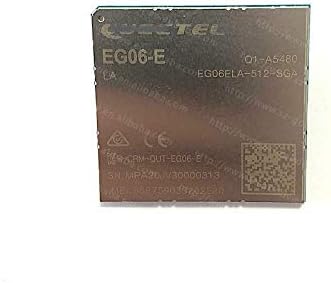
Figi 1: Top view of the Quectel EG06-E LTE Advanced Category 6 Module, showing the Quectel logo, model number EG06-E, and various regulatory markings and serial numbers.

Figi 2: Anba view of the Quectel EG06-E LTE Advanced Category 6 Module, displaying the Ball Grid Array (BGA) pins for integration into a host device.
4. Operasyon Enstriksyon
Once the EG06-E module is correctly integrated into a host device and powered on, its operation is typically managed by the host system's software and firmware.
4.1 Limen
The module receives power from the host device. Ensure the host device's power supply meets the voltage and current requirements specified in the EG06-E datasheet.
4.2 Anrejistreman rezo
Upon power-up, the module will attempt to register with an available LTE network. This process involves:
- Kat SIM: Ensure a valid and activated SIM card is inserted into the host device's SIM card slot, which is connected to the module.
- Antèn: Verify that the LTE antennas are properly connected and positioned for optimal signal reception.
- Lojisyèl konte genyen: The host device's software must correctly initialize and configure the module for network access (e.g., APN settings).
4.3 Kominikasyon Done
After successful network registration, the module can establish data connections. The host device's application will typically use AT commands or a dedicated driver/API to control data sessions, send/receive data, and manage network parameters.
4.4 Fonksyonalite GNSS
If a GNSS antenna is connected, the module can provide location data. The host application can query the module for GNSS fixes using appropriate commands or interfaces.
5. Antretyen
The Quectel EG06-E module is a robust component designed for long-term operation. Minimal maintenance is required for the module itself, but proper care of the host device and its environment is essential.
- Kondisyon anviwònman: Fè modil la fonksyone nan limit tanperati ak imidite espesifye yo. Evite ekspozisyon li nan tanperati ekstrèm, limyè solèy dirèk, imidite, oswa anviwònman koroziv.
- Netwayaj: If cleaning is necessary, ensure the host device is powered off. Use a soft, dry, anti-static cloth. Do not use liquid cleaners or solvents directly on the module or its connections.
- Mizajou mikrolojisyèl: Tcheke Quectel la detanzantan website or consult your vendor for available firmware updates. Firmware updates can improve performance, add features, or address security vulnerabilities. Follow the provided instructions carefully when performing updates.
- Enspeksyon fizik: Occasionally inspect the module and its connections within the host device for any signs of physical damage, loose connections, or corrosion.
NAN. Depanaj
This section provides guidance for common issues encountered with the EG06-E module. For more detailed troubleshooting, refer to the comprehensive technical documentation provided by Quectel or contact technical support.
| Pwoblèm | Kòz posib | Solisyon |
|---|---|---|
| Modil la pa limen | No power from host device; incorrect soldering; module damage. | Verify host device power supply. Check module soldering. Consult technical support if module is suspected to be damaged. |
| Cannot register to network | Invalid/inactive SIM card; poor antenna connection/placement; no network coverage; incorrect APN settings. | Ensure SIM is active and correctly inserted. Check antenna connections and signal strength. Verify network coverage in the area. Confirm APN settings with your carrier. |
| Vitès done ki ba | Weak signal strength; network congestion; incorrect module configuration. | Improve antenna placement or use higher gain antennas. Try again during off-peak hours. Verify module configuration settings. |
| Pa gen ranje GNSS | No GNSS antenna connected; poor satellite visibility; GNSS disabled in software. | Connect a GNSS antenna. Ensure clear sky view. Enable GNSS functionality via host software. |
7. Espesifikasyon
The following are key technical specifications for the Quectel EG06-E module. For a complete list, please refer to the official product datasheet.
- Modèl: EG06-E
- Mak: Quectel
- Teknoloji: LTE Advanced Category 6
- Downlink Data Rate: Jiska 300 Mbps
- Uplink Data Rate: Jiska 50 Mbps
- Faktè fòm: LGA (Land Grid Array)
- GNSS Support: GPS, GLONASS, BeiDou/Compass, Galileo, QZSS (Qualcomm IZat Gen8C Lite)
- Eleman ki enkli: Cable (as part of typical package)
- UPC: 658437894800
- ASIN: B08XMDGS2C
8. Garanti ak sipò
For specific warranty terms and conditions related to your Quectel EG06-E module, please refer to the documentation provided by your vendor or contact Quectel directly. Warranty coverage typically applies to manufacturing defects and does not cover damage resulting from improper installation, misuse, or unauthorized modifications.
For technical support, detailed datasheets, application notes, and firmware updates, please visit the official Quectel website or contact their authorized distributors. When seeking support, please have your module's model number and serial number available.
Quectel Official Websit: www.quectel.com


