1. Entwodiksyon
Welcome to your new SoFlow SO4 Pro Gen 2 Electric Scooter. This manual provides essential information for safe operation, maintenance, and troubleshooting. Please read it thoroughly before using your scooter to ensure a safe and enjoyable experience.
2. Enstriksyon Sekirite
Sekirite ou pi enpòtan. Toujou respekte direktiv sa yo:
- Toujou mete yon kas ak ekipman pwoteksyon apwopriye (pwoteksyon jenou, pwoteksyon koud) lè w ap monte bisiklèt.
- Check the brakes, tire pressure, and overall condition of the scooter before each ride.
- Obeyi tout lwa ak règleman trafik lokal yo.
- Pa monte bisiklèt nan kondisyon mouye, gwo lapli, oswa nan flak dlo.
- Kapasite chaj maksimòm lan se 150 kg. Pa depase limit sa a.
- Utilize the integrated turn signals for enhanced visibility when changing direction.
- The contactless anti-theft feature with the integrated NFC chip provides additional security.
- Avoid riding on uneven surfaces, steep slopes (over 18%), or in crowded areas.
3. Pake kontni
Lè w ap ouvri pake a, asire w ke tout bagay sa yo la:
- SoFlow SO4 Pro Gen 2 Electric Scooter (1 piece)
- Batri ityòm (pre-enstale oswa separe)
- Batri Charger
- Manyèl itilizatè
4. Pwodwi souview
Familiarize yourself with the main components of your SoFlow SO4 Pro Gen 2 Electric Scooter.

Figi 4.1: Devan view of the SoFlow SO4 Pro Gen 2 Electric Scooter, highlighting the handlebars, front wheel, and deck.
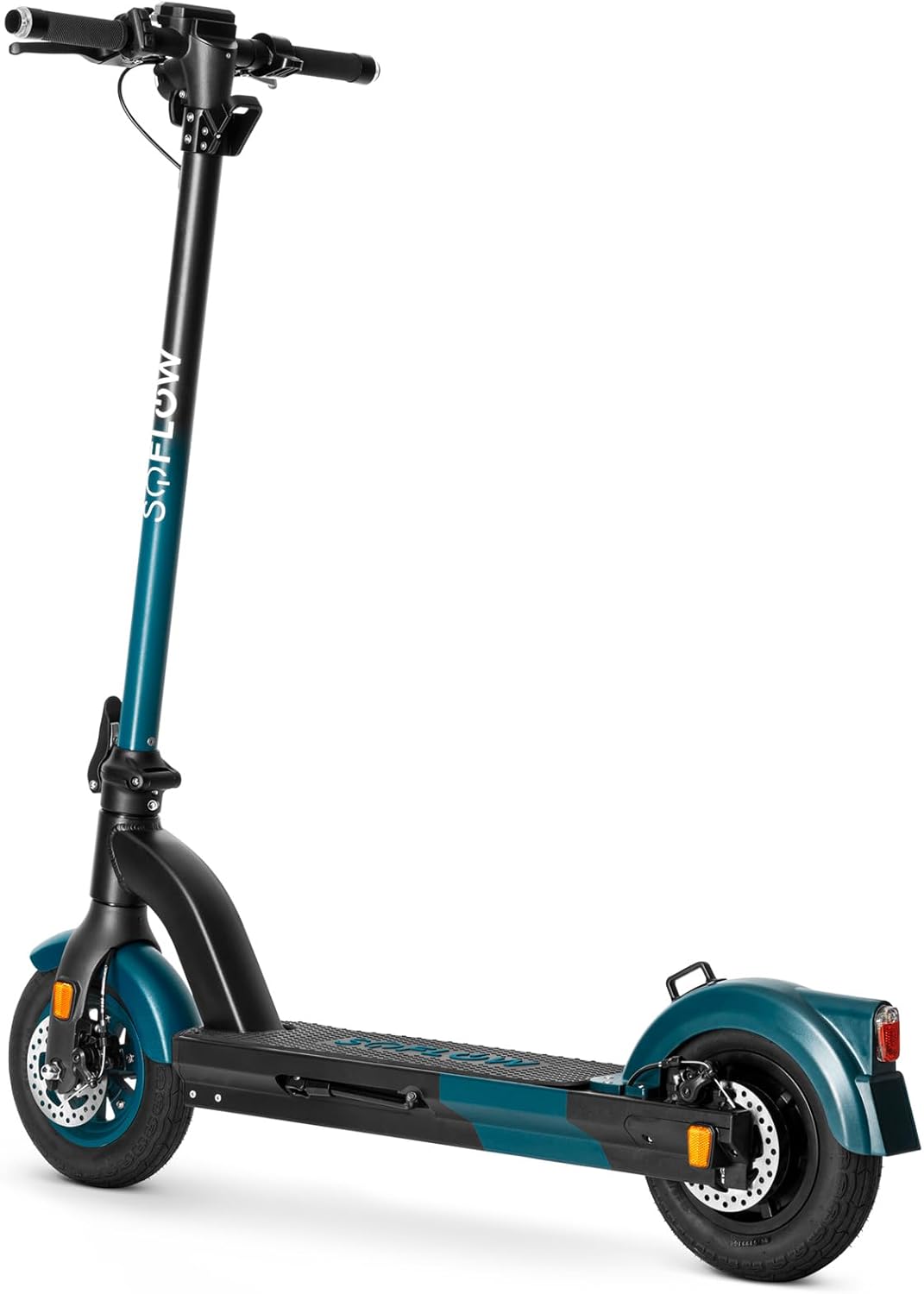
Figi 4.2: Front-bò view of the SoFlow SO4 Pro Gen 2 Electric Scooter, showing the front disc brake and tire.
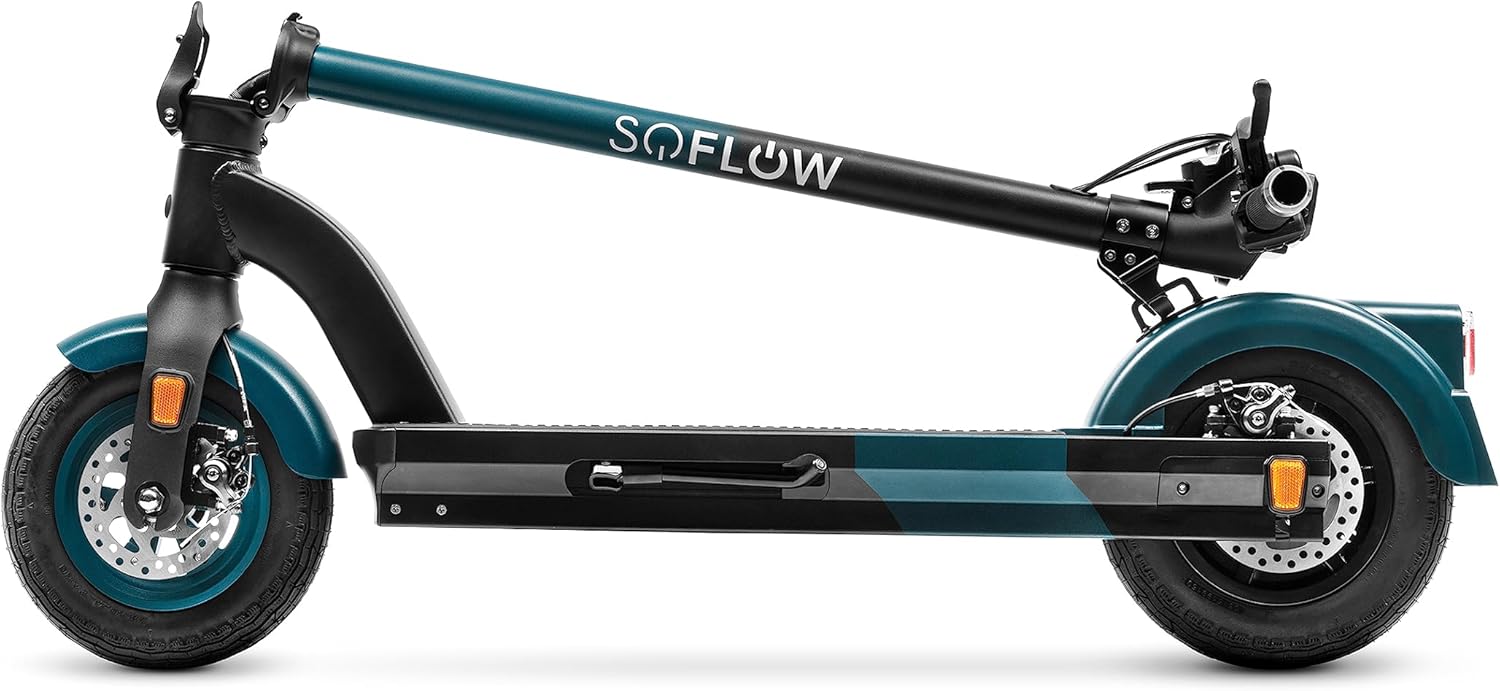
Figi 4.3: Side view of the SoFlow SO4 Pro Gen 2 Electric Scooter, illustrating the overall profile and rear wheel.

Figi 4.4: Dèyè view of the SoFlow SO4 Pro Gen 2 Electric Scooter, showing the rear fender, brake light, and disc brake.

Figi 4.5: The SoFlow SO4 Pro Gen 2 Electric Scooter in its folded position, demonstrating its compact design for transport.

Figi 4.6: A hand removing the lithium battery from the scooter's deck compartment, illustrating the removable battery feature.
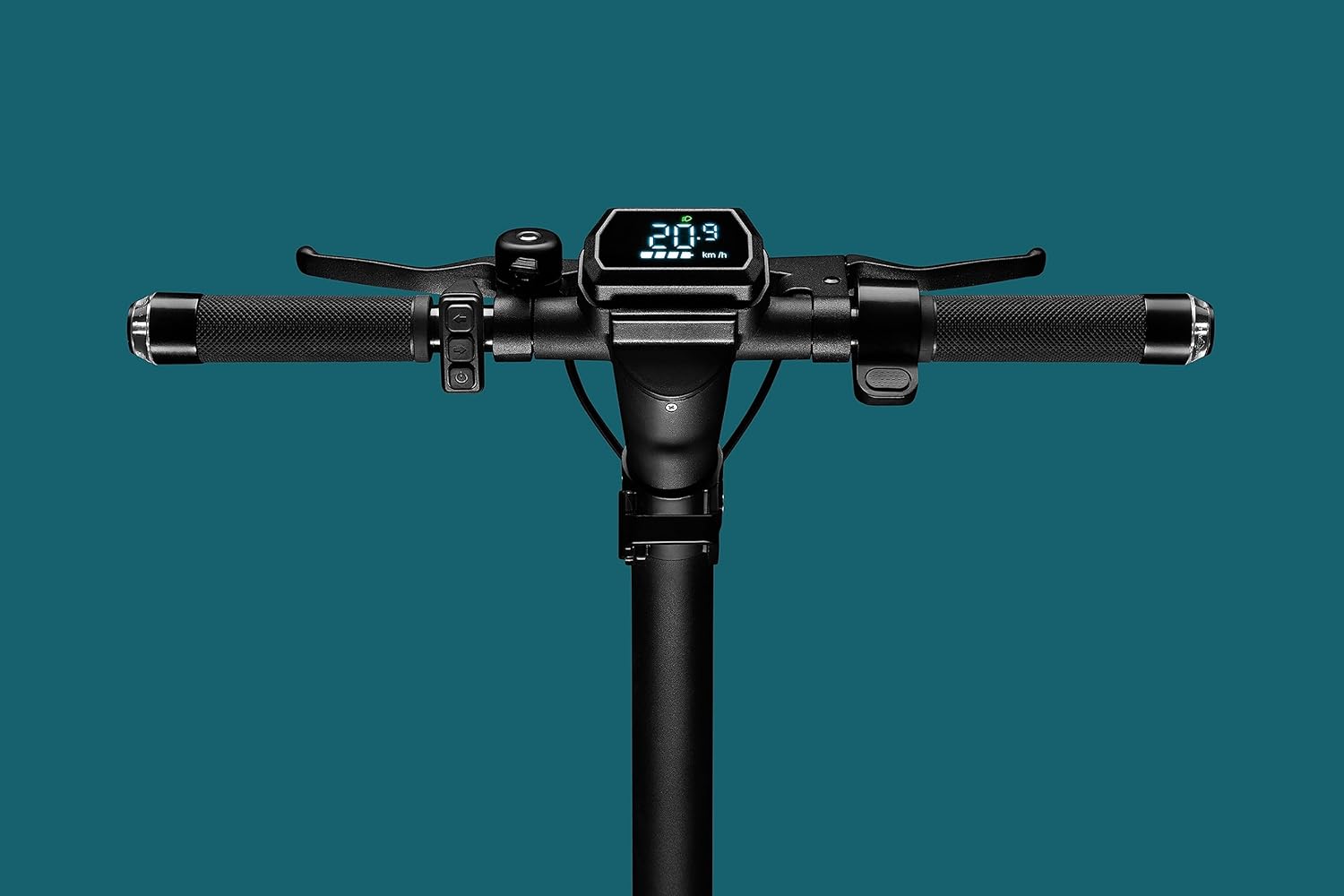
Figi 4.7: Close-up of the handlebar display, showing the digital screen with speed and battery indicators, along with controls.

Figi 4.8: The scooter's headlight illuminated, with integrated turn signals on the handlebars also lit, emphasizing visibility features.

Figi 4.9: Detaye view of the front wheel and disc brake assembly.

Figi 4.10: Detaye view of the rear wheel and disc brake assembly.
5. Enstalasyon
5.1 Depliye Scooter a
- Mete scooter a sou yon sifas ki plat.
- Release the folding mechanism latch, usually located near the base of the handlebar stem.
- Carefully lift the handlebar stem until it locks securely into the upright position. Ensure the locking mechanism is fully engaged.
- Adjust the handlebars to your desired height if adjustable, and tighten any quick-release clamps.
5.2 Chaje batri a
The SoFlow SO4 Pro Gen 2 is equipped with a Lithium battery. For optimal performance and battery longevity, follow these charging instructions:
- Jwenn pò a chaje sou scooter la.
- Konekte chargeur a nan pò chaje a, answit branche chargeur a nan yon priz kouran estanda.
- The charging indicator on the charger will show the charging status (e.g., red for charging, green for fully charged).
- A full charge takes approximately 3 hours and 50 minutes with the special "fast charge" charger.
- Always ensure the battery is fully charged before your first ride and after each use for maximum range.
6. Operasyon Enstriksyon
6.1 Limen/Etenyen
- Pou limen: Press and hold the power button on the handlebar display until the screen illuminates.
- Pou etenn: Peze epi kenbe bouton pouvwa a ankò jiskaske ekran an etenn.
6.2 Monte Scooter la
- Mete yon pye byen fèm sou platfòm nan epi pouse ak lòt pye a pou pran momantòm inisyal la.
- Once moving, place your second foot on the deck.
- Gently press the accelerator lever (throttle) to engage the motor.
- The 500-watt motor provides ample power for speeds up to 25 km/h and inclines up to 18%.
- Use the integrated turn signals on the handlebars to indicate your direction changes.
6.3 Frenaj
The scooter is equipped with front and rear disc brakes for precise and controlled stopping.
- To slow down or stop, gently squeeze the brake levers on the handlebars.
- Apply both brakes simultaneously for more effective stopping power.
- Evite frenaj toudenkou oswa brital, sitou nan gwo vitès, pou anpeche pèdi kontwòl.
6.4 Using the SoFlow App
Enhance your riding experience by connecting your scooter to the intuitive SoFlow application:
- Download the SoFlow app from your smartphone's app store.
- Enable Bluetooth on your smartphone and open the SoFlow app.
- Follow the in-app instructions to pair your scooter.
- The app provides important details such as battery capacity, current speed, Bluetooth status, and light indicators.
- You can also track your completed journeys and electronically lock the scooter for added security.
7. Antretyen
Regular maintenance ensures the longevity and optimal performance of your SoFlow SO4 Pro Gen 2 Electric Scooter.
- Netwayaj: Siye scooter a ak piblisiteamp cloth after each use. Avoid using high-pressure water or harsh chemicals.
- Presyon kawotchou: Regularly check the tire pressure of the 10-inch pneumatic tires. Maintain recommended pressure for optimal ride quality and range.
- Enspeksyon fren: Periodically inspect the front and rear disc brakes for wear and proper function. Adjust or replace brake pads as needed.
- Swen batri: Charge the battery regularly, even if the scooter is not in use for extended periods, to maintain battery health. Store the scooter in a cool, dry place.
- Tcheke jeneral: Routinely check all screws, bolts, and connections to ensure they are tight and secure.
NAN. Depanaj
Seksyon sa a adrese pwoblèm komen ou ka rankontre ak scooter ou a.
| Pwoblèm | Kòz posib | Solisyon |
|---|---|---|
| Scooter a pa limen | Low or depleted battery; Loose battery connection; Power button malfunction | Charge the battery fully; Ensure battery is securely seated; Contact support if issue persists |
| Redwi ranje/otonomi | Under-inflated tires; Heavy load; Riding uphill frequently; Cold weather | Check and inflate tires to recommended pressure; Reduce load; Adjust riding style; Battery performance may be reduced in cold temperatures |
| Fren yo santi yo fèb | Plak fren ki chire; Kab fren ki lach; Move aliyman fren disk | Inspect brake pads and replace if worn; Adjust brake cable tension; Consult a technician for disc brake alignment |
| Bwi etranj pandan operasyon an | Loose components; Debris in wheels/brakes; Motor issue | Check all fasteners; Clean wheels and brakes; If noise persists, contact customer support |
9. Espesifikasyon teknik
Detailed specifications for the SoFlow SO4 Pro Gen 2 Electric Scooter:
| Karakteristik | Spesifikasyon |
|---|---|
| Mak | SoFlow |
| Non modèl | SO4 PRO Gen2 |
| Nimewo Modèl Atik | 300.450.01 |
| Dimansyon pwodwi (L x W x H) | 109.1 x 46.6 x 114.5 cm |
| Pwa | 17.50 kg |
| Kapasite maksimòm pwa | 150 Kilogram |
| Pouvwa motè | 500W |
| Kalite batri | Lityòm-ion |
| Tan pou chaje | Apeprè. 3 èdtan 50 minit |
| Vitès maksimòm | 25 KM/H |
| Range (Autonomy) | Approx. 40 KM |
| Panche maksimòm | 18% |
| Gwosè wou | 10 pous |
| Fren | Front and Rear Disc Brakes, Regenerative Braking |
| Materyèl ankadreman | Aliminyòm |
| Karakteristik espesyal | NFC Anti-theft, Integrated Turn Signals, SoFlow App Connectivity, Foldable |
10. Garanti ak sipò
Your SoFlow SO4 Pro Gen 2 Electric Scooter comes with a standard manufacturer's warranty covering defects in materials and workmanship under normal use. Please refer to the warranty card included in your package for specific terms and conditions, including the warranty period and coverage details.
For technical support, warranty claims, or any questions regarding your scooter, please contact SoFlow customer service through their official websit la oswa enfòmasyon kontak yo bay nan dokiman acha ou a.


