1. Entwodiksyon
This manual provides detailed instructions for the setup, operation, and maintenance of your AULA H512 Wired Gaming Mouse. Please read this manual thoroughly before using the product to ensure optimal performance and longevity.

Figure 1: AULA H512 Wired Gaming Mouse
2. Pake kontni
- AULA H512 Wired Gaming Mouse
- Manyèl Itilizatè (dokiman sa a)
- 3 x 4g adjustable weights (pre-installed or included separately)

Figure 2: AULA H512 Wired Gaming Mouse and its packaging.
3. Enstriksyon Enstalasyon
- Konekte sourit la: Plug the USB connector of the AULA H512 mouse into an available USB port on your computer.
- Enstalasyon chofè: The mouse is typically plug-and-play. Your operating system (Windows 7/8/10/Vista/XP or Mac) should automatically detect and install the necessary drivers.
- Enstalasyon lojisyèl (Si ou vle): For advanced customization, including macro programming and detailed DPI settings, download and install the official AULA H512 software from the manufacturer's website. Refer to the customization section for more details.
4. Operasyon Enstriksyon
4.1 Fonksyon bouton
The AULA H512 mouse features 12 programmable buttons for enhanced control. Refer to the diagram below for button identification.

Figure 3: AULA H512 Button Layout and Functions.
- 1 - Left Button: Fonksyon klike gòch estanda.
- 2 - Right Button: Fonksyon estanda klike sou bò dwat la.
- 3 - Scroll Wheel: Scrolls content up/down. Can also be pressed for middle-click.
- 4 - DPI+: Ogmante sansiblite DPI.
- 5 - DPI-: Diminye sansiblite DPI.
- 6 - Double Click Button: Performs a double-click action.
- 7 - Forward Button: Navige pi devan nan web navigatè oswa file eksploratè.
- 8 - Backward Button: Navige bak nan web navigatè oswa file eksploratè.
- 9-12 - Numeric/Macro Keys: These side buttons are programmable and can be assigned various functions, including specific gun keys (e.g., M416, AK47, M16) or other macros via software.
4.2 Ajiste sansiblite DPI a
The mouse features 6 adjustable DPI levels: 400, 800, 1600, 2400, 3200, and 5000 DPI. Use the DPI+ (4) and DPI- (5) buttons to cycle through these settings. Each DPI level may correspond to a different LED lighting color for quick identification.
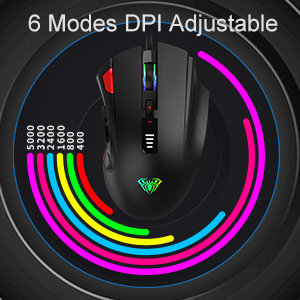
Figure 4: DPI Adjustment Modes.
4.3 RGB Efè ekleraj
The AULA H512 mouse includes 6 RGB lighting effects. These effects can be changed or turned off/on using the dedicated software or specific button combinations as detailed in the software interface. The lighting often changes with DPI settings.

Figure 5: RGB Breathing Lighting Effect.
5. Customization via Software
The AULA H512 mouse supports advanced customization through its dedicated software. This software allows you to:
- Program all 12 buttons with custom functions or macros.
- Adjust DPI settings with finer control.
- Customize RGB lighting effects and colors.
- Kreye epi sove plizyè pwofesyonèlfiles pou diferan jwèt oswa aplikasyon.
Please visit the official AULA website to download the latest version of the H512 customization software.
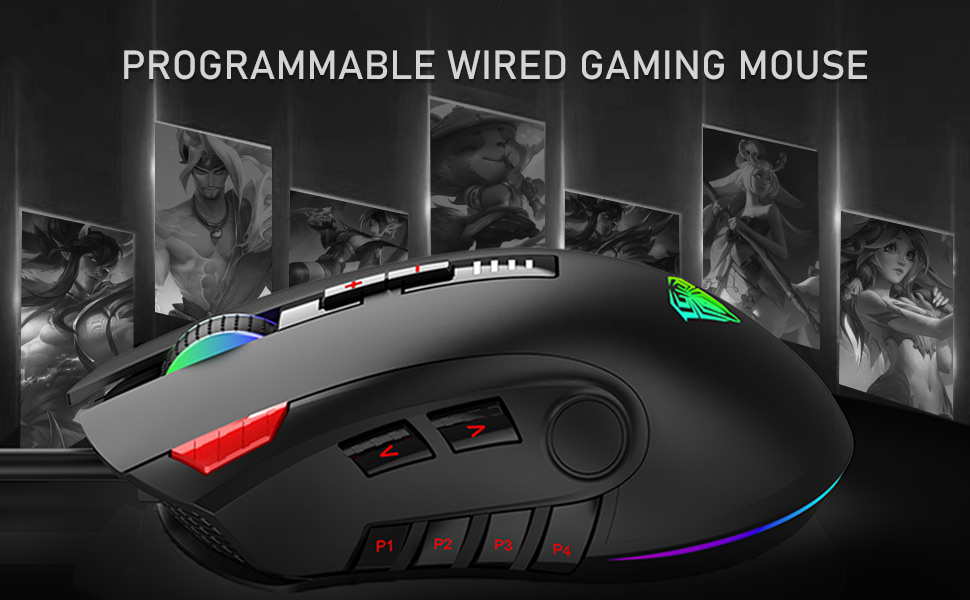
Figure 6: Software Interface for Customization.
6. Antretyen
- Netwayaj: Sèvi ak yon twal mou epi sèk pou netwaye sifas sourit la. Pou pousyè tè ki difisil pou retire, yon ti krasamp cloth can be used, ensuring no liquid enters the mouse. Avoid harsh chemicals or abrasive cleaners.
- Swen Capteur: Kenbe detèktè optik ki anba sourit la pwòp epi san pousyè oswa debri pou asire swivi egzat.
- Jesyon kab: Evite pliye byen file oswa rale kab USB a twòp pou anpeche li domaje.
NAN. Depanaj
| Pwoblèm | Solisyon posib |
|---|---|
| Sourit pa reponn |
|
| Suivi ki pa egzak oswa reta kurseur |
|
| Buttons not working as expected |
|
| Ekleraj RGB pa fonksyone |
|
8. Espesifikasyon
| Karakteristik | Detay |
|---|---|
| Modèl | H512 |
| Koneksyon | Fil USB |
| Kantite bouton | 12 (Pwogramasyon) |
| Nivo DPI | 400 / 800 / 1600 / 2400 / 3200 / 5000 DPI |
| Kalite Capteur | Optik |
| Ekleraj | RGB Backlit (6 effects) |
| Longè kab | 1.6 mèt (apeprè 5.25 pye) |
| Dimansyon (LxWxH) | 12.4 x 7.9 x 4.4 cm (4.88 x 3.11 x 1.73 pous) |
| Pwa | 147 g (Adjustable with 3x4g weights) |
| Sipòte sistèm operasyon yo | Windows 7/8/10/Vista/XP, Mac |

Figi 7: Dimansyon ak Paramèt pwodwi a.
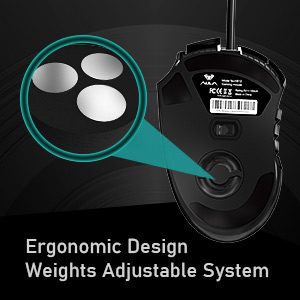
Figure 8: Adjustable Weight System.
9. Garanti ak sipò
The AULA H512 Wired Gaming Mouse comes with a standard warranty. For specific warranty terms and conditions, please refer to the warranty information provided at the time of purchase or contact AULA customer support.
Kontakte manifakti:
- Konpayi: Dongguan Suoai Elektwonik co, Ltd.
- Imèl: info@aulapro.in
- Enpòtatè (End): Odio Zone Private Limited, S-4/63, 2nd Floor, Agasthya Complex, Shettihalli Main Road, Jalahalli West, Bengaluru 560015, Karnataka, India. Email: support@odiozone.com
For further assistance or technical support, please contact the manufacturer or your local distributor.